Disable Roaming Profile Creation

ColinWG

New member
Local time
7:46 PM
Messages
29
Bad title?

Back story: Got a refurbished machine, when to work on it to set it up to work on my network.

Created a new user for the machine.

It's using a roaming profile.

I have no problems at this point with deleting that user and starting again, have not gotten that far into setting things up.

Question is, how do I disable that roaming profile creation?
 

My Computer

OS
Windows 7
Is this in a domain or workgroup environment? If a roaming profile I would suspect a domain...

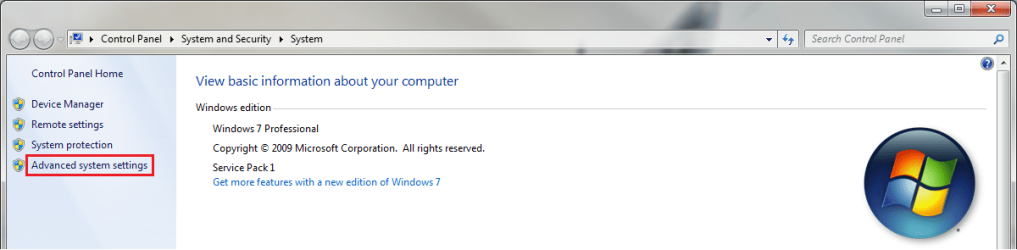
To change the profile simply go to System properties in Windows and then select Advanced System Settings

Advanced System Settings.png

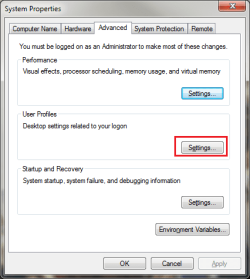
From here select User Profiles to change user profile settings.

User Profile Setting.png

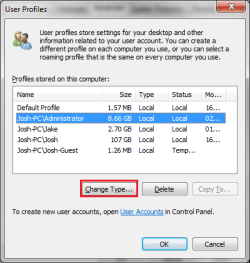
After that it should show all profiles of users that have logged on to the machine. Select the user to change and then click on Change Type...

User profiles.png

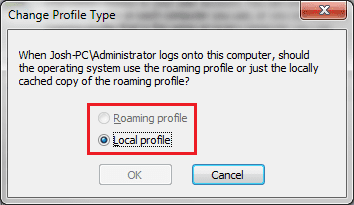
Now you can select to change the profile to local or roaming...

Local or Roaming.png

To apply the changes you will need to log off and then log back in with the user in question.

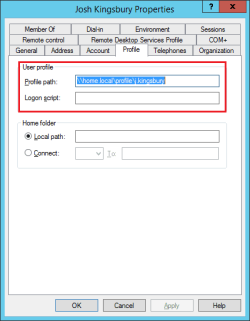
In active directory you will need to go to the properties of the user in question and disassociate the UNC path to store the profile:

Profile.png

Hope This Helps,
Josh :)
 

My Computer

Computer type
PC/Desktop
Computer Manufacturer/Model Number
Custom Built
OS
Windows 7 Professional x64 SP1 ; Windows Server 2012 R2 Standard
CPU
Intel Core i5 2400 @ 3.10GHz
Motherboard
Foxconn H67MP-S/-V/H67MP
Memory
8.0GB DDR3 @ 665MHz (2GBx4)
Graphics Card(s)
AMD Radeon HD 6870
Sound Card
Realtek High Definition Audio
Monitor(s) Displays
AOC 2243W & SMB1930NW
Screen Resolution
1440x900 & 1920x1080
Hard Drives
977GB Seagate ST31000524AS ATA Drive (SATA)
250GB WD iSCSI attached Drive
PSU
750W Gaming PSU
Case
Novatech Night
Cooling
Fan
Keyboard
Dell Standard PS/2 Keyboard
Mouse
R.A.T 07 Gaming Mouse
Internet Speed
Download: 10 Mbps Ping: 30ms Upload: 0.81 Mbps
Browser
Google Chrome
Other Info
Optiarc DVD RW AD-5260S ATA Device
Everything you've listed has apparently already been done, but whomever did the refurbish didn't properly scrub the machine, so when they created the default "user" profile, it's using a roaming path:

C:\Users\user\AppData\Roaming\Microsoft\Windows\Start Menu

Is the path I'm getting when I right click and explore the start button.

So, time to use a page from "Breaking Windows For Dummies".

Folder Options, Show Dangerous Stuff!

C:\Users\Default\AppData\Local
C:\Users\Default\AppData\Roaming
C:\Users\user\AppData\Local
C:\Users\user\AppData\LocalLow
C:\Users\user\AppData\Roaming

I ain't scared, ...

Deleting the default Roaming folder ought to prevent creation of Roaming, plus that with any registry keys related to Roaming as well, should it now?

P.S. Probably was a domain involved, but I can't find a trace of it not knowing all the kinky places windows likes to hide information.

P.P.S. Machine will not belong to either workgroup or domain, it's supposed to stand alone without any network involvement.
 

My Computer

OS
Windows 7

My Computer

Computer type
PC/Desktop
Computer Manufacturer/Model Number
Custom Built
OS
Windows 7 Professional x64 SP1 ; Windows Server 2012 R2 Standard
CPU
Intel Core i5 2400 @ 3.10GHz
Motherboard
Foxconn H67MP-S/-V/H67MP
Memory
8.0GB DDR3 @ 665MHz (2GBx4)
Graphics Card(s)
AMD Radeon HD 6870
Sound Card
Realtek High Definition Audio
Monitor(s) Displays
AOC 2243W & SMB1930NW
Screen Resolution
1440x900 & 1920x1080
Hard Drives
977GB Seagate ST31000524AS ATA Drive (SATA)
250GB WD iSCSI attached Drive
PSU
750W Gaming PSU
Case
Novatech Night
Cooling
Fan
Keyboard
Dell Standard PS/2 Keyboard
Mouse
R.A.T 07 Gaming Mouse
Internet Speed
Download: 10 Mbps Ping: 30ms Upload: 0.81 Mbps
Browser
Google Chrome
Other Info
Optiarc DVD RW AD-5260S ATA Device
Someone geeked the machine, they made SHORTCUTS in place of the physical folders in the default profile, hence new profiles were being created corrupted.
 

My Computer

OS
Windows 7
This question is an example of a little knowledge is a dangerous thing.

The presence of a folder called roaming in the AppData folder of a user account profile (or in the Default profile) does NOT indicate that roaming profiles are active or being created.

This is a required folder in all user account profiles. It is used by Windows and applications to store user-specific information. The contents of the AppData\Roaming folder are synchronized with a roaming profile in a domain environment if that option is enabled in the domain user account. However, in a non-domain environment or in a domain environment where roaming profiles are not enabled, the folder still exists. This allows the profile to be converted to a roaming profile if so desired. It is possible to create roaming profiles in a non-domain workstation, but this is not the default and must be manually enabled on a per-user basis or by group policy.

There are a two key environment variables on every Windows Vista or later system related to the AppData folder. They are typically:

%AppData% = C:\Users\<username>\AppData\Roaming
%LocalAppData% = C:\Users\<username>\AppData\Local

In advanced domain configurations, the %AppData% folder may actually be located in a shared folder on a server.

The status of your user profile -- whether local or roaming -- can be ascertained by looking at the system properties as mentioned by Shadowjk.

Do not remove the AppData\Roaming folder. You'll be very sorry that you did.

P.S. -- I know this is an old question, but it came up in a Google search about roaming profiles. I felt it important to post correct information as others will find it in their searches.
 

My Computer

Computer type
PC/Desktop
OS
Windows 10 Pro 64-bit
Back
Top