Disabling Screen Rotation Hotkeys

bastani

New member
Local time
3:22 PM
Messages
11
Hi,
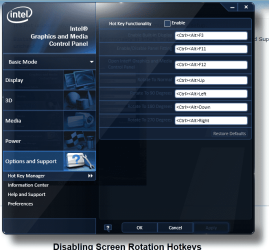
I would like to disable the hotkeys for rotating screen (ctrl+alt+arrows) but I cannot.
In fact, I right clicked on desktop and from Graphic Options I chose Hot Keys and then ticked Disabled and this was fine for a few days.
But recently I see the hotkeys are still working although the Disabled choice is still selected in the mentioned menu. I suspect it might be because of one of the windows updates which is recently installed on my machine since the problem was created just after installing a set of updates.
Any ideas or people having the same problem?
 

My Computer

OS
Windows 7 Professional x64
I don't have those hotkeys, I would just un-install the software that enables these hotkeys, e.g. Intel Display Options, Nvidia Control Panel, ATI catalist software etc. You can have the driver installed and working without the software and configuration utilities installed!
 

My Computer

Computer type
PC/Desktop
Computer Manufacturer/Model Number
Self Build
OS
Windows 7 Ultimate x64
CPU
Intel Core2 Quad Q8300 2.5Ghz
Motherboard
Asus P5QD Turbo
Memory
Kingston HyperX 4x1GB DDR2 1066Mhz
Graphics Card(s)
Asus/Nvidia 9500GT 1GB
Sound Card
On-Board HD
Monitor(s) Displays
22" Widescreen TFT
Screen Resolution
1920x1080
Hard Drives
2x 320Gb Seagate SATAII RAID 0
2x 80Gb Seagate SATAII RAID 0
1x 1tb hybrid (8gb ssd)
PSU
650w
Case
ATX
Cooling
140mm front, 120mm Rear, 80mm Chipset + stock CPU and GPU
Keyboard
Plastic one
Mouse
Plastic one
Internet Speed
4Mbps
Other Info
Laptop: HP Elitebook 2560p
i5 @2.7Ghz 4GB DDR3
Yes, for sure that is a solution, but logically there should be a way for keeping the software and having the hotkeys disabled.
The question is why they were properly disabled before and now suddenly they've decided to function without my permission ;-)!
 

My Computer

OS
Windows 7 Professional x64
Could be a number of things,


  • The setting could be stored ini an .in file which lives in a temp folder, clearing your temp folders could have reverted to default settings.
  • Updating the specific software could have caused loss of user customised settings.
  • A system restore could have reverted the software to a previous state.
  • Your computer doesn't like you and thought it would change the settings back just to **** you off.

If the problem persists it would be worth finding out how whichever software it is saves its settings and taking measures to protect them, e.g. if it's an .ini file change the permissions of the file once configured to prevent modification.
 

My Computer

Computer type
PC/Desktop
Computer Manufacturer/Model Number
Self Build
OS
Windows 7 Ultimate x64
CPU
Intel Core2 Quad Q8300 2.5Ghz
Motherboard
Asus P5QD Turbo
Memory
Kingston HyperX 4x1GB DDR2 1066Mhz
Graphics Card(s)
Asus/Nvidia 9500GT 1GB
Sound Card
On-Board HD
Monitor(s) Displays
22" Widescreen TFT
Screen Resolution
1920x1080
Hard Drives
2x 320Gb Seagate SATAII RAID 0
2x 80Gb Seagate SATAII RAID 0
1x 1tb hybrid (8gb ssd)
PSU
650w
Case
ATX
Cooling
140mm front, 120mm Rear, 80mm Chipset + stock CPU and GPU
Keyboard
Plastic one
Mouse
Plastic one
Internet Speed
4Mbps
Other Info
Laptop: HP Elitebook 2560p
i5 @2.7Ghz 4GB DDR3
I deleted all my temporary files but the problem still persists :(
It's only 5 days that I've installed Windows and drivers, so I think there should not be a need for system restore and so on. I don't know how to find if the problem stems from an updated software and in fact which software makes the problem?
Any other ideas?
 

My Computer

OS
Windows 7 Professional x64
So you disabled the hotkeys and they have turned back on again, was this when you restarted the computer? Which software is it you are using?
 

My Computer

Computer type
PC/Desktop
Computer Manufacturer/Model Number
Self Build
OS
Windows 7 Ultimate x64
CPU
Intel Core2 Quad Q8300 2.5Ghz
Motherboard
Asus P5QD Turbo
Memory
Kingston HyperX 4x1GB DDR2 1066Mhz
Graphics Card(s)
Asus/Nvidia 9500GT 1GB
Sound Card
On-Board HD
Monitor(s) Displays
22" Widescreen TFT
Screen Resolution
1920x1080
Hard Drives
2x 320Gb Seagate SATAII RAID 0
2x 80Gb Seagate SATAII RAID 0
1x 1tb hybrid (8gb ssd)
PSU
650w
Case
ATX
Cooling
140mm front, 120mm Rear, 80mm Chipset + stock CPU and GPU
Keyboard
Plastic one
Mouse
Plastic one
Internet Speed
4Mbps
Other Info
Laptop: HP Elitebook 2560p
i5 @2.7Ghz 4GB DDR3
Yes. I disabled them, and they were disabled in a few days but yesterday, after installing a couple of windows updates, they are enabled again.
The software should be either Intel Control Panel or NVIDIA Control Panel (actually I don't understand why two programs are installed on my machine for display adapter, but in device manager under display adapters I see both of them).
 

My Computer

OS
Windows 7 Professional x64
OK so they have stayed disabled since then? this would likely mean and update to display driver would often update the associated software.

Please fill out your system specs, it is unusual for the onboard intel graphics to still be enabled and detected by windows when there is a discrete graphics card installed.
 

My Computer

Computer type
PC/Desktop
Computer Manufacturer/Model Number
Self Build
OS
Windows 7 Ultimate x64
CPU
Intel Core2 Quad Q8300 2.5Ghz
Motherboard
Asus P5QD Turbo
Memory
Kingston HyperX 4x1GB DDR2 1066Mhz
Graphics Card(s)
Asus/Nvidia 9500GT 1GB
Sound Card
On-Board HD
Monitor(s) Displays
22" Widescreen TFT
Screen Resolution
1920x1080
Hard Drives
2x 320Gb Seagate SATAII RAID 0
2x 80Gb Seagate SATAII RAID 0
1x 1tb hybrid (8gb ssd)
PSU
650w
Case
ATX
Cooling
140mm front, 120mm Rear, 80mm Chipset + stock CPU and GPU
Keyboard
Plastic one
Mouse
Plastic one
Internet Speed
4Mbps
Other Info
Laptop: HP Elitebook 2560p
i5 @2.7Ghz 4GB DDR3
It's not unusual anymore, the OP has an Nvidia Optimus graphics setup.

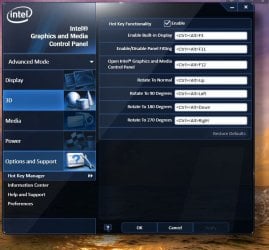
Bastani, you can diable HotKey functionality in Intel's Graphics options. Go to Options and Support section and uncheck Hotkey Functionality.

intel.JPG
 

My Computer

Computer Manufacturer/Model Number
Asus N73SV
OS
Windows 7 x64 Ultimate SP1
CPU
Core i7-2630QM
Motherboard
Intel HM 65
Memory
6 GB DDR3
Graphics Card(s)
Nvidia GT 540M / Intel HD 3000 - Optimus switching
Sound Card
HD Audio (Intel Azalia/Realtek) ALC269
Monitor(s) Displays
LED flat panel
Screen Resolution
1920 x 1080
Hard Drives
2x Seagate Momentus 640 GB - 1,28 TB in total
Internet Speed
4 MB/256 kbps
Other Info
External HDs

WD Elements 1,5 TB
WD MyBook 500 GB
Thanks Teerex, I have already disabled them via the Intel Control Panel as you see in the attached image. But strangely they are still working!
It must have been caused by an update (since it happened after a Windows Update) but I couldn't find out which update and how to resolve the issue.
I really have to disable them since I'd like to use VirtuaWin to have multiple desktops and the hotkeys ctrl+alt+arrows are the standard ones for switching between desktops.
 

Attachments

  • intel_cp.PNG
    intel_cp.PNG
    65.2 KB · Views: 116

My Computer

OS
Windows 7 Professional x64
I don't know what to tell you, bastani, unabling and disabling works even in the same session on my system. Which driver version do you have installed?
 

My Computer

Computer Manufacturer/Model Number
Asus N73SV
OS
Windows 7 x64 Ultimate SP1
CPU
Core i7-2630QM
Motherboard
Intel HM 65
Memory
6 GB DDR3
Graphics Card(s)
Nvidia GT 540M / Intel HD 3000 - Optimus switching
Sound Card
HD Audio (Intel Azalia/Realtek) ALC269
Monitor(s) Displays
LED flat panel
Screen Resolution
1920 x 1080
Hard Drives
2x Seagate Momentus 640 GB - 1,28 TB in total
Internet Speed
4 MB/256 kbps
Other Info
External HDs

WD Elements 1,5 TB
WD MyBook 500 GB
Hello again!
Sorry for my late response.
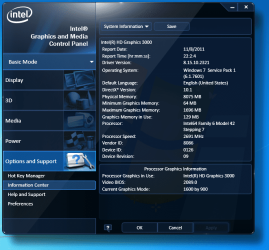
Yes, it is also strange for me that it doesn't work. The driver version is 8.15.10.2321 which must be the latest one.
I attach the screen capture of the driver's about page for more info if required.
 

Attachments

  • intel_cp_version.PNG
    intel_cp_version.PNG
    80.6 KB · Views: 26

My Computer

OS
Windows 7 Professional x64
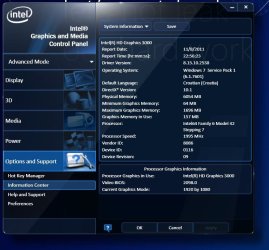
It's not the latest, try updating to the latest official driver (if you can, of course). Maybe just the process of uninstalling and reinstalling might solve the problem, and you can update to boot.

I'm a driver fanatic, so mine is even newer. :D :o
intel2.JPG
 

My Computer

Computer Manufacturer/Model Number
Asus N73SV
OS
Windows 7 x64 Ultimate SP1
CPU
Core i7-2630QM
Motherboard
Intel HM 65
Memory
6 GB DDR3
Graphics Card(s)
Nvidia GT 540M / Intel HD 3000 - Optimus switching
Sound Card
HD Audio (Intel Azalia/Realtek) ALC269
Monitor(s) Displays
LED flat panel
Screen Resolution
1920 x 1080
Hard Drives
2x Seagate Momentus 640 GB - 1,28 TB in total
Internet Speed
4 MB/256 kbps
Other Info
External HDs

WD Elements 1,5 TB
WD MyBook 500 GB
thanks a lot,
strangely after a couple of restarts the problem resolved!
But I will update the drivers anyway ;-)
 

My Computer

OS
Windows 7 Professional x64
Go to HKEY_LOCAL_MACHINE\SYSTEM\CurrentControlSet\Services\ialm\Device0

Search for "Display1_EnableRotation" and put 00 00 00 00

The way you have to change it a little strange so it must look like this at the end :

0000 00 00 00 00

Then the rotation is definitly disabled.
 

My Computer

OS
XP
Back
Top