Disabling the CAPS LOCK

Valor D

New member
I truly hate the Caps Lock key. I think it is one of the worst ideas ever created, especially in where they decided to place it. I'm constantly hitting it by accident, and it's driving me nuts. I mean, how often do u need to type ALL IN CAPS? Seriously? That's what the shift key is for! Anyway, is there any way of disabling the CAPS Lock? So, that when I hit it, it does absolutely nothing? That would be perfect, thanx.
 

My Computer

Computer Manufacturer/Model Number
DELL Inspiron 1564
OS
Windows 7 64 bit
CPU
Intel Core Processor i3-330M
Motherboard
4 GB
Memory
320 GB Harddrive
Graphics Card(s)
Integrated Intel Graphics Media Accelerator HD
Sound Card
Realtek HD Audio
Keyboard
Standard PS/2
Mouse
DELL Touchpad
The easiest way will be to download a keyboard remapper to do the work for you. If you don't want to do that you can use the registry solution.

SharpKeys Keyboard Remapper by Randyrants

   Warning
Only attempt Registry Edits if you know what you are doing. Be sure to backup the registry first.


Open the Registry Editor
Start > Run > regedit

Navigate to: [HKEY_LOCAL_MACHINE\SYSTEM\CurrentControlSet\Control\Keyboard Layout]

Select the Keyboard Layout Folder

Edit > New > Binary Value and name it "Scancode Map"

Double Click Scancode Map key and enter
00,00,00,00,00,00,00,00,02,00,00,00,2A,00,3A,00,00,00,00,00
As a value.

That will change the Caps Lock key into a Scroll Lock key.

Otherwise, you can download these registry tweaks which should do the trick for you.

HowToGeek.com said:
ChangeCapsToControl.reg
Changes Caps Lock to be a Control key

ChangeCapsToShift.reg
Changes Caps Lock to be a Shift key

SwitchCapsToScrollLock.reg
Disables Caps Lock and swaps Scroll lock to be Caps Lock

KillCapsLock.reg
Disables Caps Lock

DisableKeyboardRemap
Uninstalls the preference by deleting the key

http://www.howtogeek.com/geekers/KeyboardMappings.zip
 

My Computer

Computer Manufacturer/Model Number
Apple Macbook Pro (April 2009)
OS
W7 Ult. x64 | OS X
CPU
Intel Mobile Core 2 Duo 2.93Ghz [T9800 Penryn]
Motherboard
NVIDIA nForce 730i Rev. B1 [Mac-F2268EC8 (U2E1)]
Memory
4096MB Samsung DDR3 Dual Channel [PC3-8500F 1066Mhz]
Graphics Card(s)
NVIDIA GeForce 9600M GT 512MB [G96M Rev. C1]
Sound Card
SB X-Fi Surround 5.1 USB | Onboard Realtek (Disabled)
Monitor(s) Displays
Acer x223wbd 22" | Apple Anti-Glare 17" (Disabled)
Screen Resolution
{Current} 1440x900 {Acer} 1680x1050 {Apple} 1920x1200
Hard Drives
{Internal}
Seagate Momentus 320GB 2.5" 7200RPM [ST9320421AS]

{Externals}
LaCie 320GB USB 2.0 HDD [301284UR]
LaCie 750GB USB 2.0 FW400 eSATA HDD [301314U]
LaCie 1TB USB 2.0 HDD [301304UR]
PSU
Magsafe
Case
Aluminum/Unibody (MBP52)
Cooling
2 x 6000 RPM Fans
Keyboard
Logitech G-15v2 [PN 920-000379]
Mouse
Logitech G-9 [PN 910-000338]
Internet Speed
12Mbps/2.5Mbps w/ 24Mbps Speed Boost [Comcast]
Other Info
Logitech X-540 Speakers [PN 970223-0122]
Sennheiser PC-151 Headset
Thanx, I ran the ChangeCapsToShift.reg Program, but still no effect.Is a reboot necessary?
 

My Computer

Computer Manufacturer/Model Number
DELL Inspiron 1564
OS
Windows 7 64 bit
CPU
Intel Core Processor i3-330M
Motherboard
4 GB
Memory
320 GB Harddrive
Graphics Card(s)
Integrated Intel Graphics Media Accelerator HD
Sound Card
Realtek HD Audio
Keyboard
Standard PS/2
Mouse
DELL Touchpad
Try logging off and back on first.
 

My Computer

Computer Manufacturer/Model Number
* BFK Customs *
OS
W 7 64-bit Ultimate
CPU
Intel Q9550 Yorkfield
Motherboard
ASUS P5Q Pro
Memory
8GB Dominator 8500C5D
Graphics Card(s)
ATI : XFX 5870
Sound Card
Realtek HD Audio 7-1
Monitor(s) Displays
1x 47" LCD HDMI & 3x 26" LCD HDMI
Screen Resolution
1920x1080P & 1920x1200
Hard Drives
1x 80GB Intel X25-M G2 SSD : 1x 500GB & 1x 640GB WD Caviar Black(s)
PSU
Corsair 620HX
Case
Cooler Master RC-690
Cooling
Tuniq Tower 120, 2x 140mm and 3x 120mm case fans
Keyboard
Microsoft 500
Mouse
Razer Diamondback 3G
Internet Speed
14 Mb/s
Other Info
1x Koutech 3Gb/s SATA HDD Hot Swap Rack
That or at least logging off and back on again.
 

My Computer

Computer type
PC/Desktop
Computer Manufacturer/Model Number
Me
OS
Win 7 Ultimate x64
CPU
FX-8350 @ 4.6 GHz so far
Motherboard
Asus M5A97 EVO
Memory
ADATA XPG V1 Series Black 8GB DDR3 1600
Graphics Card(s)
Sapphire R9 270x Dual-X
Sound Card
Xonar DGX w/ Corsair Vengence 1300
Monitor(s) Displays
Acer S232HL Abid
Screen Resolution
1920x1080
Hard Drives
120 GB OCZ Vertex 3
500 GB Seagate 7200.12
PSU
Antec Earthwatts 650W Green
Case
Antec Three Hundred
Cooling
Cooler Master 212 EVO
Keyboard
Logitech G510
Mouse
Logitech G500s
Internet Speed
35000/3000
The easiest way, rip the key off your keyboard and put some tape on it to cover it up. Or just do not press it?
 

My Computer

Computer Manufacturer/Model Number
Me
OS
Windows 7 Pro
CPU
Athlon II x4 620
Motherboard
Gigabyte
Memory
2gb ddr2 800mhz 6-6-6-16
Graphics Card(s)
Radeon HD 4850
Sound Card
Onboard
Monitor(s) Displays
1366 x 768
Hard Drives
WDC Black 500gb
PSU
OCZ ceritified SLI ready 500w
Case
Cool Master Mid tower
Cooling
Stock
As mentioned you may have to reboot/log-out before the changes take effect.
 

My Computer

Computer Manufacturer/Model Number
Apple Macbook Pro (April 2009)
OS
W7 Ult. x64 | OS X
CPU
Intel Mobile Core 2 Duo 2.93Ghz [T9800 Penryn]
Motherboard
NVIDIA nForce 730i Rev. B1 [Mac-F2268EC8 (U2E1)]
Memory
4096MB Samsung DDR3 Dual Channel [PC3-8500F 1066Mhz]
Graphics Card(s)
NVIDIA GeForce 9600M GT 512MB [G96M Rev. C1]
Sound Card
SB X-Fi Surround 5.1 USB | Onboard Realtek (Disabled)
Monitor(s) Displays
Acer x223wbd 22" | Apple Anti-Glare 17" (Disabled)
Screen Resolution
{Current} 1440x900 {Acer} 1680x1050 {Apple} 1920x1200
Hard Drives
{Internal}
Seagate Momentus 320GB 2.5" 7200RPM [ST9320421AS]

{Externals}
LaCie 320GB USB 2.0 HDD [301284UR]
LaCie 750GB USB 2.0 FW400 eSATA HDD [301314U]
LaCie 1TB USB 2.0 HDD [301304UR]
PSU
Magsafe
Case
Aluminum/Unibody (MBP52)
Cooling
2 x 6000 RPM Fans
Keyboard
Logitech G-15v2 [PN 920-000379]
Mouse
Logitech G-9 [PN 910-000338]
Internet Speed
12Mbps/2.5Mbps w/ 24Mbps Speed Boost [Comcast]
Other Info
Logitech X-540 Speakers [PN 970223-0122]
Sennheiser PC-151 Headset

My Computer

Computer type
PC/Desktop
Computer Manufacturer/Model Number
Gigabyte Technology Co., Ltd.
OS
Win 7 Ultimate 64-bit SP1 (desktop)
CPU
Intel Core 2 Duo E8400
Motherboard
Gigabyte GA-EP35-DS3R
Memory
2x 2GB OCZ DDR II SDRAM PC2-6400
Graphics Card(s)
NVIDIA GeForce 9400GT
Monitor(s) Displays
HP 2009m(primary), Acer P191W
Screen Resolution
1600x900, 1440x900
Hard Drives
Internal:WD Caviar Black 640GB 32MB cache 7200RPM
External:Samsung Story Station 1TB HDD desktop drive
500GB Toshiba portable drive
PSU
Antec Earthwatts EA500D
Case
Antec Sonata III
Cooling
4 fans
Keyboard
Logitech Wave
Mouse
Logitech M-SBF90
Internet Speed
Slow due to home Wireless-G router
Antivirus
MSE, Hitman Pro, Malwarebytes
Browser
Chrome and Palemoon
Other Info
Laptop....Acer 5750Z-4835
15.6" HD Widescreen CineCrystal™ LED-backlit LCD Display: (1366x768 resolution, 16:9 aspect ratio)
Intel® Pentium® Processor B940 (2.0GHz, 2MB L3 cache)
Windows® 7 Home Premium,500GB Hard Drive,4GB DDR3 RAM, Intel® HD Graphics,8X DVD-Super Multi Double-Layer Drive
Multi-in-1 Digital Media Card Reader,802.11b/g/n Wi-Fi
Chrome and Palemoon, MSE, Hitman Pro

My Computer

Computer Manufacturer/Model Number
Apple Macbook Pro (April 2009)
OS
W7 Ult. x64 | OS X
CPU
Intel Mobile Core 2 Duo 2.93Ghz [T9800 Penryn]
Motherboard
NVIDIA nForce 730i Rev. B1 [Mac-F2268EC8 (U2E1)]
Memory
4096MB Samsung DDR3 Dual Channel [PC3-8500F 1066Mhz]
Graphics Card(s)
NVIDIA GeForce 9600M GT 512MB [G96M Rev. C1]
Sound Card
SB X-Fi Surround 5.1 USB | Onboard Realtek (Disabled)
Monitor(s) Displays
Acer x223wbd 22" | Apple Anti-Glare 17" (Disabled)
Screen Resolution
{Current} 1440x900 {Acer} 1680x1050 {Apple} 1920x1200
Hard Drives
{Internal}
Seagate Momentus 320GB 2.5" 7200RPM [ST9320421AS]

{Externals}
LaCie 320GB USB 2.0 HDD [301284UR]
LaCie 750GB USB 2.0 FW400 eSATA HDD [301314U]
LaCie 1TB USB 2.0 HDD [301304UR]
PSU
Magsafe
Case
Aluminum/Unibody (MBP52)
Cooling
2 x 6000 RPM Fans
Keyboard
Logitech G-15v2 [PN 920-000379]
Mouse
Logitech G-9 [PN 910-000338]
Internet Speed
12Mbps/2.5Mbps w/ 24Mbps Speed Boost [Comcast]
Other Info
Logitech X-540 Speakers [PN 970223-0122]
Sennheiser PC-151 Headset

My Computer

Computer type
PC/Desktop
Computer Manufacturer/Model Number
Gigabyte Technology Co., Ltd.
OS
Win 7 Ultimate 64-bit SP1 (desktop)
CPU
Intel Core 2 Duo E8400
Motherboard
Gigabyte GA-EP35-DS3R
Memory
2x 2GB OCZ DDR II SDRAM PC2-6400
Graphics Card(s)
NVIDIA GeForce 9400GT
Monitor(s) Displays
HP 2009m(primary), Acer P191W
Screen Resolution
1600x900, 1440x900
Hard Drives
Internal:WD Caviar Black 640GB 32MB cache 7200RPM
External:Samsung Story Station 1TB HDD desktop drive
500GB Toshiba portable drive
PSU
Antec Earthwatts EA500D
Case
Antec Sonata III
Cooling
4 fans
Keyboard
Logitech Wave
Mouse
Logitech M-SBF90
Internet Speed
Slow due to home Wireless-G router
Antivirus
MSE, Hitman Pro, Malwarebytes
Browser
Chrome and Palemoon
Other Info
Laptop....Acer 5750Z-4835
15.6" HD Widescreen CineCrystal™ LED-backlit LCD Display: (1366x768 resolution, 16:9 aspect ratio)
Intel® Pentium® Processor B940 (2.0GHz, 2MB L3 cache)
Windows® 7 Home Premium,500GB Hard Drive,4GB DDR3 RAM, Intel® HD Graphics,8X DVD-Super Multi Double-Layer Drive
Multi-in-1 Digital Media Card Reader,802.11b/g/n Wi-Fi
Chrome and Palemoon, MSE, Hitman Pro
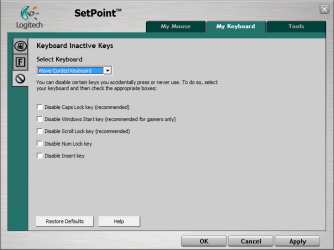
Just for anyone with a Logitech keyboard that uses Setpoint and sees this,

setpoint.png

and hasn't notice the settings.
 

My Computer

Computer type
PC/Desktop
Computer Manufacturer/Model Number
Me
OS
Win 7 Ultimate x64
CPU
FX-8350 @ 4.6 GHz so far
Motherboard
Asus M5A97 EVO
Memory
ADATA XPG V1 Series Black 8GB DDR3 1600
Graphics Card(s)
Sapphire R9 270x Dual-X
Sound Card
Xonar DGX w/ Corsair Vengence 1300
Monitor(s) Displays
Acer S232HL Abid
Screen Resolution
1920x1080
Hard Drives
120 GB OCZ Vertex 3
500 GB Seagate 7200.12
PSU
Antec Earthwatts 650W Green
Case
Antec Three Hundred
Cooling
Cooler Master 212 EVO
Keyboard
Logitech G510
Mouse
Logitech G500s
Internet Speed
35000/3000
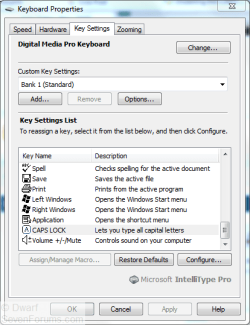
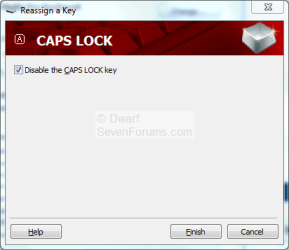
If you have a Microsoft keyboard that uses the Intellitype driver, you can also disable the Caps Lock from there.

Capture.PNG

Capture1.PNG
 

My Computer

Computer type
PC/Desktop
Computer Manufacturer/Model Number
Dwarf Dwf/11/2012 r09/2013
OS
Windows 8.1 Pro RTM x64
CPU
Intel Core-i5-3570K 4-core @ 3.4GHz (Ivy Bridge) (OC 4.4GHz)
Motherboard
ASRock Z77 Extreme4-M
Memory
4 x 4GB DDR3-1600 Corsair Vengeance CMZ8GX3M2A1600C9B (16GB)
Graphics Card(s)
MSI GeForce GTX770 Gaming OC 2GB
Sound Card
Realtek High Definition on board solution (ALC 898)
Monitor(s) Displays
ViewSonic VA1912w Widescreen (VGA)
Screen Resolution
1440x900
Hard Drives
OCZ Agility 3 SSD 120GB SATA III x2 (RAID 0)
Samsung HD501LJ 500GB SATA II x2
Hitachi HDS721010CLA332 1TB SATA II
Iomega 1.5TB Ext USB 2.0
WD 2.0TB Ext USB 3.0
PSU
XFX Pro Series 850W Semi-Modular
Case
Gigabyte IF233
Cooling
1 x 120mm Front Inlet 1 x 120mm Rear Exhaust
Keyboard
Microsoft Comfort Curve Keyboard 3000 (USB)
Mouse
Microsoft Comfort Mouse 3000 for Business (USB)
Internet Speed
NetGear DG834Gv3 ADSL Modem/Router (Ethernet) ~4.0 Mb/s (O2)
Antivirus
Avast! 8.0.1497
Browser
IE 11
Other Info
Optical Drive: HL-DT-ST BD-RE BH10LS30 SATA Bluray
Lexmark S305 Printer/Scanner/Copier (USB)
WEI Score: 8.1/8.1/8.5/8.5/8.25
Asus Eee PC 1011PX Netbook (Windows 7 x86 Starter)
Just for anyone with a Logitech keyboard that uses Setpoint and sees this,

View attachment 68816

and hasn't notice the settings.

Thanks, was not aware of that.

ETA - was just informed the batteries in the mouse are critically low - nice to know. Fore warned, is fore changed.:D
 

My Computer

Computer Manufacturer/Model Number
24c Built
OS
Win7 x64 Ult
CPU
Intel i7-950
Motherboard
ASUS PT6
Memory
12 GB DDR3
Graphics Card(s)
NVIDIA 9800GT+
Sound Card
none
Monitor(s) Displays
2 Samsung SyncMaster 2343bwx
Screen Resolution
2048X1152
Hard Drives
1st-4 OCZ Vertex Turbos 32GB RAID 0
2nd-2 WD 640GB RAID 1
PSU
Thermaltake Toughpower XT W0229RU 750W
Case
Antec 900
Cooling
case fans
Keyboard
Logitech cordless
Mouse
Logitech cordless
Internet Speed
up to 15 MB/s

My Computer

Computer Manufacturer/Model Number
Apple Macbook Pro (April 2009)
OS
W7 Ult. x64 | OS X
CPU
Intel Mobile Core 2 Duo 2.93Ghz [T9800 Penryn]
Motherboard
NVIDIA nForce 730i Rev. B1 [Mac-F2268EC8 (U2E1)]
Memory
4096MB Samsung DDR3 Dual Channel [PC3-8500F 1066Mhz]
Graphics Card(s)
NVIDIA GeForce 9600M GT 512MB [G96M Rev. C1]
Sound Card
SB X-Fi Surround 5.1 USB | Onboard Realtek (Disabled)
Monitor(s) Displays
Acer x223wbd 22" | Apple Anti-Glare 17" (Disabled)
Screen Resolution
{Current} 1440x900 {Acer} 1680x1050 {Apple} 1920x1200
Hard Drives
{Internal}
Seagate Momentus 320GB 2.5" 7200RPM [ST9320421AS]

{Externals}
LaCie 320GB USB 2.0 HDD [301284UR]
LaCie 750GB USB 2.0 FW400 eSATA HDD [301314U]
LaCie 1TB USB 2.0 HDD [301304UR]
PSU
Magsafe
Case
Aluminum/Unibody (MBP52)
Cooling
2 x 6000 RPM Fans
Keyboard
Logitech G-15v2 [PN 920-000379]
Mouse
Logitech G-9 [PN 910-000338]
Internet Speed
12Mbps/2.5Mbps w/ 24Mbps Speed Boost [Comcast]
Other Info
Logitech X-540 Speakers [PN 970223-0122]
Sennheiser PC-151 Headset
Or you could also have some fun with your "caps lock" key

billy_mays_caps_lock

or you could remap your keyboard using the Microsoft utility "remapkey" which is part of the Windows Resource Kit Tools
remapkey
 

My Computer

Computer type
PC/Desktop
Computer Manufacturer/Model Number
Self Built
OS
Windows 7 Ultimate 64bit
CPU
AMD Phenom Quad core 9950 black edition
Motherboard
Gigabyte
Memory
16Gb
Graphics Card(s)
2x XFX Radeon 5850
Sound Card
PCI Express X-Fi Titanium / Logitech G35
Monitor(s) Displays
2x HP 2410i
Screen Resolution
1920x1080
Hard Drives
2x 500Gb Seagate
1x 300Gb Seagate
1x 1Tb Seagate
2x 1Tb Hitatchi
PSU
Jean Tech Storm 700W
Case
Cooler Master COSMOS S
Cooling
Akasa Evo Blue Pro
Keyboard
Logitech G15
Mouse
Mad Catz M.M.O. 7
Internet Speed
12mb
The easiest way will be to download a keyboard remapper to do the work for you. If you don't want to do that you can use the registry solution.

SharpKeys Keyboard Remapper by Randyrants

   Warning
Only attempt Registry Edits if you know what you are doing. Be sure to backup the registry first.


Open the Registry Editor
Start > Run > regedit

Navigate to: [HKEY_LOCAL_MACHINE\SYSTEM\CurrentControlSet\Control\Keyboard Layout]

Select the Keyboard Layout Folder

Edit > New > Binary Value and name it "Scancode Map"

Double Click Scancode Map key and enter
00,00,00,00,00,00,00,00,02,00,00,00,2A,00,3A,00,00,00,00,00
As a value.

That will change the Caps Lock key into a Scroll Lock key.

Otherwise, you can download these registry tweaks which should do the trick for you.

HowToGeek.com said:
ChangeCapsToControl.reg
Changes Caps Lock to be a Control key

ChangeCapsToShift.reg
Changes Caps Lock to be a Shift key

SwitchCapsToScrollLock.reg
Disables Caps Lock and swaps Scroll lock to be Caps Lock

KillCapsLock.reg
Disables Caps Lock

DisableKeyboardRemap
Uninstalls the preference by deleting the key

http://www.howtogeek.com/geekers/KeyboardMappings.zip

Thanx, that worked great! :)
 

My Computer

Computer Manufacturer/Model Number
DELL Inspiron 1564
OS
Windows 7 64 bit
CPU
Intel Core Processor i3-330M
Motherboard
4 GB
Memory
320 GB Harddrive
Graphics Card(s)
Integrated Intel Graphics Media Accelerator HD
Sound Card
Realtek HD Audio
Keyboard
Standard PS/2
Mouse
DELL Touchpad
Back
Top