Disk defragmentation

brainiacary

New member
I have windows 7 ultimate w/ 320gb westerndigitals harddisk with 4 partitions.

Now the problem is:
capturetd.jpg

The D drive (2nd partition) is always being displayed 6% fragmented.Yesterday it was 7% and after defragmentation it is stucked on 6%.All of them used to be 0% defragmented after dfrag was done.But now D drive is always shown 6% fragmented :cry: Why is it happening plz help me
 

My Computer

OS
windows 7
Hello brainiacary.


Have you considered installing a 3rd party defrager to see if you get the same results?
 

My Computer

Computer Manufacturer/Model Number
* BFK Customs *
OS
W 7 64-bit Ultimate
CPU
Intel Q9550 Yorkfield
Motherboard
ASUS P5Q Pro
Memory
8GB Dominator 8500C5D
Graphics Card(s)
ATI : XFX 5870
Sound Card
Realtek HD Audio 7-1
Monitor(s) Displays
1x 47" LCD HDMI & 3x 26" LCD HDMI
Screen Resolution
1920x1080P & 1920x1200
Hard Drives
1x 80GB Intel X25-M G2 SSD : 1x 500GB & 1x 640GB WD Caviar Black(s)
PSU
Corsair 620HX
Case
Cooler Master RC-690
Cooling
Tuniq Tower 120, 2x 140mm and 3x 120mm case fans
Keyboard
Microsoft 500
Mouse
Razer Diamondback 3G
Internet Speed
14 Mb/s
Other Info
1x Koutech 3Gb/s SATA HDD Hot Swap Rack
I have installed piriform's Defraggler and here is its result :

capturept.jpg


But Sometimes windows' default disk defragmenter shows it(D drive) as 7% or 8% fragmented but after defragmentation it again goes to 6% and nomatter how many times i try it shows 6%.The fragmentation % does not reduce.
 

My Computer

OS
windows 7
That partition is probably being used by another program. Before defrg, bring up task manger and close all open process in that volume. Additional reasons, below

Why won't some files defrag?
 

My Computer

Computer type
PC/Desktop
Computer Manufacturer/Model Number
Dell XPS 420
OS
Windows 10, Home Clean Install
CPU
Intel Core2 processsor Q8200(2.33Ghz 1333FSB) Quad Core Tech
Motherboard
Dell
Memory
6 gb
Graphics Card(s)
ATI Radeon 256MB HD3650
Sound Card
Intergrated 7.1 Channel Audio
Monitor(s) Displays
Dell SP2009W 20"
Hard Drives
640 GB Serial ATA Hard drive
Cooling
Fan
Keyboard
Dell USB Keyboard
Mouse
Dell Premium Optical USB
Internet Speed
DSL 2.85
The Defraggler shows D partition to be 0% fragmented but windows shows it 6% fragmented and D partition space is 99% free and i dont think there are anything open.
 

My Computer

OS
windows 7
If you see any fragmentation left over, it's most likely because it's in reserved system space (MFT, System Information volume, pagefile). My guess is Windows cant touch those and correctly reports them fragmented, Defraggler cant touch those either but it doesnt tell you, hence the 0 % fragmentation.
 

My Computer

Computer Manufacturer/Model Number
Too many to describe...
OS
Windows 7 x64 pro/ Windows 7 x86 Pro/ XP SP3 x86
The Defraggler shows D partition to be 0% fragmented but windows shows it 6% fragmented and D partition space is 99% free and i dont think there are anything open.

I have tried several free and not-free defraggers.

I have settled upon:

  1. Choice #1: contig -q -s c: (or whatever drive you are degragging)
  2. Choice #2: Defraggler because of the graphic display and the indication of which files are involved.
Contig is part of the SysInternals suite. of course, contig can be downloaded separately. Contig is free, is the entire suite. My personal favorites of the suite are autoruns, procmon, proexp.

In a second, I'll get the links you need.

You can not do better than contig in my opinion.
Contig


Sysinternals Suite

Process Explorer

Process Monitor
 

My Computer

Computer Manufacturer/Model Number
Toshiba Satellite S875D-S7239 laptop
OS
MS Windows 7 Ultimate SP1 64-bit
CPU
AMD A10-4600M
Motherboard
AMD Pumori (Socket FT1)
Memory
6.00 GB Dual-Channel DDR3 @ 798MHz (11-11-12-28)
Graphics Card(s)
AMD Radeon HD 7660G
Sound Card
High Definition Audio Device
Monitor(s) Displays
Generic PnP Monitor (1600x900@60Hz)
Screen Resolution
1600x900@60Hz
Hard Drives
SSD 119GB Corsair CSSD-V128GB2 ATA Device
Keyboard
Standard PS/2 Keyboard
Mouse
HP Wireless Optical Mobile Mouse Model FHA-3410
Internet Speed
What the local pub, local coffee shop offers.
Other Info
Optical Drive:MATSHITA BD-CMB UJ160B ATA Device


Also have an Asus ha1002xp netbook with Win 7 Ultimate installed.
I have windows 7 ultimate w/ 320gb westerndigitals harddisk with 4 partitions.

Now the problem is:
capturetd.jpg

The D drive (2nd partition) is always being displayed 6% fragmented.Yesterday it was 7% and after defragmentation it is stucked on 6%.All of them used to be 0% defragmented after dfrag was done.But now D drive is always shown 6% fragmented :cry: Why is it happening plz help me

I have no idea what files ar on D but some files are protected and cannot be "defragged". 6% is nothing to be concerned about anyway.

Is there a particular reason this is of concern to you

Ken
 

My Computer

Computer Manufacturer/Model Number
HP Pavillion dv-7 1005 Tx
OS
Win 8 Release candidate 8400
CPU
[email protected]
Memory
4 gigs
Graphics Card(s)
Nvidia 9600M
Sound Card
HD built-in
Monitor(s) Displays
17" Wxga
Screen Resolution
1440x900
Cooling
none
Internet Speed
45Mb down 5Mb up
First off, I agree with zigzag 3143, to wit: 6% is nothing to be concerned about. But that's we not thee.

Windows does, indeed, "lock" some files to which, normally, a defrag will be denied access. I use a free, I think excellent, open source app called UltraDefrag which has the ability to defrag most locked files. You will fine it at SourceForge

Monk
 

My Computer

Computer Manufacturer/Model Number
Custom
OS
Dual boot XP Pro SP3x86 and Win7 Pro x64
CPU
AMD Phenom II x3 720 BE OCed to 3.3 GHz
Motherboard
Asus M3A79T Deluxe
Memory
2x2GB OCZ OCZ2RPR10664GK PC2-8500 DDR2
Graphics Card(s)
Sapphire ATi Radeon 4830 HD x2 (XFire)
Sound Card
Integrated (SoundMax)
Monitor(s) Displays
Dual: LG L227WTG/LG M237WD
Screen Resolution
1680 x 1050; 1920 x1280
Hard Drives
3 WDC WD7501AALS-00J7B0
PSU
Zalman 750HD Modular
Case
Antec 900
Cooling
4 120mm, 1 200mm fans
Keyboard
Black with lots of keys
Mouse
Razer Lachesis, Logitech RumbePad2, Logitech Marble
Internet Speed
Who counts
Other Info
7:1 SS
As already explained some files are locked while the OS is running.

There have already been some excellent suggestions, but I would also like to add:

Perfect Disk is an excellent defragmenter (and my personal choice)
This one I have found to be the best of all I have tried , both free & paid.
It is not free however, so you must purchase it. but they do offer a 30day trial if you decide to check it out.

It can defragment all of the locked files in a 'Offline Defrag". you can then run again inside Windows with a "Smart Placement" to complete the job if it really bothers you that much, which helps reduce future fragmentation

There may be some free versions that can do this as well, but Im not not sure on that. (Please inform if so, I would like to know)

I do not think that the little bit of system file fragmentation will really impact overall performance however.

But something you can try if it really bugs you and all other options fail.

Also, each defragmenter may show a different amount of fragmentation. This is because how each program sees the files and organize them.
They all have slightly different methods.

In the end, just like the "Whats the best AV Suite" question, defragmenters are a bit the same. They all work well, but it comes down mostly to personal preference.
At least IMHO
 

My Computer

Computer Manufacturer/Model Number
Custom (Self Build)
OS
Windows 7 Home Premium 64bit
CPU
Intel Core i7 2700k
Motherboard
eVGA P67 SLI
Memory
8GB Mushkin Redline Ridgebacks @1866
Graphics Card(s)
EVGA GTX570 SC
Sound Card
XiFi Titanium HD
Monitor(s) Displays
LG W2453V
Screen Resolution
1920x1080
Hard Drives
Intel 320 80GB -- Intel X25-V 40GB --WD Black 1TB x2 -- WD Blue 640GB
PSU
Seasonic x750
Case
Corsair 600T SE White
Cooling
eVGA Superclocked CPU Cooler
Keyboard
Saitek Cyborg
Antivirus
Kaspersky
Browser
IE
Other Info
LG BD/DVD
Different defraggers can give large differences in post-defragmentation bootup times, but that's probably because they try to 'optimize' file placement on the disk in different ways to how MS do it. Some get the job done really quick (Auslogic), some are rather slow (MyDefrag).
 

My Computer

OS
Windows 7
+1 Perfect Disk 10 trial version. I use it's Offline Defragger for System Files that won't move so partition can be shrunk. I think it is the only tool that does this.

My regular defragger Auslogics gives the map which shows the unmovable SysFile to begin with.
 
I have tried several free and not-free defraggers.

I have settled upon:

  1. Choice #1: contig -q -s c: (or whatever drive you are degragging)
  2. Choice #2: Defraggler because of the graphic display and the indication of which files are involved.
Contig is part of the SysInternals suite. of course, contig can be downloaded separately. Contig is free, is the entire suite. My personal favorites of the suite are autoruns, procmon, proexp.

In a second, I'll get the links you need.

You can not do better than contig in my opinion.
Contig

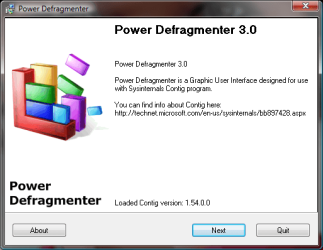
I too always use contig, alomg with Auslogic, and MyDefrag at various times, but I use the Power Defragmenter GUI, works great:

Power Defragmenter is a very advanced GUI for the Sysinternals core application which takes defragmentation process to a whole new level.

Power Defragmenter is a GUI (Graphic User Interface) application for program Contig by Sysinternals.

Contig is a very powerful defragmentation application designed for Windows NT/2000/XP operating systems.

Contig created by Mark Russinovich and Bryce Cogswell.

pwrdefrag3.png


Whats new in version 3.0?
- Simplified Contig download and setup (now almost fully automatic)
- Removed PowerMode(TM) because of compatibility problems with Windows Vista
- Introduced TriplePass(TM) mode replacing obsolete PowerMode(TM)*
- Added ability to defragment removable drives (mostly floppy and USB hard drives**)
- Fixed few glitches
- New Vista style graphics

* TripleMode(TM) runs Contig in 3 passes defragmenting any remaining fragmented files
** don't use on USB flash and SSD drives as they are basically immune to the file fragmentation due to almost non existent access latency. Defragmenting flash devices also decreases their lifetime.

Download Power Defragmenter 3.0 - This software will take the defragmentation process to a whole new level - Softpedia

A Guy
 

My Computer

Computer type
PC/Desktop
OS
Windows 10 Home x64
CPU
INTEL Core i5-750 Quad-Core 3.37GHz
Motherboard
ASUS P7P55D
Memory
HyperX Fury Black Series 8GB (2 x 4GB) 1866Mhz
Graphics Card(s)
EVGA GeForce GTX 750 Superclocked 1GB 128-Bit GDDR5
Monitor(s) Displays
LG 32MA68HY 32" IPS
Screen Resolution
1920 x 1080
Hard Drives
Samsung 840 Evo 120GB, SEAGATE 500GB Barracuda® 7200.12, SATA 3 Gb/s, 7200 RPM, 16MB cache
PSU
ANTEC TruePower New TP-550, 80 PLUS, 550W
Case
ANTEC Three Hundred Illusion
Cooling
COOLER MASTER Hyper 212 Plus, 4 x 120mm 1 x 140mm Noctua's
Internet Speed
85 + Mbps
Antivirus
Avast
Browser
Vivaldi
O&O Defrag 10 Pro will perform an online defrag of system, MFT, registry, and directories; it will perform an offline defrag of the page file.

I mention Defrag 10 Pro because it was offered free after v. 12 was released. Can you still find it free????

Monk
 

My Computer

Computer Manufacturer/Model Number
Custom
OS
Dual boot XP Pro SP3x86 and Win7 Pro x64
CPU
AMD Phenom II x3 720 BE OCed to 3.3 GHz
Motherboard
Asus M3A79T Deluxe
Memory
2x2GB OCZ OCZ2RPR10664GK PC2-8500 DDR2
Graphics Card(s)
Sapphire ATi Radeon 4830 HD x2 (XFire)
Sound Card
Integrated (SoundMax)
Monitor(s) Displays
Dual: LG L227WTG/LG M237WD
Screen Resolution
1680 x 1050; 1920 x1280
Hard Drives
3 WDC WD7501AALS-00J7B0
PSU
Zalman 750HD Modular
Case
Antec 900
Cooling
4 120mm, 1 200mm fans
Keyboard
Black with lots of keys
Mouse
Razer Lachesis, Logitech RumbePad2, Logitech Marble
Internet Speed
Who counts
Other Info
7:1 SS
Thanks everybody for replies and suggestions.You have asked why just 6% fragmentation is bothering me, because every other 3 partitions even system windows partition c drive is 0% fragmented but the d drive which is almost empty with just 1% usage is 6% fragmented.Just a week ago,when i checked, it was also 0%. I'm worried bcoz yesterday i had power outage causing my PC improper shutdown.later I did complete Disk check on all drives and got "no problems" result.then I did disk defragmentation.every other partitions were clear (0% fragmented) except D with 7%.So i performed defrag that showed 6% after finishing.
 

My Computer

OS
windows 7
O&O Defrag 10 Pro will perform an online defrag of system, MFT, registry, and directories; it will perform an offline defrag of the page file.

I mention Defrag 10 Pro because it was offered free after v. 12 was released. Can you still find it free????

Monk

This should still work:

Register for license

O&O Software -

Download

O&O Software - Archive

A Guy
 

My Computer

Computer type
PC/Desktop
OS
Windows 10 Home x64
CPU
INTEL Core i5-750 Quad-Core 3.37GHz
Motherboard
ASUS P7P55D
Memory
HyperX Fury Black Series 8GB (2 x 4GB) 1866Mhz
Graphics Card(s)
EVGA GeForce GTX 750 Superclocked 1GB 128-Bit GDDR5
Monitor(s) Displays
LG 32MA68HY 32" IPS
Screen Resolution
1920 x 1080
Hard Drives
Samsung 840 Evo 120GB, SEAGATE 500GB Barracuda® 7200.12, SATA 3 Gb/s, 7200 RPM, 16MB cache
PSU
ANTEC TruePower New TP-550, 80 PLUS, 550W
Case
ANTEC Three Hundred Illusion
Cooling
COOLER MASTER Hyper 212 Plus, 4 x 120mm 1 x 140mm Noctua's
Internet Speed
85 + Mbps
Antivirus
Avast
Browser
Vivaldi
:( I've formatted the disk now and now its fine :confused: But Im little bit scared have i done something wrong now that may cause problem in future ? :sick:
 

My Computer

OS
windows 7
Hello brainiacary.


If you're concerned you may have system problems, you can run a system file integrity check but it may set to default some of your system tweaks if you have some, just be aware; have a look at the tutorial at the link below.


SFC /SCANNOW Command - System File Checker
 

My Computer

Computer Manufacturer/Model Number
* BFK Customs *
OS
W 7 64-bit Ultimate
CPU
Intel Q9550 Yorkfield
Motherboard
ASUS P5Q Pro
Memory
8GB Dominator 8500C5D
Graphics Card(s)
ATI : XFX 5870
Sound Card
Realtek HD Audio 7-1
Monitor(s) Displays
1x 47" LCD HDMI & 3x 26" LCD HDMI
Screen Resolution
1920x1080P & 1920x1200
Hard Drives
1x 80GB Intel X25-M G2 SSD : 1x 500GB & 1x 640GB WD Caviar Black(s)
PSU
Corsair 620HX
Case
Cooler Master RC-690
Cooling
Tuniq Tower 120, 2x 140mm and 3x 120mm case fans
Keyboard
Microsoft 500
Mouse
Razer Diamondback 3G
Internet Speed
14 Mb/s
Other Info
1x Koutech 3Gb/s SATA HDD Hot Swap Rack
+1 Perfect Disk 10 trial version. I use it's Offline Defragger for System Files that won't move so partition can be shrunk. I think it is the only tool that does this.

My regular defragger Auslogics gives the map which shows the unmovable SysFile to begin with.

There is now a Perfect Disk 11.
Haven't checked it out yet to see what's new.
 

My Computer

Computer Manufacturer/Model Number
Toshiba Satellite S875D-S7239 laptop
OS
MS Windows 7 Ultimate SP1 64-bit
CPU
AMD A10-4600M
Motherboard
AMD Pumori (Socket FT1)
Memory
6.00 GB Dual-Channel DDR3 @ 798MHz (11-11-12-28)
Graphics Card(s)
AMD Radeon HD 7660G
Sound Card
High Definition Audio Device
Monitor(s) Displays
Generic PnP Monitor (1600x900@60Hz)
Screen Resolution
1600x900@60Hz
Hard Drives
SSD 119GB Corsair CSSD-V128GB2 ATA Device
Keyboard
Standard PS/2 Keyboard
Mouse
HP Wireless Optical Mobile Mouse Model FHA-3410
Internet Speed
What the local pub, local coffee shop offers.
Other Info
Optical Drive:MATSHITA BD-CMB UJ160B ATA Device


Also have an Asus ha1002xp netbook with Win 7 Ultimate installed.
Back
Top