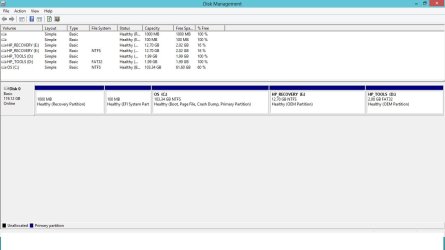
Disk Management showing double drive partitions?

Jmoo

New member
Local time
9:41 AM
Messages
2
Hey everybody,

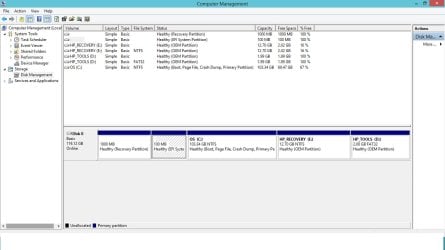
I am newly discovering drive partitioning and thought I would try it on my new HP 2570p Elitebook. I can't figure out why my computer is showing double drive partitions for D and E drives. Anybody know why this is?
Also can anyone explain what the 1000MB and 100MB "Healthy" drives are used for. Can I delete them and merge with my C: drive for more memory?
(On a side note disk management and computer management aren't even giving me an option to delete when right-clicking on the drives)

My ultimate plan is to install windows 7 on C: drive solely by itself to get rid of all the bloatware that came with my computer, and have a partitioned D: drive for all my pics/music etc. using partition wizard. I'm hoping to maximize hard drive space because I have a 128 GB SSD.
Please use simple terms because I am new to all this!
Thanks for all the advice/help in advance.
 

Attachments
  • Computer Management.jpg
    Computer Management.jpg
    80.7 KB · Views: 31
  • Disk Management.jpg
    Disk Management.jpg
    62.2 KB · Views: 20

My Computer My Computer

OS
Windows 8 64 bit
Welcome to SevenForums!

Hopefully one of our experts will jump in to help you.

But meanwhile, my advice is to search on this forum and Google for what you want to do. Changing partitions is serious business for the uninformed!

Your PC has a UEFI bios and I would not want to give you misinformation. But I am sure deleting the 100Mb and 1000Mb partitions will not be a good thing! Besides you will only gain 1Gb.

Also check with HP to find if your notebook can use a second SSD, that would be your best option.
 

My Computer My Computer

Computer Manufacturer/Model Number
HP p6370t
OS
Windows 7 Home Premium 64bit
CPU
i3-530
Motherboard
MSI - IONA
Memory
8 Gb
Graphics Card(s)
onboard
Sound Card
onboard
Monitor(s) Displays
Dell ST2400
Screen Resolution
1920x1080
Hard Drives
Intell 520 SSD 120Gb, WD6400AAKS, 640Gb & WD USB MyBook 1Tb
Internet Speed
1.5 Mmbps, Hughes Satellite
Any HP experts out there. I am still trying to find a reason why my computer is showing duplicate partitions.
My brand new computer also game with 60 GB of memory used-right out of the box! Is this a normal amount for bloatware etc?
When I right click on the partitions I only get a help function, no delete, shrink, or merge.

Any ideas??
Please help,
John
 

My Computer My Computer

OS
Windows 8 64 bit
Hi, you don't have duplicate partitions. See my diagram.
A partition has to be unallocated space to move with Windows Disk Management.

Computer%20Management.jpg
NOTE: Disk space isn't memory, it is storage.;)
 

My Computer My Computer

Computer type
PC/Desktop
Computer Manufacturer/Model Number
Home Built Desktop By DataTech
OS
Windows 7 Ultimate X64 SP1
CPU
Intel i5-2550K, Differing ~4.4-4.8GHz No built in GPU
Motherboard
ASUS P8Z68-V PRO/GEN3
Memory
16GB G.Skill Sniper 1866MHz @ 2133MHz 2x8GB
Graphics Card(s)
ASUS GTX650TIB-DC2OC-2GD5, (650TI Boost)
Sound Card
Onboard Realtek 5-1
Monitor(s) Displays
Samsung P2570HD
Screen Resolution
1920x1080
Hard Drives
Samsung 840 Pro 256GB SSD for OS, 500GB Seagate Constellation (Enterprise drive) for Data
PSU
Corsair HX650W
Case
Inwin Dragon Rider
Cooling
Hyper 212 EVO w/two Noctua fans, push-pull, @1300 RPM
Keyboard
E-Z Eyes, bright yellow keys with large characters
Mouse
steelseries SENSEI Laser Pro Gaming
Internet Speed
48-51Mbs Mbs down, 11 Mbs up Xfinity Cable
Antivirus
Norton Internet Security 2013
Browser
IE 10, Opera, Pale Moon if needed
Other Info
4 case fans, LG BluRay-RE, ASUS DVD-RW, Mr. Fusion power supply, 1.21 gigawatts.
Back
Top