
Diskpart No Media ?

Docfxit

New member
Power User
VIP
Local time
12:37 PM
Messages
118
I have a laptop with Diskpart showing:

DISKPART> list disk

Disk ### Status Size Free Dyn Gpt
-------- ------------- ------- ------- --- ---
Disk 0 Online 476 GB 3072 KB
Disk 1 Online 4596 MB 6144 KB
* Disk 2 No Media 0 B 0 B

I believe there really is a physical Disk 2. How can I get it online?

Thank you,

Docfxit
 

My Computer My Computer

At a glance

Win 7 Ultimate x32, x64, Win 7 Pro x32, x64 W...
Computer type
PC/Desktop
OS
Win 7 Ultimate x32, x64, Win 7 Pro x32, x64 Win 7 Home x64, XP Pro sp3
Is that your optical drive?

Can you post a screenshot of disk management?

http://www.sevenforums.com/tutorials/274797-disk-management-post-screen-capture-image.html

Looking at your other thread, the disk 2 on this,

378331d1450712211t-how-create-security-partition-after-win7-win10-installed-diskpartitions.jpg


is actually disk 1 in diskpart.
 

My Computer My Computer

At a glance

Win 10 Pro x64Intel I5-2500K @3.3GHz16GB G.Skill Ripjaws X (4x4GB)EVGA GeForce 750 Ti SC 2GB
Computer type
PC/Desktop
Computer Manufacturer/Model Number
Self Built
OS
Win 10 Pro x64
CPU
Intel I5-2500K @3.3GHz
Motherboard
Asrock P67 Extreme4
Memory
16GB G.Skill Ripjaws X (4x4GB)
Graphics Card(s)
EVGA GeForce 750 Ti SC 2GB
Sound Card
ASUS Xonar DG 5.1 Channels 24-bit 96KHz PCI Interface Sound
Monitor(s) Displays
auria eq2367
Screen Resolution
1920 x 1080
Hard Drives
250GB Samsung 850 EVO SSD
1TB WD Blue
1TB Hitachi
PSU
SeaSonic X 650W 80 Plus Gold
Case
Corsair Obsidian 750D
Cooling
Corsair H60, Three 140mm case fans
Keyboard
Logitech Wireless Keyboard K520
Mouse
Logitech Wireless Mouse M310
Internet Speed
Wave Broadband ~ 100 dn 5 up
Antivirus
Windows Defender, Malwarebytes Premium
Browser
Edge, IE11, Chrome
Other Info
Laptop specs: HP g7-1365dx /
CPU: AMD A6-3420M APU with Radeon(tm) HD Graphics /
RAM: Crucial 8Gb (2x4Gb) /
SSD: Crucial M4-CT128M4SSD2 ATA Device/ FW 000F /
GFX: AMD Radeon HD 6520G /
OS: Windows 10 Pro x64
DiskManagementW550s.jpg

Thank you for looking at it,

There is supposed to be a 14.91 GB is the factory installed SanDisk internal SSD U110 16GB physical disk
in this system.

I have another W550s just like this one and it has the 16gb internal SSD.
I also have an SD card slot that shows nothing on the other W550s when nothing is inserted.
On this one when I insert an SD it doesn't show at all.

Docfxit
 

My Computer My Computer

At a glance

Win 7 Ultimate x32, x64, Win 7 Pro x32, x64 W...
Computer type
PC/Desktop
OS
Win 7 Ultimate x32, x64, Win 7 Pro x32, x64 Win 7 Home x64, XP Pro sp3
Thanks for the screenshot, it shows as removable and the no media with a drive letter. I'm guessing a card reader or something like that. Do you have anything plugged in to the USB ports?

If you right click on the square area of Disk 2 and select properties, do you see what it is there?

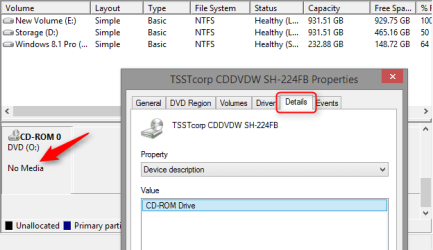
Here's a shot of my optical drive for reference,

2015-12-21_23h16_08.png

The 16GB SSD is probably there but it's a cache drive.
 

My Computer My Computer

At a glance

Win 10 Pro x64Intel I5-2500K @3.3GHz16GB G.Skill Ripjaws X (4x4GB)EVGA GeForce 750 Ti SC 2GB
Computer type
PC/Desktop
Computer Manufacturer/Model Number
Self Built
OS
Win 10 Pro x64
CPU
Intel I5-2500K @3.3GHz
Motherboard
Asrock P67 Extreme4
Memory
16GB G.Skill Ripjaws X (4x4GB)
Graphics Card(s)
EVGA GeForce 750 Ti SC 2GB
Sound Card
ASUS Xonar DG 5.1 Channels 24-bit 96KHz PCI Interface Sound
Monitor(s) Displays
auria eq2367
Screen Resolution
1920 x 1080
Hard Drives
250GB Samsung 850 EVO SSD
1TB WD Blue
1TB Hitachi
PSU
SeaSonic X 650W 80 Plus Gold
Case
Corsair Obsidian 750D
Cooling
Corsair H60, Three 140mm case fans
Keyboard
Logitech Wireless Keyboard K520
Mouse
Logitech Wireless Mouse M310
Internet Speed
Wave Broadband ~ 100 dn 5 up
Antivirus
Windows Defender, Malwarebytes Premium
Browser
Edge, IE11, Chrome
Other Info
Laptop specs: HP g7-1365dx /
CPU: AMD A6-3420M APU with Radeon(tm) HD Graphics /
RAM: Crucial 8Gb (2x4Gb) /
SSD: Crucial M4-CT128M4SSD2 ATA Device/ FW 000F /
GFX: AMD Radeon HD 6520G /
OS: Windows 10 Pro x64
Thanks for the help.

I figured it all out.
Even though these two laptops were supposed to be the same the 16gb internal SSD wasn't installed in this one.
The drive that said No Media is showing because it has an HP printer with an SD memory slot. As soon as I put an SD card in it I see it works fine.
I have no idea why putting an SD card in the laptop didn't work before. It's working now.

I do have one question.
When I boot into Win 7 I can't see the hard drive with Win 10
When I boot into Win 10 I can see the hard drive with Win 7

I know there was a problem between XP and Win 7 so Win 7 was hidden from XP.
Is that the same case here?

Thanks,
Docfxit
 

My Computer My Computer

At a glance

Win 7 Ultimate x32, x64, Win 7 Pro x32, x64 W...
Computer type
PC/Desktop
OS
Win 7 Ultimate x32, x64, Win 7 Pro x32, x64 Win 7 Home x64, XP Pro sp3
Glad you got that sorted out. As for the other question, I don't remember there being a problem between XP and 7 like that.

Not to say it wasn't like that for you or others, I just don't remember seeing that.

I really don't have an answer for that honestly, you can start a new thread about that if you want, I'm sure others can help.
 

My Computer My Computer

At a glance

Win 10 Pro x64Intel I5-2500K @3.3GHz16GB G.Skill Ripjaws X (4x4GB)EVGA GeForce 750 Ti SC 2GB
Computer type
PC/Desktop
Computer Manufacturer/Model Number
Self Built
OS
Win 10 Pro x64
CPU
Intel I5-2500K @3.3GHz
Motherboard
Asrock P67 Extreme4
Memory
16GB G.Skill Ripjaws X (4x4GB)
Graphics Card(s)
EVGA GeForce 750 Ti SC 2GB
Sound Card
ASUS Xonar DG 5.1 Channels 24-bit 96KHz PCI Interface Sound
Monitor(s) Displays
auria eq2367
Screen Resolution
1920 x 1080
Hard Drives
250GB Samsung 850 EVO SSD
1TB WD Blue
1TB Hitachi
PSU
SeaSonic X 650W 80 Plus Gold
Case
Corsair Obsidian 750D
Cooling
Corsair H60, Three 140mm case fans
Keyboard
Logitech Wireless Keyboard K520
Mouse
Logitech Wireless Mouse M310
Internet Speed
Wave Broadband ~ 100 dn 5 up
Antivirus
Windows Defender, Malwarebytes Premium
Browser
Edge, IE11, Chrome
Other Info
Laptop specs: HP g7-1365dx /
CPU: AMD A6-3420M APU with Radeon(tm) HD Graphics /
RAM: Crucial 8Gb (2x4Gb) /
SSD: Crucial M4-CT128M4SSD2 ATA Device/ FW 000F /
GFX: AMD Radeon HD 6520G /
OS: Windows 10 Pro x64
Back
Top