
Solved Display shaking when set on monitors native resolution

drazzz

New member
Local time
3:44 AM
Messages
3
Hello everyone,
As you can see from the title, my display is shaking when set on monitors native resolution (1680x1050, 60Hz, analog), but when I downgrade resolution to the first lower one (1440x900, 60Hz), everything is ok.
I have only the 60Hz option for refresh rate, and I installed the latest HD graphics driver, but nothing solves the problem. I've tried the same monitor on another PC and it works fine... :sarc:
Please, anyone with the solution, I'm really desperate?
Here's a screenshot of my problem
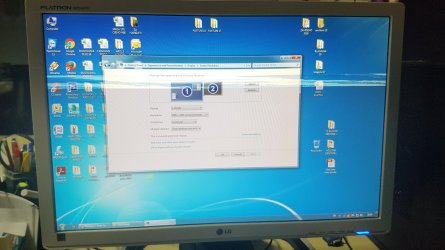
20170119_201939.jpg

EDIT: Maybe I should mention that the shaking is happening BEHIND the mouse cursor, the cursor looks normal all the time??


Monitor LG Flatron W2242PK
 
Last edited:

My Computer

Computer type
PC/Desktop
Computer Manufacturer/Model Number
Dell Optiplex 790
OS
Windows 7 Ultimate x64
CPU
i3 2120
Motherboard
Dell
Memory
2x4Gb RAM 1333
Graphics Card(s)
Intel HD Graphics 2000 onboard
Browser
Google Chrome
Have you checked the tightness of the cables? Have you tried a new cable?
 

My Computer

Computer type
PC/Desktop
Computer Manufacturer/Model Number
custom build
OS
Windows 7 Professional 64bit
CPU
Intel i7-5960X
Motherboard
EVGA X99 Classified
Memory
64GB Corsair Dominator 2400MHz
Graphics Card(s)
3 EVGA GTX980's
Sound Card
on board
Monitor(s) Displays
3 Dell E2715H 27"
Screen Resolution
1920x1080 (5760x1080)
Hard Drives
Samsung 950 Pro 1TB M.2 SSD,
Western Digital Black 2TB HDD's x5
Western Digital Black 1TB HDD's x3
PSU
Corsair AX1200i
Case
Corsair 750D
Cooling
Corsair H110i GT
Keyboard
Corsair K70
Mouse
Corsair M45
Internet Speed
250 down/10 up
Antivirus
Microsoft Security Essentials
Browser
IE 11, Google Chrome
Yes, I've tried another cable and the problem is the same, now it's started shaking on 1440x900 also, when I'm using 3sd max
 

My Computer

Computer type
PC/Desktop
Computer Manufacturer/Model Number
Dell Optiplex 790
OS
Windows 7 Ultimate x64
CPU
i3 2120
Motherboard
Dell
Memory
2x4Gb RAM 1333
Graphics Card(s)
Intel HD Graphics 2000 onboard
Browser
Google Chrome
Check another monitor on the problem PC. If it has the same issue, then it's your graphics adapter that is at fault.
 

My Computer

Computer type
PC/Desktop
Computer Manufacturer/Model Number
Mellon Labs (custom build)
OS
Win 7 Pro x64/Win 10 Pro x64 dual boot
CPU
AMD FX 8350 Vishera @ 4200
Motherboard
ASUS M5A97 R2.0
Memory
16 GB Mushkin Blackline DDR3-2400 @ 1866 (9-10-10-10-31)
Graphics Card(s)
XFX Radeon R9 280 Double D Black Edition
Sound Card
Realtek HD Audio on MB. Sounds great.
Monitor(s) Displays
Acer 24", Acer 22"
Screen Resolution
3840 x 1080
Hard Drives
1 x Mushkin Chronos 120 GB SSD (Win 10)
1 x Samsung 850 EVO 250 GB SSD (Win 7)
1 x WD 1TB SATA Blue
1 x WD 1TB SATA Green
PSU
Corsair TX-750
Case
CoolerMaster HAF 912+
Cooling
Coolermaster Seidon 240M Liquid AIO. 6 case fans
Keyboard
Logitech G710+
Mouse
Logitech G500s
Internet Speed
Much better since I got fiber, but still way overpriced.
Antivirus
MSE, Malware Bytes for scanning
Browser
Firefox
Other Info
Corsair VOID USB headphones.

A Mellon Labs X-1 - LCD Smartie driven system status display.

Brought to you by the letter E
Thanks for your help! As it turns out it was a bad integrated graphics. I took another optiplex 790, and inserted my HDD into it.. and it works fine. Rerurned the faulty config to the shop where I bought it.
 

My Computer

Computer type
PC/Desktop
Computer Manufacturer/Model Number
Dell Optiplex 790
OS
Windows 7 Ultimate x64
CPU
i3 2120
Motherboard
Dell
Memory
2x4Gb RAM 1333
Graphics Card(s)
Intel HD Graphics 2000 onboard
Browser
Google Chrome
Back
Top