Solved DNS\Hostname

KLR

New member
I got a problem in my WINDOWS 7..
when I'm connected to internet.. it give's me a DNS\Hostname error..
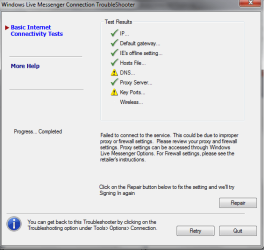
and when im singning in at "Windows Live Messenger" it give's me error code "80072ee7".. and the error in "DNS, and the Key ports".. can someone help me??
tell me what should i do?? please help..
 

My Computer

Computer Manufacturer/Model Number
Acer
OS
Windows 7 Ultimate 32-bit (6.1, Build 7600)
CPU
Inel Core i3 CPU
Memory
4096MB RAM
Graphics Card(s)
Intel HD Graphics 1051MB
Sound Card
Speakers
Monitor(s) Displays
HP Laptop Monitor, Built in, Full HD
Screen Resolution
1366 x 768
Hard Drives
500 GB Hard Drive
Mouse
Touch Pad
Internet Speed
28.8 Mbps
GO to a command prompt and enter IPCONFIG /ALL. Enter teh results here. Then look under "DNS Servers: list and try to ping one of the DNS servers you have listed.
 

My Computer

OS
Windows 7
CPU
i5-750
Motherboard
Asus
Memory
4GB DDR3 1600
Graphics Card(s)
GT220
GO to a command prompt and enter IPCONFIG /ALL. Enter teh results here. Then look under "DNS Servers: list and try to ping one of the DNS servers you have listed.

i did what you said.. that's what i got:


Microsoft Windows [Version 6.1.7600]
Copyright (c) 2009 Microsoft Corporation. All rights reserved.

C:\Users\KILLER>IPCONFIG/ALL

Windows IP Configuration

Host Name . . . . . . . . . . . . : LapTop-PC
Primary Dns Suffix . . . . . . . :
Node Type . . . . . . . . . . . . : Mixed
IP Routing Enabled. . . . . . . . : No
WINS Proxy Enabled. . . . . . . . : No
DNS Suffix Search List. . . . . . : mshome.net

Wireless LAN adapter Wireless Network Connection:

Media State . . . . . . . . . . . : Media disconnected
Connection-specific DNS Suffix . :
Description . . . . . . . . . . . : Atheros AR5009 802.11a/g/n WiFi Adapter
Physical Address. . . . . . . . . : 70-1A-04-0A-8B-EB
DHCP Enabled. . . . . . . . . . . : Yes
Autoconfiguration Enabled . . . . : Yes

Ethernet adapter Local Area Connection:

Connection-specific DNS Suffix . : mshome.net
Description . . . . . . . . . . . : Realtek PCIe GBE Family Controller
Physical Address. . . . . . . . . : 00-26-9E-54-C7-31
DHCP Enabled. . . . . . . . . . . : Yes
Autoconfiguration Enabled . . . . : Yes
IPv6 Address. . . . . . . . . . . : 2002:bcf7:435b:b:d4c:a943:2d89:769a(Prefe
rred)
Site-local IPv6 Address . . . . . : fec0::b:d4c:a943:2d89:769a%1(Preferred)
Temporary IPv6 Address. . . . . . : 2002:bcf7:435b:b:3d95:6b1c:4ad2:30fb(Pref
erred)
Link-local IPv6 Address . . . . . : fe80::d4c:a943:2d89:769a%11(Preferred)
IPv4 Address. . . . . . . . . . . : 192.168.137.222(Preferred)
Subnet Mask . . . . . . . . . . . : 255.255.255.0
Lease Obtained. . . . . . . . . . : 26 آذار, 2010 11:42:48 ص
Lease Expires . . . . . . . . . . : 02 نيسان, 2010 06:13:38 م
Default Gateway . . . . . . . . . : fe80::f11e:41dc:df78:d431%11
192.168.137.1
DHCP Server . . . . . . . . . . . : 192.168.137.1
DHCPv6 IAID . . . . . . . . . . . : 234890910
DHCPv6 Client DUID. . . . . . . . : 00-01-00-01-13-1E-25-E6-00-26-9E-54-C7-31

DNS Servers . . . . . . . . . . . : 192.168.137.1
NetBIOS over Tcpip. . . . . . . . : Enabled

Tunnel adapter isatap.{A819DC79-9AE4-48CE-AE46-E7E7264DFE17}:

Media State . . . . . . . . . . . : Media disconnected
Connection-specific DNS Suffix . :
Description . . . . . . . . . . . : Microsoft ISATAP Adapter
Physical Address. . . . . . . . . : 00-00-00-00-00-00-00-E0
DHCP Enabled. . . . . . . . . . . : No
Autoconfiguration Enabled . . . . : Yes

Tunnel adapter isatap.mshome.net:

Media State . . . . . . . . . . . : Media disconnected
Connection-specific DNS Suffix . : mshome.net
Description . . . . . . . . . . . : Microsoft ISATAP Adapter #2
Physical Address. . . . . . . . . : 00-00-00-00-00-00-00-E0
DHCP Enabled. . . . . . . . . . . : No
Autoconfiguration Enabled . . . . : Yes

Tunnel adapter 6TO4 Adapter:

Media State . . . . . . . . . . . : Media disconnected
Connection-specific DNS Suffix . :
Description . . . . . . . . . . . : Microsoft 6to4 Adapter
Physical Address. . . . . . . . . : 00-00-00-00-00-00-00-E0
DHCP Enabled. . . . . . . . . . . : No
Autoconfiguration Enabled . . . . : Yes

Tunnel adapter Teredo Tunneling Pseudo-Interface:

Connection-specific DNS Suffix . :
Description . . . . . . . . . . . : Teredo Tunneling Pseudo-Interface
Physical Address. . . . . . . . . : 00-00-00-00-00-00-00-E0
DHCP Enabled. . . . . . . . . . . : No
Autoconfiguration Enabled . . . . : Yes
IPv6 Address. . . . . . . . . . . : 2001:0:4137:9e76:877:b2e:4308:bca4(Prefer
red)
Link-local IPv6 Address . . . . . : fe80::877:b2e:4308:bca4%17(Preferred)
Default Gateway . . . . . . . . . :
NetBIOS over Tcpip. . . . . . . . : Disabled


so... what you think?

 

My Computer

Computer Manufacturer/Model Number
Acer
OS
Windows 7 Ultimate 32-bit (6.1, Build 7600)
CPU
Inel Core i3 CPU
Memory
4096MB RAM
Graphics Card(s)
Intel HD Graphics 1051MB
Sound Card
Speakers
Monitor(s) Displays
HP Laptop Monitor, Built in, Full HD
Screen Resolution
1366 x 768
Hard Drives
500 GB Hard Drive
Mouse
Touch Pad
Internet Speed
28.8 Mbps
You will need to reset your router, the DNS and DHCP servers are the same and your default gateway is using the wrong address.
 

My Computer

Computer type
PC/Desktop
Computer Manufacturer/Model Number
Home built
OS
Windows 7 Ult, Windows 8.1 Pro,
CPU
Q9650-4.275GHz, E8600 4.5GHz, E6750-3.8GHz
Motherboard
Evga 780i FTW
Memory
G.Skill PC2 9600 1200Mhz 5 5 5 15 2T
Graphics Card(s)
GTX480
Sound Card
Asus Xonar D2
Monitor(s) Displays
HannsG
Screen Resolution
1680X1050
Hard Drives
GSkill Phoenix Pro 120GB SSD
PSU
ThermalTake Toughpower 1000Watt modular
Case
ThermalTake XaserV
Cooling
Xigmatek S1283
Keyboard
Logitech G15
Mouse
Logitech G9
Internet Speed
T1
... :S

You will need to reset your router, the DNS and DHCP servers are the same and your default gateway is using the wrong address.


i'll explain my situation..
i have a "wimax USB device".. and im connecting to internet through it..
and i have another computer, and i share the connection with it.. at the main computer "server" its alright and good connection, but at the second one I've got the problem, both have "WINDOWS 7"..
the both computers connected via Ethernet Cable, and it was a good until the day before yesterday.. but there is no viruses or something, so its not the problem..
so.. i thought maybe there is a programs or something like that to repair this problem.. i would be thankful if someone helped me..

hope i explained good.. and you'll know whats wrong..
thx anyway
 

My Computer

Computer Manufacturer/Model Number
Acer
OS
Windows 7 Ultimate 32-bit (6.1, Build 7600)
CPU
Inel Core i3 CPU
Memory
4096MB RAM
Graphics Card(s)
Intel HD Graphics 1051MB
Sound Card
Speakers
Monitor(s) Displays
HP Laptop Monitor, Built in, Full HD
Screen Resolution
1366 x 768
Hard Drives
500 GB Hard Drive
Mouse
Touch Pad
Internet Speed
28.8 Mbps
OK, so are you using Windows 7 "Inernet Connection Sharing" on the "server", the one that works?
 

My Computer

OS
Windows 7
CPU
i5-750
Motherboard
Asus
Memory
4GB DDR3 1600
Graphics Card(s)
GT220
OK, so are you using Windows 7 "Inernet Connection Sharing" on the "server", the one that works?

well its not "server".. its just the pc that connecting directly to internet if u know what i mean..
so.. the first pc.. connected to internet, and its working great..
the probem with the second one.. and it gives me the "DNS/Hostname" error..
and yea.. both have the windows 7.. and im using the "Inernet Connection Sharing
 

My Computer

Computer Manufacturer/Model Number
Acer
OS
Windows 7 Ultimate 32-bit (6.1, Build 7600)
CPU
Inel Core i3 CPU
Memory
4096MB RAM
Graphics Card(s)
Intel HD Graphics 1051MB
Sound Card
Speakers
Monitor(s) Displays
HP Laptop Monitor, Built in, Full HD
Screen Resolution
1366 x 768
Hard Drives
500 GB Hard Drive
Mouse
Touch Pad
Internet Speed
28.8 Mbps

My Computer

Computer Manufacturer/Model Number
Acer
OS
Windows 7 Ultimate 32-bit (6.1, Build 7600)
CPU
Inel Core i3 CPU
Memory
4096MB RAM
Graphics Card(s)
Intel HD Graphics 1051MB
Sound Card
Speakers
Monitor(s) Displays
HP Laptop Monitor, Built in, Full HD
Screen Resolution
1366 x 768
Hard Drives
500 GB Hard Drive
Mouse
Touch Pad
Internet Speed
28.8 Mbps

My Computer

Computer Manufacturer/Model Number
Acer
OS
Windows 7 Ultimate 32-bit (6.1, Build 7600)
CPU
Inel Core i3 CPU
Memory
4096MB RAM
Graphics Card(s)
Intel HD Graphics 1051MB
Sound Card
Speakers
Monitor(s) Displays
HP Laptop Monitor, Built in, Full HD
Screen Resolution
1366 x 768
Hard Drives
500 GB Hard Drive
Mouse
Touch Pad
Internet Speed
28.8 Mbps
Your welcome.. just trying to help. :)
 

My Computer

Computer type
PC/Desktop
OS
Win7 Home Premium x64 SP1, Archlinux x86_64. Elementary Luna

thx.. but its not only the msn not working..
everything what need an internet gives me the same error..
as u see.. in these pictures:

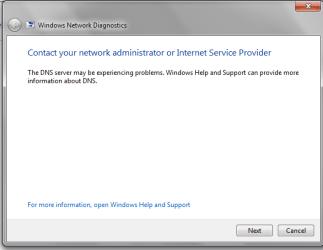
The internet explorer after Diagnostics the problem.. as u see in DNS 1.. (attachments)

The Windows live messenger connection Trouble Shooter.. DNS 2..

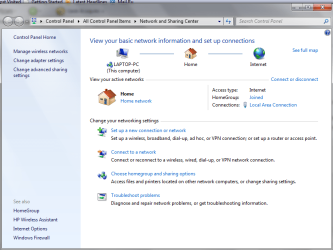
And here is the network and Sharing Center.. Show u that im connected to inter net already..

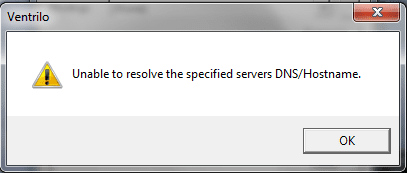
on DNS 4.. a program called "Ventrilo" has the same problem...

I got in my PC Norton Internet security.. maybe that could cause the problem?
 

Attachments

  • DNS 1.png
    DNS 1.png
    35.3 KB · Views: 6
  • DNS 2.png
    DNS 2.png
    51.5 KB · Views: 6
  • DNS 3.png
    DNS 3.png
    117.9 KB · Views: 5
  • DNS 4.png
    DNS 4.png
    21.3 KB · Views: 5

My Computer

Computer Manufacturer/Model Number
Acer
OS
Windows 7 Ultimate 32-bit (6.1, Build 7600)
CPU
Inel Core i3 CPU
Memory
4096MB RAM
Graphics Card(s)
Intel HD Graphics 1051MB
Sound Card
Speakers
Monitor(s) Displays
HP Laptop Monitor, Built in, Full HD
Screen Resolution
1366 x 768
Hard Drives
500 GB Hard Drive
Mouse
Touch Pad
Internet Speed
28.8 Mbps
guyz please.. i need help..
come on.. help me.. :)
 

My Computer

Computer Manufacturer/Model Number
Acer
OS
Windows 7 Ultimate 32-bit (6.1, Build 7600)
CPU
Inel Core i3 CPU
Memory
4096MB RAM
Graphics Card(s)
Intel HD Graphics 1051MB
Sound Card
Speakers
Monitor(s) Displays
HP Laptop Monitor, Built in, Full HD
Screen Resolution
1366 x 768
Hard Drives
500 GB Hard Drive
Mouse
Touch Pad
Internet Speed
28.8 Mbps
Uninstall norton then retry.
 

My Computer

Computer type
PC/Desktop
OS
Win7 Home Premium x64 SP1, Archlinux x86_64. Elementary Luna
Uninstall Norton then retry.


but then.. i wont have any protection for my pc.. :S
and i don't have the CD of the Norton.. and it will be double problem.. :S:S

and it was working before 4days.. but i don't really know what happened, because it suddenly stopped working.. and i had Norton at that time..
 

My Computer

Computer Manufacturer/Model Number
Acer
OS
Windows 7 Ultimate 32-bit (6.1, Build 7600)
CPU
Inel Core i3 CPU
Memory
4096MB RAM
Graphics Card(s)
Intel HD Graphics 1051MB
Sound Card
Speakers
Monitor(s) Displays
HP Laptop Monitor, Built in, Full HD
Screen Resolution
1366 x 768
Hard Drives
500 GB Hard Drive
Mouse
Touch Pad
Internet Speed
28.8 Mbps
Hmm i'll see if i can find anything on to help you again..like i said i had the same problem and what i followed from those links solved it..maybes yours is a little different, i'll try again.
 

My Computer

Computer type
PC/Desktop
OS
Win7 Home Premium x64 SP1, Archlinux x86_64. Elementary Luna
guyz please.. i need help..
come on.. help me.. :)

Just passing through has anyone suggested you run
ipconfig /flushdns then ipconfig /renew

You could also post a screenshot of the out put of ipconfig /all


That would help us a lot


Let us know if you need help with any of this

Ken
 

My Computer

Computer Manufacturer/Model Number
HP Pavillion dv-7 1005 Tx
OS
Win 8 Release candidate 8400
CPU
[email protected]
Memory
4 gigs
Graphics Card(s)
Nvidia 9600M
Sound Card
HD built-in
Monitor(s) Displays
17" Wxga
Screen Resolution
1440x900
Cooling
none
Internet Speed
45Mb down 5Mb up
You could also try a winsock repair

Right click on command prompt, choose to run as Admininstrator, copy/paste

netsh winsock reset

Press enter.
 

My Computer

Computer type
PC/Desktop
Computer Manufacturer/Model Number
Bruce ... somewhere in his 40's
OS
Windows 7 Ultimate 32bit SP1
CPU
Intel(R) Core(TM)2 Quad CPU @ 2.40GHz, 2400 MHz
Motherboard
INTEL/D975XBX2
Memory
4 GB
Graphics Card(s)
ATI Radeon HD 2600 Pro
Monitor(s) Displays
Samsung SyncMaster 914v
Screen Resolution
1280 x 1024
Hard Drives
2/500GB each ... ST3500630AS ATA Device.
One is not connected
PSU
Rocketfish 700 W
Case
G.Skill Gigabyte Chassis
Keyboard
Standard PS/2 Keyboard
Mouse
Microsoft PS/2 Mouse
Internet Speed
DSL
Antivirus
Avira Internet Security
Browser
IE 11
Other Info
ATI HDMI Audio
Hmm i'll see if i can find anything on to help you again..like i said i had the same problem and what i followed from those links solved it..maybes yours is a little different, i'll try again.

thx a lot man.. and thx for ur caring ;)


You could also try a winsock repair

Right click on command prompt, choose to run as Admininstrator, copy/paste

netsh winsock reset

Press enter.

i'll try it tonight.. :)


Just passing through has anyone suggested you run
ipconfig /flushdns then ipconfig /renew

You could also post a screenshot of the out put of ipconfig /all


That would help us a lot


Let us know if you need help with any of this

Ken
that what shows from "ipconfig/all"::

Microsoft Windows [Version 6.1.7600]
Copyright (c) 2009 Microsoft Corporation. All rights reserved.

C:\Users\KILLER>IPCONFIG/ALL

Windows IP Configuration

Host Name . . . . . . . . . . . . : LapTop-PC
Primary Dns Suffix . . . . . . . :
Node Type . . . . . . . . . . . . : Mixed
IP Routing Enabled. . . . . . . . : No
WINS Proxy Enabled. . . . . . . . : No
DNS Suffix Search List. . . . . . : mshome.net

Wireless LAN adapter Wireless Network Connection:

Media State . . . . . . . . . . . : Media disconnected
Connection-specific DNS Suffix . :
Description . . . . . . . . . . . : Atheros AR5009 802.11a/g/n WiFi Adapter
Physical Address. . . . . . . . . : 70-1A-04-0A-8B-EB
DHCP Enabled. . . . . . . . . . . : Yes
Autoconfiguration Enabled . . . . : Yes

Ethernet adapter Local Area Connection:

Connection-specific DNS Suffix . : mshome.net
Description . . . . . . . . . . . : Realtek PCIe GBE Family Controller
Physical Address. . . . . . . . . : 00-26-9E-54-C7-31
DHCP Enabled. . . . . . . . . . . : Yes
Autoconfiguration Enabled . . . . : Yes
IPv6 Address. . . . . . . . . . . : 2002:bcf7:435b:b:d4c:a943:2d89:769a(Prefe
rred)
Site-local IPv6 Address . . . . . : fec0::b:d4c:a943:2d89:769a%1(Preferred)
Temporary IPv6 Address. . . . . . : 2002:bcf7:435b:b:3d95:6b1c:4ad2:30fb(Pref
erred)
Link-local IPv6 Address . . . . . : fe80::d4c:a943:2d89:769a%11(Preferred)
IPv4 Address. . . . . . . . . . . : 192.168.137.222(Preferred)
Subnet Mask . . . . . . . . . . . : 255.255.255.0
Lease Obtained. . . . . . . . . . : 26 آذار, 2010 11:42:48 ص
Lease Expires . . . . . . . . . . : 02 نيسان, 2010 06:13:38 م
Default Gateway . . . . . . . . . : fe80::f11e:41dc:df78:d431%11
192.168.137.1
DHCP Server . . . . . . . . . . . : 192.168.137.1
DHCPv6 IAID . . . . . . . . . . . : 234890910
DHCPv6 Client DUID. . . . . . . . : 00-01-00-01-13-1E-25-E6-00-26-9E-54-C7-31

DNS Servers . . . . . . . . . . . : 192.168.137.1
NetBIOS over Tcpip. . . . . . . . : Enabled

Tunnel adapter isatap.{A819DC79-9AE4-48CE-AE46-E7E7264DFE17}:

Media State . . . . . . . . . . . : Media disconnected
Connection-specific DNS Suffix . :
Description . . . . . . . . . . . : Microsoft ISATAP Adapter
Physical Address. . . . . . . . . : 00-00-00-00-00-00-00-E0
DHCP Enabled. . . . . . . . . . . : No
Autoconfiguration Enabled . . . . : Yes

Tunnel adapter isatap.mshome.net:

Media State . . . . . . . . . . . : Media disconnected
Connection-specific DNS Suffix . : mshome.net
Description . . . . . . . . . . . : Microsoft ISATAP Adapter #2
Physical Address. . . . . . . . . : 00-00-00-00-00-00-00-E0
DHCP Enabled. . . . . . . . . . . : No
Autoconfiguration Enabled . . . . : Yes

Tunnel adapter 6TO4 Adapter:

Media State . . . . . . . . . . . : Media disconnected
Connection-specific DNS Suffix . :
Description . . . . . . . . . . . : Microsoft 6to4 Adapter
Physical Address. . . . . . . . . : 00-00-00-00-00-00-00-E0
DHCP Enabled. . . . . . . . . . . : No
Autoconfiguration Enabled . . . . : Yes

Tunnel adapter Teredo Tunneling Pseudo-Interface:

Connection-specific DNS Suffix . :
Description . . . . . . . . . . . : Teredo Tunneling Pseudo-Interface
Physical Address. . . . . . . . . : 00-00-00-00-00-00-00-E0
DHCP Enabled. . . . . . . . . . . : No
Autoconfiguration Enabled . . . . : Yes
IPv6 Address. . . . . . . . . . . : 2001:0:4137:9e76:877:b2e:4308:bca4(Prefer
red)
Link-local IPv6 Address . . . . . : fe80::877:b2e:4308:bca4%17(Preferred)
Default Gateway . . . . . . . . . :
NetBIOS over Tcpip. . . . . . . . : Disabled
 

My Computer

Computer Manufacturer/Model Number
Acer
OS
Windows 7 Ultimate 32-bit (6.1, Build 7600)
CPU
Inel Core i3 CPU
Memory
4096MB RAM
Graphics Card(s)
Intel HD Graphics 1051MB
Sound Card
Speakers
Monitor(s) Displays
HP Laptop Monitor, Built in, Full HD
Screen Resolution
1366 x 768
Hard Drives
500 GB Hard Drive
Mouse
Touch Pad
Internet Speed
28.8 Mbps
Back
Top