Do I need to buy a new hard drive? S.M.A.R.T show some disturbing info

Max Pen

Creative Kid
Member
VIP
Local time
6:08 AM
Messages
165
Location
Belgium, Flanders
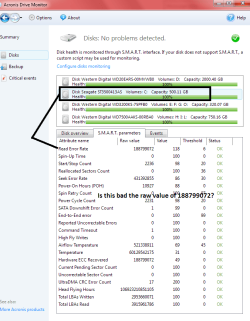
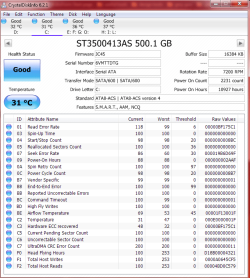
I know little about SMart data only that it doesn't always tell in time your drive is failing but that when it does mention something is wrong it should be taken serious right?

So you be the judge.

I used two different smart readers to be sure that the info shown is correct.

So is my windows drive in good health or not? :confused:
 

Attachments

  • Smart info from Acronis.png
    Smart info from Acronis.png
    30.3 KB · Views: 1
  • smart crystaldiskinfo.png
    smart crystaldiskinfo.png
    40.7 KB · Views: 1

My Computer My Computer

At a glance

Windows 7 Ultimate 64-bit
Computer type
PC/Desktop
Computer Manufacturer/Model Number
Asus
OS
Windows 7 Ultimate 64-bit
Browser
Chrome
Because both programs report good I wouldn't worry about them if they were my drives.
You could test them with the manufactures test program.
 

My Computer My Computer

At a glance

Windows 10 Pro. 64/ version 1709 Windows 7 Pr...Intel i7-6800K @ 4.3Corsair Platinum 16 gig @2400EVGA GTX 1070 OC
Computer type
PC/Desktop
Computer Manufacturer/Model Number
Home made Desktop
OS
Windows 10 Pro. 64/ version 1709 Windows 7 Pro/64
CPU
Intel i7-6800K @ 4.3
Motherboard
ASUS X-99 Deluxe II
Memory
Corsair Platinum 16 gig @2400
Graphics Card(s)
EVGA GTX 1070 OC
Monitor(s) Displays
Asus 27" LED LCD/VE278Q
Screen Resolution
1920-1080 or 1280-720 HDMI
Hard Drives
INTEL SSD 730-240 Gb Sata 3.0/
PSU
EVGA Platium 1200W
Case
Phanteks Luxe Tempered Glass 8 fans/ one radiator
Cooling
XSPC/ Water Cooled CPU
Keyboard
Das 4 Professional
Mouse
Logitech M705/MX Anywhere 2-S
Internet Speed
100 mbits
Antivirus
Microsoft Security Essentials/ Malwarebytes Premium 3.0/ SAS
Browser
I.E. 11 default/Firefox/ ISP Time Warner Cable/Spectrum
Other Info
LG BluRay Burner/
Sound system-KLipsch-THX/
Icy Dock ssd Hot Swap bays.
What program is that if I may inquire?
 

My Computer My Computer

At a glance

Windows 7 Ultimate 64-bit
Computer type
PC/Desktop
Computer Manufacturer/Model Number
Asus
OS
Windows 7 Ultimate 64-bit
Browser
Chrome

My Computer My Computer

At a glance

Windows 10 Pro. 64/ version 1709 Windows 7 Pr...Intel i7-6800K @ 4.3Corsair Platinum 16 gig @2400EVGA GTX 1070 OC
Computer type
PC/Desktop
Computer Manufacturer/Model Number
Home made Desktop
OS
Windows 10 Pro. 64/ version 1709 Windows 7 Pro/64
CPU
Intel i7-6800K @ 4.3
Motherboard
ASUS X-99 Deluxe II
Memory
Corsair Platinum 16 gig @2400
Graphics Card(s)
EVGA GTX 1070 OC
Monitor(s) Displays
Asus 27" LED LCD/VE278Q
Screen Resolution
1920-1080 or 1280-720 HDMI
Hard Drives
INTEL SSD 730-240 Gb Sata 3.0/
PSU
EVGA Platium 1200W
Case
Phanteks Luxe Tempered Glass 8 fans/ one radiator
Cooling
XSPC/ Water Cooled CPU
Keyboard
Das 4 Professional
Mouse
Logitech M705/MX Anywhere 2-S
Internet Speed
100 mbits
Antivirus
Microsoft Security Essentials/ Malwarebytes Premium 3.0/ SAS
Browser
I.E. 11 default/Firefox/ ISP Time Warner Cable/Spectrum
Other Info
LG BluRay Burner/
Sound system-KLipsch-THX/
Icy Dock ssd Hot Swap bays.
So is my windows drive in good health or not? :confused:

Who knows?

Who could possibly know?

People drop dead every day, and many of them were in "good health", according to their doctor during their last physical exam.

SMART is unnecessarily cryptic, which makes it less useful than it might be. Who knows what 188799072 means? It tells a layman nothing.

I'd agree with Layback Bear. Don't place a lot of reliance on it, keep backups, and assume the drive could either fail in the next 30 seconds or last for 15 years. You just take your chances.

I'd look at it a few times a year to see if it shows "all green". I'd probably keep an eye on the "reallocated sectors" count. If that started moving up from 0, I'd probably start shopping, but even if that stays at zero you can't be sure of anything.
 

My Computer My Computer

At a glance

Windows 7 Home Premium SP1, 64-bitIntel Skylake i5-6600K, not overclocked8 GB HyperX DDR4-2666 (2 x 4 GB)none; graphics are integrated on CPU
Computer type
PC/Desktop
Computer Manufacturer/Model Number
Ignatz Special; 4 speed manual gearbox; factory air conditioning; one of one
OS
Windows 7 Home Premium SP1, 64-bit
CPU
Intel Skylake i5-6600K, not overclocked
Motherboard
AsRock Z170M Extreme 4, micro ATX
Memory
8 GB HyperX DDR4-2666 (2 x 4 GB)
Graphics Card(s)
none; graphics are integrated on CPU
Sound Card
onboard: Realtek ALC1150; external: USB Behringer UF0-202
Monitor(s) Displays
Dell S2340M 23 inch IPS
Screen Resolution
1600 x 900
Hard Drives
System: Crucial MX100 series SSD, 128 GB;
Data: Samsung Spinpoint 103SJ, 1 TB;
Backup: WD Caviar Green WD30EZRX-00D8PB0, 3 TB
PSU
Rosewill SilentNight 500 watt fanless, semi-modular
Case
Antec Solo II
Cooling
Noctua NH-U12S; Noctua F12 intake, Noctua S12A exhaust
Keyboard
Microsoft 200 6JH-00001 USB
Mouse
Dell or Microsoft optical wired; USB
Antivirus
Microsoft Security Essentials and Malwarebytes Premium
Browser
Pale Moon
Other Info
All fans PWM; speeds at idle: CPU circa 500 rpm; intake circa 600 rpm; exhaust circa 600 rpm; CPU temps 27 idle and 47 C load in a warm room (27 C/81 F) when running Intel Extreme Tuning Utility stress test.
I would run at least a chkdsk.
 

My Computer My Computer

At a glance

Vista, Windows7, Mint Mate, Zorin, Windows 8from 1.6GHz Duo to i7
Computer Manufacturer/Model Number
HP, Dell, Gateway, Toshiba - 4 laptops and 2 desktops
OS
Vista, Windows7, Mint Mate, Zorin, Windows 8
CPU
from 1.6GHz Duo to i7
Monitor(s) Displays
2x HP w2207
Hard Drives
5x HDD, 7x SSD, 12x Externals
Keyboard
with trackball - no mices
Mouse
Trackball mice
Internet Speed
DSL 6000
Mini tool partition wizard has a surface checking facility, it takes some time but may give some peace of mind. Windows checkdisk works also, as already advised.
 

My Computer My Computer

At a glance

w7 ult 64 and w7 hp 64 X 2 mint 64 8.1 64 10w...
Computer type
PC/Desktop
OS
w7 ult 64 and w7 hp 64 X 2 mint 64 8.1 64 10wtp 64
I would run at least a chkdsk.
My suggestion too. Run chkdsk /r on it from an elevated (admin) command prompt. It likely will prompt to allow chkdsk to run at next boot. Follow the prompts to allow that, then reboot.

Note it can take many hours to complete, often appearing to be frozen. Just let it run (I do it overnight on large drives). Note chkdsk /r is the same as running Error Checking with all options checked from the Tools menu under the drive's Properties menu.

FTR, I think it wise to watch the SMART status, but agree if SMART reports okay, then your drive is okay - at least for now.

In ANY event - the very fact your are concerned should be a red flag for you to ensure you have current backups of any data you don't want lost!
 

My Computer My Computer

At a glance

Windows 7 Profession 64-bitIntel Core i7-860 QuadMushkin 4x2Gb PC12800Gigabyte GTX260 896Mb
Computer Manufacturer/Model Number
BrightWorks Systems B4
OS
Windows 7 Profession 64-bit
CPU
Intel Core i7-860 Quad
Motherboard
Gigabyte P55-UD4P
Memory
Mushkin 4x2Gb PC12800
Graphics Card(s)
Gigabyte GTX260 896Mb
Sound Card
Integrated 7.1 HD Dolby
Monitor(s) Displays
2 Samsung 2220wm-HAS 22"
Screen Resolution
1680 x 1050 | 1680 x 1050
Hard Drives
WD HE 1Tb
PSU
Corsair TX-750W
Case
Ultra M998
Cooling
OEM
Keyboard
MS Wireless Comfort 5000
Mouse
MS Wireless 5000
Internet Speed
Cable and pretty darn fast
Back
Top