
Documents Library

yzahjh

New member
I am in the process of deploying windows 7 throughout my school. Documents,Music & Videos, are all redirected, which is working absolutely fine.The only problem i have is the the " 2 locations link ".Does anyone know how i can hide or remove the "2 locations link"
 

Attachments
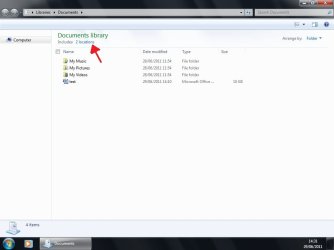
  • 2 locations.jpg
    2 locations.jpg
    77.5 KB · Views: 30

My Computer

OS
Windows 7 Professional 32 bit
If it is not possible to hide or remove the " 2 locations link ". Is there a way to stop users from adding or removing the default save location ?
 

My Computer

OS
Windows 7 Professional 32 bit
There is a way to fully disable the libraries, guess that not what you wanted it to be. Since you don't want other users to mess with your setting.

I think there isn't a way to hide or remove the "2 location link" without hacking into the system file.

Here is a temporary way to hide the Library pane.

http://www.sevenforums.com/tutorials/61514-library-pane-turn-off.html

When you open documents go to the menu bar under Organize dropdown / Layout / uncheck Library Pane.
Hope others users don't turn it on and start messing your setting.:)
 
Last edited by a moderator:

My Computer

OS
ultimate x64
Thank You

Thank you so much Bulldog7:)....i used the Registry setting for turning off the Library pane, worked a treat. Although it is only for HKEY CURRENT USER, I applied it to all users that log on using the GPO Preferences.
 

My Computer

OS
Windows 7 Professional 32 bit
Back
Top