Does ANY browser block THESE popups - really irritating

jimbo45

New member
Guru
Gold Member
VIP
Local time
8:06 PM
Messages
5,941
Location
Hafnarfjörður IS
Hi all
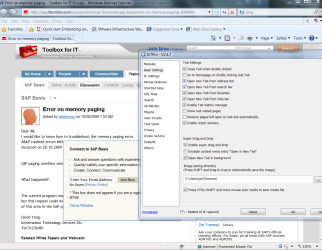
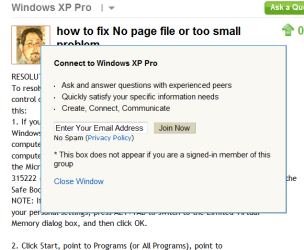
I REALLY LOATHE with venom these little popups that can appear over text you are reading - and there doesn't seem to be anyway of stopping them unless you totally don't touch your mouse.

If people thing this is a good way of advertising then they must come from a different planet - as I certainly won't either visit the site or buy the product they are trying to sell.

The whole idea of online advertising IMO is vastly overblown - most people I know hate it and do everything they can to avoid it unless they are specifically looking for something so why people think its BIG BUSINESS is beyond me.

Image encosed.

Conventional Ad-Blockers and pop up blockers seem ineffective against this type of sneakware

cheers
jimbo.
 

Attachments
  • popup.png
    popup.png
    15.9 KB · Views: 31

My Computer My Computer

Computer type
PC/Desktop
Computer Manufacturer/Model Number
Custom built, several laptops HP/ASUS
OS
Linux CENTOS 7 / various Windows OS'es and servers
CPU
Intel i7 Intel i5
Memory
8GB, 16GB
Graphics Card(s)
On Motherboard
Sound Card
Realtek HD audio
Monitor(s) Displays
Apple Cinema display, Samsung LCD
Screen Resolution
1920 X 1080
Hard Drives
4 X 1TB SATA
Mouse
Toshiba wireless laser
Internet Speed
> 20MB up
Good topic Jimbo! ;-)

I am also experiencing these annoying popups.

Hope someone has an answer.

zx81
 

My Computer My Computer

Computer Manufacturer/Model Number
Dell Inpspiron 1720
OS
Windows 7 Home Premium x64
CPU
Intel 1720 Core 2 Duo 2.00GHz,800,2M
Memory
4GB 667MHz DDR2 SDRAM (2x2048)
Graphics Card(s)
NVIDIA Geforce Go 8600M GT 256MB DDR2
Sound Card
SigmaTel
Monitor(s) Displays
17.0" Widescreen WXGA+ (1440x900) TFT with TrueLife
Screen Resolution
1440x900
Hard Drives
2x160GB 5400RPM Serial ATA
Mouse
Logitech
Firefox + Adblock Plus +Noscript
 

My Computer My Computer

Computer type
PC/Desktop
Computer Manufacturer/Model Number
Systems by SmartEyeball
OS
8 Pro x64
CPU
i7 3770K 4.6GHz
Motherboard
ASUS P8Z77 WS
Memory
16GB G.Skill Trident X 2666mhz
Graphics Card(s)
x2 EVGA 780 Ti Superclocked SLI
Sound Card
SB X-FI Surround 5.1 PRO USB / ATH-AD900 Headphones
Monitor(s) Displays
x3 Dell U2410 / 58" Samsung
Screen Resolution
5760*1200/ 1920*1200
Hard Drives
2x Intel 520 240GB (RAID 0) * 2x WD Caviar Blacks 2TB (RAID 0) * 2TB WD Caviar Black * Sony Optirac DVD
PSU
Silverstone Strider Evolution 1200W
Case
Thermaltake Level 10 GT Snow Edition
Cooling
Noctua NH-D14
Keyboard
Topre Realforce // Ducky Shine MX Black // Filco Ninja TKL
Mouse
Thermaltake Theron (Highly Recommended) + Razer Imperator
Antivirus
MSE
Browser
IE, FF, WaterFox
Other Info
GT Extreme V2 Sim Racing Cockpit + 40" LCD and K/B Mouse stand ▼
Fanatec CSR Elite Wheel + Clubsport V1 Pedals + CSR shifter/7G-H ▼Saitek X52 Pro ▼ TrackIR 5 Pro
Buttkicker v2 Seat Rumbler with Dedicated 5.1 and Sub Woofer attached to frame ▼
=
Bloody Big Grin
Yeah you can disable Javascript but then who knows how well the website will run.
 

My Computer My Computer

Computer Manufacturer/Model Number
Custom Build
OS
Windows 7 x64 Ultimate
CPU
AMD Phenom II X4 955 @ 3.72GHz
Motherboard
Gigabyte GA-MA770T-UD3P
Memory
Patriot 8GB DDR3 1333MHz
Graphics Card(s)
NVIDIA GTX560
Sound Card
-
Monitor(s) Displays
LG 23" W2343T
Screen Resolution
1920 x 1080
Hard Drives
256GB Crucial M4 SSD - OS/program files
250GB - Internal HDD - User files
500GB - Internal HDD - Storage #1
1.5TB - Internal HDD - Storage #2
500GB - External HDD - Portable Storage #1
2TB - External HDD - Portable Storage #2
PSU
TT450W
Case
Thermaltake V3
Cooling
Blue Orb II
Keyboard
Compaq.
Mouse
Logitech MX518
Internet Speed
7Mbps.
Other Info
Cooling (couldn't fit it above).
2 x 120mm LED Blue Fan
1 x Blue Orb II [CPU Cooler]
Firefox + Adblock Plus +Noscript

Hi

still no good

BTW - ADBLOCK doesn't stop these little boxes - they aren't part of normal "POPUP" type of activity.

try this site

Error on memory paging - Toolbox for IT Groups

here's the screenshot - this site doesn't even require you to hover a mouse over the text like some sites do (vibrant system)

This is the organisation -- BOMBARD THEM with mails saying YOU HATE this type of insidious advertising - I thought the USA was bad enough but this is a UK company.

http://vibrantmedia.co.uk

I think any member of the company that designed these types of irritants should be taken to the town square and left in the stocks to allow us to vent our anger on them.

Cheers
jimbo
 

Attachments

  • sap.png
    sap.png
    19.6 KB · Views: 30

My Computer My Computer

Computer type
PC/Desktop
Computer Manufacturer/Model Number
Custom built, several laptops HP/ASUS
OS
Linux CENTOS 7 / various Windows OS'es and servers
CPU
Intel i7 Intel i5
Memory
8GB, 16GB
Graphics Card(s)
On Motherboard
Sound Card
Realtek HD audio
Monitor(s) Displays
Apple Cinema display, Samsung LCD
Screen Resolution
1920 X 1080
Hard Drives
4 X 1TB SATA
Mouse
Toshiba wireless laser
Internet Speed
> 20MB up
The only guaranteed way of stopping popups is by switching off javascript

this will also stop, redirects, some website menus and even images like the one above getting bigger once clicked

I find the simplest solution is to use firefox, and get a plugin called 'web developer', it will add a toolbar with loads of web developer tools on it, one of those tools is disable and you can disable javascript from there... if you leave javascript off most the time except when you have website issues it will stop these popups, but you have to remember that there is a bad side too.. if you hit a website that relies on javascript, you will need to re-enable it and refresh the page before the site will work properly.

there is obviously many ways to do it, but I find that the easiest.

a good idea is to make sure you do not have any adware infecting your computer, try using spybot search and destroy first... obviously I have not seen your computer and dont know what type of popups you are getting, it might just be that you are going to sites that love to advertise
 

My Computer My Computer

Computer Manufacturer/Model Number
ASUS Self Built
OS
windows 7 professional 64bit
CPU
AMD Athlon 64 X2 Dual Core Processor 4200+
Motherboard
ASUS M2A-MX
Memory
4GIG DDR2 (PC2-5300)
Graphics Card(s)
ATI Radeon HD 3450
Sound Card
Realtek ALC66a High Definition Audio 6-channel CODEC
Monitor(s) Displays
Hanns.G Hi221
Screen Resolution
Current Resolution 1680 x 1050 @ 61Hz
Hard Drives
Manufacturer Hitachi Model Hitachi HDS721616PLA380 Size 160.0 GB ( 3 of them )
use the ie7pro software in ie8.

under block ads enter as bad url's

*vibrantmedia.cm*
*kontera.com*
*intellitext.com*
 

My Computer My Computer

Computer Manufacturer/Model Number
self build
OS
vista xp w7
CPU
ci920 quad core
Motherboard
msi x58
Memory
3gb ddr3
Graphics Card(s)
ati hd4350
Sound Card
ati hd4350
Monitor(s) Displays
samsung t240hd
Hard Drives
sata2 c drive
ide backups
PSU
700
Case
no name
Cooling
standard intel cpu fan
Firefox + Adblock Plus +Noscript

Hi

still no good

BTW - ADBLOCK doesn't stop these little boxes - they aren't part of normal "POPUP" type of activity.

try this site

Error on memory paging - Toolbox for IT Groups

here's the screenshot - this site doesn't even require you to hover a mouse over the text like some sites do (vibrant system)

This is the organisation -- BOMBARD THEM with mails saying YOU HATE this type of insidious advertising - I thought the USA was bad enough but this is a UK company.

Vibrant Media - The In-Text Advertising Leader

I think any member of the company that designed these types of irritants should be taken to the town square and left in the stocks to allow us to vent our anger on them.

Cheers
jimbo

I use Firefox + Adblock Plus + NoScript + RefControl = when I click on link, no popup at all
 

My Computer My Computer

Computer Manufacturer/Model Number
self built
OS
7600.20510 x86
CPU
P4 550 3.4 GHz HT running at 3.5 GHz
Motherboard
MSI PM8M3-V (MS-7211 v1.x) Micro-ATX mainboard
Memory
OCZ 2 GB(2x1GB) DDR400mHz running @ 414 mHz
Graphics Card(s)
HIS Radeon HD 3850 IceQ 3 Turbo HDMI Dual DL-DVI AGP
Sound Card
MOTU Traveler firewire studio interface 192 kHz 24 bit
Monitor(s) Displays
22" widescreen Acer X223W LCD, 17" Compaq P75 CRT
Screen Resolution
1680x1050 and 1280x1024
Hard Drives
SATA I x2 WD, 400 GB and 120 GB, SATA 2 WD Caviar Black 1 TB
PSU
350W generic
Case
Cybertronpc, it glows blue
Cooling
stock cpu fan, Ice-Q 3 gpu and system, many case fans
Keyboard
Logitch Classical Keyboard 200
Mouse
Logitech Mediaplay cordless
Internet Speed
1792/448 kbits/sec
Other Info
SATA II PCI fake RAID adapter, 1 GB Readyboost, original ATI Remote Wonder (even works with WMC perfectly), Logitech Rumblepad 2 game controller x2
use the ie7pro software in ie8.

under block ads enter as bad url's

*vibrantmedia.cm*
*kontera.com*
*intellitext.com*


I'm afraid thats no good -- the IE7 pro program obviously doesn't work for this case

cheers
jimbo
 

Attachments

  • sap.png
    sap.png
    92.6 KB · Views: 54

My Computer My Computer

Computer type
PC/Desktop
Computer Manufacturer/Model Number
Custom built, several laptops HP/ASUS
OS
Linux CENTOS 7 / various Windows OS'es and servers
CPU
Intel i7 Intel i5
Memory
8GB, 16GB
Graphics Card(s)
On Motherboard
Sound Card
Realtek HD audio
Monitor(s) Displays
Apple Cinema display, Samsung LCD
Screen Resolution
1920 X 1080
Hard Drives
4 X 1TB SATA
Mouse
Toshiba wireless laser
Internet Speed
> 20MB up

My Computer My Computer

Computer Manufacturer/Model Number
Dell XPS 15 L502x
OS
Windows 7 Ultimate x64 SP1
CPU
Core i7-2670QM
Memory
8GB DDR3 PC3-10600
Graphics Card(s)
Intel HD Graphics 3000 + GeForce GT 540M
Screen Resolution
1920x1080
Hard Drives
1TB 5400RPM Seagate
Try entering the following lines in IE7Pro, or in Maxthon2's AdBlocker:

*intellitext*
*intellitxt*
*vibrantmedia*
*kontera*
*infolink*

They work fine with Maxthon2's ad blocker. No reason they should not work with IE7Pro.
 

My Computers My Computers

System One System Two

  • Computer type
    Laptop
    Computer Manufacturer/Model Number
    Custom
    OS
    Windows 10 Professional 64-Bit
    CPU
    Intel Core i7 8700K
    Motherboard
    Asus Maximus X Code
    Memory
    G.Skill TridentZ RGB DDR4 4000 F4-4000C18D-16GTZR
    Graphics Card(s)
    Zotac GeForce GTX-1660 Ti AMP 6GB
    Sound Card
    ROG SupremeFX S1220 (Onboard)
    Monitor(s) Displays
    Dell UP2716D
    Screen Resolution
    2560x1440
    Hard Drives
    Samsung 980 Pro PCIe NVMe 500GB
    Samsung 970 Evo PCIe NVMe 250GB
    Samsung 860 Evo SATA III 2TB
    WD Black WD2003FZEX 2TB x 3
    ODD - GH24NSC0
    PSU
    Coolermaster V1000
    Case
    Corsair Obsidian 450D
    Cooling
    Corsair H115i - Corsair SP140 Red x 2
    Keyboard
    Logitech G213
    Mouse
    Logitech G102
    Internet Speed
    100 Mbps (Supposedly) - Asianet India FTTH
    Antivirus
    Avast Free!
    Browser
    Maxthon Cloud Browser 5.xx
    Other Info
    Asus FX-553VD (960 Evo, 860 Evo, 16GB)
    Samsung Galaxy C9 Pro
    Canon EOS 70D
  • Computer type
    Laptop
    System Manufacturer/Model Number
    Asus FX503VD
    OS
    Windows 10 Pro x64
    CPU
    Intel Core i7 7700HQ
    Memory
    2 x 8GB Samsung DDR4 2400
    Graphics Card(s)
    GTX 1050
    Screen Resolution
    1920 x 1080
    Hard Drives
    Samsung 960 Evo PCIe NVMe 250GB Boot
    Samsung 840 Pro Series 256 GB SSD (MZ-7PD256BW);
Hmm, the first time I clicked on the link (with IE 8), I got the popup.
I have CookieWall installed and running, so it showed the cookie .... I told it to "always delete". The second time I clicked on the link, the popup was not there.

CookieWall:
Network Downloads : CookieWall /// AnalogX
 

My Computer My Computer

Computer type
PC/Desktop
Computer Manufacturer/Model Number
Bruce ... somewhere in his 40's
OS
Windows 7 Ultimate 32bit SP1
CPU
Intel(R) Core(TM)2 Quad CPU @ 2.40GHz, 2400 MHz
Motherboard
INTEL/D975XBX2
Memory
4 GB
Graphics Card(s)
ATI Radeon HD 2600 Pro
Monitor(s) Displays
Samsung SyncMaster 914v
Screen Resolution
1280 x 1024
Hard Drives
2/500GB each ... ST3500630AS ATA Device.
One is not connected
PSU
Rocketfish 700 W
Case
G.Skill Gigabyte Chassis
Keyboard
Standard PS/2 Keyboard
Mouse
Microsoft PS/2 Mouse
Internet Speed
DSL
Antivirus
Avira Internet Security
Browser
IE 11
Other Info
ATI HDMI Audio
I am not getting the popups at that link.

I am using Firefox 3.5.4 with NoScript and Flashblock. No other extensions.
 

My Computer My Computer

Computer type
PC/Desktop
Computer Manufacturer/Model Number
Ignatz Special; 4 speed manual gearbox; factory air conditioning; one of one
OS
Windows 7 Home Premium SP1, 64-bit
CPU
Intel Skylake i5-6600K, not overclocked
Motherboard
AsRock Z170M Extreme 4, micro ATX
Memory
8 GB HyperX DDR4-2666 (2 x 4 GB)
Graphics Card(s)
none; graphics are integrated on CPU
Sound Card
onboard: Realtek ALC1150; external: USB Behringer UF0-202
Monitor(s) Displays
Dell S2340M 23 inch IPS
Screen Resolution
1600 x 900
Hard Drives
System: Crucial MX100 series SSD, 128 GB;
Data: Samsung Spinpoint 103SJ, 1 TB;
Backup: WD Caviar Green WD30EZRX-00D8PB0, 3 TB
PSU
Rosewill SilentNight 500 watt fanless, semi-modular
Case
Antec Solo II
Cooling
Noctua NH-U12S; Noctua F12 intake, Noctua S12A exhaust
Keyboard
Microsoft 200 6JH-00001 USB
Mouse
Dell or Microsoft optical wired; USB
Antivirus
Microsoft Security Essentials and Malwarebytes Premium
Browser
Pale Moon
Other Info
All fans PWM; speeds at idle: CPU circa 500 rpm; intake circa 600 rpm; exhaust circa 600 rpm; CPU temps 27 idle and 47 C load in a warm room (27 C/81 F) when running Intel Extreme Tuning Utility stress test.
i clicked the link and the first time i got the pop up (firefox+no script+ad block plus)

however, i'm not really understanding your problem... the pop up box states that popup doesn't appear if you are a signed in member of the forum. are you a member? were you signed in?
 

My Computer My Computer

Computer Manufacturer/Model Number
Rig 1
OS
Windows 7 Ultimate x64
CPU
AMD Phenom II X4 940 Black Edition @ 3.4GHz (AM2+)
Motherboard
Gigabyte GA-MA790X-UD4P (AM2+)
Memory
Corsair CM2X4096-8500C5 (4 X 2GB)
Graphics Card(s)
XFX Radeon HD 5770 / Diamond Radeon HD 5770 CrossFireX
Sound Card
Asus Xonar DS (PCI)
Monitor(s) Displays
Samsung SyncMaster 932bw+ (3)
Screen Resolution
4320x900
Hard Drives
OCZ Vertex 2 80 GB - Windows 7 System --
WD Caviar Black 1TB - Music, Movies, Vids, Pics --
WD Caviar Black 640GB - User Profiles & Games --
WD My Book 320GB external
PSU
Corsair CMPSU-750TX
Case
Cooler Master HAF 932
Cooling
Corsair Hydro Series H50
Keyboard
Logitech Desktop Wave
Mouse
Logitech LX8 Laser
Internet Speed
20 down / 2 up
Other Info
LG GGC-H20L Blu-Ray / HDDVD combo --
Hauppauge HVR-1250 --
Silverstone MFP-51 --
Logitech Webcam C600
Back
Top