
You are using an out of date browser. It may not display this or other websites correctly.
You should upgrade or use an alternative browser.
You should upgrade or use an alternative browser.
Solved Doing a clean install, do I need drivers & utilities disc?
- Thread starter Lize
- Start date

- Local time
- 4:51 PM
- Messages
- 12,011
Sorry, just a little paranoid. Okay I have Google Chrome up.
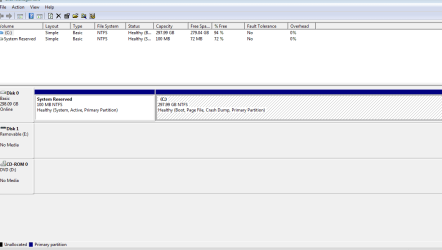
Show us Disk Management.
My Computer
- Computer type
- PC/Desktop
- Computer Manufacturer/Model Number
- Ignatz Special; 4 speed manual gearbox; factory air conditioning; one of one
- OS
- Windows 7 Home Premium SP1, 64-bit
- CPU
- Intel Skylake i5-6600K, not overclocked
- Motherboard
- AsRock Z170M Extreme 4, micro ATX
- Memory
- 8 GB HyperX DDR4-2666 (2 x 4 GB)
- Graphics Card(s)
- none; graphics are integrated on CPU
- Sound Card
- onboard: Realtek ALC1150; external: USB Behringer UF0-202
- Monitor(s) Displays
- Dell S2340M 23 inch IPS
- Screen Resolution
- 1600 x 900
- Hard Drives
- System: Crucial MX100 series SSD, 128 GB;
Data: Samsung Spinpoint 103SJ, 1 TB;
Backup: WD Caviar Green WD30EZRX-00D8PB0, 3 TB
- PSU
- Rosewill SilentNight 500 watt fanless, semi-modular
- Case
- Antec Solo II
- Cooling
- Noctua NH-U12S; Noctua F12 intake, Noctua S12A exhaust
- Keyboard
- Microsoft 200 6JH-00001 USB
- Mouse
- Dell or Microsoft optical wired; USB
- Antivirus
- Microsoft Security Essentials and Malwarebytes Premium
- Browser
- Pale Moon
- Other Info
- All fans PWM; speeds at idle: CPU circa 500 rpm; intake circa 600 rpm; exhaust circa 600 rpm; CPU temps 27 idle and 47 C load in a warm room (27 C/81 F) when running Intel Extreme Tuning Utility stress test.
- Local time
- 4:51 PM
- Messages
- 12,011
Great. Couldn't have done it better myself.
Take a peek in Device Manager.
Otherwise, continue on with your configuration and install apps, etc.
Take a peek in Device Manager.
Otherwise, continue on with your configuration and install apps, etc.
My Computer
- Computer type
- PC/Desktop
- Computer Manufacturer/Model Number
- Ignatz Special; 4 speed manual gearbox; factory air conditioning; one of one
- OS
- Windows 7 Home Premium SP1, 64-bit
- CPU
- Intel Skylake i5-6600K, not overclocked
- Motherboard
- AsRock Z170M Extreme 4, micro ATX
- Memory
- 8 GB HyperX DDR4-2666 (2 x 4 GB)
- Graphics Card(s)
- none; graphics are integrated on CPU
- Sound Card
- onboard: Realtek ALC1150; external: USB Behringer UF0-202
- Monitor(s) Displays
- Dell S2340M 23 inch IPS
- Screen Resolution
- 1600 x 900
- Hard Drives
- System: Crucial MX100 series SSD, 128 GB;
Data: Samsung Spinpoint 103SJ, 1 TB;
Backup: WD Caviar Green WD30EZRX-00D8PB0, 3 TB
- PSU
- Rosewill SilentNight 500 watt fanless, semi-modular
- Case
- Antec Solo II
- Cooling
- Noctua NH-U12S; Noctua F12 intake, Noctua S12A exhaust
- Keyboard
- Microsoft 200 6JH-00001 USB
- Mouse
- Dell or Microsoft optical wired; USB
- Antivirus
- Microsoft Security Essentials and Malwarebytes Premium
- Browser
- Pale Moon
- Other Info
- All fans PWM; speeds at idle: CPU circa 500 rpm; intake circa 600 rpm; exhaust circa 600 rpm; CPU temps 27 idle and 47 C load in a warm room (27 C/81 F) when running Intel Extreme Tuning Utility stress test.
I looked in Device Manager, no yellow exclamation marks. So my disk management looks good? Do I have the a-okay to surf the web now?
My Computer
- Computer Manufacturer/Model Number
- Dell Inspirion zino HD
- OS
- Windows 7 SP1 Home Premium X64
- Internet Speed
- DSL

- Local time
- 4:51 PM
- Messages
- 50,634
Looks good, Lize.
Let us know how performance goes, anything at all.
Let us know how performance goes, anything at all.
- Local time
- 4:51 PM
- Messages
- 12,011
I looked in Device Manager, no yellow exclamation marks. So my disk management looks good? Do I have the a-okay to surf the web now?
Yeah, disk management is fine.
Device Manager apparently OK.
Make sure all your external stuff works---printer, external drives, whatever you have.
I'd advise you to download Malwarebytes as another layer of protection to complement Microsoft Security Essentials, but I won't belabor the point.
Keep your eyes peeled on that green MSE icon at the lower right. If it goes orange, something is not kosher.
Look in MSE interface periodically to confirm that you are receiving new virus definition updates---that should happen nearly every day. The date and time of the most recent update is shown on the update tab.
My Computer
- Computer type
- PC/Desktop
- Computer Manufacturer/Model Number
- Ignatz Special; 4 speed manual gearbox; factory air conditioning; one of one
- OS
- Windows 7 Home Premium SP1, 64-bit
- CPU
- Intel Skylake i5-6600K, not overclocked
- Motherboard
- AsRock Z170M Extreme 4, micro ATX
- Memory
- 8 GB HyperX DDR4-2666 (2 x 4 GB)
- Graphics Card(s)
- none; graphics are integrated on CPU
- Sound Card
- onboard: Realtek ALC1150; external: USB Behringer UF0-202
- Monitor(s) Displays
- Dell S2340M 23 inch IPS
- Screen Resolution
- 1600 x 900
- Hard Drives
- System: Crucial MX100 series SSD, 128 GB;
Data: Samsung Spinpoint 103SJ, 1 TB;
Backup: WD Caviar Green WD30EZRX-00D8PB0, 3 TB
- PSU
- Rosewill SilentNight 500 watt fanless, semi-modular
- Case
- Antec Solo II
- Cooling
- Noctua NH-U12S; Noctua F12 intake, Noctua S12A exhaust
- Keyboard
- Microsoft 200 6JH-00001 USB
- Mouse
- Dell or Microsoft optical wired; USB
- Antivirus
- Microsoft Security Essentials and Malwarebytes Premium
- Browser
- Pale Moon
- Other Info
- All fans PWM; speeds at idle: CPU circa 500 rpm; intake circa 600 rpm; exhaust circa 600 rpm; CPU temps 27 idle and 47 C load in a warm room (27 C/81 F) when running Intel Extreme Tuning Utility stress test.
Okay, Thanks alot for the help, you guys are great! I will mark this topic as solved.
One more thing, should I erase my device management attachment? Or is it okay to keep it up. I don't know if it contains any sensitive information.
One more thing, should I erase my device management attachment? Or is it okay to keep it up. I don't know if it contains any sensitive information.
My Computer
- Computer Manufacturer/Model Number
- Dell Inspirion zino HD
- OS
- Windows 7 SP1 Home Premium X64
- Internet Speed
- DSL
- Local time
- 4:51 PM
- Messages
- 12,011
Malwarebytes.com
There is nothing sensitive in that screen shot.
Re malwarebytes: You configure it similarly to MSE. BUT---it does not provide real-time protection---which means you must periodically do manual scans--say weekly.
Update its virus definitions BEFORE you do a scan.
If you are willing to spend between 15 and 25 bucks you can get the Pro version of malwarebytes which has these advantages:
1: it does protect in real time, just like MSE
2: it updates automatically, like MSE
3: you can set it up to scan according to a schedule, like MSE.
You can buy PRO for 25 maximum from malwarebytes.com. If your google skills are slick, you can probably find a discount coupon on the web. Newegg occasionally sells it for 12 to 15 bucks.
The free version is fine, but it lacks those 3 features.
Do you have Windows Service Pack 1 installed? Be sure to get Windows updates on a regular basis.
There is nothing sensitive in that screen shot.
Re malwarebytes: You configure it similarly to MSE. BUT---it does not provide real-time protection---which means you must periodically do manual scans--say weekly.
Update its virus definitions BEFORE you do a scan.
If you are willing to spend between 15 and 25 bucks you can get the Pro version of malwarebytes which has these advantages:
1: it does protect in real time, just like MSE
2: it updates automatically, like MSE
3: you can set it up to scan according to a schedule, like MSE.
You can buy PRO for 25 maximum from malwarebytes.com. If your google skills are slick, you can probably find a discount coupon on the web. Newegg occasionally sells it for 12 to 15 bucks.
The free version is fine, but it lacks those 3 features.
Do you have Windows Service Pack 1 installed? Be sure to get Windows updates on a regular basis.
My Computer
- Computer type
- PC/Desktop
- Computer Manufacturer/Model Number
- Ignatz Special; 4 speed manual gearbox; factory air conditioning; one of one
- OS
- Windows 7 Home Premium SP1, 64-bit
- CPU
- Intel Skylake i5-6600K, not overclocked
- Motherboard
- AsRock Z170M Extreme 4, micro ATX
- Memory
- 8 GB HyperX DDR4-2666 (2 x 4 GB)
- Graphics Card(s)
- none; graphics are integrated on CPU
- Sound Card
- onboard: Realtek ALC1150; external: USB Behringer UF0-202
- Monitor(s) Displays
- Dell S2340M 23 inch IPS
- Screen Resolution
- 1600 x 900
- Hard Drives
- System: Crucial MX100 series SSD, 128 GB;
Data: Samsung Spinpoint 103SJ, 1 TB;
Backup: WD Caviar Green WD30EZRX-00D8PB0, 3 TB
- PSU
- Rosewill SilentNight 500 watt fanless, semi-modular
- Case
- Antec Solo II
- Cooling
- Noctua NH-U12S; Noctua F12 intake, Noctua S12A exhaust
- Keyboard
- Microsoft 200 6JH-00001 USB
- Mouse
- Dell or Microsoft optical wired; USB
- Antivirus
- Microsoft Security Essentials and Malwarebytes Premium
- Browser
- Pale Moon
- Other Info
- All fans PWM; speeds at idle: CPU circa 500 rpm; intake circa 600 rpm; exhaust circa 600 rpm; CPU temps 27 idle and 47 C load in a warm room (27 C/81 F) when running Intel Extreme Tuning Utility stress test.

- Local time
- 7:51 PM
- Messages
- 63
try Ninite - Install or Update Multiple Apps at Once has everything you need for free with no extra's
My Computer
- Computer Manufacturer/Model Number
- Unforgiven!!
- OS
- Windows 7 Ultimate x64
- CPU
- AMD X6 1090T
- Motherboard
- ASUS m4a79xtd evo
- Memory
- 16 Gig Kingston HyperX
- Graphics Card(s)
- Saphire Radeon 6700
- Sound Card
- O/B
- Monitor(s) Displays
- 23" Acer 19"Acer
- Screen Resolution
- 1920x1080 Native
- Hard Drives
- M4 64 Gig SSD
W/D Cav Black 1 T/B
W/D Scorpio Blue 500 Gig X2
- PSU
- OCZ 650 watt 80+ Modular
- Case
- Cooler Master 690 Basic
- Cooling
- Cooler Master Hyper 212+ Push/Pull
- Keyboard
- Razer Black Widow Ultimate
- Mouse
- Razer D/A 3500dpi
- Internet Speed
- Meh...it's okay
I am back with a few questions. I want to do some troubleshooting tomorrow.
1. I am having some mouse troubles. It double-clicks when I only want it to single click. Like if I press back it goes back two pages, if I do online shopping and want to to put something in my cart, I click and it puts two of the item in my cart, or if I click to open a new tab it opens two. I thought before it was the trojan doing this, now after the reinstall it seems to be something else. Any ideas on what to do?
2. I bought the Pro version of Malwarebytes. I read online that it could clash with MSE since they both use real time protection, Is this true?
1. I am having some mouse troubles. It double-clicks when I only want it to single click. Like if I press back it goes back two pages, if I do online shopping and want to to put something in my cart, I click and it puts two of the item in my cart, or if I click to open a new tab it opens two. I thought before it was the trojan doing this, now after the reinstall it seems to be something else. Any ideas on what to do?
2. I bought the Pro version of Malwarebytes. I read online that it could clash with MSE since they both use real time protection, Is this true?
My Computer
- Computer Manufacturer/Model Number
- Dell Inspirion zino HD
- OS
- Windows 7 SP1 Home Premium X64
- Internet Speed
- DSL
- Local time
- 4:51 PM
- Messages
- 12,011
Regarding Malwarebytes Pro----no, that is not true.
I have been using both Malwarebytes Pro and MSE with no issues for a couple of years.
It is generally true that 2 realtime applications can conflict, but not in this case. They complement each other.
Regarding the mouse issue---have you investigated the mouse controls in Windows control panel?
I have been using both Malwarebytes Pro and MSE with no issues for a couple of years.
It is generally true that 2 realtime applications can conflict, but not in this case. They complement each other.
Regarding the mouse issue---have you investigated the mouse controls in Windows control panel?
My Computer
- Computer type
- PC/Desktop
- Computer Manufacturer/Model Number
- Ignatz Special; 4 speed manual gearbox; factory air conditioning; one of one
- OS
- Windows 7 Home Premium SP1, 64-bit
- CPU
- Intel Skylake i5-6600K, not overclocked
- Motherboard
- AsRock Z170M Extreme 4, micro ATX
- Memory
- 8 GB HyperX DDR4-2666 (2 x 4 GB)
- Graphics Card(s)
- none; graphics are integrated on CPU
- Sound Card
- onboard: Realtek ALC1150; external: USB Behringer UF0-202
- Monitor(s) Displays
- Dell S2340M 23 inch IPS
- Screen Resolution
- 1600 x 900
- Hard Drives
- System: Crucial MX100 series SSD, 128 GB;
Data: Samsung Spinpoint 103SJ, 1 TB;
Backup: WD Caviar Green WD30EZRX-00D8PB0, 3 TB
- PSU
- Rosewill SilentNight 500 watt fanless, semi-modular
- Case
- Antec Solo II
- Cooling
- Noctua NH-U12S; Noctua F12 intake, Noctua S12A exhaust
- Keyboard
- Microsoft 200 6JH-00001 USB
- Mouse
- Dell or Microsoft optical wired; USB
- Antivirus
- Microsoft Security Essentials and Malwarebytes Premium
- Browser
- Pale Moon
- Other Info
- All fans PWM; speeds at idle: CPU circa 500 rpm; intake circa 600 rpm; exhaust circa 600 rpm; CPU temps 27 idle and 47 C load in a warm room (27 C/81 F) when running Intel Extreme Tuning Utility stress test.
Okay, good to know thanks.
No, I have not. The mouse was working fine and then started doing the double-clicking thing again today. What settings is is supposed to be on in the Control Panel?
No, I have not. The mouse was working fine and then started doing the double-clicking thing again today. What settings is is supposed to be on in the Control Panel?
My Computer
- Computer Manufacturer/Model Number
- Dell Inspirion zino HD
- OS
- Windows 7 SP1 Home Premium X64
- Internet Speed
- DSL
- Local time
- 4:51 PM
- Messages
- 12,011
I suppose certain mice have different controls than others.
But for mine, I have a control panel setting for "double click speed". There is also a setting in Windows Explorer tools/folder options where you can choose single click or double click to open a folder. These may or may not help you.
But for mine, I have a control panel setting for "double click speed". There is also a setting in Windows Explorer tools/folder options where you can choose single click or double click to open a folder. These may or may not help you.
My Computer
- Computer type
- PC/Desktop
- Computer Manufacturer/Model Number
- Ignatz Special; 4 speed manual gearbox; factory air conditioning; one of one
- OS
- Windows 7 Home Premium SP1, 64-bit
- CPU
- Intel Skylake i5-6600K, not overclocked
- Motherboard
- AsRock Z170M Extreme 4, micro ATX
- Memory
- 8 GB HyperX DDR4-2666 (2 x 4 GB)
- Graphics Card(s)
- none; graphics are integrated on CPU
- Sound Card
- onboard: Realtek ALC1150; external: USB Behringer UF0-202
- Monitor(s) Displays
- Dell S2340M 23 inch IPS
- Screen Resolution
- 1600 x 900
- Hard Drives
- System: Crucial MX100 series SSD, 128 GB;
Data: Samsung Spinpoint 103SJ, 1 TB;
Backup: WD Caviar Green WD30EZRX-00D8PB0, 3 TB
- PSU
- Rosewill SilentNight 500 watt fanless, semi-modular
- Case
- Antec Solo II
- Cooling
- Noctua NH-U12S; Noctua F12 intake, Noctua S12A exhaust
- Keyboard
- Microsoft 200 6JH-00001 USB
- Mouse
- Dell or Microsoft optical wired; USB
- Antivirus
- Microsoft Security Essentials and Malwarebytes Premium
- Browser
- Pale Moon
- Other Info
- All fans PWM; speeds at idle: CPU circa 500 rpm; intake circa 600 rpm; exhaust circa 600 rpm; CPU temps 27 idle and 47 C load in a warm room (27 C/81 F) when running Intel Extreme Tuning Utility stress test.
Similar threads
- Replies
- 6
- Views
- 1K

- Replies
- 3
- Views
- 5K
- Replies
- 6
- Views
- 9K
- Replies
- 1
- Views
- 2K

