Downgrade to Vista from Windows 7

Alright I will follow those instructions. I have a blank DVD-R first so Ill try that first. How come I cant use my external hard drive? Seems odd that i can use a flash drive but not that. Thanks for your reply
 

My Computer My Computer

At a glance

Windows 7Intel Core 2 Duo T8300 @ 2.40GHZ4GBNVIDIA GeForce 8600M GT
Computer Manufacturer/Model Number
Dell XPS M1530
OS
Windows 7
CPU
Intel Core 2 Duo T8300 @ 2.40GHZ
Memory
4GB
Graphics Card(s)
NVIDIA GeForce 8600M GT
Screen Resolution
1920x1200
I'm honestly not sure why you can't use an external...or if you can...but I would think the performance would be terrible. The nice thing about burning the disc is you can put it somewhere safe for future use.
 

My Computer My Computer

At a glance

Windows 7 Ultimate x64 SP1Intel Core i7-260012 GB Patriot Extreme DDR3-1333Nvidia GTX 470
OS
Windows 7 Ultimate x64 SP1
CPU
Intel Core i7-2600
Motherboard
Gigabyte GA-P67A-UD3P-B3
Memory
12 GB Patriot Extreme DDR3-1333
Graphics Card(s)
Nvidia GTX 470
Monitor(s) Displays
Dell UltraSharp 2209WA
Hard Drives
OCZ Agility3 240 GB, WD5001AALS, WD7501AALS
PSU
OCZ ModStream 700W
Case
CoolerMaster HAF 912 Advanced
Cooling
CoolerMaster Hyper 212 Plus
I gave you steps to get an ISO file for Student Download, burn it to DVD or write to flash stick, then do a perfect reinstall of Win7.

Instead of complaining that it is too hard, please ask a specific question about what step you don't understand so we can help you reinstall.

We help thousands of people here successfully reinstall and fix Win7. The ones who succeed ask questions about what they don't understand while keeping the steps in order so they work steadily toward their goal.

Did you even read the steps I typed out for you in detail with links to each tool needed to complete the step?
 
I apologize for complaining. I did read what you wrote and I didnt get that far. I did notice that when I ran the Disk Management is did not display anything. No drives were found. Does this create a bigger issue?
 

My Computer My Computer

At a glance

Windows 7Intel Core 2 Duo T8300 @ 2.40GHZ4GBNVIDIA GeForce 8600M GT
Computer Manufacturer/Model Number
Dell XPS M1530
OS
Windows 7
CPU
Intel Core 2 Duo T8300 @ 2.40GHZ
Memory
4GB
Graphics Card(s)
NVIDIA GeForce 8600M GT
Screen Resolution
1920x1200
I believe you were using Diskpart to Clean the SSD before reinstalling Win7 - since you had a virus the drive needs wiping first.

Because it's easy to make a mistake with Diskpart Commands I suggest you use free Partition Wizard bootable CD to get a graphical picture of your Hard Drive.

First rightclick on each of your partitions to Check File System and then run the full Surface Scan with both boxes checked. This will fix problems which might exist with your HD.

Then click on the Partition Wizard Disk tab to Wipe the HD from there.

Download from here. Click on ISO file to burn to CD: Free Download Magic Partition Manager Software - Partition Wizard Online
 
alright, i am running a surface test on all partitions. Looks like its going to take awhile. Should there be all green boxes at the end? When this is done should I be ok to run the windows 7 installation after burning it on a DVD and then running it with Microsoft Store: Windows 7 USB/DVD Download Tool?
 

My Computer My Computer

At a glance

Windows 7Intel Core 2 Duo T8300 @ 2.40GHZ4GBNVIDIA GeForce 8600M GT
Computer Manufacturer/Model Number
Dell XPS M1530
OS
Windows 7
CPU
Intel Core 2 Duo T8300 @ 2.40GHZ
Memory
4GB
Graphics Card(s)
NVIDIA GeForce 8600M GT
Screen Resolution
1920x1200
Check File System and run Surface Test (with both boxes checked) on each partition.

Then Wipe the entire HD from the Partition Wizard Disk tab at top.

Use the MS tool to burn the ISO to DVD or write it to a flash stick. But you'll need an ISO file first. All of this is covered in my earlier post here, as well as the steps to get a perfect install.

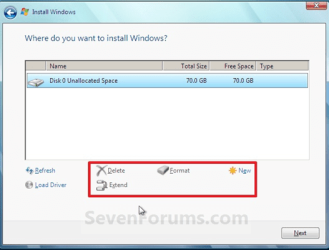
Boot the Win7 DVD, select Custom Install, use Drive Options to create New partition(s) as you wish (100gb recommended for Win7), Format each and install Win7 to first partition. You may be assigned the 100mb Boot Partition but just ignore it.
drive options.PNG

Then go back to my earlier post here where I give you steps for having a perfect install.
 
im sure you know what i am looking at but here are some screenshots from what ive seen.
 

Attachments

My Computer My Computer

At a glance

Windows 7Intel Core 2 Duo T8300 @ 2.40GHZ4GBNVIDIA GeForce 8600M GT
Computer Manufacturer/Model Number
Dell XPS M1530
OS
Windows 7
CPU
Intel Core 2 Duo T8300 @ 2.40GHZ
Memory
4GB
Graphics Card(s)
NVIDIA GeForce 8600M GT
Screen Resolution
1920x1200
Your HD partitioning is all intact according to Partition Wizard. Run Surface Test and File System Check on all partitions.

Did you try following these steps to run Factory Recovery:
Restoring Your Dell Computer to Original Factory Installation with Dell DataSafe Local Backup 2.0
To restore your computer to the original factory installation, follow these steps:
1 Turn on the computer, when the Dell Logo appears repeatedly press the <F8> key until you see the Advanced Boot Options menu.
2 From the Advanced Boot Options highlight Repair Your Computer with the arrow keys and press <ENTER>.
3 Click Next > and login to your administrator account on the computer. The administrator account is the account created the first time the computer was turned on.
4 Click Dell Factory Image Recovery and DataSafe options and follow the prompts provided.
 
I am currently running windows 7, not vista. Im just looking to reinstall it so I can start from scratch. I tried the <F8> steps before. The "Dell Factory Image Restore" was not one of the options. I will try again after this surface test is complete. Ill click "Dell Factory Tools" next time. Maybe it will be in there
 

My Computer My Computer

At a glance

Windows 7Intel Core 2 Duo T8300 @ 2.40GHZ4GBNVIDIA GeForce 8600M GT
Computer Manufacturer/Model Number
Dell XPS M1530
OS
Windows 7
CPU
Intel Core 2 Duo T8300 @ 2.40GHZ
Memory
4GB
Graphics Card(s)
NVIDIA GeForce 8600M GT
Screen Resolution
1920x1200
The steps posted for running Dell Factory Recovery are for Win7.

What type of file do you have for Win7 installer? Is it an ISO? Rightclick on it and look at Properties to see the file type.

The MS tool you referred to is to burn an ISO to DVD or write it to flash stick.

If you do not have an ISO file, then go back to my earlier post here which will show you how to obtain one for the Student deal, and also gives the steps to a perfect install.
 
When I purchased the OS online from digital river I first had to download....
- DLMWin7HP32US (application .exe)
then opened it
- gave me this, Win7-HP-Retail-en-us-x86 (application .exe)
ran that
- gave me this, setup (windows 7 setup application .exe)

I have to download the ISO and burn it to a DVD tomorrow. The download is going to take hours.
 

My Computer My Computer

At a glance

Windows 7Intel Core 2 Duo T8300 @ 2.40GHZ4GBNVIDIA GeForce 8600M GT
Computer Manufacturer/Model Number
Dell XPS M1530
OS
Windows 7
CPU
Intel Core 2 Duo T8300 @ 2.40GHZ
Memory
4GB
Graphics Card(s)
NVIDIA GeForce 8600M GT
Screen Resolution
1920x1200
im just going to download the ISO file. I tried to follow the Make bootable iso from student d/l but i get lost after I open the elevated command prompt. I attached a screenshot if you can help. If not ill just downlaod the ISO over night. Once I have the ISO should I burn it to disk and then run a perfect installation like you said before? I dont mind the wait.
 

Attachments

My Computer My Computer

At a glance

Windows 7Intel Core 2 Duo T8300 @ 2.40GHZ4GBNVIDIA GeForce 8600M GT
Computer Manufacturer/Model Number
Dell XPS M1530
OS
Windows 7
CPU
Intel Core 2 Duo T8300 @ 2.40GHZ
Memory
4GB
Graphics Card(s)
NVIDIA GeForce 8600M GT
Screen Resolution
1920x1200
Capture.PNG

You need to substitute "your_username" with the active User name exactly as it appears on account.

To open Elevated Command Line, type CMD in Start Search Box, rightclick result to Run as Admin.

Like I said, it might be easier to download the ISO which is provided.
 
This virus that I got messes with my internet so my download failed last night. All my internet browsers (IE, chrome and firefox) all unexpectedly close every so often. I think im going to have to figure out this Make bootable iso from student d/l.

I really am trying to follow the steps but i dont know what I am doing wrong. Ive attached screenshots again. I cant even complete step 1. The option to unblock the file is not there.
 

Attachments

My Computer My Computer

At a glance

Windows 7Intel Core 2 Duo T8300 @ 2.40GHZ4GBNVIDIA GeForce 8600M GT
Computer Manufacturer/Model Number
Dell XPS M1530
OS
Windows 7
CPU
Intel Core 2 Duo T8300 @ 2.40GHZ
Memory
4GB
Graphics Card(s)
NVIDIA GeForce 8600M GT
Screen Resolution
1920x1200
you'll need to use another computer to download the ISO, or borrow any Win7 DVD to unlock all versions to install yours.

Have you run your AV full scan, and Malwarebytes full scan?
 
I just ran a full scan in both. I attached a screenshot of the results.
 

Attachments

My Computer My Computer

At a glance

Windows 7Intel Core 2 Duo T8300 @ 2.40GHZ4GBNVIDIA GeForce 8600M GT
Computer Manufacturer/Model Number
Dell XPS M1530
OS
Windows 7
CPU
Intel Core 2 Duo T8300 @ 2.40GHZ
Memory
4GB
Graphics Card(s)
NVIDIA GeForce 8600M GT
Screen Resolution
1920x1200
Download and install Avast 5 which is a better AV than AVG. Schedule and Run it's full boot scan available in 32 bit to get a deeper second look with an AV.
 
Back
Top