DR download manager won't run

beaskies

New member
Local time
4:51 AM
Messages
6
I've bought the Student 32-bit version of Win7. I received a confirmation email with my order number and Key.
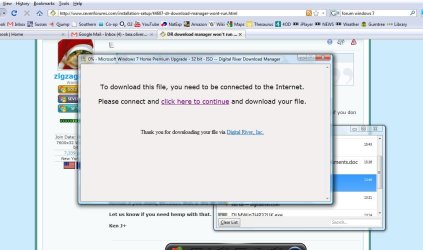
Successfully downloaded both the .exe file and the ISO file. I don't want to run the ISO file if I can possibly avoid it BUT the .exe file doesn't run. The Digital River download manager opens, and then says that I need to be connected to the Internet for it to run...when i AM connected! So I don't even get as far as putting the key code in.
Found the Customer service button, which asked for Oder no or email address + last 5 digits of credit card details - it regognises neither of these. I'm pretty sure I bought it directly from the Microsoft website, so perhaps the exe. file is corrupted? Still doesn't explain why it doesn't recognise my order
Any ideas?
I've also tried rebooting but makes no difference

beaskies
 

My Computer My Computer

At a glance

Vista32-bit2GB
Computer Manufacturer/Model Number
Dell
OS
Vista
CPU
32-bit
Memory
2GB
I've bought the Student 32-bit version of Win7. I received a confirmation email with my order number and Key.
Successfully downloaded both the .exe file and the ISO file. I don't want to run the ISO file if I can possibly avoid it BUT the .exe file doesn't run. The Digital River download manager opens, and then says that I need to be connected to the Internet for it to run...when i AM connected! So I don't even get as far as putting the key code in.
Found the Customer service button, which asked for Oder no or email address + last 5 digits of credit card details - it regognises neither of these. I'm pretty sure I bought it directly from the Microsoft website, so perhaps the exe. file is corrupted? Still doesn't explain why it doesn't recognise my order
Any ideas?
I've also tried rebooting but makes no difference

beaskies


Hi and welcome

Just curious, why dont you want to run the ISO? it is the prefered method of installation. Plus if you don twant to burn a dvd, and have a USB stick you could install from there.

Let us know if we can help

Ken J+
 

My Computer My Computer

At a glance

Win 8 Release candidate 8400[email protected]4 gigsNvidia 9600M
Computer Manufacturer/Model Number
HP Pavillion dv-7 1005 Tx
OS
Win 8 Release candidate 8400
CPU
[email protected]
Memory
4 gigs
Graphics Card(s)
Nvidia 9600M
Sound Card
HD built-in
Monitor(s) Displays
17" Wxga
Screen Resolution
1440x900
Cooling
none
Internet Speed
45Mb down 5Mb up
beaskies[/QUOTE]


Hi and welcome

Just curious, why dont you want to run the ISO? it is the prefered method of installation. Plus if you don twant to burn a dvd, and have a USB stick you could install from there.

Let us know if we can help

Ken J+[/QUOTE]

thanks

doesn't the ISO format my hard drive? This would mean spending ages backing up everything onto external hard drives wouldn't it? How would I install it from USB??
cheers
 

My Computer My Computer

At a glance

Vista32-bit2GB
Computer Manufacturer/Model Number
Dell
OS
Vista
CPU
32-bit
Memory
2GB


Hi and welcome

Just curious, why dont you want to run the ISO? it is the prefered method of installation. Plus if you don twant to burn a dvd, and have a USB stick you could install from there.

Let us know if we can help

Ken J+[/QUOTE]

thanks

doesn't the ISO format my hard drive? This would mean spending ages backing up everything onto external hard drives wouldn't it? How would I install it from USB??
cheers[/QUOTE]

UM NO.

the ISO when burned to dvd does exactly the same as the vhd, or anything else. You can chose to format
if you want, because that is the best way to do it.; If not just chose to upgrade.

Let us know if you need hemp with that.


Ken J+
 

My Computer My Computer

At a glance

Win 8 Release candidate 8400[email protected]4 gigsNvidia 9600M
Computer Manufacturer/Model Number
HP Pavillion dv-7 1005 Tx
OS
Win 8 Release candidate 8400
CPU
[email protected]
Memory
4 gigs
Graphics Card(s)
Nvidia 9600M
Sound Card
HD built-in
Monitor(s) Displays
17" Wxga
Screen Resolution
1440x900
Cooling
none
Internet Speed
45Mb down 5Mb up
OK i jut tried to run the ISO.
It came up with exactly the same screen (prt screen should be attached) saying i need to connect to the internet.
Sorry, what's a vhd?
What next??!
 

Attachments

  • DRdownloader.jpg
    DRdownloader.jpg
    84.2 KB · Views: 25

My Computer My Computer

At a glance

Vista32-bit2GB
Computer Manufacturer/Model Number
Dell
OS
Vista
CPU
32-bit
Memory
2GB
OK i jut tried to run the ISO.
It came up with exactly the same screen (prt screen should be attached) saying i need to connect to the internet.
Sorry, what's a vhd?
What next??!

Ok so you have the setup file which needs to connect to the internet to get the rest. What is the size of both files?

You are going to have to connect one way or another. Doe the Pc have acces to the internet?

Ken
 

My Computer My Computer

At a glance

Win 8 Release candidate 8400[email protected]4 gigsNvidia 9600M
Computer Manufacturer/Model Number
HP Pavillion dv-7 1005 Tx
OS
Win 8 Release candidate 8400
CPU
[email protected]
Memory
4 gigs
Graphics Card(s)
Nvidia 9600M
Sound Card
HD built-in
Monitor(s) Displays
17" Wxga
Screen Resolution
1440x900
Cooling
none
Internet Speed
45Mb down 5Mb up
I am on the internet! it's the PC i'm using! that's why i'm so stumped...:huh:
Both the ISO and the .exe are 346kb
 

My Computer My Computer

At a glance

Vista32-bit2GB
Computer Manufacturer/Model Number
Dell
OS
Vista
CPU
32-bit
Memory
2GB
heeelllp!!!
 

My Computer My Computer

At a glance

Vista32-bit2GB
Computer Manufacturer/Model Number
Dell
OS
Vista
CPU
32-bit
Memory
2GB

My Computer My Computer

At a glance

Windows 7 Ultimate 32bit SP1Intel(R) Core(TM)2 Quad CPU @ 2.40GHz, 2400 MHz4 GBATI Radeon HD 2600 Pro
Computer type
PC/Desktop
Computer Manufacturer/Model Number
Bruce ... somewhere in his 40's
OS
Windows 7 Ultimate 32bit SP1
CPU
Intel(R) Core(TM)2 Quad CPU @ 2.40GHz, 2400 MHz
Motherboard
INTEL/D975XBX2
Memory
4 GB
Graphics Card(s)
ATI Radeon HD 2600 Pro
Monitor(s) Displays
Samsung SyncMaster 914v
Screen Resolution
1280 x 1024
Hard Drives
2/500GB each ... ST3500630AS ATA Device.
One is not connected
PSU
Rocketfish 700 W
Case
G.Skill Gigabyte Chassis
Keyboard
Standard PS/2 Keyboard
Mouse
Microsoft PS/2 Mouse
Internet Speed
DSL
Antivirus
Avira Internet Security
Browser
IE 11
Other Info
ATI HDMI Audio
The cleanest possible install is booting from DVD and formatting the HD.

You need the Win7 DVD to do repairs anyway so burn it since you have the ISO.

Load ISO into ImgBurn, confirm that it says bootable, pop a DVD in the drive and burn at 4x with Verify. If the ISO is intact then ImgBurn never fails.

Boot your DVD to install Win7, plug your ethernet cable, select "Keep connected to internet during installation" then Custom Install, use Advanced drive tools to format your HD and install.

View attachment 40641
 
Back
Top