
Solved Dragged Icon stuck on

dziadgba

New member
Local time
10:07 AM
Messages
2
Title: Dragged Icon stuck on Desktop

Hy,
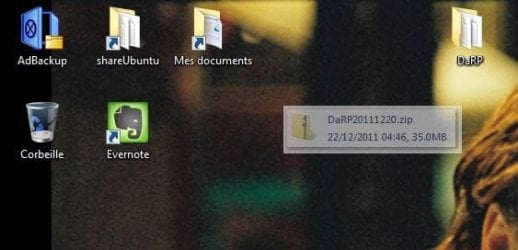
I wanted to drag a zip-file to the desktop from an application (Evernote). Now it is stuck on the Desktop (always in front, even when I drag some windows over it) as you can see in the attachment. I can not select or click on it. This happens quite often and not only when I drag things from Evernote. Refresh screen does not solve the problem. Restarting Windows solves the problem, but maybe somebody can indicate me how to refresh the Desktop and get rid of this icon without restarting?
Thanks
Dziadgba
 

Attachments
  • Capture.JPG
    Capture.JPG
    27.7 KB · Views: 33
Last edited:

My Computer My Computer

OS
Windows 7 Professional x64

My Computer My Computer

Computer type
PC/Desktop
Computer Manufacturer/Model Number
Self built custom
OS
64-bit Windows 11 Pro for Workstations
CPU
Intel i7-8700K OC'd to 5 GHz
Motherboard
ASUS ROG Maximus XI Formula Z390
Memory
64 GB (4x16GB) G.SKILL TridentZ RGB DDR4 3600 MHz
Graphics Card(s)
ASUS ROG-STRIX-GTX1080TI-O11G-GAMING
Sound Card
Integrated
Monitor(s) Displays
2 x Samsung Odyssey G7 27"
Screen Resolution
2560x1440
Hard Drives
1TB Samsung 990 PRO M.2,
4TB Samsung 990 PRO PRO M.2,
TerraMaster F8 SSD Plus NAS
PSU
Seasonic Prime Titanium 850W
Case
Thermaltake Core P3
Cooling
Corsair Hydro H115i
Keyboard
Logitech wireless K800
Mouse
Logitech MX Master 4
Internet Speed
2 Gb/s Download and 100 Mb/s Upload
Antivirus
Malwarebyte Anti-Malware Premium
Browser
Google Chrome
Other Info
Logitech Z625 speaker system,
Logitech BRIO 4K Pro webcam,
HP Color LaserJet Pro MFP M477fdn,
APC SMART-UPS RT 1000 XL - SURT1000XLI,
Galaxy S23 Plus phone
hy,
Thanks for your answer.
I repeated the same operation (dragged same file again from Evernote to desktop and at that point the stucked Icon disappeared. I will try to restart Explorer next time it happens.
thanks
 

My Computer My Computer

OS
Windows 7 Professional x64
You're most welcome. Please let us know how it went if it happens again. :)
 

My Computer My Computer

Computer type
PC/Desktop
Computer Manufacturer/Model Number
Self built custom
OS
64-bit Windows 11 Pro for Workstations
CPU
Intel i7-8700K OC'd to 5 GHz
Motherboard
ASUS ROG Maximus XI Formula Z390
Memory
64 GB (4x16GB) G.SKILL TridentZ RGB DDR4 3600 MHz
Graphics Card(s)
ASUS ROG-STRIX-GTX1080TI-O11G-GAMING
Sound Card
Integrated
Monitor(s) Displays
2 x Samsung Odyssey G7 27"
Screen Resolution
2560x1440
Hard Drives
1TB Samsung 990 PRO M.2,
4TB Samsung 990 PRO PRO M.2,
TerraMaster F8 SSD Plus NAS
PSU
Seasonic Prime Titanium 850W
Case
Thermaltake Core P3
Cooling
Corsair Hydro H115i
Keyboard
Logitech wireless K800
Mouse
Logitech MX Master 4
Internet Speed
2 Gb/s Download and 100 Mb/s Upload
Antivirus
Malwarebyte Anti-Malware Premium
Browser
Google Chrome
Other Info
Logitech Z625 speaker system,
Logitech BRIO 4K Pro webcam,
HP Color LaserJet Pro MFP M477fdn,
APC SMART-UPS RT 1000 XL - SURT1000XLI,
Galaxy S23 Plus phone
Hi dziadgba. Yes, welcome to 7F! :)

Right click on an open area on your desktop to open the context menu.
Left or right click on Refresh.

Your problem could indicate that video display settings need changed and/or video drivers need updated.
 

My Computer My Computer

Computer type
PC/Desktop
Computer Manufacturer/Model Number
Gateway DX4831-01e (Mid-Tower Desktop)
OS
Originally Win 7 Hm Prem x64 Ver 6.1.7600 Build 7601-SP1 | Upgraded to Windows 10 December 14, 2019
CPU
Intel i3 530 2.93GHz, 2933MHz 2 Cores 4 Logical Processors
Motherboard
Gateway H57M01 133 megahertz
Memory
6GB of 1,333MHz DDR3 SDRAM
Graphics Card(s)
32MB Intel Graphics Media Accelerator HD IGChip
Sound Card
Realtek High Definition Audio
Monitor(s) Displays
Gateway HX2000 20inch TFT active matrix TN
Screen Resolution
1600 x 900 x 59 hertz
Hard Drives
WDC WD10EADS-00M2B0 [HDD] (1000.20 GB) -- drive 0,
HL-DT-ST DVDRAM GH41N [CD-ROM dr]
Four card readers, and Four USB 2.0
PSU
300watts.
Case
Mid-Tower Desktop
Cooling
Stock from Gateway
Keyboard
Natural Ergonomic Keyboard 4000, see Other Info
Mouse
Orig. Gateway wore out now using Insignia USB wired optical
Internet Speed
Vz FIOS 10ms png 57.64Mbps down 65.53Mbps up Speedtest.org
Antivirus
Zamana Anti-logger with Anti-malware, MSE, Windows Firewall,
Browser
IE11.0.9600.19399-Upd ver11.0.135, Firefox 68.0.1 x64
Other Info
System Specs by Belarc.

BIOS: American Megatrends Inc. P01-A0 11/17/2009

Replaced the MS 'Natural' Standard PS/2 Enhanced 101-102 Keyboard with a new Natural Ergonomic Keyboard 4000 on August 1st 2014.

Canon Pixma MG3222 Printer.

Updated to IE11 on 12102015 | Fios Quantum Router g1100

Additional AV: SpywareBlaster, manual Mbam, SAS
I know it's an old thread but changing my colors from 32 bit to 16 bit and then back again fixed this problem right up. to clarify go to control panel> display > screen resolution and selecting advanced settings and then changing the colors under the monitor tab. windows will probably give you the option to undo the change select ok and you're done! (I hope)

http://www.sevenforums.com/tutorials/258-color-bit-depth-display-settings.html
 
Last edited by a moderator:

My Computer My Computer

Computer type
PC/Desktop
Computer Manufacturer/Model Number
Acer 5250
OS
windows 7 64 bit
Memory
8 gb ddr3
Graphics Card(s)
AMD Radeon 5250
I know it's an old thread but changing my colors from 32 bit to 16 bit and then back again fixed this problem right up. to clarify go to control panel> display > screen resolution and selecting advanced settings and then changing the colors under the monitor tab. windows will probably give you the option to undo the change select ok and you're done! (I hope)

http://www.sevenforums.com/tutorials/258-color-bit-depth-display-settings.html


Hey, I just joined so I could thank you for your solution! I've had this problem before and hadn't found a solution, but your color depth change worked for me! Thanks again!
 

My Computer My Computer

Computer type
PC/Desktop
OS
Windows 7 Ultimate x64
I know it's an old thread but changing my colors from 32 bit to 16 bit and then back again fixed this problem right up. to clarify go to control panel> display > screen resolution and selecting advanced settings and then changing the colors under the monitor tab. windows will probably give you the option to undo the change select ok and you're done! (I hope)

http://www.sevenforums.com/tutorials/258-color-bit-depth-display-settings.html

And years later this answer still helps someone... thank you!

Nancy Ü
 

My Computer My Computer

Computer type
PC/Desktop
Computer Manufacturer/Model Number
Dell XPS 8700
OS
Win 7
CPU
Intel Core i7-4790 3.60 GHz
Memory
16GB Dual Channel DDR3 1600MHz - 4 DIMMs
Graphics Card(s)
NVIDIA GeForce GTX 1050 Ti
Antivirus
AVG
Browser
Chrome
Back
Top