KaiserSoze
New member
- Local time
- 8:43 AM
- Messages
- 5
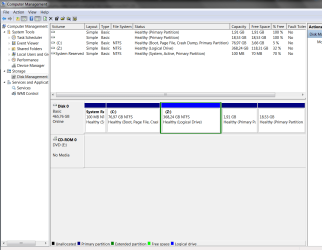
After a Reboot, while using Easeus Partition Master, my D drive disappeared. I assigned the D letter to it in Disk Management and when I rebooted again, the D letter was taken. I was forced to assign letter Z until I figure out what to do.
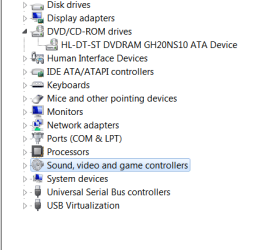
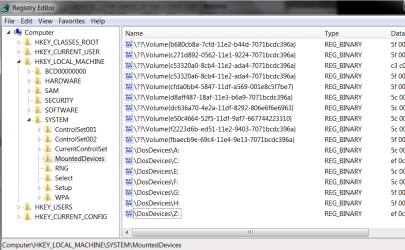
The device D letter is assigned to now, does not exist in either Registry of Disk manager (check screenshots)
The only place where I can see the culprit occupying D is in My Computer. I checked Deamon Tools or similar programs and neither of them uses such a drive. Can you please help me sorting this one out? I can't switch back to D: with any of the three possible methods (Disk Management, Regedit or diskpart command in CMD). This letter simply deosn't exist for the computer.
P.S.: I have 2 more partitions but the are containing Linux and they are not touched for quite a while. It can't be them.
The device D letter is assigned to now, does not exist in either Registry of Disk manager (check screenshots)
The only place where I can see the culprit occupying D is in My Computer. I checked Deamon Tools or similar programs and neither of them uses such a drive. Can you please help me sorting this one out? I can't switch back to D: with any of the three possible methods (Disk Management, Regedit or diskpart command in CMD). This letter simply deosn't exist for the computer.
P.S.: I have 2 more partitions but the are containing Linux and they are not touched for quite a while. It can't be them.
Attachments

My Computer
At a glance
Windows 7 Enterprise
- Computer type
- PC/Desktop
- OS
- Windows 7 Enterprise

 Z was just a random choice in a moment of irritation. The core of the problem is that letter D is occupied by some kind of virtual device (which is not a network drive or a USB drive), that does not appear in registry, thus it cannot be renamed.

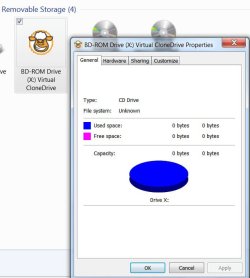
 I only have the physical one available.