
sebastian869
New member
- Local time
- 9:21 PM
- Messages
- 55
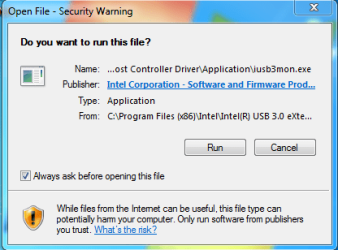
"Drv64.exe - bad image" when i went to install win 7 USB 3 drivers.
I took a snap show of the problem using win7 screen capture.
I just did a clean install of win 7 and was up dating the drivers to Intel(R)_USB_3.0_eXtensible_Host_Controller_Driver_4.0.0.36 from
Intel(R)_USB_3.0_eXtensible_Host_Driver_3.0.5.69 (I changed the exact length cuz nero was complain its too long)
Im using a z97 extreme 6 and win 7 x64 home premium. The other odd thing is it created a pop up after each time i boot and i dont know what it means nor how to get rid of it.
was wondering if it could be related to order of install for ex inf, management engine etc., OR if i need to install the disk which is OEM win 7 service pack 1, Should i wait to update with windows update before installing the drivers?
All the updates that im aware of have been updated before install of OS.
Thx
P.s. had this happened on my last clean install
and I installed from dir in drive d:
I took a snap show of the problem using win7 screen capture.
I just did a clean install of win 7 and was up dating the drivers to Intel(R)_USB_3.0_eXtensible_Host_Controller_Driver_4.0.0.36 from
Intel(R)_USB_3.0_eXtensible_Host_Driver_3.0.5.69 (I changed the exact length cuz nero was complain its too long)
Im using a z97 extreme 6 and win 7 x64 home premium. The other odd thing is it created a pop up after each time i boot and i dont know what it means nor how to get rid of it.
was wondering if it could be related to order of install for ex inf, management engine etc., OR if i need to install the disk which is OEM win 7 service pack 1, Should i wait to update with windows update before installing the drivers?
All the updates that im aware of have been updated before install of OS.
Thx
P.s. had this happened on my last clean install
and I installed from dir in drive d:
Attachments

My Computer
At a glance
windows 7 x64 home premiumi7-4790k16GB Corsair CMZ16GX3M2A2133C10swaping bad Asus 780ti GTX780TI-DC2OC-3GD5 fo...
- Computer type
- PC/Desktop
- Computer Manufacturer/Model Number
- selp built
- OS
- windows 7 x64 home premium
- CPU
- i7-4790k
- Motherboard
- Asrock extreme6 Z97
- Memory
- 16GB Corsair CMZ16GX3M2A2133C10
- Graphics Card(s)
- swaping bad Asus 780ti GTX780TI-DC2OC-3GD5 for 970 or 980
- Hard Drives
- Samsung 850Pro MZ-7KE256BW, Wester Digital VelociRaptor WD 1000DHTZ 1TB 10,000 R.P.M. 64MB Cache
- Antivirus
- microsoft security essentials
- Browser
- explorer 11 and chrome/firefox
