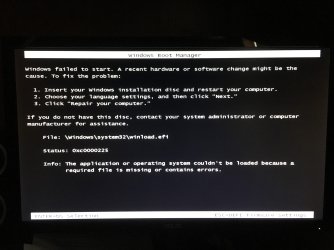
Dual boot system - Winload.efi error

blaz3

New member
Local time
2:26 PM
Messages
4
I've spent hours upon hours trying to resolve this issue please help me out.

Its been a while since I set up my dual booted windows 10 with windows 7 system and I'm lost. Windows 10 boots up fine.

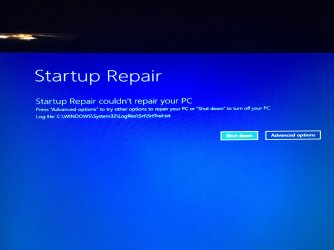
I'm getting this winload.efi error when I tried to load windows 7. Imgur: The magic of the Internet I tried to repair my pc with startup repair. Imgur: The magic of the Internet I also ran windows memory diagnostics, no issues.

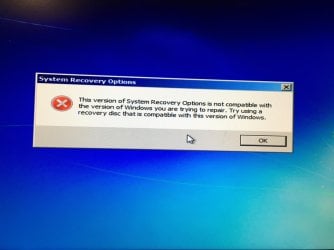
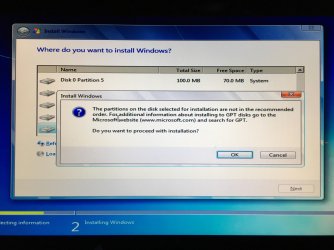
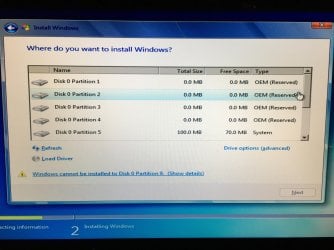
I tried reinstalling windows 7 on partition 9 but am getting these messages. Imgur: The magic of the Internet, Imgur: The magic of the Internet, Imgur: The magic of the Internet (Got this message at first try and was able to continue but my pc just restarted with same issues.), (My second try) Imgur: The magic of the Internet, I tried doing windows 7 installation startup repair which ran the first time I forget the outcome but didn't work, now I am getting this error message - Imgur: The magic of the Internet

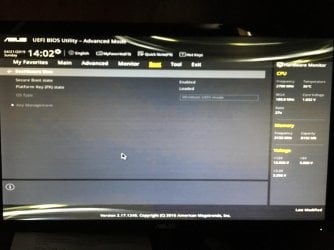
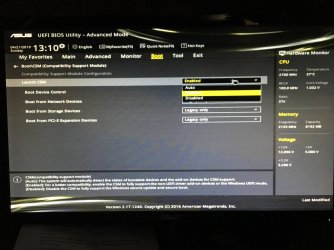
I think its because my secure boot is enabled but the whole bios page where its located is greyed out, I can't select anything on that page. Imgur: The magic of the Internet,
Imgur: The magic of the Internet
 

My Computer

Computer type
PC/Desktop
OS
NJ
You haven't listed your motherboard model. If you do, maybe someone with the same or similar mobo will be able to guide you.

If you want to post pictures, you can use the paper clip:

attachments.jpg
 

My Computers

System One System Two

  • Computer type
    PC/Desktop
    OS
    7 X64
    CPU
    i5 8400
    Motherboard
    gigabyte b365m ds3h
    Memory
    2x8gb 3200mhz
    Hard Drives
    various
    PSU
    pure power 11 400w cm
    Case
    Coolermaster
    Cooling
    cryorig m9i
  • Computer type
    PC/Desktop
    OS
    7x64
    CPU
    g5400
    Motherboard
    ga b365m ds3h
    Memory
    8gb ddr4 2400
    PSU
    xfx pro 450w
My pc is ASUS VIVOPC M32CD-B07 with Intel h110 chipset57368717_2245160575750726_5417692075254611968_n.jpg

58383690_2634011880002671_8175389824673382400_n.jpg

57587021_424352421461110_6779321451116756992_n.jpg

58608386_2191981854445815_7450923120665296896_n.jpg

58462906_350758445555746_810157314517499904_n.jpg

58372757_2232663256772593_4318372398157004800_n.jpg

57738837_1040609856131900_8498608275728629760_n.jpg

57439843_310987509598677_152991880454340608_n.jpg

56595513_2279708498909433_4950880918895067136_n (1).jpg
 

My Computer

Computer type
PC/Desktop
OS
NJ
First, you need to insert a usb stick and restart

Top pic: go to "key management"

highlight "save secure boot keys" and press enter

It asks where to save them ( if it says "select a filesystem" - it means select a place to save them )- select a usb stick
It saves some files onto the usb stick.

Move the file called PK from the usb stick somewhere else. leave the other files exactly as they are.

F10 to save changes and exit bios.

Go back into bios and you should now be able to set Secure Boot to disabled and OS type to "other"


[When you have booted into windows, move the PK file back the original place on the usb stick.
you can use the usb stick to go back to secure boot again. Though there should also be a way to reset the backup default keys stored in bios, if you ever need to enable secure boot again.]
 

My Computers

System One System Two

  • Computer type
    PC/Desktop
    OS
    7 X64
    CPU
    i5 8400
    Motherboard
    gigabyte b365m ds3h
    Memory
    2x8gb 3200mhz
    Hard Drives
    various
    PSU
    pure power 11 400w cm
    Case
    Coolermaster
    Cooling
    cryorig m9i
  • Computer type
    PC/Desktop
    OS
    7x64
    CPU
    g5400
    Motherboard
    ga b365m ds3h
    Memory
    8gb ddr4 2400
    PSU
    xfx pro 450w
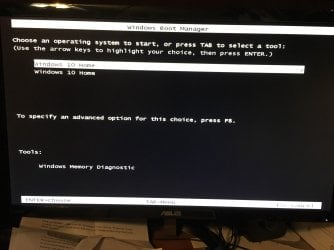
I could never get into key management and now from messing around further I can't even get back into bios. I think my pc isn't recognizing windows boot manager anymore and it keeps trying to boot from my disks that I was using. I had to restore my windows 10 through command prompt fixes such as chkdsk and bootrec. These are the messages I get now. 58442337_280281706240646_8059233933096648704_n.jpg

I finally got this screen up so I can boot windows 10 os
58670500_343179919660953_8724062069852209152_n.jpg

After fixing this error
58684933_2408454146056219_8542981386749870080_n.jpg
 

My Computer

Computer type
PC/Desktop
OS
NJ
I would be curious as to how you installed the dual boot. Like what Partitioning did you use, MBR or GPT. And, which OS first 7 or 10?

And, what started all these problems off?
 

My Computer

Computer type
Laptop
Computer Manufacturer/Model Number
HP Pavilion dv7-6c23cl
OS
Windows 7 Home Premium 64bit
CPU
AMD A8-3520M
Motherboard
Hewlett-Packard 180B (Socket FS1)
Memory
6.00GB DDR3 @ 674MHz (9-9-9-24)
Graphics Card(s)
512MB ATI AMD Radeon HD 6620G
Sound Card
IDT High Definition Audio CODEC
Monitor(s) Displays
Generic PnP Monitor
Screen Resolution
(1600x900@60Hz)
Hard Drives
Samsung 850 EVO 250GB SSD
Mouse
Logitec M525
Internet Speed
30-75Mbps
Antivirus
Avast Free, Unfortunately
Browser
Google Chrome, Firefox, IE
I would be curious as to how you installed the dual boot. Like what Partitioning did you use, MBR or GPT. And, which OS first 7 or 10?

And, what started all these problems off?

I forget how I installed my dual boot, I just followed the instructions online. I think windows 7 can only be installed via MBR if I remember right which requires me to disable secure boot for. When I could boot into bios it wouldn't let me as the options were greyed out. Now I can't even boot into bios.

What started this was I took my computer down for storage for a while then went back on it and got the winload.efi error when booting to windows 7. I think why is because my windows 7 key I bought turned out to be counterfeit. While I could use windows 7 for some time being counterfeit maybe I was eventually kicked out of being able to use windows 7.
 

My Computer

Computer type
PC/Desktop
OS
NJ
I see. I don't have time now to think about all this now but it looks like you will need to do a reinstall. Maybe wipe the drive first and start over. The BIOS can be reflashed also if it is not working. Perhaps you will have better luck with the BIOS once the drive is wiped.

You can Install 7 as GPT but it takes some different instructions and don't know if anyone here would agree with doing so. Seems most here like MBR, and dualbooting with 10 is out of my league, I've avoided this all together for this exact reason. I've dual booted many Windows 7 and linux on MBR but simply don't have time to bother dual booting 10. I'm sure you will get some feedback here if you are patient. I would install 7 first and set boot priority to 10. And it all may work better with GPT, but I don't really know.
 

My Computer

Computer type
Laptop
Computer Manufacturer/Model Number
HP Pavilion dv7-6c23cl
OS
Windows 7 Home Premium 64bit
CPU
AMD A8-3520M
Motherboard
Hewlett-Packard 180B (Socket FS1)
Memory
6.00GB DDR3 @ 674MHz (9-9-9-24)
Graphics Card(s)
512MB ATI AMD Radeon HD 6620G
Sound Card
IDT High Definition Audio CODEC
Monitor(s) Displays
Generic PnP Monitor
Screen Resolution
(1600x900@60Hz)
Hard Drives
Samsung 850 EVO 250GB SSD
Mouse
Logitec M525
Internet Speed
30-75Mbps
Antivirus
Avast Free, Unfortunately
Browser
Google Chrome, Firefox, IE
Back
Top