Dual Core CPU not detected in my computer properties

mclarren

New member
Local time
10:47 AM
Messages
6
I just want to clarify my curiosity. I have a sony laptop that was given to me long ago. He said its been fixed /formatted twice but its still functioning and running windows 7 ultimate 64bit os, and its a dual core cpu labeled. So here is my question, When i right click my computer->then properties->and in the system area, I didnt see a dual core cpu in the processor, only this=AMD E-450 APU with Radeon(tm)HD Graphics 1.65 ghz=. But when i go to check it on the task manager->view peromance->I see the dual graphics, in the cpu usage history. So is this not a problem? because i just want to be sure that it doesnt have any problem. When i visit my brother's home, i try to compare it with his laptop which is also a dual core cpu, running also win 7 ultimate, I checked it to his laptop->my computer->properties->It stated as dual core something like that.... :huh:This might not be an issue but please just let me know.
 

My Computer My Computer

At a glance

Windows 7 Ultimate x64AMD Radion HD graphics
Computer type
PC/Desktop
Computer Manufacturer/Model Number
sony
OS
Windows 7 Ultimate x64
Graphics Card(s)
AMD Radion HD graphics
Hard Drives
toshiba
Antivirus
avast free
Browser
chrome, firefox, internet explorer
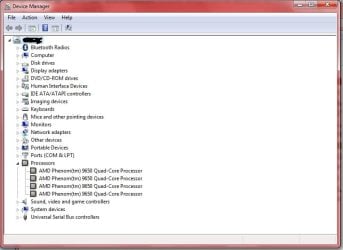
I expect it is just the way Windows reads/names the CPU, I have attached a pic of mine, although mine is a quad core you can see there is no mention of it.
You don't have anything to worry about.
 

Attachments

  • cpu.PNG
    cpu.PNG
    2.6 KB · Views: 1

My Computer My Computer

At a glance

Windows 7 Professional 64 bit
OS
Windows 7 Professional 64 bit
check from Device Manager. IF you have more than one core, it will show more entries in the Processor tab (windows 7 does not seem to be able to tell the difference between actual physical processors and cores in a multi-core processor, so a dual CPU computer will have as much entries as total cores it has). I attached mine

device manager.jpg

yes I have a quad core, disregard the name with "quad core processor" in it, that depends from what the manufacturer saw fit to call it. See how I have 4 entries. You should have 2.

Also from Task Manager, Performance tab, you should see two graphs about CPU activity, one per core. (otherwise check View--> CPU History and select "One graph Per CPU").
 

My Computer My Computer

At a glance

Win 7 Pro 64-bit 7601AMD Phenom 9650 QuadCore, revision DR-B35 GB yes I run 2x 2GB and 1x 1GB, different b...NVIDIA GeForce 9800 GT 512 Mb, unknown manufa...
Computer type
PC/Desktop
Computer Manufacturer/Model Number
custom built
OS
Win 7 Pro 64-bit 7601
CPU
AMD Phenom 9650 QuadCore, revision DR-B3
Motherboard
ASUS M4A78
Memory
5 GB yes I run 2x 2GB and 1x 1GB, different brand, spank me.
Graphics Card(s)
NVIDIA GeForce 9800 GT 512 Mb, unknown manufacturer.
Sound Card
Crappy Realtek Integrated Audio
Monitor(s) Displays
Fujitsu Siemens P19-3P
Screen Resolution
1280 x 1024 x 32 bits @ 60 Hz Oh yeah, 4:3 rocks!
Hard Drives
(1) MAXTOR S TM3320613AS SATA Disk Device (2) STM35004 18AS SATA Disk Device (3) TOSHIBA USB 2.5"-HDD
PSU
whatever, around 450w
Case
Scavenged from old company PC, 10+ years old
Cooling
CPU fan, GPU fan, case fan, nothing fancy
Keyboard
Microsoft, PS/2, white.
Mouse
Optical, logitec.
Internet Speed
effective max speeds: 70-ish kB/s down 30-ish kB/s up
Antivirus
Avira, free edition.
Browser
Firefox with FXChrome to make it look like Google Chrome :P
Other Info
Was discarded by previous owner due to "horrible performance".
Was running Win Xp from a IDE drive. Yeah. Was a pain.
SATA II drive and Win7 and it zips away! Yay!
Ok, I got it, tnks for the fast replay. Can i add one more? After this you may close this thread. I would like you to see my systems spec one last time, I attached a jpgs. As long as i see those, im running dual core...
 

Attachments

  • processor1.jpg
    processor1.jpg
    5.3 KB · Views: 1
  • processor2.jpg
    processor2.jpg
    16.7 KB · Views: 1

My Computer My Computer

At a glance

Windows 7 Ultimate x64AMD Radion HD graphics
Computer type
PC/Desktop
Computer Manufacturer/Model Number
sony
OS
Windows 7 Ultimate x64
Graphics Card(s)
AMD Radion HD graphics
Hard Drives
toshiba
Antivirus
avast free
Browser
chrome, firefox, internet explorer
And also this one, It does not matter? right? the processor.
 

Attachments

  • processor.jpg
    processor.jpg
    3.2 KB · Views: 3

My Computer My Computer

At a glance

Windows 7 Ultimate x64AMD Radion HD graphics
Computer type
PC/Desktop
Computer Manufacturer/Model Number
sony
OS
Windows 7 Ultimate x64
Graphics Card(s)
AMD Radion HD graphics
Hard Drives
toshiba
Antivirus
avast free
Browser
chrome, firefox, internet explorer
Everything is just fine and exactly as it should be. :)
 

My Computer My Computer

At a glance

Windows 7 Professional 64 bit
OS
Windows 7 Professional 64 bit
The name shown is that provided by the CPU itself. It is just a name chosen by the CPU manufacturer that in some way describes the CPU. This name will often include the number of cores but this is by no means universal.

Windows knows the difference between cores and physical processors but except for licensing purposes this is of little significance. Home editions of Windows are limited to 1 physical processor but the number of cores doesn't matter.
 

My Computer My Computer

At a glance

Windows 7 Pro 64 bitXeon W35208 GBNvidia Geforce 210
Computer type
PC/Desktop
Computer Manufacturer/Model Number
HP
OS
Windows 7 Pro 64 bit
CPU
Xeon W3520
Memory
8 GB
Graphics Card(s)
Nvidia Geforce 210
Back
Top