Duplicate copy of Win7 on secondary SSD after restoring old system img

Jojack

New member
Local time
6:45 AM
Messages
6
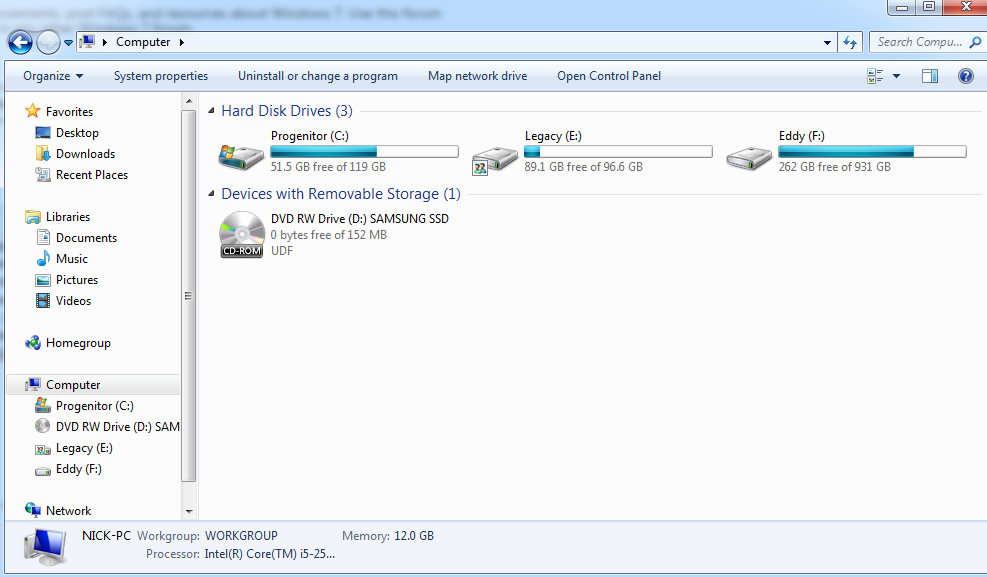
I have Windows 7. So, the trouble started a couple days ago. I downloaded an update for Avast! Free Antivirus. After updating, it asked to restart the computer - I clicked OK. Upon restarted, Windows 7 wouldn't boot at all. After some experimenting, I determined it was probably a driver issue (I couldn't even start Safe Mode, so it must've been a core driver). I used an old system image stored on an external hard drive to restore my primary SSD. It worked, but now the other SSD that I have also has a mysterious copy of windows that never existed previously. It's taking up a lot of room, and I'm fairly certain it isn't being used at all. I want to delete it to free up space (the secondary SSD is dedicated only to video games) but I don't want to screw anything up. Can I delete the mysterious copy of Win7 from my secondary SSD without any issues? Pictures below:

As you can see, it looks as if Progenitor (the original SSD) is still the drive running the OS (I assume that's what the Windows logo next to it means).
6jE5N72.png


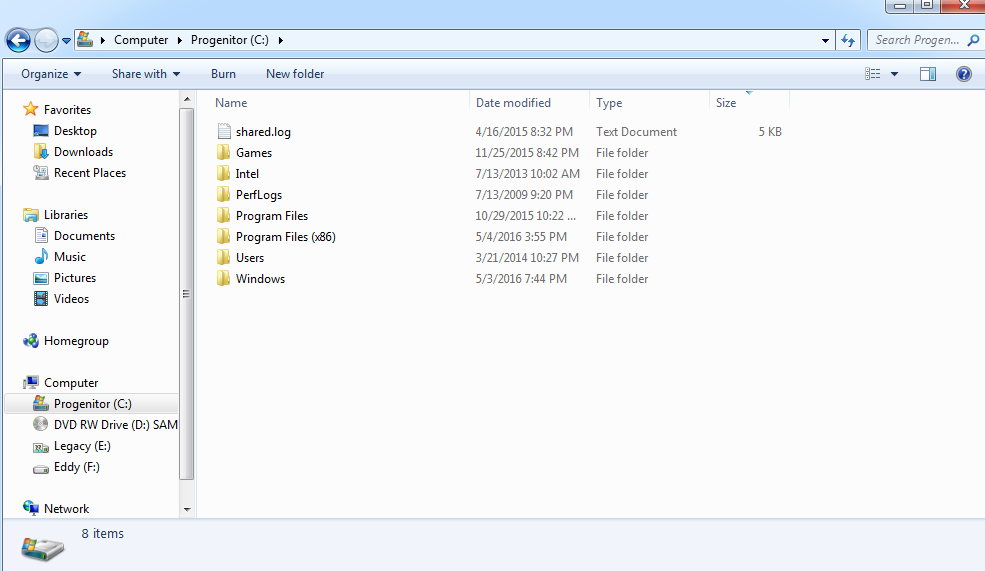
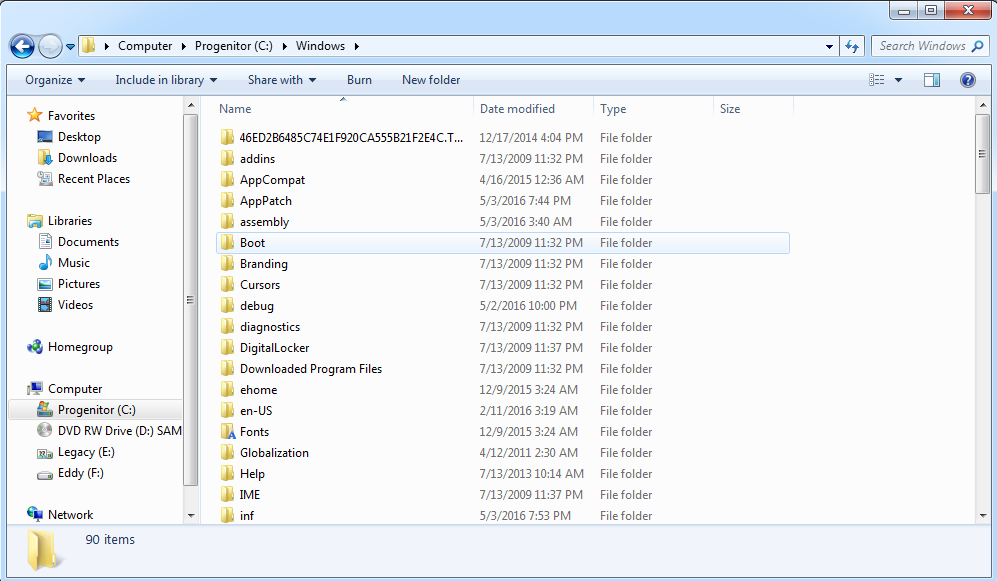
The next two images seem to show that Windows is still fully installed and operational on Progenitor (the original SSD that was restored by the system image on Eddy (the external hard drive)).
MKPa2Zy.png


x2FEEAz.png


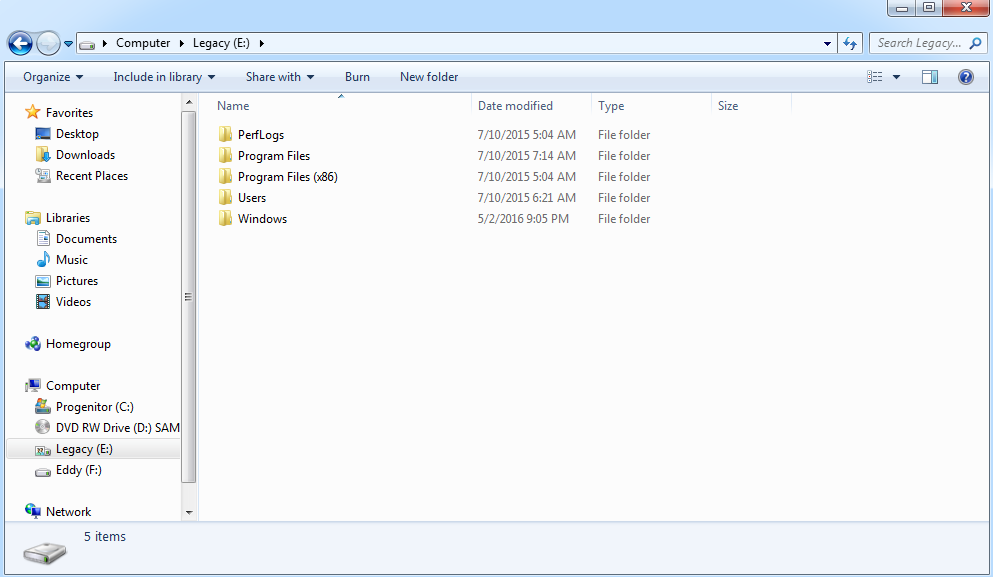
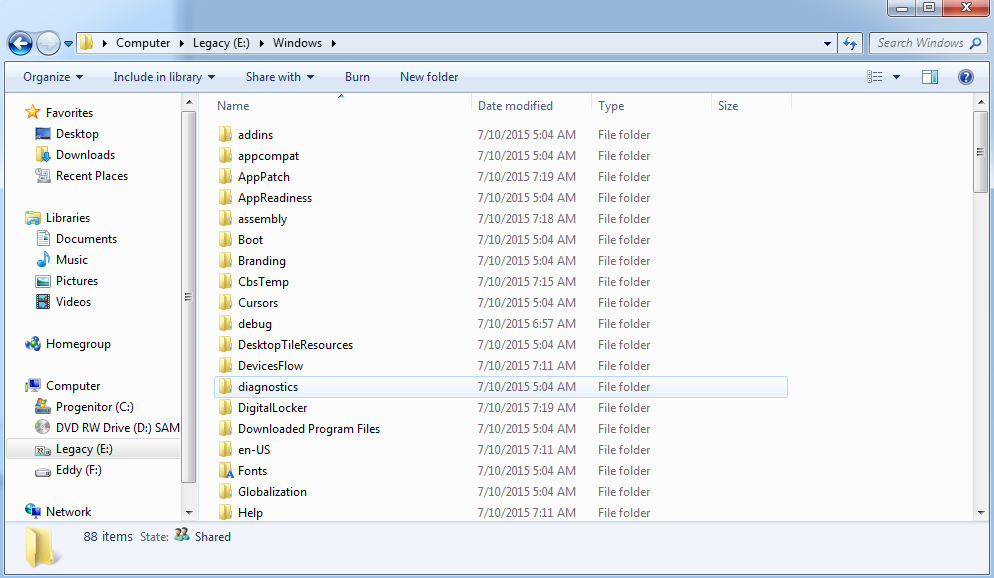
This is where I find things get weird. While I distinctly remember the system image restoration saying that it was restoring drive C (Progenitor), a seemingly-full installation of Windows also seems to have been put onto Legacy (the secondary, gaming-dedicated SSD). It's taking up a lot of space, and I don't think that it's actually being used, but I don't want to delete it and screw something up horribly. What possible explanation could there be for this to be happening? I'm absolutely baffled.
S2eatue.png


tww6aD9.png


I am completely sure that there was never a copy of Windows 7 on Legacy SSD before. Before the restoration to the system image, that disk only ever had two folders: "Steam" and another service, maybe Origin or Uplay, I can't remember. It definitely never had Windows before. I've had Progenitor as my OS SSD for much longer than I've owned Legacy. I cannot possibly fathom why Windows was put onto Legacy, especially since the system image specifically stated that it was restoring Drive C (Progenitor), and everything else is exactly the way I expected it to be (same wallpaper, files, etc from 6 months ago). I want to free up space on Legacy, but fear that by messing with it I might horribly mess something up. What do you think? Any advice?
 

My Computer My Computer

At a glance

Windows 7 Home Premium
Computer type
PC/Desktop
Computer Manufacturer/Model Number
Custom
OS
Windows 7 Home Premium
You can probably safely delete the Windows install on Legacy...

But before you do... (with the power off) disconnect Legacy's SATA cable and make sure that you can boot from Progenitor. That will make sure that no files are needed from Legacy in order to boot. Sometimes these restores can cause the boot tables to get messed up between drives, especially when it restored your data to a different drive that what it said it was going to. You never know what might have happened to the BCD tables.

Don't do any deletion until you're positive that you can boot from Progenitor alone.
 

My Computer My Computer

At a glance

Win 7 Pro x64/Win 10 Pro x64 dual bootAMD FX 8350 Vishera @ 420016 GB Mushkin Blackline DDR3-2400 @ 1866 (9-1...XFX Radeon R9 280 Double D Black Edition
Computer type
PC/Desktop
Computer Manufacturer/Model Number
Mellon Labs (custom build)
OS
Win 7 Pro x64/Win 10 Pro x64 dual boot
CPU
AMD FX 8350 Vishera @ 4200
Motherboard
ASUS M5A97 R2.0
Memory
16 GB Mushkin Blackline DDR3-2400 @ 1866 (9-10-10-10-31)
Graphics Card(s)
XFX Radeon R9 280 Double D Black Edition
Sound Card
Realtek HD Audio on MB. Sounds great.
Monitor(s) Displays
Acer 24", Acer 22"
Screen Resolution
3840 x 1080
Hard Drives
1 x Mushkin Chronos 120 GB SSD (Win 10)
1 x Samsung 850 EVO 250 GB SSD (Win 7)
1 x WD 1TB SATA Blue
1 x WD 1TB SATA Green
PSU
Corsair TX-750
Case
CoolerMaster HAF 912+
Cooling
Coolermaster Seidon 240M Liquid AIO. 6 case fans
Keyboard
Logitech G710+
Mouse
Logitech G500s
Internet Speed
Much better since I got fiber, but still way overpriced.
Antivirus
MSE, Malware Bytes for scanning
Browser
Firefox
Other Info
Corsair VOID USB headphones.

A Mellon Labs X-1 - LCD Smartie driven system status display.

Brought to you by the letter E
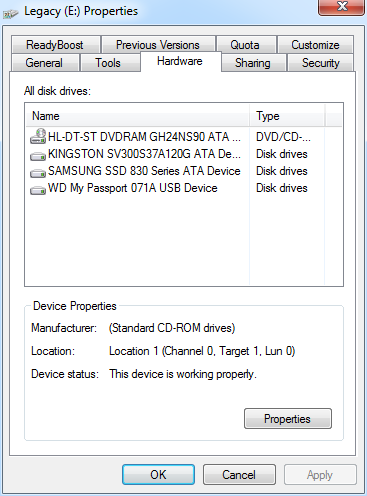
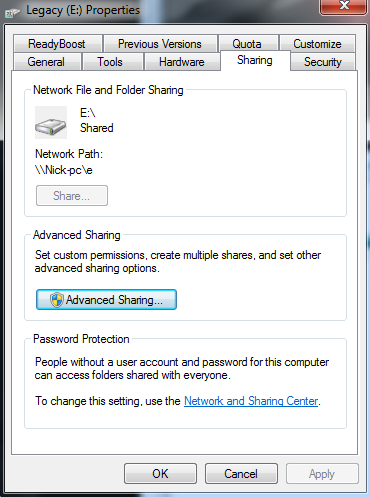
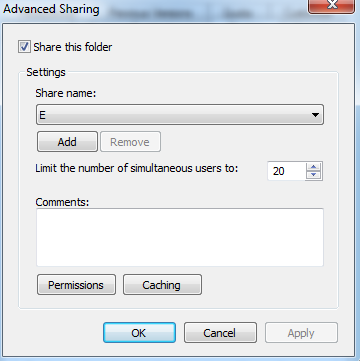
There would be a lot involved in duplicating the install to another drive without disturbing or destroying the existing contents. It's hard to believe such a thing could happen by accident. I'm also curious as to why the drive icon for legacy has the little "two people" sub-icon, which if I understand correctly indicates network sharing.

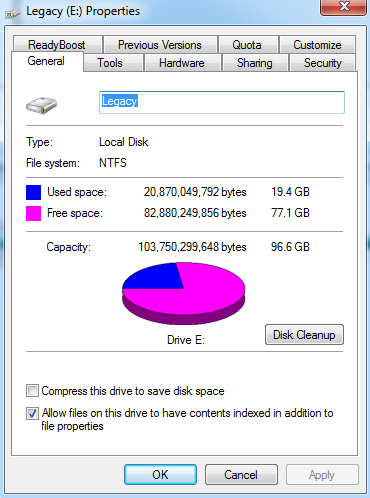
Can you right-click on the icon for Legacy, select Properties, and share screenshots of the General and Hardware tabs? Maybe the Sharing tab too on account of the 'sub-icon'.
 

My Computer My Computer

At a glance

Windows 7 Professional x64, Arch Linux
Computer type
PC/Desktop
OS
Windows 7 Professional x64, Arch Linux

My Computer My Computer

At a glance

Multi-Boot W7_Pro_x64 W8.1_Pro_x64 W10_Pro_x6...AMD Athlon II x4 6206GB GSkill DDR2 800AMD 4670 GPU + AMD 4200 IGP
Computer type
PC/Desktop
Computer Manufacturer/Model Number
home built
OS
Multi-Boot W7_Pro_x64 W8.1_Pro_x64 W10_Pro_x64 +Linux_VMs +Chromium_VM
CPU
AMD Athlon II x4 620
Motherboard
Gigabyte GA-MA785G-UD3H
Memory
6GB GSkill DDR2 800
Graphics Card(s)
AMD 4670 GPU + AMD 4200 IGP
Sound Card
on board Realtek ALC889A
Monitor(s) Displays
RCA 40" LCD TV, Insignia 32" LCD TV, HP 15" LCD monitor
Screen Resolution
1680 x 1050
Hard Drives
OCZ Vertex 3 120GB,
Samsung F3 1TB (3),
Several others - WD, Seagate, Hitachi, ...
PSU
Corsair 500 W
Case
Rosewill mid tower
Cooling
CM 90mm rifle
Keyboard
Gyration wireless, Logitech wireless, Dell USB wired
Mouse
Gyration wireless, Logitech wireless, V7 USB wired
Internet Speed
Spectrum - 100Mbps D / 10Mbps U
Antivirus
Avast, MBAM3, EMET, WinPatrol
Browser
Pale Moon, Firefox, IE
Other Info
2 multi-boot PC's
Mainly HTPC/Office/Gen purpose (no gaming).
Trendnet USB KVM.
LG DVD burner/Blue Ray Player.
Tray system for removable SATA backup drives.

Not currently OCd, under-volted.
I use Hybrid sleep, rarely re-boot or shutdown.

Hauppauge HD-PVR, Avermedia PCIe TV Tuner, Hauppauge PCI TV Tuner.
There would be a lot involved in duplicating the install to another drive without disturbing or destroying the existing contents. It's hard to believe such a thing could happen by accident. I'm also curious as to why the drive icon for legacy has the little "two people" sub-icon, which if I understand correctly indicates network sharing.

Can you right-click on the icon for Legacy, select Properties, and share screenshots of the General and Hardware tabs? Maybe the Sharing tab too on account of the 'sub-icon'.

As requested:

pc9uHVU.png


AQyi3Kf.png


EYDdjkL.png


AmmHUFR.png
 

My Computer My Computer

At a glance

Windows 7 Home Premium
Computer type
PC/Desktop
Computer Manufacturer/Model Number
Custom
OS
Windows 7 Home Premium
For questions like this a screen print of Disk Management is very helpful.
Post a maximized screen print of Disk Management with all fields resized to display all info using these instructions:
http://www.sevenforums.com/tutorials/274797-disk-management-post-screen-capture-image.html

Also, what Program do you use for System Image Backups ?

I believe this is what you're looking for:

MtX1dHq.png


Upon examination, it seems as though, for some reason, a recovery partition was also set up on Legacy, which is also extremely odd. I suppose it explains why it also said that I had 96.6gb total when I knew for a fact that it was a 120gb SSD.

For System Image Backups, I just use the default Windows tool in Control Panel\System and Security\Backup and Restore\Create a System Image
 
Last edited:

My Computer My Computer

At a glance

Windows 7 Home Premium
Computer type
PC/Desktop
Computer Manufacturer/Model Number
Custom
OS
Windows 7 Home Premium
Oops, I thought the Hardware tab would indicate the disk which holds the partition. DavidE is right, we'll need to see a screenshot of Disk Management.
 

My Computer My Computer

At a glance

Windows 7 Professional x64, Arch Linux
Computer type
PC/Desktop
OS
Windows 7 Professional x64, Arch Linux
Oops, I thought the Hardware tab would indicate the disk which holds the partition. DavidE is right, we'll need to see a screenshot of Disk Management.

Posted directly above :D

It's so strange that it not only put Windows on Legacy, but also set up some sort of Recovery Partition for something on it.
 

My Computer My Computer

At a glance

Windows 7 Home Premium
Computer type
PC/Desktop
Computer Manufacturer/Model Number
Custom
OS
Windows 7 Home Premium
As an update, I have tried booting the computer up without Legacy plugged into anything, and everything seemed to work perfectly fine. I still haven't done anything to Legacy yet, but it seems as though none of the files on it are actually being used except that "E:\Windows\Panther" and "E:\Windows\Logs\PBR" have both been modified as of two days ago, whereas the rest of the files and folders haven't been modified since July 10th, 2015
 
Last edited:

My Computer My Computer

At a glance

Windows 7 Home Premium
Computer type
PC/Desktop
Computer Manufacturer/Model Number
Custom
OS
Windows 7 Home Premium
Also, thank you guys for the responses so far! Learning a lot just from your questions. Thanks for the help thus far!
 

My Computer My Computer

At a glance

Windows 7 Home Premium
Computer type
PC/Desktop
Computer Manufacturer/Model Number
Custom
OS
Windows 7 Home Premium
LOL, I just googled the Windows\Panther directory. Apparently it's used for logging during install and initial setup or upgrade, can grow to several GB, and is perfectly safe to delete. Seems like that should have been a job for Disk Cleanup... :rolleyes:

People gripe about the $ cost of Windows, but I'm much more bothered by the GB cost. Since Vista, MS seems to have a complete disregard for the amount of space Windows requires.
 

My Computer My Computer

At a glance

Windows 7 Professional x64, Arch Linux
Computer type
PC/Desktop
OS
Windows 7 Professional x64, Arch Linux
The DM screen print in post #6 shows your Page File is on the [E] drive.
I would move the Page File to the drive, at least temporarily. [url=http://www.vistax64.com/tutorials/132201-virtual-memory-paging-file-change.html]Virtual Memory Paging File - Change[/url] Did you intentionally move the Page File to a non-C partition ? Having that file on a different partition than [C] can cause "problems" with the built in Windows Imaging utility. Third party imaging utilities such as Macrium would work better with such a change. To me it looks like Disk 0 is setup for Legacy Bios, there is no EFI partition. To me it looks like Disk 1 is setup for UEFI, there is a EFI partition. I don't know if/how that's possible, for both drives to boot Windows and work correctly.
 

My Computer My Computer

At a glance

Multi-Boot W7_Pro_x64 W8.1_Pro_x64 W10_Pro_x6...AMD Athlon II x4 6206GB GSkill DDR2 800AMD 4670 GPU + AMD 4200 IGP
Computer type
PC/Desktop
Computer Manufacturer/Model Number
home built
OS
Multi-Boot W7_Pro_x64 W8.1_Pro_x64 W10_Pro_x64 +Linux_VMs +Chromium_VM
CPU
AMD Athlon II x4 620
Motherboard
Gigabyte GA-MA785G-UD3H
Memory
6GB GSkill DDR2 800
Graphics Card(s)
AMD 4670 GPU + AMD 4200 IGP
Sound Card
on board Realtek ALC889A
Monitor(s) Displays
RCA 40" LCD TV, Insignia 32" LCD TV, HP 15" LCD monitor
Screen Resolution
1680 x 1050
Hard Drives
OCZ Vertex 3 120GB,
Samsung F3 1TB (3),
Several others - WD, Seagate, Hitachi, ...
PSU
Corsair 500 W
Case
Rosewill mid tower
Cooling
CM 90mm rifle
Keyboard
Gyration wireless, Logitech wireless, Dell USB wired
Mouse
Gyration wireless, Logitech wireless, V7 USB wired
Internet Speed
Spectrum - 100Mbps D / 10Mbps U
Antivirus
Avast, MBAM3, EMET, WinPatrol
Browser
Pale Moon, Firefox, IE
Other Info
2 multi-boot PC's
Mainly HTPC/Office/Gen purpose (no gaming).
Trendnet USB KVM.
LG DVD burner/Blue Ray Player.
Tray system for removable SATA backup drives.

Not currently OCd, under-volted.
I use Hybrid sleep, rarely re-boot or shutdown.

Hauppauge HD-PVR, Avermedia PCIe TV Tuner, Hauppauge PCI TV Tuner.
Back
Top