DVD drive icon missing

OB2015

New member
Local time
3:28 PM
Messages
2
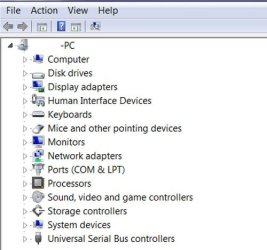
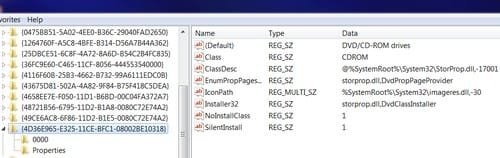
My DVD drive was playing fine but then one day it stopped running and the DVD drive icon was missing. The draw opens and closes when I place a dvd disk in it. The PC status light acts like it's reading it but then just stops. The Device Manager does not list the DVD device...but it always did before.
I have attached images of the info I could find on my PC.
Does anyone have an idea of what the problem and solution might be?:(
 

Attachments

  • System info.jpg
    System info.jpg
    28 KB · Views: 8
  • Device Manager.jpg
    Device Manager.jpg
    28.7 KB · Views: 8
  • Class.jpg
    Class.jpg
    16.2 KB · Views: 8

My Computer

Computer type
PC/Desktop
Computer Manufacturer/Model Number
EMachines
OS
Windows 7 Home Premium 64 bit SP1
Graphics Card(s)
Radeon HD 6310
Antivirus
Bitdefender
Browser
IE Firefox

My Computer

Computer type
Laptop
Computer Manufacturer/Model Number
Fujitsu LIFEBOOK
OS
Win 7 HP SP1 64-bit Vista HB SP2 32-bit Linux Mint 18.3
CPU
Intel(R) Pentium(R) CPU P6200 @ 2.13GHz
Motherboard
FUJITSU FJNBB06
Memory
4.00 GB
Graphics Card(s)
Intel(R) Graphics Media Accelerator HD
Sound Card
[1] Realtek High Definition Audio [2] Intel(R) Display Audio
Screen Resolution
1366 x 768 x 32 bits (4294967296 colors) @ 59 Hz
Hard Drives
TOSHIBA MK5076GSX
Antivirus
AVG FREE
You may have a bad DVD. Have you tried some other DVDs?
 

My Computer

Computer type
PC/Desktop
Computer Manufacturer/Model Number
Dell
OS
Linux Mint 18.2 xfce 64-bit (VMWare host) / Windows 8.1 Pro 32-bit (VMWare guest)
CPU
Haswell
Memory
4 GB
Monitor(s) Displays
Acer 23"
Screen Resolution
1920 x 1080
Hard Drives
Two hard drives, 1TB each: One for Linux, one for my data.
Keyboard
IBM Model M
Antivirus
Sophos (Linux), Trend Micro (Windows)
Browser
Firefox, Opera
Other Info
I use Samba to share my data drive with the other computers at my house and with my guest session in VMWare Workstation Player.
Back
Top