DVD Drive not shown under Windows Explorer

prabz

New member
Member
Local time
12:55 PM
Messages
31
Location
CHN, India
I have Win 7 ultimate x64 edition. Past few days my DVD drive is missing from the computer. It shows under BIOS as well as Device manager (TSSTcorp CDDVDW SH-S223C ATA Device). I tried my best and nothing working. Please help me fixing this.

I even tried system restore back to 3 days. Still no luck. :cry:

prabz
 

My Computer My Computer

Computer Manufacturer/Model Number
Custom Built
OS
Windows 7 Ultimate 64bit
CPU
Intel(R) Core(TM)2 Duo CPU E7500
Motherboard
DG41RQ
Memory
2.00 GB
Graphics Card(s)
Intel(R) G41 Express Chipset
Sound Card
Realtek
Monitor(s) Displays
Acer 20" Wide LCD
Screen Resolution
1600x900
Hard Drives
Seagate 500 GB Internal
Keyboard
Microsoft Cordless
Mouse
Microsoft Cordless
Welcome prabz, :D


Several users have had luck by shutting down computer. Disconnecting DVD power & data cable. Power up computer, then delete any DVD drivers still present. Power OFF again. Reconnect DVD power & data cable, be connected to the internet & power ON computer again. See if Win7 finds the newest drivers automatically.

Best of Luck, Let us know ;)
 

My Computer My Computer

Computer type
PC/Desktop
Computer Manufacturer/Model Number
Built them myself, Science Experiments !
OS
Win7 Enterprise, Win7 x86 (Ult 7600), Win7 x64 Ult 7600, TechNet RTM on AMD x64 (2.8Ghz)
CPU
AMD fx8350 4ghz, AMD-32 2400mhz, AMD-64 3200mhz, AMDx64 2.8G
Motherboard
SIS 755, ECS-K8M890M-M (Ult 7600), GigaByte & others
Memory
2gb, 4gb on the Ult 7600, 4gb on Technet RTM, 32gb on FX8350
Graphics Card(s)
Draw my own Graphics, several nVidia cards
Sound Card
on motherboard
Monitor(s) Displays
19" flat scr, 28" I-Inc widescr,22" Emprex Widescr, 23" Acer
Screen Resolution
1280 x 1024, 1440 x 900, 1920 x 1080
Hard Drives
6 pata Ide HD's & 2 Sata HD's
added 80gb external on Ult 7600 computer,
numerous extra 1tb, 2TB, 3Tb SATA HD's
A collection of ext HD Docks w/ HDs
PSU
430w, 550w, 600w, 700, 800, etc
Case
All Generic Full Towers
Cooling
Open Air & a few fans, some w/ colored LEDs
Keyboard
Compaq & Dell recycled from GoodWill
Mouse
Made in China Optical Wired Mouse
Internet Speed
Fast Cable InterNet
Antivirus
AVG Free on 24 different Desktops, NO Problems!
Browser
IE 8 is preferred, but use FireFox sometimes
Other Info
Linksys Routers, switches, & Hubs
Too Many USB Flash Drives to count, Biggest is 64GB !
Eight computers in my home network.
Sixteen computers at my business network.
Linked via TeamViewer !
Lots of old used spare computer parts everywhere!
Thanks for your response DocBrown.. Sorry for the delayed reply.. I tried what you have mentioned. But no luck :(

Any other ideas ???
 

My Computer My Computer

Computer Manufacturer/Model Number
Custom Built
OS
Windows 7 Ultimate 64bit
CPU
Intel(R) Core(TM)2 Duo CPU E7500
Motherboard
DG41RQ
Memory
2.00 GB
Graphics Card(s)
Intel(R) G41 Express Chipset
Sound Card
Realtek
Monitor(s) Displays
Acer 20" Wide LCD
Screen Resolution
1600x900
Hard Drives
Seagate 500 GB Internal
Keyboard
Microsoft Cordless
Mouse
Microsoft Cordless
Check whether your DVD drive shows up under disk management.
Start - Run - diskmgmt.msc

Do you have any daemon tools installed?
 

My Computer My Computer

Computer Manufacturer/Model Number
MacBook Pro
OS
Lion
CPU
i5
Memory
4GB
Graphics Card(s)
Intel
Screen Resolution
1200x800
Hard Drives
Seagate FreeAgent GO 250GB Ext. HDD
Hi prabz,

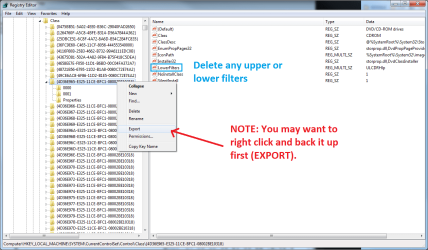
A common issue is that the upper and lower filters get corrupted in the registry just remove them.
  1. Type REGEDIT in Search, right click and open it
  2. Navigate to HKLM\SYSTEM\CurrentCOntrol Set\Control\Class\{4D36E965-E325-11CE-BFC1-08002BE10318}
  3. Delete anything called UpperFilters or Lowerfilters
  4. Reboot


Good Luck

Tim
 

Attachments

  • filters.png
    filters.png
    40.3 KB · Views: 284
Last edited:

My Computer My Computer

Computer Manufacturer/Model Number
Custom Hack job
OS
Windows 7 Ultimate 64 bit
CPU
Intel(R) Core(TM)2 Quad CPU Q8200 @ 2.33GHz
Motherboard
GigaByte EP45-UD3
Memory
8 GB Kingston
Graphics Card(s)
Nvidia GeForce 9600GT
Sound Card
Soundblaster Audigy
Monitor(s) Displays
AOC x2 22"
Hard Drives
2 x Samsung 500GB (RAID)
2 x Samsung 2TB
1 x WD Green 2TB
1 x Seagate 1TB
1 x Samsung 500GB
PSU
Thermaltake QFan 750W
Case
CM Scout Gaming
Cooling
Coolermaster V10
Keyboard
Microsoft Wireless Keyboard 1000
Mouse
Microsoft Wireless Optical 2000
Internet Speed
320
Other Info
Winfast PVR2000CP
LG DVD-RAM DVD/RW/DL Super Multi
Linksys WMP300Nx2 Wireless Adapter
Thanks for the kind responses.

dre@ms - the drive is not listed in the Disk mgmt either.

timstitt - I have tried earlier before i posted. I tried now as well. But no luck.

Theog - Even the MS fixit did not work

:(
 

My Computer My Computer

Computer Manufacturer/Model Number
Custom Built
OS
Windows 7 Ultimate 64bit
CPU
Intel(R) Core(TM)2 Duo CPU E7500
Motherboard
DG41RQ
Memory
2.00 GB
Graphics Card(s)
Intel(R) G41 Express Chipset
Sound Card
Realtek
Monitor(s) Displays
Acer 20" Wide LCD
Screen Resolution
1600x900
Hard Drives
Seagate 500 GB Internal
Keyboard
Microsoft Cordless
Mouse
Microsoft Cordless
SAD!!! Wat abt daemon tools??
 

My Computer My Computer

Computer Manufacturer/Model Number
MacBook Pro
OS
Lion
CPU
i5
Memory
4GB
Graphics Card(s)
Intel
Screen Resolution
1200x800
Hard Drives
Seagate FreeAgent GO 250GB Ext. HDD
That's interesting.... so...

Have you loaded the latest chipset drivers from the manufacturers website (not MS update)?

Additionally - There is a Microsoft Fix it Tool that you can download to fix missing CD/DVD drives. I have a feeeling that it's only for 32bit OS though. But give it a go, it was built for XP but is supposed to work on Windows 7 too.

EDIT: Some other thoughts. It's weird that it shows in device manager but not under disk mgt. Have you tried to uninstall it from device manager then scan for new hardware? I would also open the box and just check on the cables in case the connection is loose. Or even move it to another connection on the mobo (just to windows find it again).

Lastly, if you have a usb external enclosure for HDD's or multi drive usb adapter, your DVD drive will work in that too (if the configuration allows you to fit it somehow for testing. Forcing it to install via USB might be what windows needs to resolve your issue.
 

My Computer My Computer

Computer Manufacturer/Model Number
Custom Hack job
OS
Windows 7 Ultimate 64 bit
CPU
Intel(R) Core(TM)2 Quad CPU Q8200 @ 2.33GHz
Motherboard
GigaByte EP45-UD3
Memory
8 GB Kingston
Graphics Card(s)
Nvidia GeForce 9600GT
Sound Card
Soundblaster Audigy
Monitor(s) Displays
AOC x2 22"
Hard Drives
2 x Samsung 500GB (RAID)
2 x Samsung 2TB
1 x WD Green 2TB
1 x Seagate 1TB
1 x Samsung 500GB
PSU
Thermaltake QFan 750W
Case
CM Scout Gaming
Cooling
Coolermaster V10
Keyboard
Microsoft Wireless Keyboard 1000
Mouse
Microsoft Wireless Optical 2000
Internet Speed
320
Other Info
Winfast PVR2000CP
LG DVD-RAM DVD/RW/DL Super Multi
Linksys WMP300Nx2 Wireless Adapter
That's interesting.... so...

Have you loaded the latest chipset drivers from the manufacturers website (not MS update)?

Additionally - There is a Microsoft Fix it Tool that you can download to fix missing CD/DVD drives. I have a feeeling that it's only for 32bit OS though. But give it a go, it was built for XP but is supposed to work on Windows 7 too.

EDIT: Some other thoughts. It's weird that it shows in device manager but not under disk mgt. Have you tried to uninstall it from device manager then scan for new hardware? I would also open the box and just check on the cables in case the connection is loose. Or even move it to another connection on the mobo (just to windows find it again).

Lastly, if you have a usb external enclosure for HDD's or multi drive usb adapter, your DVD drive will work in that too (if the configuration allows you to fit it somehow for testing. Forcing it to install via USB might be what windows needs to resolve your issue.

Finally it worked!!!:thumbsup: Chipset drivers did the trick. Thank you timstitt. My bad... I would have done this long back. :p

Thank you all for the suggestions...
 

My Computer My Computer

Computer Manufacturer/Model Number
Custom Built
OS
Windows 7 Ultimate 64bit
CPU
Intel(R) Core(TM)2 Duo CPU E7500
Motherboard
DG41RQ
Memory
2.00 GB
Graphics Card(s)
Intel(R) G41 Express Chipset
Sound Card
Realtek
Monitor(s) Displays
Acer 20" Wide LCD
Screen Resolution
1600x900
Hard Drives
Seagate 500 GB Internal
Keyboard
Microsoft Cordless
Mouse
Microsoft Cordless
Glad ur issue is resolved.
 

My Computer My Computer

Computer Manufacturer/Model Number
MacBook Pro
OS
Lion
CPU
i5
Memory
4GB
Graphics Card(s)
Intel
Screen Resolution
1200x800
Hard Drives
Seagate FreeAgent GO 250GB Ext. HDD
That's interesting.... so...

Have you loaded the latest chipset drivers from the manufacturers website (not MS update)?

Additionally - There is a Microsoft Fix it Tool that you can download to fix missing CD/DVD drives. I have a feeeling that it's only for 32bit OS though. But give it a go, it was built for XP but is supposed to work on Windows 7 too.

EDIT: Some other thoughts. It's weird that it shows in device manager but not under disk mgt. Have you tried to uninstall it from device manager then scan for new hardware? I would also open the box and just check on the cables in case the connection is loose. Or even move it to another connection on the mobo (just to windows find it again).

Lastly, if you have a usb external enclosure for HDD's or multi drive usb adapter, your DVD drive will work in that too (if the configuration allows you to fit it somehow for testing. Forcing it to install via USB might be what windows needs to resolve your issue.

Finally it worked!!!:thumbsup: Chipset drivers did the trick. Thank you timstitt. My bad... I would have done this long back. :p

Thank you all for the suggestions...

You're Welcome Prabz! Hey and it wasn't my first suggestion either. :) Just glad it's fixed mate. Enjoy your weekend.

Tim
 

My Computer My Computer

Computer Manufacturer/Model Number
Custom Hack job
OS
Windows 7 Ultimate 64 bit
CPU
Intel(R) Core(TM)2 Quad CPU Q8200 @ 2.33GHz
Motherboard
GigaByte EP45-UD3
Memory
8 GB Kingston
Graphics Card(s)
Nvidia GeForce 9600GT
Sound Card
Soundblaster Audigy
Monitor(s) Displays
AOC x2 22"
Hard Drives
2 x Samsung 500GB (RAID)
2 x Samsung 2TB
1 x WD Green 2TB
1 x Seagate 1TB
1 x Samsung 500GB
PSU
Thermaltake QFan 750W
Case
CM Scout Gaming
Cooling
Coolermaster V10
Keyboard
Microsoft Wireless Keyboard 1000
Mouse
Microsoft Wireless Optical 2000
Internet Speed
320
Other Info
Winfast PVR2000CP
LG DVD-RAM DVD/RW/DL Super Multi
Linksys WMP300Nx2 Wireless Adapter
Back
Top