Dvd install failure

OldGospelMan73

New member
Local time
6:50 AM
Messages
5
Friends computer not recognize dvd in computer but said ok in system info. Not read cd. Install new one, Shows up in computer with successful install of driver, etc. Still will not recognize or play media?? GIGABYTE gaming computer.. desktop.. LITE ON DVD
 

My Computer

Computer type
Laptop
Computer Manufacturer/Model Number
HP
OS
Windows 7 Home Premium 64 bit
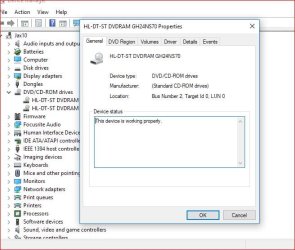
Is there any error code shown for the drive in the Device Manager? Or does it show "Working OK"?

For example:
 

Attachments

  • Capture.JPG
    Capture.JPG
    58.8 KB · Views: 11

My Computer

Computer type
PC/Desktop
Computer Manufacturer/Model Number
My Own Build
OS
Windows 10 64 bit
CPU
Intel i7 6700K
Motherboard
ASUS ROG Maximus VIII Hero
Memory
16GB Corsair Dominator
Graphics Card(s)
Intel CPU Graphics
Sound Card
RealTek
Monitor(s) Displays
27" Dell S2719dgf
Screen Resolution
2560X1440
Hard Drives
1 TB Samsung 850 EVO SSD for Win 10 Pro
500GB Samsung 850 EVO SSD for Win 10 Insider
2 TB drive for backup
PSU
EVGA Supernova 750G2
Case
BeQuiet Silent Base 600
Cooling
Deepcool Captain 120EX
Keyboard
Microsoft Wireless 2000
Mouse
Microsoft wireless
Internet Speed
100 MB/sec (Cable)
Antivirus
Microsoft Defender and Malwarebytes
Browser
Edge/Firefox
Other Info
Cakewalk (Sonar) by BandLab and Studio One 4.1 Pro recording studio software. MOTU 896Mk3 Hybrid recording interface, Frontier Tranzport wireless control unit, Behringer X-Touch Control Surface.
Five USB connected optical drives for CD Audio production using Nero BurningROM
Shows working properly. Old player would not load on My computer... but showed ok everywhere else. Would do nothing with any disc except spin abit then eject. This one shows up in my computer and elsewhere as ok. Tried burning some pics on dvd and cd but both failed at the end. Tried playing mujsic cd...no luck.
 

My Computer

Computer type
Laptop
Computer Manufacturer/Model Number
HP
OS
Windows 7 Home Premium 64 bit
Friends computer not recognize dvd in computer but said ok in system info. Not read cd. Install new one, Shows up in computer with successful install of driver, etc. Still will not recognize or play media?? GIGABYTE gaming computer.. desktop.. LITE ON DVD

Try reading the media which won't work in a different computer / different drive.

Try swapping cables with a known good drive.

Do you have another computer available? If so, try installing the new drive in the other computer, to see if it works there. If it works in one computer but not the other, then the problem is with the computer or with Windows, not with the drive.
 

My Computer

Computer type
PC/Desktop
Computer Manufacturer/Model Number
Dell
OS
Linux Mint 18.2 xfce 64-bit (VMWare host) / Windows 8.1 Pro 32-bit (VMWare guest)
CPU
Haswell
Memory
4 GB
Monitor(s) Displays
Acer 23"
Screen Resolution
1920 x 1080
Hard Drives
Two hard drives, 1TB each: One for Linux, one for my data.
Keyboard
IBM Model M
Antivirus
Sophos (Linux), Trend Micro (Windows)
Browser
Firefox, Opera
Other Info
I use Samba to share my data drive with the other computers at my house and with my guest session in VMWare Workstation Player.
Back
Top