Solved Either my CPU is too hot or Asus PC Probe II is incorrect. Help!

nekov4ego

New member
Power User
Local time
3:18 AM
Messages
102
Location
Bulgaria, Europe
I posted in other forums, but I am not sure I will get a response there, so I decided to ask here too.

I recently noticed that my CPU was getting too hot when I played games -- up to 69C. I had two additional cores unlocked, so I thought it was because of them but after I locked them it was all the same.
I was using Asus PC Probe II for monitoring my temps and today I tried other programs -- SpeedFan and Core Temp, and they show 10C difference compared to Asus PC Probe II. I am not sure but I think the "Core" shows the temp for my CPU in SpeedFan (though it's only one).

I have a Phenom II X2 555 Black Edition and am using the stock fan. Please, tell me if PC Probe is incorrect because I know 69 degrees are too much for my CPU. Thanks in advance!
 

Attachments
  • Untitled.jpg
    Untitled.jpg
    75.3 KB · Views: 360

My Computer My Computer

At a glance

Microsoft Windows 7 Ultimate x64 (Build 7601 ...AMD Phenom II X2 555 @ X4 B55 (3.2Ghz, 2MB L2...4GB (2x2GB) Corsair DDR3, 1333MhzASUS ENGTX560, DirectCU, 1GD5
OS
Microsoft Windows 7 Ultimate x64 (Build 7601 SP1)
CPU
AMD Phenom II X2 555 @ X4 B55 (3.2Ghz, 2MB L2/6MB L3 Cache)
Motherboard
ASUS M4A785TD-V Evo
Memory
4GB (2x2GB) Corsair DDR3, 1333Mhz
Graphics Card(s)
ASUS ENGTX560, DirectCU, 1GD5
Sound Card
8-Channel HD Audio
Monitor(s) Displays
Philips 226CL2SB
Screen Resolution
1920x1080p
Hard Drives
500GB Seagate, SATA2, 7200rpm, 16MB/s
PSU
Corsair TX650 v2
Internet Speed
90mbps Fiber Optics
Hello there, have you tried checking the temps with Speccy??

Probably it has something to do with the core unlocking...

Check with Speccy your temps and then post a screenshot :)
 

My Computer My Computer

At a glance

Windows
Computer type
PC/Desktop
OS
Windows
69c is a bit warm, but not out of spec. If you're using the stock heatsink, perhaps an upgrade is in order
 

My Computer My Computer

At a glance

Windows 7 Professional 64 bitxeon x5680 x296 GBnVidia quadro FX 5800 x2
Computer Manufacturer/Model Number
HP z800
OS
Windows 7 Professional 64 bit
CPU
xeon x5680 x2
Motherboard
hp
Memory
96 GB
Graphics Card(s)
nVidia quadro FX 5800 x2
Monitor(s) Displays
HP zr30w x4
Hard Drives
4 HP SAS 600GB HDDs RAID 0
PSU
1100w
Case
ATX
Cooling
factory installed liquid cooling
Hello there, have you tried checking the temps with Speccy??

Probably it has something to do with the core unlocking...

Check with Speccy your temps and then post a screenshot :)

I locked the cores, and it is now using only two, but the temps are the same in PC Probe. I will check them with Speccy tomorrow, and I will post. Thanks.

This seems to be quite accurate;

Real Temp - CPU temperature monitoring

Regards....Mike Connor

I think this is only for Intel CPUs.

69c is a bit warm, but not out of spec. If you're using the stock heatsink, perhaps an upgrade is in order

Well, yes, it is not out of specs but the maximum temp for my CPU is 70C, and 69C will shorten its longevity. Thanks for the help. I will probably get a new fan. The problem is I don't know which is good and which isn't and I am afraid of applying the thermal paste -- everyone is like "there's only one way to apply it and if you don't do it properly, your CPU will die in two years". I could get the pros from where I buy the fan apply it, though. But until I get more info and recommendations about CPU fans, I will be using the stock.
 

My Computer My Computer

At a glance

Microsoft Windows 7 Ultimate x64 (Build 7601 ...AMD Phenom II X2 555 @ X4 B55 (3.2Ghz, 2MB L2...4GB (2x2GB) Corsair DDR3, 1333MhzASUS ENGTX560, DirectCU, 1GD5
OS
Microsoft Windows 7 Ultimate x64 (Build 7601 SP1)
CPU
AMD Phenom II X2 555 @ X4 B55 (3.2Ghz, 2MB L2/6MB L3 Cache)
Motherboard
ASUS M4A785TD-V Evo
Memory
4GB (2x2GB) Corsair DDR3, 1333Mhz
Graphics Card(s)
ASUS ENGTX560, DirectCU, 1GD5
Sound Card
8-Channel HD Audio
Monitor(s) Displays
Philips 226CL2SB
Screen Resolution
1920x1080p
Hard Drives
500GB Seagate, SATA2, 7200rpm, 16MB/s
PSU
Corsair TX650 v2
Internet Speed
90mbps Fiber Optics
I think this is only for Intel CPUs.

Oops! Sorry, my bad. Try this;

Core Temp

Also, that is close to critical temp;

CPU maximum temperatures

Regards....Mike Connor

Yes, I used Core Temp and SpeedFan. Also I don't see my CPU in the list you posted, but I know from AMD's website that the maximum is 70C. And I think 69C can't mean good. Can you recommend me a good fan..? Or what should I look at when buying a new one. Thanks for the fast replies :)
 

My Computer My Computer

At a glance

Microsoft Windows 7 Ultimate x64 (Build 7601 ...AMD Phenom II X2 555 @ X4 B55 (3.2Ghz, 2MB L2...4GB (2x2GB) Corsair DDR3, 1333MhzASUS ENGTX560, DirectCU, 1GD5
OS
Microsoft Windows 7 Ultimate x64 (Build 7601 SP1)
CPU
AMD Phenom II X2 555 @ X4 B55 (3.2Ghz, 2MB L2/6MB L3 Cache)
Motherboard
ASUS M4A785TD-V Evo
Memory
4GB (2x2GB) Corsair DDR3, 1333Mhz
Graphics Card(s)
ASUS ENGTX560, DirectCU, 1GD5
Sound Card
8-Channel HD Audio
Monitor(s) Displays
Philips 226CL2SB
Screen Resolution
1920x1080p
Hard Drives
500GB Seagate, SATA2, 7200rpm, 16MB/s
PSU
Corsair TX650 v2
Internet Speed
90mbps Fiber Optics
I think this is only for Intel CPUs.

Oops! Sorry, my bad. Try this;

Core Temp

Also, that is close to critical temp;

CPU maximum temperatures

Regards....Mike Connor

Yes, I used Core Temp and SpeedFan. Also I don't see my CPU in the list you posted, but I know from AMD's website that the maximum is 70C. And I think 69C can't mean good. Can you recommend me a good fan..? Or what should I look at when buying a new one. Thanks for the fast replies :)

Well, I don't usually recommend hardware at all, on principle, but in this case I can recommend the "Arctic Freezer Xtreme". Nice and quiet, and very efficient indeed.

Freezer Xtreme Arctic Cooler CPU cooler review

Arctic Freezer Xtreme Rev. 2 CPU Cooler Review-Hi Tech Legion-Arctic Freezer Xtreme Rev. 2 CPU Cooler Review

I have installed this on a few machines lately and it is excellent.

Regards....Mike Connor
 

My Computer My Computer

At a glance

Several, including Windows 7 x64 Ultimate
OS
Several, including Windows 7 x64 Ultimate
Thanks for the recommendation. It's not very expensive, but I will have to use the stock fan for now; I want a new graphics card first and for it I will have to buy a new PSU as well. And I don't usually have much money since I am 16.

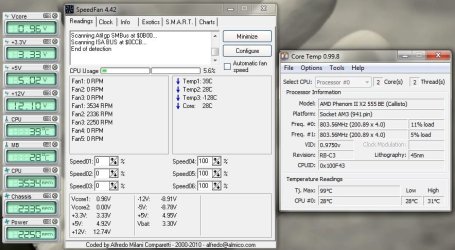
According to Speccy, my temps are all right; it shows exactly the same temperature for my CPU as SpeedFan and Core Temp. As far as I know, PC Probe II is the software that allows me to see my socket temps that are also displayed in the BIOS -- so the difference should be because of the sensors of my motherboard; and I think Core Temp (I don't know about the other two programs) is motherboard independent, I actually read this in the website from which I downloaded the program.

The uniqueness of it is that it shows the temperature of each individual core in each processor in your system! You can see in real time how the CPU temperature varies when you load your CPU. It's also completely motherboard independent.

I know what I show you are the temps during idle and not while I am playing, but the point is the difference in the temps between the programs. If it's 10C always, then my CPU should be reaching up to 60C -- and this is much more normal because of the stock fan, and should not harm my CPU as bad as almost 70C would.
Here is the screenshot...
 

Attachments

  • Untitled.jpg
    Untitled.jpg
    128.1 KB · Views: 203

My Computer My Computer

At a glance

Microsoft Windows 7 Ultimate x64 (Build 7601 ...AMD Phenom II X2 555 @ X4 B55 (3.2Ghz, 2MB L2...4GB (2x2GB) Corsair DDR3, 1333MhzASUS ENGTX560, DirectCU, 1GD5
OS
Microsoft Windows 7 Ultimate x64 (Build 7601 SP1)
CPU
AMD Phenom II X2 555 @ X4 B55 (3.2Ghz, 2MB L2/6MB L3 Cache)
Motherboard
ASUS M4A785TD-V Evo
Memory
4GB (2x2GB) Corsair DDR3, 1333Mhz
Graphics Card(s)
ASUS ENGTX560, DirectCU, 1GD5
Sound Card
8-Channel HD Audio
Monitor(s) Displays
Philips 226CL2SB
Screen Resolution
1920x1080p
Hard Drives
500GB Seagate, SATA2, 7200rpm, 16MB/s
PSU
Corsair TX650 v2
Internet Speed
90mbps Fiber Optics
OK. The main thing is you know what is going on and are happy with it.

Regards....Mike Connor
 

My Computer My Computer

At a glance

Several, including Windows 7 x64 Ultimate
OS
Several, including Windows 7 x64 Ultimate
OK. The main thing is you know what is going on and are happy with it.

Regards....Mike Connor

So my CPU temps are normal?

Edit: Oh, I don't know, it got to 77C in PC Probe II. That's not normal, it wasn't like this three days ago. I've been using this CPU for 4-5 months.
 
Last edited:

My Computer My Computer

At a glance

Microsoft Windows 7 Ultimate x64 (Build 7601 ...AMD Phenom II X2 555 @ X4 B55 (3.2Ghz, 2MB L2...4GB (2x2GB) Corsair DDR3, 1333MhzASUS ENGTX560, DirectCU, 1GD5
OS
Microsoft Windows 7 Ultimate x64 (Build 7601 SP1)
CPU
AMD Phenom II X2 555 @ X4 B55 (3.2Ghz, 2MB L2/6MB L3 Cache)
Motherboard
ASUS M4A785TD-V Evo
Memory
4GB (2x2GB) Corsair DDR3, 1333Mhz
Graphics Card(s)
ASUS ENGTX560, DirectCU, 1GD5
Sound Card
8-Channel HD Audio
Monitor(s) Displays
Philips 226CL2SB
Screen Resolution
1920x1080p
Hard Drives
500GB Seagate, SATA2, 7200rpm, 16MB/s
PSU
Corsair TX650 v2
Internet Speed
90mbps Fiber Optics
Back
Top