
Elevated Command Prompt

How to Open an Elevated Command Prompt in Windows 7

   Information
This will show you how to open an elevated command prompt with administrator rights (Run as administrator) instead of the default command prompt without administrator rights in Windows 7.

   Tip
If you opened the elevated command prompt from a shortcut (ex: in Start Menu) and it opens to another location other than C:\Windows\System32, then right click on the shortcut and click on Properties. In the Shortcut tab, check to make sure that you have %HOMEDRIVE%%HOMEPATH% in the Start in field like below.
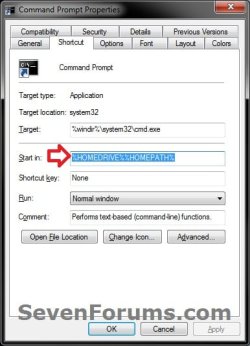
Start-in.jpg


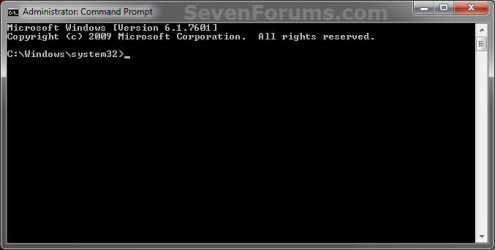
EXAMPLE: Elevated Command Prompt
NOTE: Notice how the elevated command prompt opens to C:\Windows\System32 and not C:\Users\(user name) as the default command prompt without administrator rights. Elevated_Command_Prompt.jpg


Here's How: 1. Do step 2, 3, 4, or 5 below for how you would like to open an elevated command prompt.

2. Use an Elevated Command Prompt shortcut.

OR

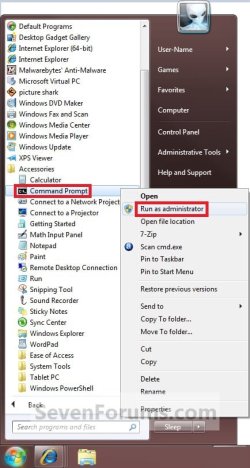
3. Open the Start Menu, click on All Programs and Accessories, right click on Command Prompt, and click on Run as administrator. (see screenshot below) Shortcut.jpg
OR

4. Open the Start Menu, type cmd in the search box, and press CTRL+SHIFT+ENTER.

OR

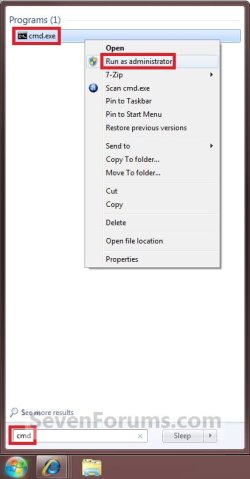
5. Open the Start Menu, type cmd in the search box, right click on cmd.exe (at top), and click on Run as administrator. (see screenshot below) Search_box.jpg
   Tip

  • If you are in a administrator account and get a log in prompt after doing any of the above steps, then click on the Cancel button and repeat the above step again. This will only do this for the very first time you try to open a elevated command prompt in Windows 7.
  • If you are in a standard account, then you will need to type in the administrator's password to elevate the command prompt.
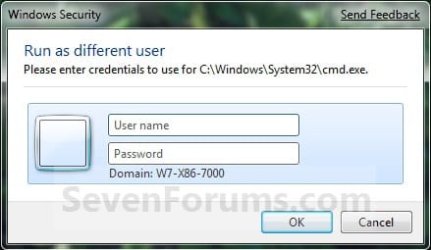
Log-In.jpg


That's it,
Shawn


Last edited:
Can't access elevated command prompt

Hello, I'm just new here. I can't access the elevated command prompt. I tried all the steps but my cmd showsC:/Users/(username) . I tried running in admin mode but it just showed C:/Users/(username)/Desktop. Any help? Thanks :D
 

My Computer

OS
Windows 7 Home Basic 64 bit
Hello pleomax, and welcome to Seven Forums.

Are you logged in an administrator account?

What happens when you right click on the Command Prompt shortcut and click on Run as administrator?
 

My Computer

Computer type
PC/Desktop
Computer Manufacturer/Model Number
Self built custom
OS
64-bit Windows 11 Pro for Workstations
CPU
Intel i7-8700K OC'd to 5 GHz
Motherboard
ASUS ROG Maximus XI Formula Z390
Memory
64 GB (4x16GB) G.SKILL TridentZ RGB DDR4 3600 MHz
Graphics Card(s)
ASUS ROG-STRIX-GTX1080TI-O11G-GAMING
Sound Card
Integrated
Monitor(s) Displays
2 x Samsung Odyssey G7 27"
Screen Resolution
2560x1440
Hard Drives
1TB Samsung 990 PRO M.2,
4TB Samsung 990 PRO PRO M.2,
TerraMaster F8 SSD Plus NAS
PSU
Seasonic Prime Titanium 850W
Case
Thermaltake Core P3
Cooling
Corsair Hydro H115i
Keyboard
Logitech wireless K800
Mouse
Logitech MX Master 4
Internet Speed
2 Gb/s Download and 100 Mb/s Upload
Antivirus
Malwarebyte Anti-Malware Premium
Browser
Google Chrome
Other Info
Logitech Z625 speaker system,
Logitech BRIO 4K Pro webcam,
HP Color LaserJet Pro MFP M477fdn,
APC SMART-UPS RT 1000 XL - SURT1000XLI,
Galaxy S23 Plus phone
Thank you Brink for another great guide.

I've always been stumped by cmd vs elevated cmd. What if I'm the only user (admin) on the machine? Do I still need to use elevated command prompt?

For me Right-click cmd and Run as administrator in the start menu does not work, CTRL+SHIFT+ENTER method does not work as well.

However, start menu search cmd and right-click Run as admin does work and so does manually creating a shortcut. :thumbsup:
 

My Computer

Computer type
PC/Desktop
Computer Manufacturer/Model Number
Less is more
OS
Windows 7 Ultimate x64 SP1
CPU
Core i7 2600k (4.6GHz)
Motherboard
ASUS P8Z68 Deluxe (3603)
Memory
16GB G.SKILL Ares 1600MHz
Graphics Card(s)
MSI R6970 Lightning
Sound Card
Asus Xonar Essence ST (UNi drivers 1.41)
Monitor(s) Displays
Samsung P2570, CrossOver 27Q LED-P
Screen Resolution
1920*1080, 2560*1440
Hard Drives
256GB OCZ Vector, 2x Hitachi 4TB (7K4000), Hitachi 3TB (7K3000 & 5K3000)
PSU
Seasonic X750
Case
Lian-Li PC-P80N
Cooling
NZXT HAVIK 140 (2x GELID Wing12PL Push/Pull)
Keyboard
CM Storm Trigger (Brown Switch)
Mouse
Logitech G400
Internet Speed
55Mbps/10Mbps
Other Info
Speakers - Klipsch ProMedia 2.1
Headphones - Sennheiser HD595
Router - ASUS RT-N66U
Webcam - Logitech C910

My Computer

Computer type
PC/Desktop
Computer Manufacturer/Model Number
Self built custom
OS
64-bit Windows 11 Pro for Workstations
CPU
Intel i7-8700K OC'd to 5 GHz
Motherboard
ASUS ROG Maximus XI Formula Z390
Memory
64 GB (4x16GB) G.SKILL TridentZ RGB DDR4 3600 MHz
Graphics Card(s)
ASUS ROG-STRIX-GTX1080TI-O11G-GAMING
Sound Card
Integrated
Monitor(s) Displays
2 x Samsung Odyssey G7 27"
Screen Resolution
2560x1440
Hard Drives
1TB Samsung 990 PRO M.2,
4TB Samsung 990 PRO PRO M.2,
TerraMaster F8 SSD Plus NAS
PSU
Seasonic Prime Titanium 850W
Case
Thermaltake Core P3
Cooling
Corsair Hydro H115i
Keyboard
Logitech wireless K800
Mouse
Logitech MX Master 4
Internet Speed
2 Gb/s Download and 100 Mb/s Upload
Antivirus
Malwarebyte Anti-Malware Premium
Browser
Google Chrome
Other Info
Logitech Z625 speaker system,
Logitech BRIO 4K Pro webcam,
HP Color LaserJet Pro MFP M477fdn,
APC SMART-UPS RT 1000 XL - SURT1000XLI,
Galaxy S23 Plus phone
Good tutorial. Worked just great.
 

My Computer

Computer Manufacturer/Model Number
BIOSTAR Group A55MH
OS
Windows 7 Ultimate 64-bit
CPU
2.90 gigahertz AMD A8-3850 APU with Radeon HD Graphics
Motherboard
BIOSTAR Group A55MH Bus Clock: 100 megahertz BIOS: American
Memory
8170 Megabytes Usable Installed Memory
Graphics Card(s)
ATI Radeon HD 5450 [Display adapter]
Sound Card
AMD High Definition Audio Device
Monitor(s) Displays
Samsung SyncMaster [Monitor] (19.1"vis, s/n HA19HVDP427004,
Screen Resolution
1440x900
Hard Drives
1500.20 Gigabytes Usable Hard Drive Capacity
1104.84 Gigabytes Hard Drive Free Space
Case
DELL Dimension 3000
Keyboard
HP KB 0228
Mouse
GH optical-wired
Internet Speed
50+MB
Thank you Billy. I'm glad it was able to help. :)
 

My Computer

Computer type
PC/Desktop
Computer Manufacturer/Model Number
Self built custom
OS
64-bit Windows 11 Pro for Workstations
CPU
Intel i7-8700K OC'd to 5 GHz
Motherboard
ASUS ROG Maximus XI Formula Z390
Memory
64 GB (4x16GB) G.SKILL TridentZ RGB DDR4 3600 MHz
Graphics Card(s)
ASUS ROG-STRIX-GTX1080TI-O11G-GAMING
Sound Card
Integrated
Monitor(s) Displays
2 x Samsung Odyssey G7 27"
Screen Resolution
2560x1440
Hard Drives
1TB Samsung 990 PRO M.2,
4TB Samsung 990 PRO PRO M.2,
TerraMaster F8 SSD Plus NAS
PSU
Seasonic Prime Titanium 850W
Case
Thermaltake Core P3
Cooling
Corsair Hydro H115i
Keyboard
Logitech wireless K800
Mouse
Logitech MX Master 4
Internet Speed
2 Gb/s Download and 100 Mb/s Upload
Antivirus
Malwarebyte Anti-Malware Premium
Browser
Google Chrome
Other Info
Logitech Z625 speaker system,
Logitech BRIO 4K Pro webcam,
HP Color LaserJet Pro MFP M477fdn,
APC SMART-UPS RT 1000 XL - SURT1000XLI,
Galaxy S23 Plus phone
Hi Brink

I have UAC disabled and when I go to start type in cmd and then do the CTRL+SHIFT+ENTER . CMD opens up to
C:\Users\<user account> . But if I right click on CMD in the start menu and choose Run as Administrator then it opens up to C:\Windows\System32>_ . Does the CTRL+SHIFT+ENTER shortcut get disabled if you have UAC disabled ?
 

My Computer

Computer Manufacturer/Model Number
Custom Built
OS
Windows 7 Ultimate 32-Bit & Windows 7 Ultimate 64-Bit
CPU
Intel Core i7 CPU 950 @ 3.07GHz
Motherboard
ASUS P6T DELUXE V2
Memory
OCZ 6GB (3 x 2GB) 240-Pin DDR3 SDRAM DDR3 1600 OCZ3X1600R2
Graphics Card(s)
ATI Radeon HD 5700 Series
Sound Card
OnBoard
Hard Drives
WD6400AACS-00M3B0 (640GB SATA )
PSU
CORSAIR 850w
Case
NZXT LEXA
Cooling
Intel Stock Heatsink Fan
Keyboard
Microsoft Wireless Laser Keyboard 7000
Mouse
Microsoft Wireless Laser Mouse 7000

My Computer

Computer type
PC/Desktop
Computer Manufacturer/Model Number
Self built custom
OS
64-bit Windows 11 Pro for Workstations
CPU
Intel i7-8700K OC'd to 5 GHz
Motherboard
ASUS ROG Maximus XI Formula Z390
Memory
64 GB (4x16GB) G.SKILL TridentZ RGB DDR4 3600 MHz
Graphics Card(s)
ASUS ROG-STRIX-GTX1080TI-O11G-GAMING
Sound Card
Integrated
Monitor(s) Displays
2 x Samsung Odyssey G7 27"
Screen Resolution
2560x1440
Hard Drives
1TB Samsung 990 PRO M.2,
4TB Samsung 990 PRO PRO M.2,
TerraMaster F8 SSD Plus NAS
PSU
Seasonic Prime Titanium 850W
Case
Thermaltake Core P3
Cooling
Corsair Hydro H115i
Keyboard
Logitech wireless K800
Mouse
Logitech MX Master 4
Internet Speed
2 Gb/s Download and 100 Mb/s Upload
Antivirus
Malwarebyte Anti-Malware Premium
Browser
Google Chrome
Other Info
Logitech Z625 speaker system,
Logitech BRIO 4K Pro webcam,
HP Color LaserJet Pro MFP M477fdn,
APC SMART-UPS RT 1000 XL - SURT1000XLI,
Galaxy S23 Plus phone
Are you holding down Ctrl+Shift then pressing Enter or you pressing Ctrl Shift Enter all together ? I tried both ways and still not being able to get the Command Prompt to open to C:\Windows\System32 .


Added : Just installed Windows 7 PRO in a VMware . Tried Ctrl+Shift+Enter it worked . Disabled UAC restarted the machine and tried Ctrl+Shift+Enter once again and it opened to C:\Users\<UserName>_ .
 

My Computer

Computer Manufacturer/Model Number
Custom Built
OS
Windows 7 Ultimate 32-Bit & Windows 7 Ultimate 64-Bit
CPU
Intel Core i7 CPU 950 @ 3.07GHz
Motherboard
ASUS P6T DELUXE V2
Memory
OCZ 6GB (3 x 2GB) 240-Pin DDR3 SDRAM DDR3 1600 OCZ3X1600R2
Graphics Card(s)
ATI Radeon HD 5700 Series
Sound Card
OnBoard
Hard Drives
WD6400AACS-00M3B0 (640GB SATA )
PSU
CORSAIR 850w
Case
NZXT LEXA
Cooling
Intel Stock Heatsink Fan
Keyboard
Microsoft Wireless Laser Keyboard 7000
Mouse
Microsoft Wireless Laser Mouse 7000
sorry Brink, not so understand how to open elevated command prompt, it's not go to all programs > command prompt > run as administrator ? sorry for my weird question , elevated command promprt it's different with usually Command Prompt?
 

My Computer

OS
Windows 7 Home Premium 64bit
sorry Brink, not so understand how to open elevated command prompt, it's not go to all programs > command prompt > run as administrator ? sorry for my weird question , elevated command promprt it's different with usually Command Prompt?

Hello sle3pingz,

It's not a weird question at all. :)

Yes, that for step 3 would be how to.

An "elevated command prompt" is a command prompt that runs with elevated rights (run as administrator).

A "command prompt" is just an unelevated command prompt that has the same rights as a standard user account.
 

My Computer

Computer type
PC/Desktop
Computer Manufacturer/Model Number
Self built custom
OS
64-bit Windows 11 Pro for Workstations
CPU
Intel i7-8700K OC'd to 5 GHz
Motherboard
ASUS ROG Maximus XI Formula Z390
Memory
64 GB (4x16GB) G.SKILL TridentZ RGB DDR4 3600 MHz
Graphics Card(s)
ASUS ROG-STRIX-GTX1080TI-O11G-GAMING
Sound Card
Integrated
Monitor(s) Displays
2 x Samsung Odyssey G7 27"
Screen Resolution
2560x1440
Hard Drives
1TB Samsung 990 PRO M.2,
4TB Samsung 990 PRO PRO M.2,
TerraMaster F8 SSD Plus NAS
PSU
Seasonic Prime Titanium 850W
Case
Thermaltake Core P3
Cooling
Corsair Hydro H115i
Keyboard
Logitech wireless K800
Mouse
Logitech MX Master 4
Internet Speed
2 Gb/s Download and 100 Mb/s Upload
Antivirus
Malwarebyte Anti-Malware Premium
Browser
Google Chrome
Other Info
Logitech Z625 speaker system,
Logitech BRIO 4K Pro webcam,
HP Color LaserJet Pro MFP M477fdn,
APC SMART-UPS RT 1000 XL - SURT1000XLI,
Galaxy S23 Plus phone
Even elevated rights aren't giving enough power

In the Win7 64bit's guest account, Start Menu> right clicked on the 'command prompt' in the start menu. Chose 'Run as admin' or 'another admin user'. Filled the required user name and password. Command prompt window opens (with the title Administrator: Command Prompt". I type 'Control'. Control Panel Opens. I click on 'Network and Sharing Center'. NSC windows opens, but there it shows 'Access Denied'.

Kindly help.
 
Last edited:

My Computer

OS
Windows Seven
Hello Zopfan,

It's because you are logged in to a guest account. You'll need to be logged in to an administrator account instead. :(
 

My Computer

Computer type
PC/Desktop
Computer Manufacturer/Model Number
Self built custom
OS
64-bit Windows 11 Pro for Workstations
CPU
Intel i7-8700K OC'd to 5 GHz
Motherboard
ASUS ROG Maximus XI Formula Z390
Memory
64 GB (4x16GB) G.SKILL TridentZ RGB DDR4 3600 MHz
Graphics Card(s)
ASUS ROG-STRIX-GTX1080TI-O11G-GAMING
Sound Card
Integrated
Monitor(s) Displays
2 x Samsung Odyssey G7 27"
Screen Resolution
2560x1440
Hard Drives
1TB Samsung 990 PRO M.2,
4TB Samsung 990 PRO PRO M.2,
TerraMaster F8 SSD Plus NAS
PSU
Seasonic Prime Titanium 850W
Case
Thermaltake Core P3
Cooling
Corsair Hydro H115i
Keyboard
Logitech wireless K800
Mouse
Logitech MX Master 4
Internet Speed
2 Gb/s Download and 100 Mb/s Upload
Antivirus
Malwarebyte Anti-Malware Premium
Browser
Google Chrome
Other Info
Logitech Z625 speaker system,
Logitech BRIO 4K Pro webcam,
HP Color LaserJet Pro MFP M477fdn,
APC SMART-UPS RT 1000 XL - SURT1000XLI,
Galaxy S23 Plus phone
Determine the original user when in an elevated Command Prompt

I'm not sure I have selected the right Tutorial to comment on, but here goes!

This relates to a Windows 7 Pro PC in a workgroup.

Suppose one is running as a Standard User, not as an Administrator.

If one starts an elevated Command Prompt window, all the environment variables (like %username%) change to the Administrator username used to start that Command Prompt window.

I can't find (via test or Googling) how to determine the name of the original Standard User in the batch file which runs in the elevated command prompt window. Is this possible? Thanks!
 

My Computer

OS
Windows 7 Pro 64-bit
my problem lies not in taking ownership of files in the command line. If anybody can help me...my problem lies in the command that i input in the cmd itself like the chkdsk command or the defrag command in cmd, there is always a prompt that "you dont have enough administrative rights". if anyone knows how the cmd itself can be taken ownership of...id be much grateful.....

good day and god bless......


I just right clicked on the CMD and selected run and administrator lol it worked 😂
 

My Computer

Computer type
Laptop
Computer Manufacturer/Model Number
HP pavillion DV7-3165dx
OS
Pennsylvania
CPU
AMD Turion (tm)Ultra Dual-Core Mobile M620 2.49Ghz
Motherboard
?
Antivirus
NONE
Browser
Chrome
Seriously just right click it and select run as admin
 

My Computer

Computer type
Laptop
Computer Manufacturer/Model Number
HP pavillion DV7-3165dx
OS
Pennsylvania
CPU
AMD Turion (tm)Ultra Dual-Core Mobile M620 2.49Ghz
Motherboard
?
Antivirus
NONE
Browser
Chrome
Hello Zopfan,

It's because you are logged in to a guest account. You'll need to be logged in to an administrator account instead. :(

Thank you very much for your kind reply.
And very sorry for my belated reply (I missed the mail notification somehow).

But
the still problem persists when I'm logged into the admin account. Though I agree its very strange.
 

My Computer

OS
Windows Seven
Ok I gotcha ! Did you ever figure it out ? You probably just logged into a guest account or I'm sure if you google it you can find out how to set as always fun S admin . I use to remember how to do it years ago in highsvhooonwhen they tried to clock us out of library computers but that was a LONG time ago and very old windows lol keep searching sure someone willl find or has asked the same question before. GL sorry if I sounded rude this was a long time ago somtnwven remover commenting must have been one of those nights lol
 

My Computer

Computer type
Laptop
Computer Manufacturer/Model Number
HP pavillion DV7-3165dx
OS
Pennsylvania
CPU
AMD Turion (tm)Ultra Dual-Core Mobile M620 2.49Ghz
Motherboard
?
Antivirus
NONE
Browser
Chrome
Sorry for typos I have bad carpel tunnel !
 

My Computer

Computer type
Laptop
Computer Manufacturer/Model Number
HP pavillion DV7-3165dx
OS
Pennsylvania
CPU
AMD Turion (tm)Ultra Dual-Core Mobile M620 2.49Ghz
Motherboard
?
Antivirus
NONE
Browser
Chrome
Command Prompt. Type "cmd" without quotation marks into the search bar at the bottom of the Start menu. Right-click "cmd.exe" in the list of search results and select "Run As Administrator." Type the phrase "net user administrator /active:yes" without the quotation marks at the command prompt.

Try right clicking in the bottom corner where CMD would appear normally, shouldnhihe yoi a list including run as admin!
 

My Computer

Computer type
Laptop
Computer Manufacturer/Model Number
HP pavillion DV7-3165dx
OS
Pennsylvania
CPU
AMD Turion (tm)Ultra Dual-Core Mobile M620 2.49Ghz
Motherboard
?
Antivirus
NONE
Browser
Chrome
Back
Top