Elevated Command Prompt

How to Open an Elevated Command Prompt in Windows 7

   Information
This will show you how to open an elevated command prompt with administrator rights (Run as administrator) instead of the default command prompt without administrator rights in Windows 7.

   Tip
If you opened the elevated command prompt from a shortcut (ex: in Start Menu) and it opens to another location other than C:\Windows\System32, then right click on the shortcut and click on Properties. In the Shortcut tab, check to make sure that you have %HOMEDRIVE%%HOMEPATH% in the Start in field like below.
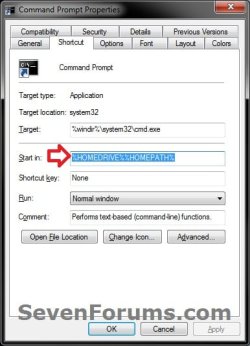
Start-in.jpg


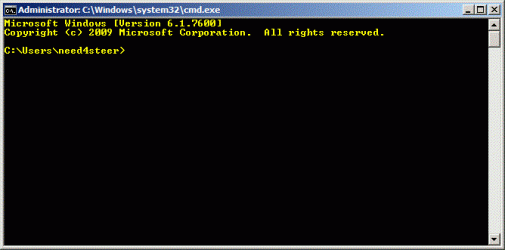
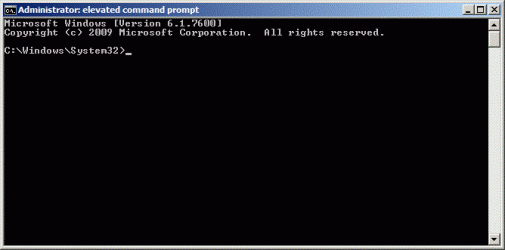
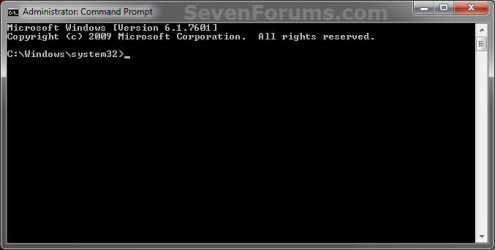
EXAMPLE: Elevated Command Prompt
NOTE: Notice how the elevated command prompt opens to C:\Windows\System32 and not C:\Users\(user name) as the default command prompt without administrator rights. Elevated_Command_Prompt.jpg


Here's How: 1. Do step 2, 3, 4, or 5 below for how you would like to open an elevated command prompt.

2. Use an Elevated Command Prompt shortcut.

OR

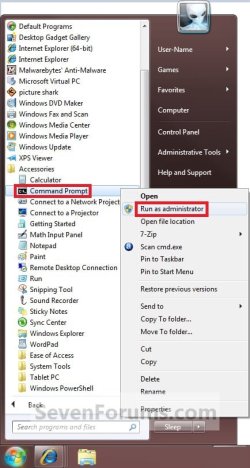
3. Open the Start Menu, click on All Programs and Accessories, right click on Command Prompt, and click on Run as administrator. (see screenshot below) Shortcut.jpg
OR

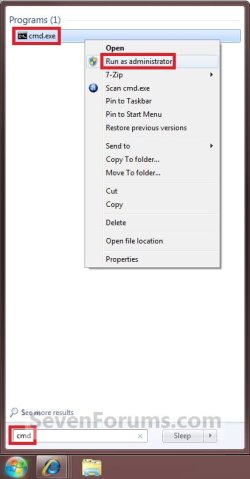
4. Open the Start Menu, type cmd in the search box, and press CTRL+SHIFT+ENTER.

OR

5. Open the Start Menu, type cmd in the search box, right click on cmd.exe (at top), and click on Run as administrator. (see screenshot below) Search_box.jpg
   Tip

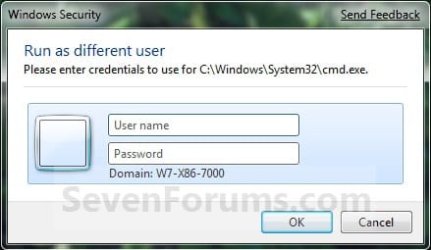
  • If you are in a administrator account and get a log in prompt after doing any of the above steps, then click on the Cancel button and repeat the above step again. This will only do this for the very first time you try to open a elevated command prompt in Windows 7.
  • If you are in a standard account, then you will need to type in the administrator's password to elevate the command prompt.
Log-In.jpg


That's it,
Shawn


Last edited:
I tried doing that, but everytime I try it keeps asking for the Admin password, do I have any hope being a Standard User?
 

My Computer

OS
Windows 7
Hello xIxREXxiIx,

Sorry, but you will have to do this in a administrator account, or type in the administrator's password. :(

Shawn
 

My Computer

Computer type
PC/Desktop
Computer Manufacturer/Model Number
Self built custom
OS
64-bit Windows 11 Pro for Workstations
CPU
Intel i7-8700K OC'd to 5 GHz
Motherboard
ASUS ROG Maximus XI Formula Z390
Memory
64 GB (4x16GB) G.SKILL TridentZ RGB DDR4 3600 MHz
Graphics Card(s)
ASUS ROG-STRIX-GTX1080TI-O11G-GAMING
Sound Card
Integrated
Monitor(s) Displays
2 x Samsung Odyssey G7 27"
Screen Resolution
2560x1440
Hard Drives
1TB Samsung 990 PRO M.2,
4TB Samsung 990 PRO PRO M.2,
TerraMaster F8 SSD Plus NAS
PSU
Seasonic Prime Titanium 850W
Case
Thermaltake Core P3
Cooling
Corsair Hydro H115i
Keyboard
Logitech wireless K800
Mouse
Logitech MX Master 4
Internet Speed
2 Gb/s Download and 100 Mb/s Upload
Antivirus
Malwarebyte Anti-Malware Premium
Browser
Google Chrome
Other Info
Logitech Z625 speaker system,
Logitech BRIO 4K Pro webcam,
HP Color LaserJet Pro MFP M477fdn,
APC SMART-UPS RT 1000 XL - SURT1000XLI,
Galaxy S23 Plus phone
Thanks man saved my life
Ha ha ha
 

My Computer

Computer Manufacturer/Model Number
Assembled
OS
Windows 7 Ultimate / Windows 8 Build
CPU
Core i3 3.0GHz Second Generation (LGA1155)
Motherboard
Intel DH67CL
Memory
Kingston KVR1333 4GB (2+2)
Graphics Card(s)
Onboard Intel HD Graphics
Sound Card
Sound Blaster Audigy LS
Monitor(s) Displays
Samsung 933NW Plus LCD
Screen Resolution
1440*900
Hard Drives
Samsung 1TB
PSU
Mercury 500W
Case
Mercury Elite
Cooling
Standard
Keyboard
Viewsonic View mate
Mouse
Viewsonic View mate mini
Internet Speed
512kpbs
my problem lies not in taking ownership of files in the command line. If anybody can help me...my problem lies in the command that i input in the cmd itself like the chkdsk command or the defrag command in cmd, there is always a prompt that "you dont have enough administrative rights". if anyone knows how the cmd itself can be taken ownership of...id be much grateful.....

good day and god bless......
 

My Computer

OS
windows seven
Hello Chronoss, and welcome to Seven Forums.

Are you logged in as an administrator, and are using a elevated (right click and "Run as administrator") command prompt?
 

My Computer

Computer type
PC/Desktop
Computer Manufacturer/Model Number
Self built custom
OS
64-bit Windows 11 Pro for Workstations
CPU
Intel i7-8700K OC'd to 5 GHz
Motherboard
ASUS ROG Maximus XI Formula Z390
Memory
64 GB (4x16GB) G.SKILL TridentZ RGB DDR4 3600 MHz
Graphics Card(s)
ASUS ROG-STRIX-GTX1080TI-O11G-GAMING
Sound Card
Integrated
Monitor(s) Displays
2 x Samsung Odyssey G7 27"
Screen Resolution
2560x1440
Hard Drives
1TB Samsung 990 PRO M.2,
4TB Samsung 990 PRO PRO M.2,
TerraMaster F8 SSD Plus NAS
PSU
Seasonic Prime Titanium 850W
Case
Thermaltake Core P3
Cooling
Corsair Hydro H115i
Keyboard
Logitech wireless K800
Mouse
Logitech MX Master 4
Internet Speed
2 Gb/s Download and 100 Mb/s Upload
Antivirus
Malwarebyte Anti-Malware Premium
Browser
Google Chrome
Other Info
Logitech Z625 speaker system,
Logitech BRIO 4K Pro webcam,
HP Color LaserJet Pro MFP M477fdn,
APC SMART-UPS RT 1000 XL - SURT1000XLI,
Galaxy S23 Plus phone
yup...have done that and ive even activated most of the tweaks which pertains to acquisition of administrative rights.....

this pose as a problem to me since am used to defragging and disc checking utilizing such commands....

but in the attrib side i find no problems in that area....

my problems lies merely on that part....

thanks for replying...

good day and god bless....
 

My Computer

OS
windows seven
yup...have done that and ive even activated most of the tweaks which pertains to acquisition of administrative rights.....

this pose as a problem to me since am used to defragging and disc checking utilizing such commands....

but in the attrib side i find no problems in that area....

my problems lies merely on that part....

thanks for replying...

good day and god bless....

Tick the "Always run as administrator" box in Properties > Advanced. Maybe that helps
 

My Computer

Computer Manufacturer/Model Number
HP, Dell, Gateway, Toshiba - 4 laptops and 2 desktops
OS
Vista, Windows7, Mint Mate, Zorin, Windows 8
CPU
from 1.6GHz Duo to i7
Monitor(s) Displays
2x HP w2207
Hard Drives
5x HDD, 7x SSD, 12x Externals
Keyboard
with trackball - no mices
Mouse
Trackball mice
Internet Speed
DSL 6000
thanks for replying...im gonna try that....

im running 2 systems....

mostly im on XP....

the one that contains the WIN 7 OS belongs to mah friend, i do maintennance on his systems...

will let you know if it works...

thanks a lot...good day and god bless....
 

My Computer

OS
windows seven
Interesting I tried all scenerios! The ONLY method that resulted in the proper path was the last one. ALL the others still pointed to the user as if I had not specified the Run as Administor.
 

My Computer

Computer Manufacturer/Model Number
Custom
OS
Windows 7 Pro x64
CPU
Intel i7-860
Motherboard
Gigabyte GA-P55A-UD7
Memory
OCZ Platinum DDR3 1333 (PC3 10666) OCZ3P1333LV4GK
Graphics Card(s)
HIS H585FN1GD Radeon HD 5850 (Cypress Pro) 1GB 256-bit GDDR5
Sound Card
Integrated
Monitor(s) Displays
Panasonic TC-P50V10
Hard Drives
1 - (for OS) SSD 80G|INTEL SSDSA2M080G2XXX OEM
2 - Western Digital WD20EARS Caviar Green Hard Drives - 2TB, 3.5", SATA-3G
PSU
OCZ Gold OCZZ850M 850W
Case
Lian Li C3300
Thanks a lot for another great tutorial.

I have 1 questions and 1 tip:
1) About the symptom of the elevated commnad prompt you wrote:

EXAMPLE: Elevated Command Prompt
NOTE: Notice how the elevated command prompt opens to C:\Windows\System32 and not C:\Users\(user name) as the default command prompt without administrator rights.
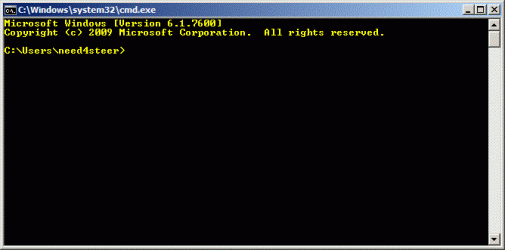
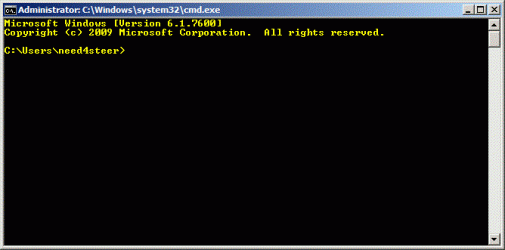
Well when I open mines it shows like this:
cmd1.gif

If I try one of the methods you mentioned I get the same command promp.
Please note the title: "Administrator:C:\Windows\system32\cmd.exe"
I'm guessing it's another symptom that the command prompt it elevated.
BTW my account has administrator privilege.


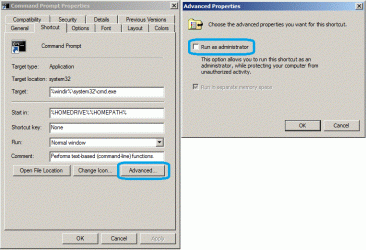
2) Another method to make the command prompt elevated, as you mentioned at http://www.sevenforums.com/tutorials/3718-elevated-command-prompt-shortcut.html is to modify it's shortcut:
right click on it --> properties --> shortcut tab --> advanced --> mark "Run as administrator".

modify the properties.gif

And once again, thanks a lot for this great tutorial.

EDIT
Please read post #19 on this topic at http://www.sevenforums.com/1039804-post19.html for further information.
 
Last edited:

My Computer

OS
Windows 7 Ultimate 32bit
CPU
AMD Phenom II x4 965 3.4GHz
Motherboard
Gigabyte GA-890FXA-UD5 rev2.0
Memory
G.SKILL F3-16000CL8D-4GBPIS (2GBx2)
Graphics Card(s)
Inno3d GTX480 1.5GB GDDR5
Monitor(s) Displays
LG FLATRON W2486L
Screen Resolution
1920x1080@60Hz
Hard Drives
Western Digital Caviar Black WD1002FAEX 1TB 64MB 7200RPM Sata III x3
PSU
Enermax MODU82+ 625W
Case
Thermaltake Element G Middle Tower
Hello Need4steer,

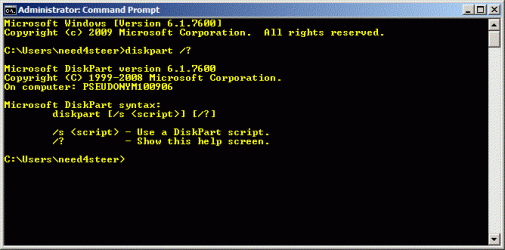
As a test, copy and paste diskpart /? into your command prompt from the above screenshot. If you get a UAC prompt or an error, then it's not a elevated command prompt.
 

My Computer

Computer type
PC/Desktop
Computer Manufacturer/Model Number
Self built custom
OS
64-bit Windows 11 Pro for Workstations
CPU
Intel i7-8700K OC'd to 5 GHz
Motherboard
ASUS ROG Maximus XI Formula Z390
Memory
64 GB (4x16GB) G.SKILL TridentZ RGB DDR4 3600 MHz
Graphics Card(s)
ASUS ROG-STRIX-GTX1080TI-O11G-GAMING
Sound Card
Integrated
Monitor(s) Displays
2 x Samsung Odyssey G7 27"
Screen Resolution
2560x1440
Hard Drives
1TB Samsung 990 PRO M.2,
4TB Samsung 990 PRO PRO M.2,
TerraMaster F8 SSD Plus NAS
PSU
Seasonic Prime Titanium 850W
Case
Thermaltake Core P3
Cooling
Corsair Hydro H115i
Keyboard
Logitech wireless K800
Mouse
Logitech MX Master 4
Internet Speed
2 Gb/s Download and 100 Mb/s Upload
Antivirus
Malwarebyte Anti-Malware Premium
Browser
Google Chrome
Other Info
Logitech Z625 speaker system,
Logitech BRIO 4K Pro webcam,
HP Color LaserJet Pro MFP M477fdn,
APC SMART-UPS RT 1000 XL - SURT1000XLI,
Galaxy S23 Plus phone
Well this is how it's looking:
cmd.gif

I didn't get UAC prompt or an error.
BTW I disabled UAC.

The reasone I posted my command line prompt is in order to suggest that there might be another symptom for the elevated command prompt - it's title.
 

My Computer

OS
Windows 7 Ultimate 32bit
CPU
AMD Phenom II x4 965 3.4GHz
Motherboard
Gigabyte GA-890FXA-UD5 rev2.0
Memory
G.SKILL F3-16000CL8D-4GBPIS (2GBx2)
Graphics Card(s)
Inno3d GTX480 1.5GB GDDR5
Monitor(s) Displays
LG FLATRON W2486L
Screen Resolution
1920x1080@60Hz
Hard Drives
Western Digital Caviar Black WD1002FAEX 1TB 64MB 7200RPM Sata III x3
PSU
Enermax MODU82+ 625W
Case
Thermaltake Element G Middle Tower
Ah, that my why you didn't get a UAC prompt or error. Enabled UAC, then try again.

Unless you are logged in as the built-in Administrator, you should get a UAC prompt using that command if the command prompt didn't open at C:\Windows\system32.
 

My Computer

Computer type
PC/Desktop
Computer Manufacturer/Model Number
Self built custom
OS
64-bit Windows 11 Pro for Workstations
CPU
Intel i7-8700K OC'd to 5 GHz
Motherboard
ASUS ROG Maximus XI Formula Z390
Memory
64 GB (4x16GB) G.SKILL TridentZ RGB DDR4 3600 MHz
Graphics Card(s)
ASUS ROG-STRIX-GTX1080TI-O11G-GAMING
Sound Card
Integrated
Monitor(s) Displays
2 x Samsung Odyssey G7 27"
Screen Resolution
2560x1440
Hard Drives
1TB Samsung 990 PRO M.2,
4TB Samsung 990 PRO PRO M.2,
TerraMaster F8 SSD Plus NAS
PSU
Seasonic Prime Titanium 850W
Case
Thermaltake Core P3
Cooling
Corsair Hydro H115i
Keyboard
Logitech wireless K800
Mouse
Logitech MX Master 4
Internet Speed
2 Gb/s Download and 100 Mb/s Upload
Antivirus
Malwarebyte Anti-Malware Premium
Browser
Google Chrome
Other Info
Logitech Z625 speaker system,
Logitech BRIO 4K Pro webcam,
HP Color LaserJet Pro MFP M477fdn,
APC SMART-UPS RT 1000 XL - SURT1000XLI,
Galaxy S23 Plus phone
Hi need4steer; Keep in mind that a user account in part of the administrator's group (and therefore having administrative privileges) is not the same as the 'Administrator' account,

I'm not sure how correct this really is, but from my personal experiences having a user account in Windows Vista and 7 that is set as an administrator will still run as a standard user account by default, but doesn't require re-authentication as administrator to perform administrative functions. [1]

Following that assumption, it makes sense that by default the standard command prompt is launched as it doesn't require administrative rights to run.

Well this is how it's looking:
View attachment 108291

I didn't get UAC prompt or an error.
BTW I disabled UAC.

The reasone I posted my command line prompt is in order to suggest that there might be another symptom for the elevated command prompt - it's title.
I must admit it's a bit confusing with referring to this as a 'symptom'... If I had to guess, I'd say you're saying another indication of whether the command prompt is elevated or not is it's title?

If so; then yes, that is correct. An elevated command prompt will show the word 'elevated' in the title.

Ah, that my why you didn't get a UAC prompt or error. Enabled UAC, then try again.

Unless you are logged in as the built-in Administrator, you should get a UAC prompt using that command if the command prompt didn't open at C:\Windows\system32.
I also have UAC disabled on my system (it drives me insane), and I can get to the elevated command prompt without any issues. I get the impression that need4steer isn't saying he can't get to it, but rather just pointing out that there is another way to get to it... I might be mistaken though.

Edit: [1] Just to expand on that note, a user account with administrative access is still required to pass through the UAC prompt in order to perform certain functions, but shouldn't require the 'Administrator' password to do so. As I said though, I might be mistaken, that's just what I've gleaned from my own experiences with it.
 

My Computer

Computer type
PC/Desktop
OS
Win 10 x64 Pro x64 / Ubuntu 15.10 x64
CPU
Intel i7-4960X
Motherboard
Asus Rampage IV Black Edition
Memory
4x8GB Corsair Dominator Platinum @2400MHz 10-12-12-31
Graphics Card(s)
2x MSI GTX780Ti 3GB (SLI)
Sound Card
Onboard SupremeFX (Cirrus Logic CS4398)
Monitor(s) Displays
3x LG Cinema 27" IPS LED (27MP65)
Screen Resolution
[1920x1080]x3
Hard Drives
Crucial M500 120GB, Crucial M500 480GB, Toshiba DT01ACA200 2TB
PSU
CoolerMaster V1000
Case
Corsair Obsidian 750D
Cooling
ThermalTake Water 3.0 Extreme, 4xSP120, 3xAF120
Keyboard
Moshi Luna
Mouse
Logitech G700s / Roccat Tyon
Internet Speed
4Mb uncapped ADSL (Afrihost)
Antivirus
MS Security Essentials
Browser
Chrome... Duh. (:
Brink, ZaLiTH,thanks a lot for your fast response.

Brink, I'll try enabling UAC and I'll post back.

ZaLiTH, yes - this is what I ment. So if an elevated command prompt have to show the word 'elevated' how do you think I can get it without UAC enabled?
 

My Computer

OS
Windows 7 Ultimate 32bit
CPU
AMD Phenom II x4 965 3.4GHz
Motherboard
Gigabyte GA-890FXA-UD5 rev2.0
Memory
G.SKILL F3-16000CL8D-4GBPIS (2GBx2)
Graphics Card(s)
Inno3d GTX480 1.5GB GDDR5
Monitor(s) Displays
LG FLATRON W2486L
Screen Resolution
1920x1080@60Hz
Hard Drives
Western Digital Caviar Black WD1002FAEX 1TB 64MB 7200RPM Sata III x3
PSU
Enermax MODU82+ 625W
Case
Thermaltake Element G Middle Tower
Brink, ZaLiTH,thanks a lot for your fast response.

Brink, I'll try enabling UAC and I'll post back.

ZaLiTH, yes - this is what I ment. So if an elevated command prompt have to show the word 'elevated' how do you think I can get it without UAC enabled?

To be honest, it shouldn't really make any difference whether you have UAC enabled or not; User Account Control works by limiting the level of access a user has to change settings that affect your system. Turning this control system off should in theory make it easier to get to the administrative side of Windows...

However, try Brink's suggestion and see what happens. I can't think of anything else to check off hand (Unless something in the group policies might be affecting this...? Not likely though.).

Well, I'm leaving work now and I have no internet access at home, so I won't be able to check for any replies until tomorrow morning... Hope you manage to figure out what's happening. :)
 

My Computer

Computer type
PC/Desktop
OS
Win 10 x64 Pro x64 / Ubuntu 15.10 x64
CPU
Intel i7-4960X
Motherboard
Asus Rampage IV Black Edition
Memory
4x8GB Corsair Dominator Platinum @2400MHz 10-12-12-31
Graphics Card(s)
2x MSI GTX780Ti 3GB (SLI)
Sound Card
Onboard SupremeFX (Cirrus Logic CS4398)
Monitor(s) Displays
3x LG Cinema 27" IPS LED (27MP65)
Screen Resolution
[1920x1080]x3
Hard Drives
Crucial M500 120GB, Crucial M500 480GB, Toshiba DT01ACA200 2TB
PSU
CoolerMaster V1000
Case
Corsair Obsidian 750D
Cooling
ThermalTake Water 3.0 Extreme, 4xSP120, 3xAF120
Keyboard
Moshi Luna
Mouse
Logitech G700s / Roccat Tyon
Internet Speed
4Mb uncapped ADSL (Afrihost)
Antivirus
MS Security Essentials
Browser
Chrome... Duh. (:
Thanks again ZaLiTH.
You were right - it didn't make any difference.

I enabled UAC, and I even set it to the highest (one above the default) level.
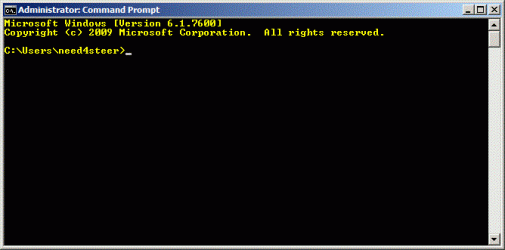
This is how the administrator command prompt lookes like:
cmd.gif
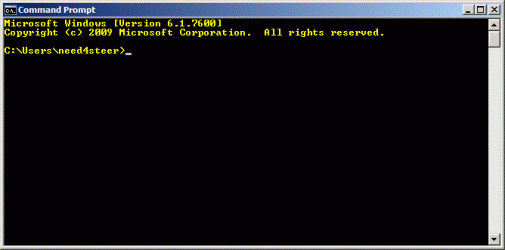
You can see that now the path is C:\Windows\system32 and not C:\Users\need4steer. I don't have "elevated" in the title though.

This is how mine (need4steer) command prompt lookes like:
cmd2.gif
You can see in the title that C:\Windows\system32\cmd.exe is still there.

I disable the "Run as administrator" option in the command prompt options:
cmd4.gif

This is how mine (need4steer) command prompt lookes like now:
cmd3.gif
So now it's the default command prompt with "command prompt" in the title.

It apears that I can't get a command prompt with "elevated" in the title...
I tried all the methods in this post.
Any suggestions?
 

My Computer

OS
Windows 7 Ultimate 32bit
CPU
AMD Phenom II x4 965 3.4GHz
Motherboard
Gigabyte GA-890FXA-UD5 rev2.0
Memory
G.SKILL F3-16000CL8D-4GBPIS (2GBx2)
Graphics Card(s)
Inno3d GTX480 1.5GB GDDR5
Monitor(s) Displays
LG FLATRON W2486L
Screen Resolution
1920x1080@60Hz
Hard Drives
Western Digital Caviar Black WD1002FAEX 1TB 64MB 7200RPM Sata III x3
PSU
Enermax MODU82+ 625W
Case
Thermaltake Element G Middle Tower
Need4steer,

There is no "elevated" in a elevated (Run as administrator) command prompt's title. Your top screenshot in the post above is a elevated command prompt.
 

My Computer

Computer type
PC/Desktop
Computer Manufacturer/Model Number
Self built custom
OS
64-bit Windows 11 Pro for Workstations
CPU
Intel i7-8700K OC'd to 5 GHz
Motherboard
ASUS ROG Maximus XI Formula Z390
Memory
64 GB (4x16GB) G.SKILL TridentZ RGB DDR4 3600 MHz
Graphics Card(s)
ASUS ROG-STRIX-GTX1080TI-O11G-GAMING
Sound Card
Integrated
Monitor(s) Displays
2 x Samsung Odyssey G7 27"
Screen Resolution
2560x1440
Hard Drives
1TB Samsung 990 PRO M.2,
4TB Samsung 990 PRO PRO M.2,
TerraMaster F8 SSD Plus NAS
PSU
Seasonic Prime Titanium 850W
Case
Thermaltake Core P3
Cooling
Corsair Hydro H115i
Keyboard
Logitech wireless K800
Mouse
Logitech MX Master 4
Internet Speed
2 Gb/s Download and 100 Mb/s Upload
Antivirus
Malwarebyte Anti-Malware Premium
Browser
Google Chrome
Other Info
Logitech Z625 speaker system,
Logitech BRIO 4K Pro webcam,
HP Color LaserJet Pro MFP M477fdn,
APC SMART-UPS RT 1000 XL - SURT1000XLI,
Galaxy S23 Plus phone
But in your 1st picture in this post there once was "elevated" in the elevated command prompt's title.

Anyway what do you think?
Should I just stay with the annoying UAC on and use elevated command prompt (without elevated in the title) or is it good enough to use the probably elevated (chkdsk /? ran ok) command prompt that has "Administrator: Command prompt" in the title?

BTW, I went back and disabled UAC disabled and checked "Run as administrator" option in the command prompt options and found that if I'm running the command prompt from a shortcut with or without right click --> run as administrator it is looking as before:
cmd1.gif

But if I'm running it via start --> run --> cmd or via "CTRL+SHIFT+ENTER" after I'm typing cmd in the start menu search bar I'm getting a command prompt with "Administrator: C:\Windows\system32\cmd.exe":
cmd2.gif

So the title depends on where and how you started the command prompt.
Anyway I'm truly believe that the command prompt it elaveted. I only wish I could get to the mode in which the word "elevated" shows in the title - just to be sure.

EDIT
OMG I got it.
I decided to start to read this post from the begining because I thought I must have missed something - AND I DID!!!.
In the begining of this post, In step 1, you posted a link to another post:
http://www.sevenforums.com/tutorials/3718-elevated-command-prompt-shortcut.html.
I bypassed it because I didn't wanted a made shortcut.
Anyway I decided now to try and download it, but suddenly I discovered another tutorial from you. In this tutorial you wrote: NOTE: You can type in any name that you would like to use for the shortcut though.

So I did it:
cmd3.gif

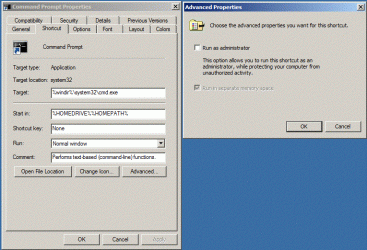
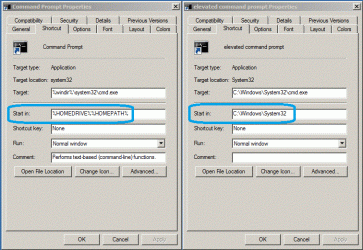
It is just a title. That's all. And as for the path - this is the "start in" property in the command prompt properties that should be configured to "C:\Windows\System32".
cmd4.gif
On the right is my old shortcut, where "start in" is configured to the user profile home folder (in my case %HOMEDRIVE%=C:\ and %HOMEPATH%=\Users\need4steer - which makes C:\Users\need4steer).
On the left is the shortcut I created as shown in your other tutorial - http://www.sevenforums.com/tutorials/3718-elevated-command-prompt-shortcut.html, and which I configured with the title "elevated command prompt".

So, Correct me if I'm wrong, but I think I finally got it:
The title could be whatever you want.
The "start in" property too.
It's running it as administrator in one of the methods mentioned at the head of this topic that makes the command prompt elevated, and it is elevated because the administrator user is running it.
And to sum it, the one symptom that is matters and ain't modified through all this topic is that the elevated command prompt should have "Administrator:" in the begining of the title - which indicates that the administrator user ran it.

Thanks a lot for your help and effort.
And I'm sorry for post #10, http://www.sevenforums.com/1037016-post10.html, in which I suggested method 2. I didn't saw that on your other turotial. I edited it with credit.

ZaLiTH, thanks a lot to you too. Appearantly you'll arrive to work and see that we figured it out somehow...
 
Last edited:

My Computer

OS
Windows 7 Ultimate 32bit
CPU
AMD Phenom II x4 965 3.4GHz
Motherboard
Gigabyte GA-890FXA-UD5 rev2.0
Memory
G.SKILL F3-16000CL8D-4GBPIS (2GBx2)
Graphics Card(s)
Inno3d GTX480 1.5GB GDDR5
Monitor(s) Displays
LG FLATRON W2486L
Screen Resolution
1920x1080@60Hz
Hard Drives
Western Digital Caviar Black WD1002FAEX 1TB 64MB 7200RPM Sata III x3
PSU
Enermax MODU82+ 625W
Case
Thermaltake Element G Middle Tower
Back
Top