Elevated Program Shortcut without UAC Prompt - Create

How to Create an Elevated Program Shortcut without a UAC Prompt in Windows


   Information
This will show you how to create an elevated "Run as administrator" shortcut of any installed program using Task Scheduler so that it will not give you a UAC prompt for permission when you start it while still having UAC turned on in Vista, Windows 7, and Windows 8.

In the tutorial, you will first create a new task, then a new shortcut to run the task. Afterwards, how to change the icon of the shortcut.

   Note
Special thanks to OEM for pointing this out, and the previous Vista version by DMEX.

   Warning


  • This shortcut and task can only be created and work while logged in as an administrator account.
  • This shortcut will not work in a standard user account.


Here's How:
1. Press the Windows + R keys to open the Run dialog, type taskschd.msc, and press Enter.
NOTE: This will open Task Scheduler. This file is located at:
C:\Windows\system32\taskschd.msc.

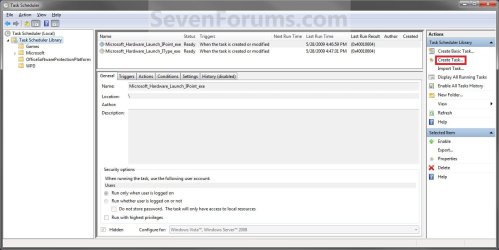
2. While having Task Scheduler Library selected in the left pane, click/tap on Create task in the far right pane. (see screenshot below)
Step1.jpg
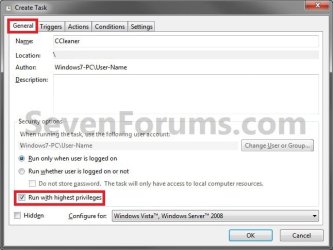
3. Under the General tab, type in the "Name" of the program you want to create this shortcut for. (see screenshot below)
NOTE: This will be the name of the task. As an example, I will use CCleaner for that program. Make note of this name, you will need it later in step 12 and 14 below.
Step2.jpg
4. Check the Run with highest privileges box. (See screenshot below)
Step3.jpg
5. Click/tap on the Configure for drop down box to open it, and select Windows® 7, Windows Server™ 2008 R2 or the Windows you are currently in. (see screenshot above and below)
NOTE: This is like compatibility mode. If the program does not support running in Windows 7 normally, then you can select the OS that is does support running in instead to have it run in compatibility mode as if it was running in that OS instead of Windows 7.

Drop_Down_Box.jpg
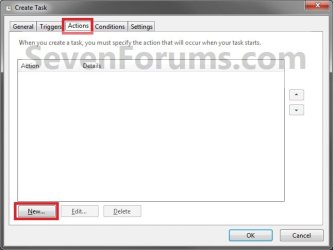
6. Click/tap on the Actions tab, then on the New button. (see screenshot below)
Step4.jpg
7. In the Program/script: box in the Actions tab, copy and paste the path below. (see screenshot below step 9)
NOTE: Thank you to chillz for the updated steps 7 and 8.
%windir%\System32\cmd.exe
8. In the Add arguments (optional): box in the Actions tab, type in the argument below. (see screenshot below step 9)

NOTE: Substitute Task Name in the argument below with the name you entered in step 3 (ex: CCleaner) within quotes, and substitute Full Path of Program in the argument below with the actual full path of the program's .exe file within quote.
/c start "Task Name" "Full Path of Program"


For example:

Code:
/c start "CCleaner" "C:\Program Files\CCleaner\CCleaner64.exe"
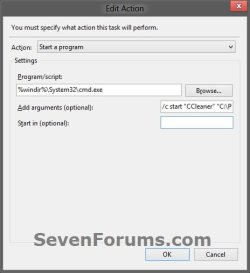
9. Click/tap on OK. (see screenshot below)
step7.jpg
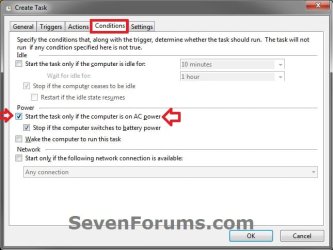
10. Click/tap on the Conditions tab, and uncheck the Stop if the computer switches to battery power box first, then uncheck the Start the task only if the computer is on AC power box. (see screenshots below)
NOTE: This step is mostly for laptops, so that you will be able to run the program when the laptop is running on battery power.
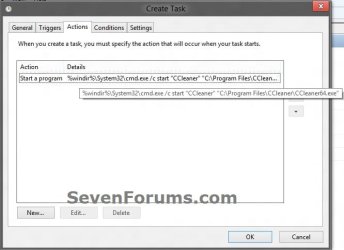
step8.jpg

Conditions.jpg

11. Click/tap on OK. (See screenshots above)

12. You will now see your new task created with the name (ex: CCleaner) you gave it in step 3. Close Task Scheduler. (see screenshot below)
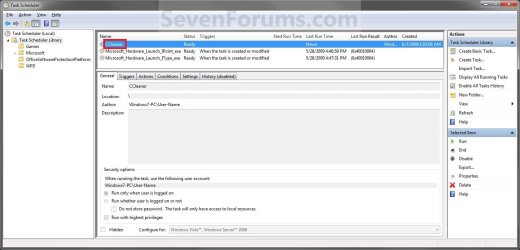
Step9.jpg
13. Right click or press and hold on an empty area of your desktop, then click/tap on New and Shortcut.

14. Type in the target below for the location field, then click/tap on the Next button. (see screenshot below)
NOTE: Subsitute task-name in the target with the name (ex: CCleaner) within quotes that you used in step 3.
schtasks /run /tn "task-name"

For example: For my task name CCleaner I used from step 3, I would type:
schtasks /run /tn "CCleaner"
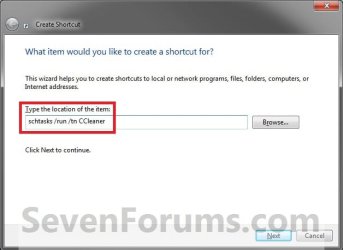
Step10.jpg
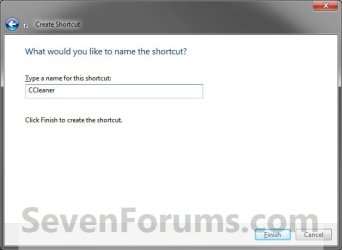
15. Type in a name you want for the shortcut (ex: CCleaner), then click/tap on the Finish button. (see screenshot below)
Step11.jpg
16. Right click on the new shortcut (ex: CCleaner) on the desktop, then click/tap on Properties.

17. Click/tap on the Shortcut tab, and on the Change Icon button. (see screenshot below)
Step12.jpg
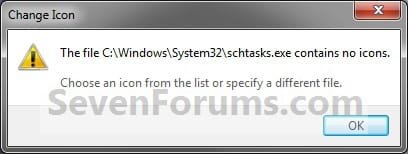
18. Click/tap on OK. (see screenshot below)
Step13.jpg
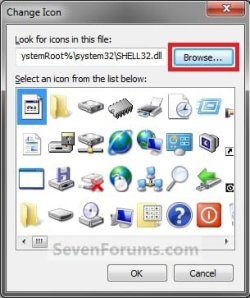
19. Click/tap on the Browse button. (see screenshot below)
Step14.jpg
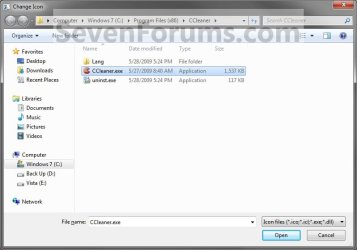
20. Navigate to the .exe file of the program that you have created this shortcut with, select it, and click/tap on Open. (see screenshot below)
NOTE: If you have a icon of your own that you would prefer to use instead, then navigate to where you have that icon saved at instead.
Step15.jpg
21. Select the icon you want for the shortcut, then click/tap on OK. (see screenshot below)
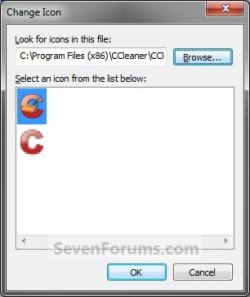
Step16.jpg
22. Click/tap on OK. (see screenshot below)
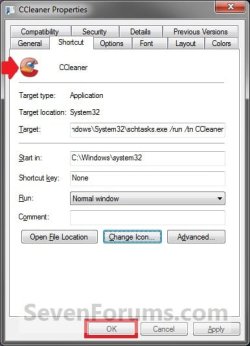
Step17.jpg
23. You can now use this elevated shortcut to run at startup in your "Startup" folder, run at startup as a task, Pin to Start Menu, Pin to Taskbar, assign a keyboard shortcut, or move to where you like for easy use.

24. When you run this new elevated shortcut, you will now no longer have to click/tap on YES to approve the UAC prompt to allow the program run as administrator.


   Tip
To Undo and Remove this Task:
  • While having Task Scheduler Library selected in the left pane, right click on the task in the right pane that you created in step 12, then click on Delete and Yes to approve.
  • Delete the shortcut.
That's it,
Shawn


Last edited:
Out of sheer laziness, combined with the fact that since an almost fatal automobile accident has left my hands very shaky, I am aware of my inability to type accurately. So I dragged taskschd.msc onto a shortcut on my desktop.

My first time though, on step 12, I didn't realize that there were spaces after schtasks and run. A comment there might help for people using this tutorial for the first time. I managed to not browse when the screen said browse after step 11, but ten years ago I would have thought that easy enough and messed up. I copied the tutorial into word and step 11 ended one page while step 12 started the next, so I started to browse and then thought to look for step 12. Fortunately most people don't use a size 14 font Times New Roman) and when I looked at it in size 12 in both Times New Roman and Rial at 12-point steps 11 and 12 were together on the same page. I'm 63 and my vision is no longe correctable to 20-20, hence the font size of 14.

It is a shame that you can't keep the original icon but that's life.

It's still the best tutorial that I've read and I've certainly read out of at least 100, downloading the approximately twenty that I expect to use. It really makes life a lot easier.

Cheers,

Gerry
 

My Computer

Computer Manufacturer/Model Number
Home Made
OS
Windows 7 Home Premium
CPU
Intel I5Core750
Motherboard
Gigabyte P55A-UD3
Memory
6 GB Corsair DDR3 1600
Graphics Card(s)
Zotac GeForce 9600 GT
Sound Card
7:1 on otherboard
Monitor(s) Displays
ViewSonic VG2030m (one of the last 4 by 3 monitors)
Screen Resolution
1400 by 1050 (Native Resolution)
Hard Drives
2 500 GB Western Digital SATA
PSU
Thermaltake TR2 500W
Case
Cooler Master Elite 332
Cooling
Thermaltake SpinQ
Keyboard
400 v1.0
Mouse
Logitech LX-8
Internet Speed
9.82 Mbs download speed 1.87 Mbs Upload speed
Other Info
Monochrome Laser Printer -HP 1020
Ink-Jet color all in one without fax - Canon Pixma MP 170
500GB external portable hard drive - Iomega
Thank you Gerry. I have added a note about the spacing in the command.

Did the program's exe file not have a icon that you could select to use for the shortcut in steps 14-20?
 

My Computer

Computer type
PC/Desktop
Computer Manufacturer/Model Number
Self built custom
OS
64-bit Windows 11 Pro for Workstations
CPU
Intel i7-8700K OC'd to 5 GHz
Motherboard
ASUS ROG Maximus XI Formula Z390
Memory
64 GB (4x16GB) G.SKILL TridentZ RGB DDR4 3600 MHz
Graphics Card(s)
ASUS ROG-STRIX-GTX1080TI-O11G-GAMING
Sound Card
Integrated
Monitor(s) Displays
2 x Samsung Odyssey G7 27"
Screen Resolution
2560x1440
Hard Drives
1TB Samsung 990 PRO M.2,
4TB Samsung 990 PRO PRO M.2,
TerraMaster F8 SSD Plus NAS
PSU
Seasonic Prime Titanium 850W
Case
Thermaltake Core P3
Cooling
Corsair Hydro H115i
Keyboard
Logitech wireless K800
Mouse
Logitech MX Master 4
Internet Speed
2 Gb/s Download and 100 Mb/s Upload
Antivirus
Malwarebyte Anti-Malware Premium
Browser
Google Chrome
Other Info
Logitech Z625 speaker system,
Logitech BRIO 4K Pro webcam,
HP Color LaserJet Pro MFP M477fdn,
APC SMART-UPS RT 1000 XL - SURT1000XLI,
Galaxy S23 Plus phone
I could change icons, but I could not (perhaps through ignorance) use the original icon, so my CCleaner icons doesn't remotely resemble the original. I know what it is, but I'd rather have the original icon. BTW, if you make a folder of these icons and then close it, they cease to work and you have to repeat the process of making new icons. That;s why my shortcut key to CCleaner is now Ctrl-Alt-K instead of the original Ctrl-Alt-C. I had hoped to conserve desktop space by closing a folder of icons, but had the sense to start with one icon, and when I reopened the folder neither the shortcut icon nor the shortcut key combination did a thing.
 

My Computer

Computer Manufacturer/Model Number
Home Made
OS
Windows 7 Home Premium
CPU
Intel I5Core750
Motherboard
Gigabyte P55A-UD3
Memory
6 GB Corsair DDR3 1600
Graphics Card(s)
Zotac GeForce 9600 GT
Sound Card
7:1 on otherboard
Monitor(s) Displays
ViewSonic VG2030m (one of the last 4 by 3 monitors)
Screen Resolution
1400 by 1050 (Native Resolution)
Hard Drives
2 500 GB Western Digital SATA
PSU
Thermaltake TR2 500W
Case
Cooler Master Elite 332
Cooling
Thermaltake SpinQ
Keyboard
400 v1.0
Mouse
Logitech LX-8
Internet Speed
9.82 Mbs download speed 1.87 Mbs Upload speed
Other Info
Monochrome Laser Printer -HP 1020
Ink-Jet color all in one without fax - Canon Pixma MP 170
500GB external portable hard drive - Iomega
Gerry,

Yeah, if you move or delete the icon that you selected to use for a shortcut, it will no longer be available to be used by the shortcut.

For CCleaner, the you can browse to the C:\Program Files\CCleaner\CCleaner.exe location to select the CCleaner.exe file to have the original icon for the shortcut. Was it not like how it looked in steps 18 and 19 to select the CCleaner icon?
 

My Computer

Computer type
PC/Desktop
Computer Manufacturer/Model Number
Self built custom
OS
64-bit Windows 11 Pro for Workstations
CPU
Intel i7-8700K OC'd to 5 GHz
Motherboard
ASUS ROG Maximus XI Formula Z390
Memory
64 GB (4x16GB) G.SKILL TridentZ RGB DDR4 3600 MHz
Graphics Card(s)
ASUS ROG-STRIX-GTX1080TI-O11G-GAMING
Sound Card
Integrated
Monitor(s) Displays
2 x Samsung Odyssey G7 27"
Screen Resolution
2560x1440
Hard Drives
1TB Samsung 990 PRO M.2,
4TB Samsung 990 PRO PRO M.2,
TerraMaster F8 SSD Plus NAS
PSU
Seasonic Prime Titanium 850W
Case
Thermaltake Core P3
Cooling
Corsair Hydro H115i
Keyboard
Logitech wireless K800
Mouse
Logitech MX Master 4
Internet Speed
2 Gb/s Download and 100 Mb/s Upload
Antivirus
Malwarebyte Anti-Malware Premium
Browser
Google Chrome
Other Info
Logitech Z625 speaker system,
Logitech BRIO 4K Pro webcam,
HP Color LaserJet Pro MFP M477fdn,
APC SMART-UPS RT 1000 XL - SURT1000XLI,
Galaxy S23 Plus phone
Shawn,

I tried what you suggested and it worked fine 8 out of 9 times. I was so happy to have the shortcuts on the desktop that I really didn't worry about them. It really is quite trivial...if you know about it :). Spyware Doctor gave me a great deal of trouble because none of the executable files had the standard SD icon, nor did any one of them clearly stick out as the software execution file. pcts.Gui.exe just didn't seen any more logical than a few others. So I uninstalled and reinstalled Spyware Doctor checking the box for desktop shortcut. Once I knew that was the executive file to select it was again trivial. SO now I'm 9 for 9.

Thanks,

Gerry
 

My Computer

Computer Manufacturer/Model Number
Home Made
OS
Windows 7 Home Premium
CPU
Intel I5Core750
Motherboard
Gigabyte P55A-UD3
Memory
6 GB Corsair DDR3 1600
Graphics Card(s)
Zotac GeForce 9600 GT
Sound Card
7:1 on otherboard
Monitor(s) Displays
ViewSonic VG2030m (one of the last 4 by 3 monitors)
Screen Resolution
1400 by 1050 (Native Resolution)
Hard Drives
2 500 GB Western Digital SATA
PSU
Thermaltake TR2 500W
Case
Cooler Master Elite 332
Cooling
Thermaltake SpinQ
Keyboard
400 v1.0
Mouse
Logitech LX-8
Internet Speed
9.82 Mbs download speed 1.87 Mbs Upload speed
Other Info
Monochrome Laser Printer -HP 1020
Ink-Jet color all in one without fax - Canon Pixma MP 170
500GB external portable hard drive - Iomega
That's great news Gerry. In addition, you can right click on the program's normal shortcut, then click on the "Shortcut" tab, and "Change icon" button to also see what the path is for the icon it uses. This way you can use it as well for the elevated shortcut.
 

My Computer

Computer type
PC/Desktop
Computer Manufacturer/Model Number
Self built custom
OS
64-bit Windows 11 Pro for Workstations
CPU
Intel i7-8700K OC'd to 5 GHz
Motherboard
ASUS ROG Maximus XI Formula Z390
Memory
64 GB (4x16GB) G.SKILL TridentZ RGB DDR4 3600 MHz
Graphics Card(s)
ASUS ROG-STRIX-GTX1080TI-O11G-GAMING
Sound Card
Integrated
Monitor(s) Displays
2 x Samsung Odyssey G7 27"
Screen Resolution
2560x1440
Hard Drives
1TB Samsung 990 PRO M.2,
4TB Samsung 990 PRO PRO M.2,
TerraMaster F8 SSD Plus NAS
PSU
Seasonic Prime Titanium 850W
Case
Thermaltake Core P3
Cooling
Corsair Hydro H115i
Keyboard
Logitech wireless K800
Mouse
Logitech MX Master 4
Internet Speed
2 Gb/s Download and 100 Mb/s Upload
Antivirus
Malwarebyte Anti-Malware Premium
Browser
Google Chrome
Other Info
Logitech Z625 speaker system,
Logitech BRIO 4K Pro webcam,
HP Color LaserJet Pro MFP M477fdn,
APC SMART-UPS RT 1000 XL - SURT1000XLI,
Galaxy S23 Plus phone
I had already deleted the normal icon. I had to reinstall to get one and trace back to see which of the executable files was the "the executable". Then I went through the process for overruling UAC, and it was only then that I erased the generic shortcut icon.
 

My Computer

Computer Manufacturer/Model Number
Home Made
OS
Windows 7 Home Premium
CPU
Intel I5Core750
Motherboard
Gigabyte P55A-UD3
Memory
6 GB Corsair DDR3 1600
Graphics Card(s)
Zotac GeForce 9600 GT
Sound Card
7:1 on otherboard
Monitor(s) Displays
ViewSonic VG2030m (one of the last 4 by 3 monitors)
Screen Resolution
1400 by 1050 (Native Resolution)
Hard Drives
2 500 GB Western Digital SATA
PSU
Thermaltake TR2 500W
Case
Cooler Master Elite 332
Cooling
Thermaltake SpinQ
Keyboard
400 v1.0
Mouse
Logitech LX-8
Internet Speed
9.82 Mbs download speed 1.87 Mbs Upload speed
Other Info
Monochrome Laser Printer -HP 1020
Ink-Jet color all in one without fax - Canon Pixma MP 170
500GB external portable hard drive - Iomega
Ah, ok.
 

My Computer

Computer type
PC/Desktop
Computer Manufacturer/Model Number
Self built custom
OS
64-bit Windows 11 Pro for Workstations
CPU
Intel i7-8700K OC'd to 5 GHz
Motherboard
ASUS ROG Maximus XI Formula Z390
Memory
64 GB (4x16GB) G.SKILL TridentZ RGB DDR4 3600 MHz
Graphics Card(s)
ASUS ROG-STRIX-GTX1080TI-O11G-GAMING
Sound Card
Integrated
Monitor(s) Displays
2 x Samsung Odyssey G7 27"
Screen Resolution
2560x1440
Hard Drives
1TB Samsung 990 PRO M.2,
4TB Samsung 990 PRO PRO M.2,
TerraMaster F8 SSD Plus NAS
PSU
Seasonic Prime Titanium 850W
Case
Thermaltake Core P3
Cooling
Corsair Hydro H115i
Keyboard
Logitech wireless K800
Mouse
Logitech MX Master 4
Internet Speed
2 Gb/s Download and 100 Mb/s Upload
Antivirus
Malwarebyte Anti-Malware Premium
Browser
Google Chrome
Other Info
Logitech Z625 speaker system,
Logitech BRIO 4K Pro webcam,
HP Color LaserJet Pro MFP M477fdn,
APC SMART-UPS RT 1000 XL - SURT1000XLI,
Galaxy S23 Plus phone
Even though I have an old fashioned (4 by 3) screen with a 20" diagonal measure I find that I like to get rid of icons asap, just so that I can find space for the new ones. I already have the smallest icon size of four so short of using a quick launch bar and pinning it to the task bar, I have little choice but to minimize the number of icons, or drag more icons to the task bar.
 

My Computer

Computer Manufacturer/Model Number
Home Made
OS
Windows 7 Home Premium
CPU
Intel I5Core750
Motherboard
Gigabyte P55A-UD3
Memory
6 GB Corsair DDR3 1600
Graphics Card(s)
Zotac GeForce 9600 GT
Sound Card
7:1 on otherboard
Monitor(s) Displays
ViewSonic VG2030m (one of the last 4 by 3 monitors)
Screen Resolution
1400 by 1050 (Native Resolution)
Hard Drives
2 500 GB Western Digital SATA
PSU
Thermaltake TR2 500W
Case
Cooler Master Elite 332
Cooling
Thermaltake SpinQ
Keyboard
400 v1.0
Mouse
Logitech LX-8
Internet Speed
9.82 Mbs download speed 1.87 Mbs Upload speed
Other Info
Monochrome Laser Printer -HP 1020
Ink-Jet color all in one without fax - Canon Pixma MP 170
500GB external portable hard drive - Iomega
Mr. Brian,

Thank you! I have copied your post to a Word file.

Gerry
 

My Computer

Computer Manufacturer/Model Number
Home Made
OS
Windows 7 Home Premium
CPU
Intel I5Core750
Motherboard
Gigabyte P55A-UD3
Memory
6 GB Corsair DDR3 1600
Graphics Card(s)
Zotac GeForce 9600 GT
Sound Card
7:1 on otherboard
Monitor(s) Displays
ViewSonic VG2030m (one of the last 4 by 3 monitors)
Screen Resolution
1400 by 1050 (Native Resolution)
Hard Drives
2 500 GB Western Digital SATA
PSU
Thermaltake TR2 500W
Case
Cooler Master Elite 332
Cooling
Thermaltake SpinQ
Keyboard
400 v1.0
Mouse
Logitech LX-8
Internet Speed
9.82 Mbs download speed 1.87 Mbs Upload speed
Other Info
Monochrome Laser Printer -HP 1020
Ink-Jet color all in one without fax - Canon Pixma MP 170
500GB external portable hard drive - Iomega
Hello Shawn.


I figured as much as I suggest this to people I may as well give it a go, works a treat mate.

Thanks! :thumbsup:
 

My Computer

Computer Manufacturer/Model Number
* BFK Customs *
OS
W 7 64-bit Ultimate
CPU
Intel Q9550 Yorkfield
Motherboard
ASUS P5Q Pro
Memory
8GB Dominator 8500C5D
Graphics Card(s)
ATI : XFX 5870
Sound Card
Realtek HD Audio 7-1
Monitor(s) Displays
1x 47" LCD HDMI & 3x 26" LCD HDMI
Screen Resolution
1920x1080P & 1920x1200
Hard Drives
1x 80GB Intel X25-M G2 SSD : 1x 500GB & 1x 640GB WD Caviar Black(s)
PSU
Corsair 620HX
Case
Cooler Master RC-690
Cooling
Tuniq Tower 120, 2x 140mm and 3x 120mm case fans
Keyboard
Microsoft 500
Mouse
Razer Diamondback 3G
Internet Speed
14 Mb/s
Other Info
1x Koutech 3Gb/s SATA HDD Hot Swap Rack
You're welcome Ted, and thank you. :)
 

My Computer

Computer type
PC/Desktop
Computer Manufacturer/Model Number
Self built custom
OS
64-bit Windows 11 Pro for Workstations
CPU
Intel i7-8700K OC'd to 5 GHz
Motherboard
ASUS ROG Maximus XI Formula Z390
Memory
64 GB (4x16GB) G.SKILL TridentZ RGB DDR4 3600 MHz
Graphics Card(s)
ASUS ROG-STRIX-GTX1080TI-O11G-GAMING
Sound Card
Integrated
Monitor(s) Displays
2 x Samsung Odyssey G7 27"
Screen Resolution
2560x1440
Hard Drives
1TB Samsung 990 PRO M.2,
4TB Samsung 990 PRO PRO M.2,
TerraMaster F8 SSD Plus NAS
PSU
Seasonic Prime Titanium 850W
Case
Thermaltake Core P3
Cooling
Corsair Hydro H115i
Keyboard
Logitech wireless K800
Mouse
Logitech MX Master 4
Internet Speed
2 Gb/s Download and 100 Mb/s Upload
Antivirus
Malwarebyte Anti-Malware Premium
Browser
Google Chrome
Other Info
Logitech Z625 speaker system,
Logitech BRIO 4K Pro webcam,
HP Color LaserJet Pro MFP M477fdn,
APC SMART-UPS RT 1000 XL - SURT1000XLI,
Galaxy S23 Plus phone
this works for me. but i do have a question,, do you also see a black window that looks like a command prompt then disappears before the program starts? anyone? thank you
 

My Computer

OS
Windows s7ven
Hello s7ven.


Yes, that's just the order of things; it's the program/app getting elevated so it can run.
 

My Computer

Computer Manufacturer/Model Number
* BFK Customs *
OS
W 7 64-bit Ultimate
CPU
Intel Q9550 Yorkfield
Motherboard
ASUS P5Q Pro
Memory
8GB Dominator 8500C5D
Graphics Card(s)
ATI : XFX 5870
Sound Card
Realtek HD Audio 7-1
Monitor(s) Displays
1x 47" LCD HDMI & 3x 26" LCD HDMI
Screen Resolution
1920x1080P & 1920x1200
Hard Drives
1x 80GB Intel X25-M G2 SSD : 1x 500GB & 1x 640GB WD Caviar Black(s)
PSU
Corsair 620HX
Case
Cooler Master RC-690
Cooling
Tuniq Tower 120, 2x 140mm and 3x 120mm case fans
Keyboard
Microsoft 500
Mouse
Razer Diamondback 3G
Internet Speed
14 Mb/s
Other Info
1x Koutech 3Gb/s SATA HDD Hot Swap Rack

My Computer

Computer Manufacturer/Model Number
* BFK Customs *
OS
W 7 64-bit Ultimate
CPU
Intel Q9550 Yorkfield
Motherboard
ASUS P5Q Pro
Memory
8GB Dominator 8500C5D
Graphics Card(s)
ATI : XFX 5870
Sound Card
Realtek HD Audio 7-1
Monitor(s) Displays
1x 47" LCD HDMI & 3x 26" LCD HDMI
Screen Resolution
1920x1080P & 1920x1200
Hard Drives
1x 80GB Intel X25-M G2 SSD : 1x 500GB & 1x 640GB WD Caviar Black(s)
PSU
Corsair 620HX
Case
Cooler Master RC-690
Cooling
Tuniq Tower 120, 2x 140mm and 3x 120mm case fans
Keyboard
Microsoft 500
Mouse
Razer Diamondback 3G
Internet Speed
14 Mb/s
Other Info
1x Koutech 3Gb/s SATA HDD Hot Swap Rack
Great tutorial but I have a question.
Is there a way to merge icon of this shortcut with icon of the program being run on taskbar (these are two different applications obviously sou their icons display separately)?
It's not a big deal but it's a bit annoying.
Thank you very much anyway.
 

My Computer

OS
Windows 7
Hello BlastFX, welcome to Seven Forums!


As there is a difference in the 2 icons, the first starts or activates the program and the second, an indication the program is active, I don't believe there's anything to do to make it happen; let's see if anyone has other input on this question.
 

My Computer

Computer Manufacturer/Model Number
* BFK Customs *
OS
W 7 64-bit Ultimate
CPU
Intel Q9550 Yorkfield
Motherboard
ASUS P5Q Pro
Memory
8GB Dominator 8500C5D
Graphics Card(s)
ATI : XFX 5870
Sound Card
Realtek HD Audio 7-1
Monitor(s) Displays
1x 47" LCD HDMI & 3x 26" LCD HDMI
Screen Resolution
1920x1080P & 1920x1200
Hard Drives
1x 80GB Intel X25-M G2 SSD : 1x 500GB & 1x 640GB WD Caviar Black(s)
PSU
Corsair 620HX
Case
Cooler Master RC-690
Cooling
Tuniq Tower 120, 2x 140mm and 3x 120mm case fans
Keyboard
Microsoft 500
Mouse
Razer Diamondback 3G
Internet Speed
14 Mb/s
Other Info
1x Koutech 3Gb/s SATA HDD Hot Swap Rack
Shawn.

That was an excellent addition to your tutorial. It's just a shame that I can't then put them all in a folder and remove the icons from the desktop by closing the folder. I don't suppose that has changed?

Gerry
 

My Computer

Computer Manufacturer/Model Number
Home Made
OS
Windows 7 Home Premium
CPU
Intel I5Core750
Motherboard
Gigabyte P55A-UD3
Memory
6 GB Corsair DDR3 1600
Graphics Card(s)
Zotac GeForce 9600 GT
Sound Card
7:1 on otherboard
Monitor(s) Displays
ViewSonic VG2030m (one of the last 4 by 3 monitors)
Screen Resolution
1400 by 1050 (Native Resolution)
Hard Drives
2 500 GB Western Digital SATA
PSU
Thermaltake TR2 500W
Case
Cooler Master Elite 332
Cooling
Thermaltake SpinQ
Keyboard
400 v1.0
Mouse
Logitech LX-8
Internet Speed
9.82 Mbs download speed 1.87 Mbs Upload speed
Other Info
Monochrome Laser Printer -HP 1020
Ink-Jet color all in one without fax - Canon Pixma MP 170
500GB external portable hard drive - Iomega
Back
Top