enabling security features in IE8

svibuk

New member
Local time
1:00 PM
Messages
11
i hve put this yhread in windows 2008 but i was directed here saying that the issues wuld be solved here as the architecture is same. i hope the issue wuld be solved


i have installled win 2008 with IE 8 server in my server but facing few prblm in setup 1)i need to make the web application exucute but when i execute the application the page doesnot get displayed reasons unknwn but my javascript needs to be enabled which i tried but my custom button in sceurity is disabledi tried registry (regedit) but was not able to proceed further as there was no Internet Explorer option in Microsoft2)prior to win 2008 installation i culd have screen resoultion greater than 1024 but now that the last option , i am not able to change the resolution further than 10243) i am not able to set the fonts & over all windows in terms of layout . do i need any drivers??the taskbar & the icons on it appears to be largerlooking forward to normalize it so that i culd make my web application working normally
i have set ip IIS 7.5 in win 2008 but the page web page doesn't seem to be working

i need to enable custom level so that i can enable javascript & active x components to enable my web application to open in IE
 

My Computer My Computer

OS
64 bit windows

My Computer My Computer

Computer Manufacturer/Model Number
Compaq Desktop
OS
Windows 7 Ultimate x64
CPU
AMD Sempron Dual Core
Memory
3GB
Graphics Card(s)
NVIDIA GeForce 6150SE nForce 430
Screen Resolution
1024x768
Hard Drives
150GB Sata
hi firstly thanks for not redirecting me to any other location
seconndaly i have installed java framework but nit got any solution
i hope u hve got the problematic issue
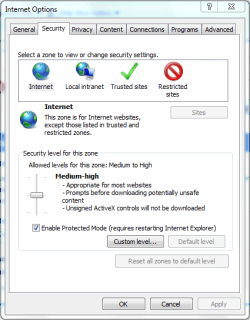
in IE click tools / internet options
select security / internet
in that u shld be able to change the setting & enable java scripting
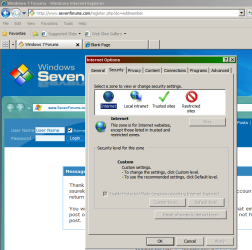
but as my custom level button is disabled i am not able to go further
its not that java shld be installed
hope i get the solution for enabling the custom level button & enable javascrpt for futher things
 

My Computer My Computer

OS
64 bit windows

My Computer My Computer

Computer Manufacturer/Model Number
Compaq Desktop
OS
Windows 7 Ultimate x64
CPU
AMD Sempron Dual Core
Memory
3GB
Graphics Card(s)
NVIDIA GeForce 6150SE nForce 430
Screen Resolution
1024x768
Hard Drives
150GB Sata
hi attached screen shot in this customlevel is disabled
 

Attachments

  • IE8screenshot.png
    IE8screenshot.png
    41 KB · Views: 6

My Computer My Computer

OS
64 bit windows
This issue can occur if Internet Explorer Enhanced Security Configuration is enabled.

Use the following method to disable it: Open Server Manager, click Configure IE ESC. Select Off for Administrators and click OK
 

My Computer My Computer

Computer Manufacturer/Model Number
Compaq Desktop
OS
Windows 7 Ultimate x64
CPU
AMD Sempron Dual Core
Memory
3GB
Graphics Card(s)
NVIDIA GeForce 6150SE nForce 430
Screen Resolution
1024x768
Hard Drives
150GB Sata
where is Configure IE ESC
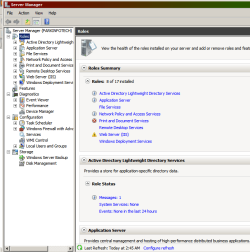
i opened server manager
in that i have 5 lists
Roles
Features
Diagnostic
Configuration
Storgae
in Configuration

task scheduler
Windows firewall wih ..
servies
WMI control
Local user & groups
 

Attachments

  • servermanager.png
    servermanager.png
    28 KB · Views: 25
Last edited:

My Computer My Computer

OS
64 bit windows
Try the following...

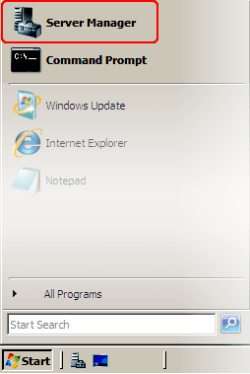
1, Click Start and select Server Manager
ws2008_startservermgr2.png

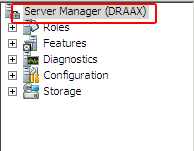
2, When the Server Manager window appears, go to the left pane and select the root of the folder tree
ws2008_rootsvrmgr.png

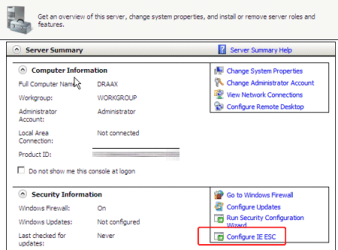
3, On the right, go to the Security Information section and click the Configure IE ESC link
ws2008_srvrmgrieesc2.png

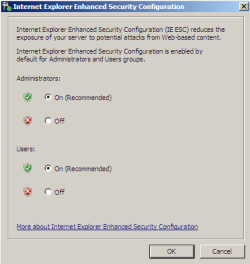
4, The Internet Explorer Enhanced Security Configuration window will appear. Use the corresponding radio buttons to disable IE ESC for Administrators and Users
ws2008_iesecconfig.png

5, Click OK

Now try and access your IE security settings.
 

My Computer My Computer

Computer Manufacturer/Model Number
Compaq Desktop
OS
Windows 7 Ultimate x64
CPU
AMD Sempron Dual Core
Memory
3GB
Graphics Card(s)
NVIDIA GeForce 6150SE nForce 430
Screen Resolution
1024x768
Hard Drives
150GB Sata
thanks a lot .
at last with ur help i got teh custome level enabled
now i can check ahead
thanks a lot once again
other i wuld have been just seraching around and around

culd i ask u few more issues related to windows

1 as i have enabled scripting for java applets enabled but still my web application in not getting opened in IE 8 it gets opened in firefox
i still not knw where the issue is

2 reg setting / adding screen resolution currently only (1024)& customizing the the layout
 

My Computer My Computer

OS
64 bit windows
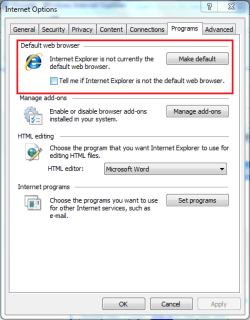
Under Internet Options in Internet Explorer > Tools, click the Programs tab and click the Make Default button to see if that does the trick.

IE Programs.PNG
 

My Computer My Computer

Computer Manufacturer/Model Number
Compaq Desktop
OS
Windows 7 Ultimate x64
CPU
AMD Sempron Dual Core
Memory
3GB
Graphics Card(s)
NVIDIA GeForce 6150SE nForce 430
Screen Resolution
1024x768
Hard Drives
150GB Sata
I'm glad the 1st issue is sorted :D
 

My Computer My Computer

Computer Manufacturer/Model Number
Compaq Desktop
OS
Windows 7 Ultimate x64
CPU
AMD Sempron Dual Core
Memory
3GB
Graphics Card(s)
NVIDIA GeForce 6150SE nForce 430
Screen Resolution
1024x768
Hard Drives
150GB Sata
i hve already done that & was checking it just says connecting ......
i think IE is not able to connect to local host of IIS 7.5 ( i suppose)
not sure whts cauisng the page block
but the same page is seen in firefox

i am once gain thankful for explaining the things so efficiently
 

My Computer My Computer

OS
64 bit windows
Have you tried uninstalling FF to see if IIS defaults back to IE?
 

My Computer My Computer

Computer Manufacturer/Model Number
Compaq Desktop
OS
Windows 7 Ultimate x64
CPU
AMD Sempron Dual Core
Memory
3GB
Graphics Card(s)
NVIDIA GeForce 6150SE nForce 430
Screen Resolution
1024x768
Hard Drives
150GB Sata
initally i just had IE , but as my web application was not getting displayed in IE , i installed firefox to check if the web application is working
do u still think i need to unistall firefox
in my earlier OS ie win XP alos i had both IE & FF
IE was my default browser & FF a stand by

the IE that i have now has got installed with OS installation . do i need to reinstall IE 8??
i am not sure wht the issue & as to why my application is not working on IE
is it windows prblm, IE prblm or, my application issue
 

My Computer My Computer

OS
64 bit windows
It's worth trying to uninstall FF then if it still don't work you can re-install it while we work on a solution.
   Note
Download and save the install files for FF here before uninstalling
 

My Computer My Computer

Computer Manufacturer/Model Number
Compaq Desktop
OS
Windows 7 Ultimate x64
CPU
AMD Sempron Dual Core
Memory
3GB
Graphics Card(s)
NVIDIA GeForce 6150SE nForce 430
Screen Resolution
1024x768
Hard Drives
150GB Sata
I've got to log off for a few hours, hopefully soneone else may be able to carry on the assistance. Good news it the initial problem is solved :D
 

My Computer My Computer

Computer Manufacturer/Model Number
Compaq Desktop
OS
Windows 7 Ultimate x64
CPU
AMD Sempron Dual Core
Memory
3GB
Graphics Card(s)
NVIDIA GeForce 6150SE nForce 430
Screen Resolution
1024x768
Hard Drives
150GB Sata
ok

i hope it does not cause any issues
one more thing i wuld like to tell is that other than my web application there are many sites which are not getting opened in IE but gets opened in firefox

all this issues started after i installed the new OS 2008 server

some websites gets displayed but buttons doesnot get clciked in IE & so on
i hope u get some idea abt the blockage

i have configured IIS so that the web application can be view in LAN
from other systems the same application frm my system gets displayed in IE
 
Last edited:

My Computer My Computer

OS
64 bit windows
hello the issue is still pending i checked frm all my possible ends
the web application is not working in IE

& abt the screen resolution issue
 

My Computer My Computer

OS
64 bit windows
Back
Top