
Error in Non-Plug and Play Drivers

melbourne47

New member
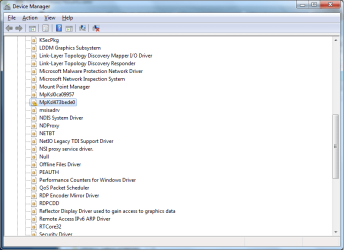
I noticed that whenever my computer starts up windows, I hear 2 (sometimes 3) "default beep"s of windows... So I started checking and encountered a problem in the Non-Plug and Play Drivers section the device manager... I don't know what that driver is for... What should I do with it? Thanks
 

Attachments
  • error.png
    error.png
    81.5 KB · Views: 163

My Computer

OS
Windows 7 Professional
CPU
Intel Core 2 Quad Q9400
Motherboard
Asus P5Q
Memory
2 x 2G Kingston 800 Mhz
Graphics Card(s)
GTX 260
Hard Drives
Seagate 500G
PSU
Corsair HX620
Case
Antec 300
Hello Melbourne,

Everything MpKsl with 8 random letters and numbers following it belongs to Microsoft Security Essentials.

The beep you are referring to belongs to the BIOS which is capable of giving out differing Beeps to indicate if your hardware is ok or not. 1 beep being for ok

Have a look here I am guessing you have an AMI BIOS; Computer POST and beep codes
 

My Computer

Computer Manufacturer/Model Number
Something I threw together
OS
Windows 7 Ultimate x64
CPU
Intel Core i7-2600K
Motherboard
Asus P8P67
Memory
16 GB G Skill F3-10666 CL9D-4GBRL
Graphics Card(s)
ATI Radeon HD 6870
Sound Card
ATI Radeon HDMI / Realtek ALC892
Monitor(s) Displays
2 x 22" standard monitors / LG32LC56v TV to watch films
Screen Resolution
1920 x1080
Hard Drives
2 x OCZ Vertex2 111.79GB
3 x Samsung103SJ
1 x Samsung103UJ
1 x WD3200BEVT
1 x Hitachi5K320-160
PSU
Thermaltake Toughpower Cable Management 750W
Case
Antec 300
Cooling
Noctua NH-U12P SE2 and 5 120mm Case fans
Keyboard
Microsoft Comfort Curve Keyboard 2000
Mouse
Hama M3110 / Logitech M305
Internet Speed
16000
Other Info
I have also used Fedora, Suse, Ubuntu Linux
And all other Windows from 95 to date except ME
I tried uninstalling the driver and reinstalled MSSE... seems to have solved that part... but I still keep hearing the default beep... No it's not the BIOS beep.... I mean when I log in to windows, the "default beep" sound from the system sounds
 

My Computer

OS
Windows 7 Professional
CPU
Intel Core 2 Quad Q9400
Motherboard
Asus P5Q
Memory
2 x 2G Kingston 800 Mhz
Graphics Card(s)
GTX 260
Hard Drives
Seagate 500G
PSU
Corsair HX620
Case
Antec 300

My Computer

Computer Manufacturer/Model Number
Something I threw together
OS
Windows 7 Ultimate x64
CPU
Intel Core i7-2600K
Motherboard
Asus P8P67
Memory
16 GB G Skill F3-10666 CL9D-4GBRL
Graphics Card(s)
ATI Radeon HD 6870
Sound Card
ATI Radeon HDMI / Realtek ALC892
Monitor(s) Displays
2 x 22" standard monitors / LG32LC56v TV to watch films
Screen Resolution
1920 x1080
Hard Drives
2 x OCZ Vertex2 111.79GB
3 x Samsung103SJ
1 x Samsung103UJ
1 x WD3200BEVT
1 x Hitachi5K320-160
PSU
Thermaltake Toughpower Cable Management 750W
Case
Antec 300
Cooling
Noctua NH-U12P SE2 and 5 120mm Case fans
Keyboard
Microsoft Comfort Curve Keyboard 2000
Mouse
Hama M3110 / Logitech M305
Internet Speed
16000
Other Info
I have also used Fedora, Suse, Ubuntu Linux
And all other Windows from 95 to date except ME
Those beeps can come from any program that you have set to start from Windows. You can take the easy way out, and simply disable the Default beep in Sounds, or you will need to do as pooch suggested and do a clean boot to make sure that it is a startup program causing the problem. If it is, then you will have to juggle them around, one at a time, to determine which are the culprit(s).
 

My Computer

Computer Manufacturer/Model Number
DIY
OS
W7x64 Pro, SuSe 12.1/** W7 x64 Pro, XP MCE
CPU
Phenom II 1090T w/Noctua NH-D14 /**4400+ X2 w/CM Hyper TX 3
Motherboard
ASRock 890FX Deluxe 4/**A8N-SLI
Memory
2 x 2GB Patriot PGS34g1600LLKA/**4x1GB Corsair VS
Graphics Card(s)
EVGA GTX460 SC/**EVGA 8800GTS
Sound Card
Asus Xonar D2X/**Xonar D1
Monitor(s) Displays
Acer X233H, Dell E152FPc /**LG M237-WD
Screen Resolution
1920x1080 & 1024x768/**1980x1080
Hard Drives
WDC 2TB, 1.5TB, 1TB, 500GB,Seagate 500GB , Maxtor 80GB /**500GB Seagate & WDC 1TB Black
PSU
CM RS600 w/ APC BX1000G/**Antec 500 TP w/ APC BX1000
Case
HAF922/**Antec 1040IIB
Cooling
3x200mm, 1x140 and 1x120mm/**5x80mm fans
Keyboard
Logitech Media USB/**Saitek Eclipse
Mouse
Cordless Trackman Wheel/**Ditto
Internet Speed
3.3Mbps
Other Info
SB 560 5.1 w/ Sennheiser RS140/**Creative T20 speakers, Dvico FusionHDTV7 Gold RT, Cisco E3000, HP 5510V AIO, Linksys E3000, Belkin F5U237 hub and **F5D8055 adapter
(** = 2nd rig)
I've finally determined the culprit.... its EVGA Precision 2.0.3... I dunno why it has an error although there is no error showing the the event viewer... switched back to EVGA Precision 2.0.2.. and the beep was gone... Thanks for the advices :)
 

My Computer

OS
Windows 7 Professional
CPU
Intel Core 2 Quad Q9400
Motherboard
Asus P5Q
Memory
2 x 2G Kingston 800 Mhz
Graphics Card(s)
GTX 260
Hard Drives
Seagate 500G
PSU
Corsair HX620
Case
Antec 300
I've finally determined the culprit.... its EVGA Precision 2.0.3... I dunno why it has an error although there is no error showing the the event viewer... switched back to EVGA Precision 2.0.2.. and the beep was gone... Thanks for the advices :)
I am glad you have got it sorted :D sometimes the newest drivers are not always the best
 

My Computer

Computer Manufacturer/Model Number
Something I threw together
OS
Windows 7 Ultimate x64
CPU
Intel Core i7-2600K
Motherboard
Asus P8P67
Memory
16 GB G Skill F3-10666 CL9D-4GBRL
Graphics Card(s)
ATI Radeon HD 6870
Sound Card
ATI Radeon HDMI / Realtek ALC892
Monitor(s) Displays
2 x 22" standard monitors / LG32LC56v TV to watch films
Screen Resolution
1920 x1080
Hard Drives
2 x OCZ Vertex2 111.79GB
3 x Samsung103SJ
1 x Samsung103UJ
1 x WD3200BEVT
1 x Hitachi5K320-160
PSU
Thermaltake Toughpower Cable Management 750W
Case
Antec 300
Cooling
Noctua NH-U12P SE2 and 5 120mm Case fans
Keyboard
Microsoft Comfort Curve Keyboard 2000
Mouse
Hama M3110 / Logitech M305
Internet Speed
16000
Other Info
I have also used Fedora, Suse, Ubuntu Linux
And all other Windows from 95 to date except ME
Back
Top