Error message while detaching USB Datacard after "safe to remove"
Hi folks! I am back and i absolutely missed you. I was without a laptop all these months and have bought a Sony vaio C series VPCCB35FN just a few days back(will fill in the specs.,sorry about that)which came loaded with Windows Seven Home Premium 64-bit
Now here's the prob. I have a wireless USB datacard.After clicking on the "Safely remove......(as above title)" and getting the message"it is safe to remove the media".Once i physically detach the USB datacard, a message appears on the screen as--->This can cause damage to the USB media or the computer!Except for this ,the laptop is flawless,touchwood!
I look forward to your helpful advice and will be grateful for that.
thank you!
My Computer
At a glance
MS Windows 7 Home Premium 64-bit SP1IntelCore [email protected]; Sandy Bridge 32nm Tech.4096Mb RAM; Single ChannelDDR3@665MHz; DRAM F...AMD Radeon HD 6630M; GPU:Whistler;BIOS Core&m...
Dear friend,
Thanks but no such option on rt.clicking C drive in Computer.
My Computer
At a glance
MS Windows 7 Home Premium 64-bit SP1IntelCore [email protected]; Sandy Bridge 32nm Tech.4096Mb RAM; Single ChannelDDR3@665MHz; DRAM F...AMD Radeon HD 6630M; GPU:Whistler;BIOS Core&m...
Think you may have understood - with the USB reader still attached go to my computer and right click on the reader (Not the c:/) and you should see the eject option - I get the same error with my Dell lappy and my external multicard reader.
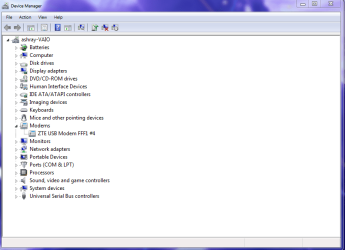
This is what i did. Opened Device Manager and under "Modems" found the datacard. Right clicking on it brought up the "uninstall" option. Please view the attached snap below:
Attachments
IMP.png
22.7 KB
· Views: 6
My Computer
At a glance
MS Windows 7 Home Premium 64-bit SP1IntelCore [email protected]; Sandy Bridge 32nm Tech.4096Mb RAM; Single ChannelDDR3@665MHz; DRAM F...AMD Radeon HD 6630M; GPU:Whistler;BIOS Core&m...
There is actually no need to go to (my) Computer,because 1) you just right click on the START button and voila, there's WE!
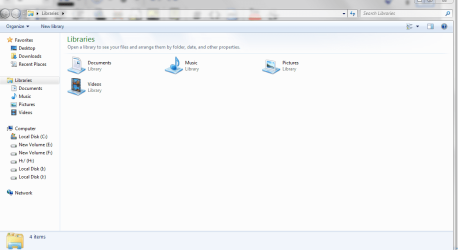
2) The Win.Explorer(WE) icon in right there staring in the Task bar. So, i clicked on the Taskbar icon and this is what showed up:
Attachments
Windows 7 Forums - Reply to Topic - Windows Internet Explorer_2012-02-20_19-15-12.png
39.3 KB
· Views: 9
My Computer
At a glance
MS Windows 7 Home Premium 64-bit SP1IntelCore [email protected]; Sandy Bridge 32nm Tech.4096Mb RAM; Single ChannelDDR3@665MHz; DRAM F...AMD Radeon HD 6630M; GPU:Whistler;BIOS Core&m...


 ! I am back and i absolutely missed you
 . I was without a laptop all these months and have bought a Sony vaio C series VPCCB35FN just a few days back
 (will fill in the specs.,sorry about that)which came loaded with Windows Seven Home Premium 64-bit