"Ethernet" Connection Drop

Downloaded the entire Win 7 RC last night without a hitch and for the past two hours have been doing the same download and a large P2P file simultaneously. Don't have any idea what was going on before but it seems to have resolved itself.
 

My Computer

OS
Windows 7 7265 x64
CPU
17 920 @3.9
Motherboard
GA-EX58-UD4P
Memory
Mushkin DDR 1600 998691
Graphics Card(s)
Sapphire 4870 1gb
Monitor(s) Displays
Dell 30"
Screen Resolution
2560X1600
Hard Drives
Intel X25-M 80 gb os
2X G.Skill Titan 128gb RAID 0 Data
PSU
Corsair HX 620
Case
Lian Li
Cooling
Custom Water
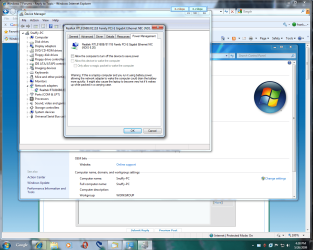
Power Management Properties on NIC Adapter

Yesterday I rec'd a new update using WUv4, part of it included a NEW NIC adapter driver. Really thought nothing about it.
today, I noticed that suddenly I was dropping internet connection and then almost instantly it would recover. Once- twice- then almost constantly for the past 1 hr. I decided to roll back to the old driver, first I checked to see exactly which driver was currently install, to check the date, ( wow, then i deciced to check power management properties, it was defaulted to x allow this to shutdown to conserve energy, x allow this driver to awake when needed.) Pure crap to have (IMHO) any NIC driver set this way. Yes, I did uncheck allow to shutdown to save energy.

Now back to no internet connections being dropped.
 
Well, count me as one of those for whom 7127 didn't fix the problem. (Again, I'm running off of my motherboard's LAN, so it isn't wireless.) I've had two situations where my internet connection died, to be "fixed" only by a reboot. (In one of the two, curiously, my "Network--Internet Access" task-bar icon showed that while I was still connected to the router, I was't connected to the internet--although troubleshooting couldn't detect any problem, hence the reboot. The other time--as has occurred in the past--my "Network--Internet Access" icon shows no problem, even as I need to reboot to reconnect.)

And, again unlike some others, this has never occurred to me while just downloading (even really large files, such as 7 RC or 7127). I only notice it when trying to load a new page--which is not to say it necessarily is connected with loading new pages (it could occur while just "statically" looking at a loaded page), but that this is when I first notice the problem).

Anyway, the bottom line for me is that 7127 isn't the magic bullet. Fortunately, this only occurs (for me) once every day or two, so it isn't so disruptive as to drive me back to Vista (or to drink)....

 

My Computer

OS
Windows 7 Build 7229
CPU
Athlon 64 x2 5200+
Motherboard
Gigabyte GA-MA78GM-S2H
Memory
4 GB DDR2
Graphics Card(s)
On board
Sound Card
On board
Well, count me as one of those for whom 7127 didn't fix the problem. (Again, I'm running off of my motherboard's LAN, so it isn't wireless.) I've had two situations where my internet connection died, to be "fixed" only by a reboot. (In one of the two, curiously, my "Network--Internet Access" task-bar icon showed that while I was still connected to the router, I was't connected to the internet--although troubleshooting couldn't detect any problem, hence the reboot. The other time--as has occurred in the past--my "Network--Internet Access" icon shows no problem, even as I need to reboot to reconnect.)

And, again unlike some others, this has never occurred to me while just downloading (even really large files, such as 7 RC or 7127). I only notice it when trying to load a new page--which is not to say it necessarily is connected with loading new pages (it could occur while just "statically" looking at a loaded page), but that this is when I first notice the problem).

Anyway, the bottom line for me is that 7127 isn't the magic bullet. Fortunately, this only occurs (for me) once every day or two, so it isn't so disruptive as to drive me back to Vista (or to drink)....

next time instead of troubleshooting, just disable/enable, tell me if that fixes it. I have little faith in the troubleshooter at this point in time still.

I didnt quite understand by your statements if you mean that the icon IS reporting correctly, or isnt. This is the main problem that 27 fixed. The issue of drops, be it ethernet or wireless, still has to do with proper drivers. I've had the power save both on and off during all this time, and i fail to see the corresponding relationship between any drops or no drops. This goes for the wireless laptop which currently still has no issues with connectivity while still on 7100. Tho it has a proper driver for the intel wireless pro a/b/g adapter. As well as my desktop and the nvidia controller, no drops occuring either, thankfully. Tomorrow hopefully, i will begin to test out my own wireless pre-existing issue here on the desktop. Maybe that will give some insight.
 

My Computer

Computer Manufacturer/Model Number
CUSTOM
OS
XP/win7 x86 build 7127
CPU
Athlon64 X2 DUAL 4200+ 2.21ghz
Motherboard
ASUS K8 PRO SLI
Memory
2GB Dual Chan DDR2 Corsair
Graphics Card(s)
Nvidia 6800GT
Sound Card
nvidia
Monitor(s) Displays
19' LCD
Screen Resolution
1280x1024
Hard Drives
WD 250, 2x500, 2x1TB IDE/USB
WD 250 SATA (system)
SEAGATE 120 Sata
PSU
coolermaster 450
Case
SUPERFLOWER
Cooling
1 HDD bay fan, 5x80mm Case Fans, AEROGATE II Fan/Temp
Keyboard
MS wireless
Mouse
MS Wireless
Internet Speed
fassssssssst
I'm just sticking to XP these days.
W7 obviously excaserbated the LAN dropout issue i've seen in Vista.

Totally not worth my time.
 

My Computer

OS
Windows 7 dual with XP SP2 ((Highly Custom))
CPU
Intel Core2Duo e7300 sometimes @ 3.33Ghtz
Motherboard
Gigabyte G31M-S2L
Memory
2gb Kingston HyperX
Graphics Card(s)
nVidia 9800GT 1gb
Sound Card
Onboard Realtech AC97 High Definition codec
Monitor(s) Displays
HP P1120 21" CRT
Screen Resolution
1600x1200
Hard Drives
WD 250gb caviar
WD 500GB SATAII
PSU
Gigabyte bundled 550w
Case
Gigabyte Generic
Cooling
stock
Keyboard
POS $25 cheapo because i type too fast, wears down kb's
Mouse
M$ Intellipoint 1.1 5 button
Internet Speed
ADSL2 @ max 1.3MBYTE/sec down, 1 up.
Just watched a Blu-Ray movie over the network and guess what it failed :cry: and it seems to be consistent with my previous posts. The packets received got to 2.1 billion before failing. I am currently on build 7127 with the Realtek 8139 driver supplied in that build.

This is bad news for me 7127 has not fixed my problem, its back to the SLOW usb 1 network device again :(
 

My Computer

Computer Manufacturer/Model Number
Foxconn Winfast K8M890-8237
OS
Windows 7 Build 7201
CPU
AMD Athlon 64 X2 6000+
Motherboard
Winfast K8M890M2MA-RS2H
Memory
KINGMAX 2x1024 DDR2 800
Graphics Card(s)
Geforce 8600GT
Sound Card
Onboard Realtek AC'97
Monitor(s) Displays
SONY 46Inch LCD 1080P
Screen Resolution
1080P
Hard Drives
80GB Western Digital SATA
PSU
ThermalTake 430W
Case
Theater Case Bach
Cooling
AMD CPU Stock 2x80mm and 2x40mm case
Keyboard
Logitech Dinovo Bluetooth
Mouse
Part of keyboard
sexytool: i can understand why, i guess i am just a glutton for punishment. Knock on wood, i havent had wired issues. so atleast my lan seems to be working with the driver thats being used atm. I dont have alot of faith in wireless, but thats TBD.

themouse: what kind of router are you using? how far along in the movie was it that it dropped aprox? Do you not have a usb 2.0 port, or i guess that modem is only a usb 1 device? Atleast with this scenario, you and i think all of us can rule out the ISP in 99.9% of the cases here i would presume.

edit: i meant to ask if the router is a 1.0 device... which would be a bit strange.
 

My Computer

Computer Manufacturer/Model Number
CUSTOM
OS
XP/win7 x86 build 7127
CPU
Athlon64 X2 DUAL 4200+ 2.21ghz
Motherboard
ASUS K8 PRO SLI
Memory
2GB Dual Chan DDR2 Corsair
Graphics Card(s)
Nvidia 6800GT
Sound Card
nvidia
Monitor(s) Displays
19' LCD
Screen Resolution
1280x1024
Hard Drives
WD 250, 2x500, 2x1TB IDE/USB
WD 250 SATA (system)
SEAGATE 120 Sata
PSU
coolermaster 450
Case
SUPERFLOWER
Cooling
1 HDD bay fan, 5x80mm Case Fans, AEROGATE II Fan/Temp
Keyboard
MS wireless
Mouse
MS Wireless
Internet Speed
fassssssssst
Sorry I was being a bit cryptic. Since my onboard Realtek card keeps dropping the connection I use an old belkin USB to NIC adapter but since it only a usb 1 device I can only achieve 10mbs.

Back to the issue - I just thought I would disable the adapter and re enable it after it failing, it was intereesting to see that it knew there was a physical connection so it tried to connect to the DHCP sever but looking at the connection details to doesnt even attempt to SEND any packets at all just zero. I cannot see this as a driver issue I feel its the layer after it. Just mu two cents worth :D
 

My Computer

Computer Manufacturer/Model Number
Foxconn Winfast K8M890-8237
OS
Windows 7 Build 7201
CPU
AMD Athlon 64 X2 6000+
Motherboard
Winfast K8M890M2MA-RS2H
Memory
KINGMAX 2x1024 DDR2 800
Graphics Card(s)
Geforce 8600GT
Sound Card
Onboard Realtek AC'97
Monitor(s) Displays
SONY 46Inch LCD 1080P
Screen Resolution
1080P
Hard Drives
80GB Western Digital SATA
PSU
ThermalTake 430W
Case
Theater Case Bach
Cooling
AMD CPU Stock 2x80mm and 2x40mm case
Keyboard
Logitech Dinovo Bluetooth
Mouse
Part of keyboard
* I was about half way through the movie. The file is about 4.5 GB
 

My Computer

Computer Manufacturer/Model Number
Foxconn Winfast K8M890-8237
OS
Windows 7 Build 7201
CPU
AMD Athlon 64 X2 6000+
Motherboard
Winfast K8M890M2MA-RS2H
Memory
KINGMAX 2x1024 DDR2 800
Graphics Card(s)
Geforce 8600GT
Sound Card
Onboard Realtek AC'97
Monitor(s) Displays
SONY 46Inch LCD 1080P
Screen Resolution
1080P
Hard Drives
80GB Western Digital SATA
PSU
ThermalTake 430W
Case
Theater Case Bach
Cooling
AMD CPU Stock 2x80mm and 2x40mm case
Keyboard
Logitech Dinovo Bluetooth
Mouse
Part of keyboard
themouse: so do you need to install a driver for the belkin? or does win7 do it for you? have you experienced any drops with the belkin? i dont recall. since it being an old device, i'm curious about how well its supported with 7. As i have this wireless adapter thats a belkin, and no 7 driver for it.
 

My Computer

Computer Manufacturer/Model Number
CUSTOM
OS
XP/win7 x86 build 7127
CPU
Athlon64 X2 DUAL 4200+ 2.21ghz
Motherboard
ASUS K8 PRO SLI
Memory
2GB Dual Chan DDR2 Corsair
Graphics Card(s)
Nvidia 6800GT
Sound Card
nvidia
Monitor(s) Displays
19' LCD
Screen Resolution
1280x1024
Hard Drives
WD 250, 2x500, 2x1TB IDE/USB
WD 250 SATA (system)
SEAGATE 120 Sata
PSU
coolermaster 450
Case
SUPERFLOWER
Cooling
1 HDD bay fan, 5x80mm Case Fans, AEROGATE II Fan/Temp
Keyboard
MS wireless
Mouse
MS Wireless
Internet Speed
fassssssssst
digger - No win7 doesnt natively support my usb NIC, installed the vista drivers that Belikin have on their site for the device. I havent experianced any drops but then again the network connection is too slow, I cannot watch an HD movie at all.
 

My Computer

Computer Manufacturer/Model Number
Foxconn Winfast K8M890-8237
OS
Windows 7 Build 7201
CPU
AMD Athlon 64 X2 6000+
Motherboard
Winfast K8M890M2MA-RS2H
Memory
KINGMAX 2x1024 DDR2 800
Graphics Card(s)
Geforce 8600GT
Sound Card
Onboard Realtek AC'97
Monitor(s) Displays
SONY 46Inch LCD 1080P
Screen Resolution
1080P
Hard Drives
80GB Western Digital SATA
PSU
ThermalTake 430W
Case
Theater Case Bach
Cooling
AMD CPU Stock 2x80mm and 2x40mm case
Keyboard
Logitech Dinovo Bluetooth
Mouse
Part of keyboard
Sorry that I wasn't clear. In my (now) three drops under 7127, the first drop was correctly "reported" by the icon--i.e., it showed I had lost my internet connection (but only between the "network" -- "internet" stage). The next two times, the icon reported no problem with my connection, even though it was gone.

I've always gone from troubleshooting (or not bothering with it) to reboot; I'll try disable/enable next time it happens and report back....
 

My Computer

OS
Windows 7 Build 7229
CPU
Athlon 64 x2 5200+
Motherboard
Gigabyte GA-MA78GM-S2H
Memory
4 GB DDR2
Graphics Card(s)
On board
Sound Card
On board
Here are some facts and possible suggestions as my issue has been eliminated so far...

facts

1.the power management setting had no effect the issue still occurred when it was unticked due to i always untick this upon my installs for any os.
2.it is not IP6 related in any other way i uninstalled all components under the properties of my Ethernet connection and since you cannot remove V6 i just unticked it.
3.high loads of Ethernet traffic seem to cause this to occur more some state uploads cause it to happen more "this is false to my knowledge" seems to be if anything related to either a power saving option under the settings to your nic or the fact MS changed the tcp/max half open connects to unlimted via registry value which stated by half-open.net that is causing this issue since it was not implemented until after build 7068 to my knowledge "i could be wrong" and i had no issues on that build ever.
4.build 7127 does not solve this
5.this occurs on nvidia based chipsets with realtek "from what i have seen so far"
6.latest nvidia ethernet driver for win 7 does not solve this in any way "i had this installed from the second i formatted into this build.
7.disabling services/re-enabling services has no effect on anything "i run a extremly slimmed down version of win7 in the way of things"

possible solutions "worked for me so far"
1.apparently there is 3 other installed adapters/components i noticed when i used ipconfig/all in cmd that were enabled but not pulling a ip/doing anything. since i know these are not needed and they were related to IPv6 protocall anyways i disabled/uninstalled them
2.i disabled two power saving options under driver advanced options "device sleeps on dissconnect" disabled " "low power state link speed" disabled "low power idle mode" disabled.

"optional"
3.although im failrly certain on these following suggestions have no effect they are still generally a good idea to disable/uninstall unless you actually use them. "all other protocall/components from hardware and ethernet propertise" "disable all sorts of power saving management from your power options" "patch your tcp/ip half-open limet to unlimeted/high value" "set network address in advance options along with your proper link/speed duplex setting"

other then those suggestions there is not more to be checked/changed other then the rest of the advanced settings for the drivers. my issue has been gone since i uninstalled those other 3 network components from device manager and disabled those advanced power features. also DO NOT use the NAM from the driver package this will give you a drop every time you launch your nvdia control panel. some people "think its because the win7 drivers were not uninstalled" this is wrong since some people confirmed removing them yet the issue still existed.
 

My Computer

Computer Manufacturer/Model Number
custom
OS
Windows 7 7600 x64/x32
CPU
e8400 @ 3.6
Motherboard
evga 780i
Memory
4gb corsair 800 4-4-4-12-1t
Graphics Card(s)
evga 260gtx 55mm 216
Sound Card
xtreme music
Monitor(s) Displays
some junk crt "100 hertz > all lcds"
Screen Resolution
1024x768
Hard Drives
2x hitchi 1tb deskstar raid 0
PSU
BFG 800w
Cooling
bunch of air cooling
digger - No win7 doesnt natively support my usb NIC, installed the vista drivers that Belikin have on their site for the device. I havent experianced any drops but then again the network connection is too slow, I cannot watch an HD movie at all.

if you get the chance today. try streaming, in any way, a decent sized .avi file to another device/pc on the network. Your belkin there should support the transfer, as on the network here, for avi it used around 1.5mbit. You should average between 4-7mbit max i'm guessing, as you probly dont come close to the 10mbit. This tho, meaning the transfer/transcoding of while streaming, is "auto-negotiated" or supposed to be anyways, thru WMP/MC dependant on your bandwidth available. Or so MS claims, i'm not sure this is working right either, but i havent done any thorough testing for this yet either.

If you have any local pc shops, besides big commercial, stop by and see what they have on "clearance". The shop here when they have bulk small stuff that they cant get rid of all, will usually cut you a deal JUST to get rid of their inventory. If you're in luck, you should find some decent common nics for $5. In my case they had a stock of "still in the box packaging" OEM case fans @4200rpm... i picked up 20 @.50/ea. Also picked up 2 older 10/100linksys nics for $5/ea
 

My Computer

Computer Manufacturer/Model Number
CUSTOM
OS
XP/win7 x86 build 7127
CPU
Athlon64 X2 DUAL 4200+ 2.21ghz
Motherboard
ASUS K8 PRO SLI
Memory
2GB Dual Chan DDR2 Corsair
Graphics Card(s)
Nvidia 6800GT
Sound Card
nvidia
Monitor(s) Displays
19' LCD
Screen Resolution
1280x1024
Hard Drives
WD 250, 2x500, 2x1TB IDE/USB
WD 250 SATA (system)
SEAGATE 120 Sata
PSU
coolermaster 450
Case
SUPERFLOWER
Cooling
1 HDD bay fan, 5x80mm Case Fans, AEROGATE II Fan/Temp
Keyboard
MS wireless
Mouse
MS Wireless
Internet Speed
fassssssssst
Here are some facts and possible suggestions as my issue has been eliminated so far...

facts

1.the power management setting had no effect the issue still occurred when it was unticked due to i always untick this upon my installs for any os.
2.it is not IP6 related in any other way i uninstalled all components under the properties of my Ethernet connection and since you cannot remove V6 i just unticked it.
3.high loads of Ethernet traffic seem to cause this to occur more some state uploads cause it to happen more "this is false to my knowledge" seems to be if anything related to either a power saving option under the settings to your nic or the fact MS changed the tcp/max half open connects to unlimted via registry value which stated by half-open.net that is causing this issue since it was not implemented until after build 7068 to my knowledge "i could be wrong" and i had no issues on that build ever.
4.build 7127 does not solve this
5.this occurs on nvidia based chipsets with realtek "from what i have seen so far"
6.latest nvidia ethernet driver for win 7 does not solve this in any way "i had this installed from the second i formatted into this build.
7.disabling services/re-enabling services has no effect on anything "i run a extremly slimmed down version of win7 in the way of things"

possible solutions "worked for me so far"
1.apparently there is 3 other installed adapters/components i noticed when i used ipconfig/all in cmd that were enabled but not pulling a ip/doing anything. since i know these are not needed and they were related to IPv6 protocall anyways i disabled/uninstalled them
2.i disabled two power saving options under driver advanced options "device sleeps on dissconnect" disabled " "low power state link speed" disabled "low power idle mode" disabled.

"optional"
3.although im failrly certain on these following suggestions have no effect they are still generally a good idea to disable/uninstall unless you actually use them. "all other protocall/components from hardware and ethernet propertise" "disable all sorts of power saving management from your power options" "patch your tcp/ip half-open limet to unlimeted/high value" "set network address in advance options along with your proper link/speed duplex setting"

other then those suggestions there is not more to be checked/changed other then the rest of the advanced settings for the drivers. my issue has been gone since i uninstalled those other 3 network components from device manager and disabled those advanced power features. also DO NOT use the NAM from the driver package this will give you a drop every time you launch your nvdia control panel. some people "think its because the win7 drivers were not uninstalled" this is wrong since some people confirmed removing them yet the issue still existed.

Solace,
thanks for the in depth report there. I hope you do stick around on this thread some more. I agree with just about everything there, except i dont think this is JUST a realtek/nvidia issue... i think there are a few more chipsets out there not having proper drivers as well. I too noticed all the other parts of the adapter, thru my network meter actually. The wan miniport, QOS... etc, i think there were about 5 or 6 including the actual adapter tcp layer itself. This i seen while installing drivers for wired and wireless multiple times in multiple ways. I almost took a screeny, but until you just mentioning this, no one had beforehand, so i all but dismissed this finding a few days ago. I have since deleted 7100, and cant reproduce the same with the 27... atleast not yet. Wireless project today, so.

Glad you posted and made yourself known (unhidden):) . Need all the info and reports on this problem as we can get. I'm sure there are a few more out there that may just be reading and not registering and posting yet. Please do!
this is a collaborative effort, all help is wanted/needed.
 

My Computer

Computer Manufacturer/Model Number
CUSTOM
OS
XP/win7 x86 build 7127
CPU
Athlon64 X2 DUAL 4200+ 2.21ghz
Motherboard
ASUS K8 PRO SLI
Memory
2GB Dual Chan DDR2 Corsair
Graphics Card(s)
Nvidia 6800GT
Sound Card
nvidia
Monitor(s) Displays
19' LCD
Screen Resolution
1280x1024
Hard Drives
WD 250, 2x500, 2x1TB IDE/USB
WD 250 SATA (system)
SEAGATE 120 Sata
PSU
coolermaster 450
Case
SUPERFLOWER
Cooling
1 HDD bay fan, 5x80mm Case Fans, AEROGATE II Fan/Temp
Keyboard
MS wireless
Mouse
MS Wireless
Internet Speed
fassssssssst
Solace - I have a VIA chipset with my Realtek card but the rest seems about right
 

My Computer

Computer Manufacturer/Model Number
Foxconn Winfast K8M890-8237
OS
Windows 7 Build 7201
CPU
AMD Athlon 64 X2 6000+
Motherboard
Winfast K8M890M2MA-RS2H
Memory
KINGMAX 2x1024 DDR2 800
Graphics Card(s)
Geforce 8600GT
Sound Card
Onboard Realtek AC'97
Monitor(s) Displays
SONY 46Inch LCD 1080P
Screen Resolution
1080P
Hard Drives
80GB Western Digital SATA
PSU
ThermalTake 430W
Case
Theater Case Bach
Cooling
AMD CPU Stock 2x80mm and 2x40mm case
Keyboard
Logitech Dinovo Bluetooth
Mouse
Part of keyboard
Digger - I would love to install a different NIC but I got no more PCI Slots free usb is my only option. I work as an IT tech at a large printing company parts are not an issue only room. :D

I have used the usb NIC all day no issue but the machine gets turned off at night maybe for a few days I should leave it on and see if it fails
 

My Computer

Computer Manufacturer/Model Number
Foxconn Winfast K8M890-8237
OS
Windows 7 Build 7201
CPU
AMD Athlon 64 X2 6000+
Motherboard
Winfast K8M890M2MA-RS2H
Memory
KINGMAX 2x1024 DDR2 800
Graphics Card(s)
Geforce 8600GT
Sound Card
Onboard Realtek AC'97
Monitor(s) Displays
SONY 46Inch LCD 1080P
Screen Resolution
1080P
Hard Drives
80GB Western Digital SATA
PSU
ThermalTake 430W
Case
Theater Case Bach
Cooling
AMD CPU Stock 2x80mm and 2x40mm case
Keyboard
Logitech Dinovo Bluetooth
Mouse
Part of keyboard
Uncheck the default settings

Still, dropping connections. but I have yet to have this question answered.
1. Windows 7 by default set the NIC Adapter to
A. allow this device to shutdown to save energy. (have you check and made sure it is unchecked as shown. BY DEFAULT every time I get a new driver - it is checked. (annoying) but you should make sure it is unchecked.

Seems Digger did answer for him, on one case I had to call the ISP, and ask if they had set anything to block Windows 7. (which they claim is an UNKNOWN OS). when the customer had originally signed they was on XP. ( Simply asking ISP Tech solved this problem.)
I also recommend evry body here locally use:
Code:
netsh int tcp set global autotuninglevel=normal
Make sure your modem has the latest fireware, some time the auto fix by manufacture does not go thru. I can goto 2Wire and manually check the modems-router.
I recommend only the prescribed Win7 drivers. Yes, I also do some testing for other as to manufacture beta drivers. so are not so whippy. I also make sure that ALL DRIVERS are SIGNED by MS. (Yes, there is a patch to fake signature) i have found this at times causes many problems.
 

Attachments

  • 2zqbuaw.png
    2zqbuaw.png
    481.6 KB · Views: 74
well here's one to twist your wig some. Since about 8 hours ago i started to go to work on this usb belkin g. The win 7 driver that was downloaded and installed did not allow me to get inet connection. I was only able to have LAN. Obtained IP, had dns configured static. still no inet. SO i go to the website drivers, Vista version, i first run comp troubleshooter. Tells me to actually run as XP SP2. I do so. I havent had any drops yet.... to be fair tho, i have only had a constant of 50% utiilization down and pushed the upload to the max, still no problem.

Thing is, for this setup.exe, when installed under XP SP2, it also installs the belkin software along with the driver. When installing with Vista or Vista SP2, this doesnt happen. I understand why, just reporting. Tho for some reason i have had the best success thus far by using the XP SP2 mode, even tho i did the same thing, the same way for build 7100.

Same story goes for my trendnet adapter, although it cant stay connected to anything long enough with the supplied win7 driver that was installed upon detection. I may try its manuf driver out on it as well in different modes to see what i get.

Now on this power management bit. TBH, i dont think it has anything to do with the drops as most of us here experience the dropouts while we are currently using our computer/connection. Tho the weird thing to state about my belkin adapter is while installing under XP SP2 mode, i now do not show the power management tab at all. All the while i find more options to change under advanced now than with the "stock" win7 driver. Also the win7 driver date was 5/7/2007 while mine is dated oddly OLD 11/10/2005 lol... but hey, its working better than the "win7" driver. I think if/when installed under Vista, from memory on 7100, it had a different date than either of those, which kinda makes sense.
and on and on and on...
 

My Computer

Computer Manufacturer/Model Number
CUSTOM
OS
XP/win7 x86 build 7127
CPU
Athlon64 X2 DUAL 4200+ 2.21ghz
Motherboard
ASUS K8 PRO SLI
Memory
2GB Dual Chan DDR2 Corsair
Graphics Card(s)
Nvidia 6800GT
Sound Card
nvidia
Monitor(s) Displays
19' LCD
Screen Resolution
1280x1024
Hard Drives
WD 250, 2x500, 2x1TB IDE/USB
WD 250 SATA (system)
SEAGATE 120 Sata
PSU
coolermaster 450
Case
SUPERFLOWER
Cooling
1 HDD bay fan, 5x80mm Case Fans, AEROGATE II Fan/Temp
Keyboard
MS wireless
Mouse
MS Wireless
Internet Speed
fassssssssst
/facepalm
/facepalm
/facepalm.

You use a BELKIN wireless and didn't think you NEEDED that software?
MY GOD MAN!

There's a reason i said to install with a pre-vista compatability mode... mainly that those are the only OS's which will install properly, e.g include the software install.

There's dozens of makes and models of network adapters out there, that don't work without their software package. Netgear is infamous for it.

I think it's safe to say that just because you neglected to realise you didn't have the FULL driver package installed, everything you've come accross and everything you've experienced has to come down to "User Error" and be disregarded as trying to find a solution to the problem because realistically; You caused your problem.

It's very probably you'll never see it again and it's not a cause of W7.

On the other hand, you DID make me realise that perhaps this realteck 8186 is the same as the "Nvidia MCP Networking device" or similar generic onboard that requires software to work in W7 100%.
It doesn't require software to work in XP period, but i've installed teh drivers off the motherboards' CD so i can't realistically claim it's running off stock drivers.
 

My Computer

OS
Windows 7 dual with XP SP2 ((Highly Custom))
CPU
Intel Core2Duo e7300 sometimes @ 3.33Ghtz
Motherboard
Gigabyte G31M-S2L
Memory
2gb Kingston HyperX
Graphics Card(s)
nVidia 9800GT 1gb
Sound Card
Onboard Realtech AC97 High Definition codec
Monitor(s) Displays
HP P1120 21" CRT
Screen Resolution
1600x1200
Hard Drives
WD 250gb caviar
WD 500GB SATAII
PSU
Gigabyte bundled 550w
Case
Gigabyte Generic
Cooling
stock
Keyboard
POS $25 cheapo because i type too fast, wears down kb's
Mouse
M$ Intellipoint 1.1 5 button
Internet Speed
ADSL2 @ max 1.3MBYTE/sec down, 1 up.
Back
Top