excel if statement

transamraiser

New member
Local time
9:12 PM
Messages
12
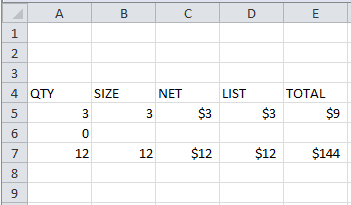
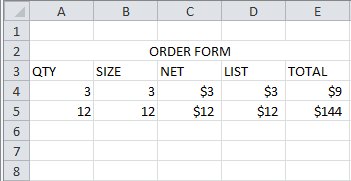
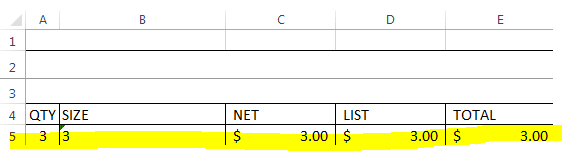
we are wanting to see if we can create an if statement in excel. basically, we are looking to create an if statement. in the first picture below, you see we have a "3" under quanity. then you also see the prices as well. we're wanting to do something like this - if "A5" (the quanity) is greater than zero, we want it to display the whole row (the qty,size, net, list, and total) into another spreadsheet. basically, if the qty is greater than 0 in the first form, it will then display that whole row in the 2nd spreadsheet(second picture) is there anyway to do this?
 

Attachments
  • excel 1.PNG
    excel 1.PNG
    2 KB · Views: 23
  • Capture2.PNG
    Capture2.PNG
    1.9 KB · Views: 22

My Computer My Computer

At a glance

Ohio
Computer type
PC/Desktop
OS
Ohio
I have not done this in years, but I know you can link spreadsheets and workbooks to have one update itself when data in the other one changes. Try starting with a web search for Working with linking excel workbooks/spreadsheets. I did and there is plenty to learn from.
 

My Computer My Computer

At a glance

Microsoft Windows 7 Ultimate 64-bit 7601 Mult...AMD FX(tm)-6100 Six-Core Processor4.00 GBAMD Radeon HD 6450
Computer type
PC/Desktop
Computer Manufacturer/Model Number
custom build
OS
Microsoft Windows 7 Ultimate 64-bit 7601 Multiprocessor Free Service Pack 1
CPU
AMD FX(tm)-6100 Six-Core Processor
Motherboard
ASUSTeK Computer INC. M5A78L-M LX PLUS
Memory
4.00 GB
Graphics Card(s)
AMD Radeon HD 6450
Sound Card
(1) AMD High Definition Audio Device (2) Realtek High Defi
Monitor(s) Displays
Toshiba 47ZV650U 47" LCD 240Hz
Screen Resolution
1920 x 1080 x 32 bits (4294967296 colors) @ 60 Hz
Hard Drives
(1) HDT722516DLA380 ATA Device (2) Hitachi HDS721025CLA382 ATA Device (3) ST4000VN000-1H4168 ATA Device (4) Generic STORAGE DEVICE USB Device (5) Generic STORAGE DEVICE USB Device (6) Generic STORAGE DEVICE USB Device (7) Generic STORAGE
PSU
Corsair CX430M
Case
WMI (Waste Management Incorporated)
Cooling
Yes, it's very cool.
Keyboard
Bluetooth KB & Mousepad
Internet Speed
Fios 15/5 and it sucks when Verizon is throttling it down
Antivirus
Avast, MSE and Malwarebytes
Browser
Firefox v.41.0.2 and IE 11
Other Info
2 years old and so far this rig still kicks butt
i did but i was hoping someone could help here..
 

My Computer My Computer

At a glance

Ohio
Computer type
PC/Desktop
OS
Ohio
You should enter the formulas on the second sheet. Assuming that the 2 sheets are named Sheet1 & Sheet2, in your example, to have the Net column (cell C4) on Sheet2 automatically filled in, the formula (placed in cell C4) would be: =IF(Sheet1!A5 > 0, Sheet1!C5, ). This basically says if cell A5 on Sheet1 is greater than 0 then this cell gets the value from Sheet1 cell C5, otherwise do nothing. You should be able to figure out the formulas for the other cells (Qty, Size, List and Total) based on this formula.

Technically, you don't really need the IF statement. You could just use the formula: =Sheet1!C5. If you put a value into cell C5 on Sheet1 then the cell where this formula is placed will show that value.
 

My Computer My Computer

At a glance

W10 Pro desktop, W11 laptop, W11 Pro tablet (...3.7Ghz 8700K i7, i7-11800H, i7-1065G716G desktop, 16G laptop, 4G tabletAMD Radeon RX580, RTX 3060, Intel Iris Plus
Computer type
PC/Desktop
Computer Manufacturer/Model Number
Home Built desktop, Dell G15 5511 Gaming laptop,MS Surface Pro 7 tablet
OS
W10 Pro desktop, W11 laptop, W11 Pro tablet (all 64-bit)
CPU
3.7Ghz 8700K i7, i7-11800H, i7-1065G7
Motherboard
ASUS TUF Z370-Pro Gaming in desktop
Memory
16G desktop, 16G laptop, 4G tablet
Graphics Card(s)
AMD Radeon RX580, RTX 3060, Intel Iris Plus
Sound Card
High Definition Audio (Built-in to mobo)
Monitor(s) Displays
Samsung U32J59 32" (2x), 15.6", 12"
Screen Resolution
3840x2160, 3840x2160, 1920x1080, 2160x1440
Hard Drives
500G SSD for OS; 2T, 10T & 15T HDDs for Data on Desktop, 1TB SSD laptop, 128G SSD tablet.
PSU
Corsair CX 750M
Case
Antec 100
Cooling
CM 212+
Keyboard
IBM Model M - used continuously since 1986
Mouse
Microsoft Pro IntelliMouse
Internet Speed
400M down 8M up
Antivirus
Windows Defender
Browser
FireFox
Other Info
Built my first computer (8Mhz 8088cpu, 640K RAM, 20MB HDD, 2 360K floppy drives) in 1985 and have been building them for myself, relatives and friends ever since.
You should enter the formulas on the second sheet. Assuming that the 2 sheets are named Sheet1 & Sheet2, in your example, to have the Net column (cell C4) on Sheet2 automatically filled in, the formula (placed in cell C4) would be: =IF(Sheet1!A5 > 0, Sheet1!C5, ). This basically says if cell A5 on Sheet1 is greater than 0 then this cell gets the value from Sheet1 cell C5, otherwise do nothing. You should be able to figure out the formulas for the other cells (Qty, Size, List and Total) based on this formula.

Technically, you don't really need the IF statement. You could just use the formula: =Sheet1!C5. If you put a value into cell C5 on Sheet1 then the cell where this formula is placed will show that value.
It depends on the desired outcome.

I interpreted the OP's request as not wanting rows with zeros in the second spreadsheet:

1.PNG

2.PNG

Your solution puts rows with zeros in the second spreadsheet...
...or maybe I'm not understanding your proposed solution.


The OP stated, "if the qty is greater than 0 in the first form, it will then display that whole row in the 2nd spreadsheet". I took that to also mean, "if the qty is 0 in the first form, it will then not display that whole row in the 2nd spreadsheet".
 

My Computer My Computer

At a glance

W7 Pro SP1 64biti78GBIntel HD Graphics
Computer type
Laptop
Computer Manufacturer/Model Number
Employer provided Dell Latitude
OS
W7 Pro SP1 64bit
CPU
i7
Memory
8GB
Graphics Card(s)
Intel HD Graphics
Hard Drives
crappy SSD
Antivirus
Employer mandated Symantec Endpoint Protection
Browser
Pale Moon 64bit, IE11 64bit & Chrome 64bit
So what's your solution?

If the OP doesn't want zeroes then the formula =IF(Sheet1!A5 > 0, Sheet1!C5, "") will blank out the field if a Qty isn't entered.
 

My Computer My Computer

At a glance

W10 Pro desktop, W11 laptop, W11 Pro tablet (...3.7Ghz 8700K i7, i7-11800H, i7-1065G716G desktop, 16G laptop, 4G tabletAMD Radeon RX580, RTX 3060, Intel Iris Plus
Computer type
PC/Desktop
Computer Manufacturer/Model Number
Home Built desktop, Dell G15 5511 Gaming laptop,MS Surface Pro 7 tablet
OS
W10 Pro desktop, W11 laptop, W11 Pro tablet (all 64-bit)
CPU
3.7Ghz 8700K i7, i7-11800H, i7-1065G7
Motherboard
ASUS TUF Z370-Pro Gaming in desktop
Memory
16G desktop, 16G laptop, 4G tablet
Graphics Card(s)
AMD Radeon RX580, RTX 3060, Intel Iris Plus
Sound Card
High Definition Audio (Built-in to mobo)
Monitor(s) Displays
Samsung U32J59 32" (2x), 15.6", 12"
Screen Resolution
3840x2160, 3840x2160, 1920x1080, 2160x1440
Hard Drives
500G SSD for OS; 2T, 10T & 15T HDDs for Data on Desktop, 1TB SSD laptop, 128G SSD tablet.
PSU
Corsair CX 750M
Case
Antec 100
Cooling
CM 212+
Keyboard
IBM Model M - used continuously since 1986
Mouse
Microsoft Pro IntelliMouse
Internet Speed
400M down 8M up
Antivirus
Windows Defender
Browser
FireFox
Other Info
Built my first computer (8Mhz 8088cpu, 640K RAM, 20MB HDD, 2 360K floppy drives) in 1985 and have been building them for myself, relatives and friends ever since.
If I had a solution - I would have posted it.

Yes, you can make the linked cell blank, and the entire row blank. My screenshot of the ORDER FORM (2nd spreadsheet) currently has info in row 4 ($3 row) and row 5 ($12 row). Imagine what that ORDER FORM would look like if there were 27 empty rows between the $3 row and the $12 row.

I'm not much of an Excel guru. My post was only an attempt at clarifying what I think the OP wants. If I'm wrong and empty rows don't matter, then your solution is great. If empty rows cannot be on the ORDER FORM, then I think that we are looking at a combination of Excel's IF function and somehow include a range of cells.

edit:
It might have to involve a macro to hide rows where values in column A are 0.
Hiding Rows Based on a Cell Value (Microsoft Excel)

Google
excel hide row based on cell value
for many other ways to construct such macros.
 
Last edited:

My Computer My Computer

At a glance

W7 Pro SP1 64biti78GBIntel HD Graphics
Computer type
Laptop
Computer Manufacturer/Model Number
Employer provided Dell Latitude
OS
W7 Pro SP1 64bit
CPU
i7
Memory
8GB
Graphics Card(s)
Intel HD Graphics
Hard Drives
crappy SSD
Antivirus
Employer mandated Symantec Endpoint Protection
Browser
Pale Moon 64bit, IE11 64bit & Chrome 64bit
Is this any help. I don't usually do these sort of calculations in Excel, but I have copied this from Excel 2013 Help files. This formula is shown for working cells A2 & A3 in a vertical format, but it should be able to used in a horizontal format.


Display zeros as blanks or dashes

Use the IF function to do this.

Data in cells A2 and A3 in an Excel worksheet

Use a formula like this to return a blank cell when the value is zero:

=IF(A2-A3=0,””,A2-A3)

Here’s how to read the formula. If 0 is the result of (A2-A3), don’t display 0 – display nothing (indicated by double quotes “”). If that’s not true, display the result of A2-A3. If you don’t want the cells blank but want to display something other than 0, put a dash “-“ or other character between the double quotes.
 

My Computer My Computer

At a glance

Windows 7 Home Premium 64 bit sp1Intel i5 3570 3.4Ghz Ivy Bridge SKT 1155 quad...G-Skill Rip Jaws 16Gb (8x2) DDR3 -1600 PC3 12...Gigabyte NVIDIA GT610 1Gb DDR3 810/1200 PCI-E...
Computer type
PC/Desktop
Computer Manufacturer/Model Number
Self built using existing case
OS
Windows 7 Home Premium 64 bit sp1
CPU
Intel i5 3570 3.4Ghz Ivy Bridge SKT 1155 quad core
Motherboard
Gigabyte Z77-HD3 SKT 1155 2xSata 3, 4x USB 3.0
Memory
G-Skill Rip Jaws 16Gb (8x2) DDR3 -1600 PC3 12800 CL 10 red
Graphics Card(s)
Gigabyte NVIDIA GT610 1Gb DDR3 810/1200 PCI-E 2.0 Silent
Sound Card
NVIDIA High Definition & Realtech High Definition Audio
Monitor(s) Displays
2 x Philips 226V4L 16:9 aspect ratio
Screen Resolution
1920 x 1080 HD
Hard Drives
Samsung 840 Pro 256gb SSD, SATA 3.
Hitachi Touro Portable 1tb, USB 3.0 HDD used for image b/ups.
PSU
Corsair VS450
Case
Codeng
Cooling
PSU fan & CPU fan
Keyboard
Logitech
Mouse
Logitech Wireless trackball M570
Internet Speed
Wireless 3G. 3mg down & 550kb up.
Antivirus
Bitdefender Internet Security 2020
Browser
Opera (Current Version) & Firefox
Other Info
MS Office 2013 Pro. Davis weather station software. MGE Nova 600 avr UPS.
... My post was only an attempt at clarifying what I think the OP wants. If I'm wrong and empty rows don't matter, then your solution is great. If empty rows cannot be on the ORDER FORM, then I think that we are looking at a combination of Excel's IF function and somehow include a range of cells. ...
That is the problem. We don't really know exactly what the OP wants. What I posted meets the requirements that were given. Anything beyond that is just a guess.

Personally, I would write a macro that would only transfer the qualifying records to the 2nd sheet. I was trying to do as simple a formula as possible for the OP as a formula is what was asked for.
 

My Computer My Computer

At a glance

W10 Pro desktop, W11 laptop, W11 Pro tablet (...3.7Ghz 8700K i7, i7-11800H, i7-1065G716G desktop, 16G laptop, 4G tabletAMD Radeon RX580, RTX 3060, Intel Iris Plus
Computer type
PC/Desktop
Computer Manufacturer/Model Number
Home Built desktop, Dell G15 5511 Gaming laptop,MS Surface Pro 7 tablet
OS
W10 Pro desktop, W11 laptop, W11 Pro tablet (all 64-bit)
CPU
3.7Ghz 8700K i7, i7-11800H, i7-1065G7
Motherboard
ASUS TUF Z370-Pro Gaming in desktop
Memory
16G desktop, 16G laptop, 4G tablet
Graphics Card(s)
AMD Radeon RX580, RTX 3060, Intel Iris Plus
Sound Card
High Definition Audio (Built-in to mobo)
Monitor(s) Displays
Samsung U32J59 32" (2x), 15.6", 12"
Screen Resolution
3840x2160, 3840x2160, 1920x1080, 2160x1440
Hard Drives
500G SSD for OS; 2T, 10T & 15T HDDs for Data on Desktop, 1TB SSD laptop, 128G SSD tablet.
PSU
Corsair CX 750M
Case
Antec 100
Cooling
CM 212+
Keyboard
IBM Model M - used continuously since 1986
Mouse
Microsoft Pro IntelliMouse
Internet Speed
400M down 8M up
Antivirus
Windows Defender
Browser
FireFox
Other Info
Built my first computer (8Mhz 8088cpu, 640K RAM, 20MB HDD, 2 360K floppy drives) in 1985 and have been building them for myself, relatives and friends ever since.
hey all

heres what we're wanting to do

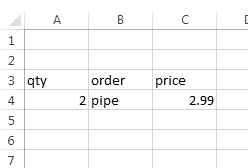
we have an excel sheet that is updated when people order things off our website. so lets say someone orders 2 pipes off the site. its transferred to an excel sheet like this (see first picture)

we have two sheets inside the actual workbook. so if cell "A3" (qty) is greater than 0, we want it to display in sheet 2

does that make sense?
 

Attachments

  • Capture.PNG
    Capture.PNG
    1.5 KB · Views: 8
  • Capture2.PNG
    Capture2.PNG
    11.9 KB · Views: 0

My Computer My Computer

At a glance

Ohio
Computer type
PC/Desktop
OS
Ohio
basically were wanting to have whatever is in row a3 to copy over to row a3 on the second sheet if the qty is above 0
 

My Computer My Computer

At a glance

Ohio
Computer type
PC/Desktop
OS
Ohio
Back
Top