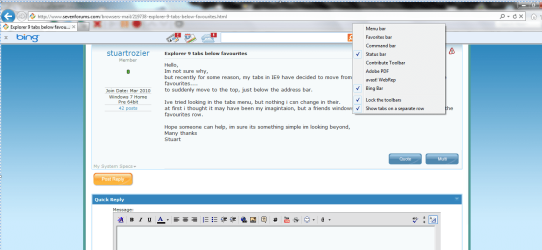
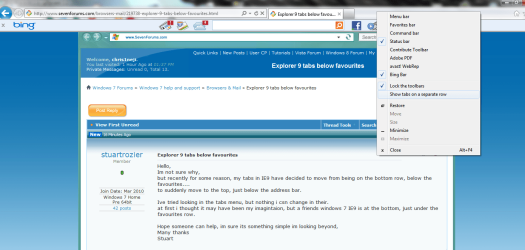
Solved Explorer 9 tabs below favourites

stuartrozier

New member
Member
VIP
Local time
1:12 AM
Messages
113
Hello,
Im not sure why,
but recently for some reason, my tabs in IE9 have decided to move from being on the bottom row, below the favourites....
to suddenly move to the top, just below the address bar.

Ive tried looking in the tabs menu, but nothing i csn change in their.
at first i thought it may have been my imagintaion, but a friends windows 7 IE9 is at the bottom, just under the favourites row.

Hope someone can help, im sure its something simple im looking beyond,
Many thanks
Stuart
 

My Computer My Computer

Computer Manufacturer/Model Number
HP
OS
Windows 7 Home Pre 64bit
CPU
i7 intel core 2.93GHZ
Motherboard
MSI
Memory
16.00GB
Graphics Card(s)
nVidia GT 220
On the empty space in the window,(border of IE9 window)
Do a right click and click on Tabs on seperate row
 

Attachments

  • IE9TabsSeperate.PNG
    IE9TabsSeperate.PNG
    63.2 KB · Views: 67
  • Ie9tabs.PNG
    Ie9tabs.PNG
    63.9 KB · Views: 64

My Computer My Computer

Computer type
PC/Desktop
Computer Manufacturer/Model Number
Gateway / Slight Modifications
OS
Windows 8 64 bit PRO
CPU
AMD Phenom X4 9100e
Motherboard
Gateway RS780
Memory
2GB X2 DDR2
Graphics Card(s)
Sapphire HD 6850
Sound Card
Integrated
Monitor(s) Displays
Gateway 19" + Dell 19"
Screen Resolution
1440X900 sometimes 2880 by 900
Hard Drives
WD 80GB
WD 640GB
WD 1,000GB
PSU
Antec BP 550watts
Case
Antec 300
Cooling
Stock Cooling
Keyboard
Saitek Eclipse II
Mouse
Gigabyte GM-M6800
Internet Speed
D: 30Mbps U:4Mbps
Antivirus
Avast version 8
Browser
Internet Explorer ver 10 64 bit
Other Info
This is my work computer.
I have another laptop running Windows 7 64 bit.
Another PC running Windows 8 64 bit pro.
Total of 3
Hey,
thanks for your quick reply,
unfortunately this isnt what i wanted,
...
i wanted the tabs-row, to be located on the bottom row,
which is under the favourites-row ....
i will try an paste a screen capture....
Capture.PNG Capture2.PNG
 

My Computer My Computer

Computer Manufacturer/Model Number
HP
OS
Windows 7 Home Pre 64bit
CPU
i7 intel core 2.93GHZ
Motherboard
MSI
Memory
16.00GB
Graphics Card(s)
nVidia GT 220
... so just to re-cap....
the FIRST image is the correct breakdown,
the SECOND image is the wrong breakdown..
thanks again
Stuart
 

My Computer My Computer

Computer Manufacturer/Model Number
HP
OS
Windows 7 Home Pre 64bit
CPU
i7 intel core 2.93GHZ
Motherboard
MSI
Memory
16.00GB
Graphics Card(s)
nVidia GT 220
Lol it took me a while to figuere this out but the difference is in the version number your using. One has IE8 the other has internet explorer 9. Consider more secure and was aiming to be more modern.

I think one of the biggest factor was to put the tabs in the same row as the address bar. Look at my picture number 2.
After all, your tabs are your webpages, and it would be logical to put them in same row. Also it would allow for more screen display area for websites. Sadly you can not do what your asking. Only way would be to revert back to the older version, i can guide you trough it if you would like. However I strongly insist to not do it.
 

My Computer My Computer

Computer type
PC/Desktop
Computer Manufacturer/Model Number
Gateway / Slight Modifications
OS
Windows 8 64 bit PRO
CPU
AMD Phenom X4 9100e
Motherboard
Gateway RS780
Memory
2GB X2 DDR2
Graphics Card(s)
Sapphire HD 6850
Sound Card
Integrated
Monitor(s) Displays
Gateway 19" + Dell 19"
Screen Resolution
1440X900 sometimes 2880 by 900
Hard Drives
WD 80GB
WD 640GB
WD 1,000GB
PSU
Antec BP 550watts
Case
Antec 300
Cooling
Stock Cooling
Keyboard
Saitek Eclipse II
Mouse
Gigabyte GM-M6800
Internet Speed
D: 30Mbps U:4Mbps
Antivirus
Avast version 8
Browser
Internet Explorer ver 10 64 bit
Other Info
This is my work computer.
I have another laptop running Windows 7 64 bit.
Another PC running Windows 8 64 bit pro.
Total of 3
Back
Top