
You are using an out of date browser. It may not display this or other websites correctly.
You should upgrade or use an alternative browser.
You should upgrade or use an alternative browser.
Explorer Glass
- Thread starter alexmira
- Start date


Arc
٩͡[๏̯͡๏]۶
just like you said, i been working on this, its same feature as fullglass, but with more options.. try then tell me.
http://www.sevenforums.com/customization/67456-black-glass-enhanced.html - Ok. I am trying it at once, and giving you the feedback.
But one more question please... why only black backgrounds
 ? why not all
  ?
?My Computer
- Computer type
- PC/Desktop
- Computer Manufacturer/Model Number
- Self Assembled
- OS
- Microsoft Windows 10 Pro Insider Preview 64-bit
- CPU
- Intel(R) Core(TM) i3-4130 CPU @ 3.40GHz
- Motherboard
- Gigabyte Technology Co., Ltd. B85M-D3H
- Memory
- Corsair Vengence 4GB x2 (8.00GB Dual-Channel DDR3 @ 798MHz)
- Graphics Card(s)
- 2047MB GeForce GTS 450 (ZOTAC International)
- Sound Card
- Onboard (Realtek High Definition Audio)
- Monitor(s) Displays
- LG Flatron E2040T
- Screen Resolution
- 1600x900
- Hard Drives
- Western Digital 1 TB
Seagate 500 GB
- PSU
- Corsair VS550
- Case
- Cooler Master K380
- Cooling
- Cooler Master Seidon 120V Plus
- Keyboard
- Logitech MK260r
- Mouse
- Logitech MK260r
- Internet Speed
- PMPL Broadband
- Antivirus
- Windows Defender + MBAM
- Browser
- Firefox
- Other Info
- Dell Studio 15" Laptop
Arc
٩͡[๏̯͡๏]۶
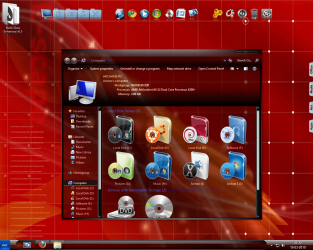
just like you said, i been working on this, its same feature as fullglass, but with more options.. try then tell me.
Really nice, and with a wide range of process support (upto 14). I checked one till now... that is explorer.exe. C O O L ! !
and the same nagging question again.... why not all windows backgrounds ?
Attachments
My Computer
- Computer type
- PC/Desktop
- Computer Manufacturer/Model Number
- Self Assembled
- OS
- Microsoft Windows 10 Pro Insider Preview 64-bit
- CPU
- Intel(R) Core(TM) i3-4130 CPU @ 3.40GHz
- Motherboard
- Gigabyte Technology Co., Ltd. B85M-D3H
- Memory
- Corsair Vengence 4GB x2 (8.00GB Dual-Channel DDR3 @ 798MHz)
- Graphics Card(s)
- 2047MB GeForce GTS 450 (ZOTAC International)
- Sound Card
- Onboard (Realtek High Definition Audio)
- Monitor(s) Displays
- LG Flatron E2040T
- Screen Resolution
- 1600x900
- Hard Drives
- Western Digital 1 TB
Seagate 500 GB
- PSU
- Corsair VS550
- Case
- Cooler Master K380
- Cooling
- Cooler Master Seidon 120V Plus
- Keyboard
- Logitech MK260r
- Mouse
- Logitech MK260r
- Internet Speed
- PMPL Broadband
- Antivirus
- Windows Defender + MBAM
- Browser
- Firefox
- Other Info
- Dell Studio 15" Laptop
Arc
٩͡[๏̯͡๏]۶
answers, im hooking the explorer, only the area its all i got, the other area not affected by it, anyway your desktop C O O L, the wallpaper , can share those? thanks for the feedback.
Why not ? BTW, scoopeeedoo gave it to me

Attachments

My Computer
- Computer type
- PC/Desktop
- Computer Manufacturer/Model Number
- Self Assembled
- OS
- Microsoft Windows 10 Pro Insider Preview 64-bit
- CPU
- Intel(R) Core(TM) i3-4130 CPU @ 3.40GHz
- Motherboard
- Gigabyte Technology Co., Ltd. B85M-D3H
- Memory
- Corsair Vengence 4GB x2 (8.00GB Dual-Channel DDR3 @ 798MHz)
- Graphics Card(s)
- 2047MB GeForce GTS 450 (ZOTAC International)
- Sound Card
- Onboard (Realtek High Definition Audio)
- Monitor(s) Displays
- LG Flatron E2040T
- Screen Resolution
- 1600x900
- Hard Drives
- Western Digital 1 TB
Seagate 500 GB
- PSU
- Corsair VS550
- Case
- Cooler Master K380
- Cooling
- Cooler Master Seidon 120V Plus
- Keyboard
- Logitech MK260r
- Mouse
- Logitech MK260r
- Internet Speed
- PMPL Broadband
- Antivirus
- Windows Defender + MBAM
- Browser
- Firefox
- Other Info
- Dell Studio 15" Laptop
Arc
٩͡[๏̯͡๏]۶
thanks a lot for sharing.
Welcome , m8.
Please see your user cp and profile. I send a request to you
My Computer
- Computer type
- PC/Desktop
- Computer Manufacturer/Model Number
- Self Assembled
- OS
- Microsoft Windows 10 Pro Insider Preview 64-bit
- CPU
- Intel(R) Core(TM) i3-4130 CPU @ 3.40GHz
- Motherboard
- Gigabyte Technology Co., Ltd. B85M-D3H
- Memory
- Corsair Vengence 4GB x2 (8.00GB Dual-Channel DDR3 @ 798MHz)
- Graphics Card(s)
- 2047MB GeForce GTS 450 (ZOTAC International)
- Sound Card
- Onboard (Realtek High Definition Audio)
- Monitor(s) Displays
- LG Flatron E2040T
- Screen Resolution
- 1600x900
- Hard Drives
- Western Digital 1 TB
Seagate 500 GB
- PSU
- Corsair VS550
- Case
- Cooler Master K380
- Cooling
- Cooler Master Seidon 120V Plus
- Keyboard
- Logitech MK260r
- Mouse
- Logitech MK260r
- Internet Speed
- PMPL Broadband
- Antivirus
- Windows Defender + MBAM
- Browser
- Firefox
- Other Info
- Dell Studio 15" Laptop

ahamprema
New member
Ok so still not CLEAR is it possible to make my Win7 x86 explorer background clear and how? Tried full galss and did not work for me.
"The question was (as I understood) if it is possible to make the explorer background transparent or not (as it is done by a few windowblinds themes and by fullglass.exe for dark explorer backgrounds) Glass2k, winroll or systemtransperency (made by our beloved friend Prisoner) works well, but they makes everything transparent ."
By Arc
I like my Win7 theme but just want to have explorer clear to match which of the above would be the easiest to use, work with Win7 and stable.
Where do I find Systemtransperency by Prisoner you mentioned, I searched and did not find it?
"The question was (as I understood) if it is possible to make the explorer background transparent or not (as it is done by a few windowblinds themes and by fullglass.exe for dark explorer backgrounds) Glass2k, winroll or systemtransperency (made by our beloved friend Prisoner) works well, but they makes everything transparent ."
By Arc
I like my Win7 theme but just want to have explorer clear to match which of the above would be the easiest to use, work with Win7 and stable.
Where do I find Systemtransperency by Prisoner you mentioned, I searched and did not find it?
Attachments

My Computer
- Computer Manufacturer/Model Number
- HP Pavilion DV6600 Laptop
- OS
- Windows 7 Ultimate 32bit
- CPU
- Intel Core Duo T5250
Arc
٩͡[๏̯͡๏]۶
Ok so still not CLEAR is it possible to make my Win7 x86 explorer background clear and how? Tried full galss and did not work for me.
"The question was (as I understood) if it is possible to make the explorer background transparent or not (as it is done by a few windowblinds themes and by fullglass.exe for dark explorer backgrounds) Glass2k, winroll or systemtransperency (made by our beloved friend Prisoner) works well, but they makes everything transparent ."
By Arc
I like my Win7 theme but just want to have explorer clear to match which of the above would be the easiest to use, work with Win7 and stable.
Where do I find Systemtransperency by Prisoner you mentioned, I searched and did not find it?
Hi pal ! http://www.sevenforums.com/projects/63796-transparency-project.html by Prisoner is here ! If you like it, dont forget to mention it to him.

My Computer
- Computer type
- PC/Desktop
- Computer Manufacturer/Model Number
- Self Assembled
- OS
- Microsoft Windows 10 Pro Insider Preview 64-bit
- CPU
- Intel(R) Core(TM) i3-4130 CPU @ 3.40GHz
- Motherboard
- Gigabyte Technology Co., Ltd. B85M-D3H
- Memory
- Corsair Vengence 4GB x2 (8.00GB Dual-Channel DDR3 @ 798MHz)
- Graphics Card(s)
- 2047MB GeForce GTS 450 (ZOTAC International)
- Sound Card
- Onboard (Realtek High Definition Audio)
- Monitor(s) Displays
- LG Flatron E2040T
- Screen Resolution
- 1600x900
- Hard Drives
- Western Digital 1 TB
Seagate 500 GB
- PSU
- Corsair VS550
- Case
- Cooler Master K380
- Cooling
- Cooler Master Seidon 120V Plus
- Keyboard
- Logitech MK260r
- Mouse
- Logitech MK260r
- Internet Speed
- PMPL Broadband
- Antivirus
- Windows Defender + MBAM
- Browser
- Firefox
- Other Info
- Dell Studio 15" Laptop
ahamprema
New member
It looks like transparency project makes the entire window transparent including the type/font, everything. Will it do what I want. Thanks again Arc & Prisoner
My Computer
- Computer Manufacturer/Model Number
- HP Pavilion DV6600 Laptop
- OS
- Windows 7 Ultimate 32bit
- CPU
- Intel Core Duo T5250

Prisoner
New member
No problem.
Also has a few other features you may be interested in. =p
Also has a few other features you may be interested in. =p
My Computer
- Computer type
- PC/Desktop
- Computer Manufacturer/Model Number
- Custom built
- OS
- Windows 8 Pro 64-bit
- CPU
- Intel Core i7 950 @4.4GHz
- Motherboard
- EVGA 131-GT-E767
- Memory
- 12GB DDR3 1333MHz @1400 (9-9-9-24)
- Graphics Card(s)
- 2x AMD Radeon HD 6770
- Sound Card
- Sound Blaster Audigy
- Monitor(s) Displays
- Acer S231HL + Acer E19T5W
- Screen Resolution
- 1920x1080 + 1440x900
- Hard Drives
- 128GB Samsung 840 Pro
1TB Seagate Barracuda 7200RPM 64mb
500GB Seagate Barracuda 7200RPM 16mb
- PSU
- Corsair GS800
- Case
- Custom-made
- Cooling
- CM Hyper212+, lots of fans
- Keyboard
- NMB RT8255C+
- Mouse
- Func MS-3
- Internet Speed
- 30/1.5
- Antivirus
- Microsoft Security Essentials/Spybot SD/Malwarebytes
- Browser
- Google Chrome
- Other Info
- Onkyo TX-27 receiver & two Realistic Optimus T100s.
Arc
٩͡[๏̯͡๏]۶
It looks like transparency project makes the entire window transparent including the type/font, everything. Will it do what I want. Thanks again Arc & Prisoner
Thanks, Prema! No need to greet me this time
. Let me have a chorus with you "Thanks, Prisoner !!"I just found out the link for you, and will be glad if I have the chance to do it again and again and again, but this time my pal would be under pressure by making newer and newer programs
My Computer
- Computer type
- PC/Desktop
- Computer Manufacturer/Model Number
- Self Assembled
- OS
- Microsoft Windows 10 Pro Insider Preview 64-bit
- CPU
- Intel(R) Core(TM) i3-4130 CPU @ 3.40GHz
- Motherboard
- Gigabyte Technology Co., Ltd. B85M-D3H
- Memory
- Corsair Vengence 4GB x2 (8.00GB Dual-Channel DDR3 @ 798MHz)
- Graphics Card(s)
- 2047MB GeForce GTS 450 (ZOTAC International)
- Sound Card
- Onboard (Realtek High Definition Audio)
- Monitor(s) Displays
- LG Flatron E2040T
- Screen Resolution
- 1600x900
- Hard Drives
- Western Digital 1 TB
Seagate 500 GB
- PSU
- Corsair VS550
- Case
- Cooler Master K380
- Cooling
- Cooler Master Seidon 120V Plus
- Keyboard
- Logitech MK260r
- Mouse
- Logitech MK260r
- Internet Speed
- PMPL Broadband
- Antivirus
- Windows Defender + MBAM
- Browser
- Firefox
- Other Info
- Dell Studio 15" Laptop
Prisoner
New member
xD
This makes me worried.
This makes me worried.
My Computer
- Computer type
- PC/Desktop
- Computer Manufacturer/Model Number
- Custom built
- OS
- Windows 8 Pro 64-bit
- CPU
- Intel Core i7 950 @4.4GHz
- Motherboard
- EVGA 131-GT-E767
- Memory
- 12GB DDR3 1333MHz @1400 (9-9-9-24)
- Graphics Card(s)
- 2x AMD Radeon HD 6770
- Sound Card
- Sound Blaster Audigy
- Monitor(s) Displays
- Acer S231HL + Acer E19T5W
- Screen Resolution
- 1920x1080 + 1440x900
- Hard Drives
- 128GB Samsung 840 Pro
1TB Seagate Barracuda 7200RPM 64mb
500GB Seagate Barracuda 7200RPM 16mb
- PSU
- Corsair GS800
- Case
- Custom-made
- Cooling
- CM Hyper212+, lots of fans
- Keyboard
- NMB RT8255C+
- Mouse
- Func MS-3
- Internet Speed
- 30/1.5
- Antivirus
- Microsoft Security Essentials/Spybot SD/Malwarebytes
- Browser
- Google Chrome
- Other Info
- Onkyo TX-27 receiver & two Realistic Optimus T100s.

jackies
New member
Great thread!
Black Glass Enhanced works like a charm!
One problem now, can't seem to find a black background theme that supports aero.
Turning aero on turns explorer background white.
Is there any aero themes with black explorer background?
Black Glass Enhanced works like a charm!
One problem now, can't seem to find a black background theme that supports aero.
Turning aero on turns explorer background white.
Is there any aero themes with black explorer background?
My Computer
- Computer Manufacturer/Model Number
- custom built
- OS
- cp/m
- Motherboard
- asus p5e ws
- Memory
- 4gig g-skill
- Graphics Card(s)
- bfg 9800gtx watercooled
- Sound Card
- echo audiofire12
- Monitor(s) Displays
- sony 42"
- Screen Resolution
- 1920x1080
- Hard Drives
- c: intel x25-m 80gig
d: 4x250gig raid0
- PSU
- pcp&c 1kw
- Case
- Chieftec Arena 2000
- Cooling
- watercooling with 2x pontiac heatercores 4x papst 120mm
- Keyboard
- mechanical
- Mouse
- Logitech
- Internet Speed
- slow
Arc
٩͡[๏̯͡๏]۶
Great thread!
Black Glass Enhanced works like a charm!
One problem now, can't seem to find a black background theme that supports aero.
Turning aero on turns explorer background white.
Is there any aero themes with black explorer background?
Here is only two. For more, search deviantART
Midnight Glass Nature Theme by ~MrGRiM01 on deviantART
Black Glass Aero Win 7 Final by ~MrGRiM01 on deviantART
My Computer
- Computer type
- PC/Desktop
- Computer Manufacturer/Model Number
- Self Assembled
- OS
- Microsoft Windows 10 Pro Insider Preview 64-bit
- CPU
- Intel(R) Core(TM) i3-4130 CPU @ 3.40GHz
- Motherboard
- Gigabyte Technology Co., Ltd. B85M-D3H
- Memory
- Corsair Vengence 4GB x2 (8.00GB Dual-Channel DDR3 @ 798MHz)
- Graphics Card(s)
- 2047MB GeForce GTS 450 (ZOTAC International)
- Sound Card
- Onboard (Realtek High Definition Audio)
- Monitor(s) Displays
- LG Flatron E2040T
- Screen Resolution
- 1600x900
- Hard Drives
- Western Digital 1 TB
Seagate 500 GB
- PSU
- Corsair VS550
- Case
- Cooler Master K380
- Cooling
- Cooler Master Seidon 120V Plus
- Keyboard
- Logitech MK260r
- Mouse
- Logitech MK260r
- Internet Speed
- PMPL Broadband
- Antivirus
- Windows Defender + MBAM
- Browser
- Firefox
- Other Info
- Dell Studio 15" Laptop
jackies
New member
Thanks for the prompt answer!
Will try these out and see what happens.
Will try these out and see what happens.
My Computer
- Computer Manufacturer/Model Number
- custom built
- OS
- cp/m
- Motherboard
- asus p5e ws
- Memory
- 4gig g-skill
- Graphics Card(s)
- bfg 9800gtx watercooled
- Sound Card
- echo audiofire12
- Monitor(s) Displays
- sony 42"
- Screen Resolution
- 1920x1080
- Hard Drives
- c: intel x25-m 80gig
d: 4x250gig raid0
- PSU
- pcp&c 1kw
- Case
- Chieftec Arena 2000
- Cooling
- watercooling with 2x pontiac heatercores 4x papst 120mm
- Keyboard
- mechanical
- Mouse
- Logitech
- Internet Speed
- slow
Arc
٩͡[๏̯͡๏]۶
Thanks for the prompt answer!
Will try these out and see what happens.
You are welcome, pal!
My Computer
- Computer type
- PC/Desktop
- Computer Manufacturer/Model Number
- Self Assembled
- OS
- Microsoft Windows 10 Pro Insider Preview 64-bit
- CPU
- Intel(R) Core(TM) i3-4130 CPU @ 3.40GHz
- Motherboard
- Gigabyte Technology Co., Ltd. B85M-D3H
- Memory
- Corsair Vengence 4GB x2 (8.00GB Dual-Channel DDR3 @ 798MHz)
- Graphics Card(s)
- 2047MB GeForce GTS 450 (ZOTAC International)
- Sound Card
- Onboard (Realtek High Definition Audio)
- Monitor(s) Displays
- LG Flatron E2040T
- Screen Resolution
- 1600x900
- Hard Drives
- Western Digital 1 TB
Seagate 500 GB
- PSU
- Corsair VS550
- Case
- Cooler Master K380
- Cooling
- Cooler Master Seidon 120V Plus
- Keyboard
- Logitech MK260r
- Mouse
- Logitech MK260r
- Internet Speed
- PMPL Broadband
- Antivirus
- Windows Defender + MBAM
- Browser
- Firefox
- Other Info
- Dell Studio 15" Laptop
ahamprema
New member
The program is great wish I could make this. It seems to make everything transparent. I would like to be able to "JUST" make the background of Explorer clear/transparent or opaque. Is this possible or am I missing some steps here and this should be giving me these results? 1 try I was getting yellow type/font in explorer.
My Computer
- Computer Manufacturer/Model Number
- HP Pavilion DV6600 Laptop
- OS
- Windows 7 Ultimate 32bit
- CPU
- Intel Core Duo T5250
Arc
٩͡[๏̯͡๏]۶
The program is great wish I could make this. It seems to make everything transparent. I would like to be able to "JUST" make the background of Explorer clear/transparent or opaque. Is this possible or am I missing some steps here and this should be giving me these results? 1 try I was getting yellow type/font in explorer.
About which program you are talking ? System transparency by Prisoner doesnt make fonts yellow at all, but it makes everything see-through. On the other hand , Black glass enhanced by curious9 or full glass makes the explorer background transparent if applied on a dark explorer theme and makes fonts yellow when applied on a normal explorer theme. So choose program as per your requirements
My Computer
- Computer type
- PC/Desktop
- Computer Manufacturer/Model Number
- Self Assembled
- OS
- Microsoft Windows 10 Pro Insider Preview 64-bit
- CPU
- Intel(R) Core(TM) i3-4130 CPU @ 3.40GHz
- Motherboard
- Gigabyte Technology Co., Ltd. B85M-D3H
- Memory
- Corsair Vengence 4GB x2 (8.00GB Dual-Channel DDR3 @ 798MHz)
- Graphics Card(s)
- 2047MB GeForce GTS 450 (ZOTAC International)
- Sound Card
- Onboard (Realtek High Definition Audio)
- Monitor(s) Displays
- LG Flatron E2040T
- Screen Resolution
- 1600x900
- Hard Drives
- Western Digital 1 TB
Seagate 500 GB
- PSU
- Corsair VS550
- Case
- Cooler Master K380
- Cooling
- Cooler Master Seidon 120V Plus
- Keyboard
- Logitech MK260r
- Mouse
- Logitech MK260r
- Internet Speed
- PMPL Broadband
- Antivirus
- Windows Defender + MBAM
- Browser
- Firefox
- Other Info
- Dell Studio 15" Laptop