Solved Extent of Program Features On/Off

Magnakai

New member
Member
VIP
Local time
12:21 PM
Messages
160
hi all, if u disable windows media player at control panel windows features, does wmp still attempt to update automatically as per schedule? can it?

one thing i realized is if u had used wmp even once after windows installation, some personal settings are already stored. turning the feature off then on again won't reset settings to default.
 

My Computer

Computer type
PC/Desktop
OS
Windows 7 Ultimate x64
I've always kept WMP disabled (turn windows features on/ off)

You can check WMP update settings here:

HKEY_LOCAL_MACHINE\SOFTWARE\Policies\Microsoft\WindowsMediaPlayer

DisableAutoUpdate DWORD

0 = Enable
1 = Disabled

WMP Updates.jpg

Or set the same via Group Policy:

Computer Configuration> Administrative Templates> Windows Components> Windows Media Player.

WMP Updates 2.jpg

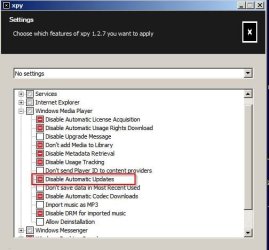
Or use some third party software:

WMP Updates 3.jpg

Although as far as I'm concerned all WMP features/ settings are disabled when turning off via Windows Features.
 

My Computer

Computer type
Laptop
Computer Manufacturer/Model Number
ASUS
OS
Microsoft Windows 7 Home Premium 64-bit 7601 Multiprocessor Free Service Pack 1
CPU
AMD C-60 APU with Radeon(tm) HD Graphics
Motherboard
ASUSTeK COMPUTER INC. X501U
Memory
4.00 GB
Graphics Card(s)
AMD Radeon HD 6290 Graphics
Sound Card
(1) AMD High Definition Audio Device (2) Realtek High Defi
Screen Resolution
1366 x 768 x 32 bits (4294967296 colors) @ 60 Hz
Hard Drives
Hitachi HTS545050A7E380 SATA Disk Device
Antivirus
Comodo CIS & FW, SecureAplus App Whitelisting, Threatfire
Browser
Cyberfox 64bit, Opera 64bit, Airfox
Other Info
Spy-The-Spy, HitmanPro.Alert, Norton Connect Safe, MJRegWatcher, BitDefender TrafficLight, Voodoo Shield, Zemana AntiMalware
ok thx, yeah i just wanted to be safe, and didn't know where to check. i have vlc as main player.
 

My Computer

Computer type
PC/Desktop
OS
Windows 7 Ultimate x64
Back
Top