External plugged in, recognized, but not FINDABLE!!

betelgeuse4721

New member
Hey all,

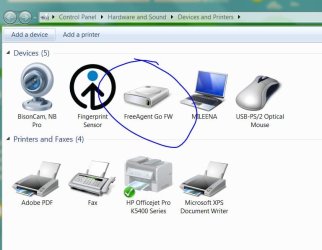
I plugged in my external for the first time on my new laptop, then windows said updating drivers, device ready to use, then I see it under my device/drivers menu, but I can't find it in My Computer and can't access it?

Any ideas?
 

My Computer

OS
Windows 7
Are you sure it's not just unlabeled as an I: or H: drive? A screen cap or two would be pretty helpful in this situation.
 

My Computer

OS
XP Professional, 7 Professional
Are you talking about External HDD? if yes,
Im pretty sure that you will have to format the external harddisk on the first time using it. And formatting can be done if you run Computer Management>Disk Management And format the new drive.
 

My Computer

OS
Windows 7 Ultimate x64
CPU
AMD Phenom II X4 840
Motherboard
Acer RS780HVF
Graphics Card(s)
ATi Radeon HD5770 1GB
Monitor(s) Displays
HP 2009m
Screen Resolution
1600x900
Hard Drives
Seagate 320GB 7200rpm / Hitachi 1TB 7200rpm
PSU
Cooler Master GX 550W
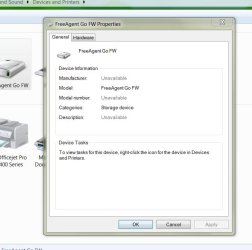
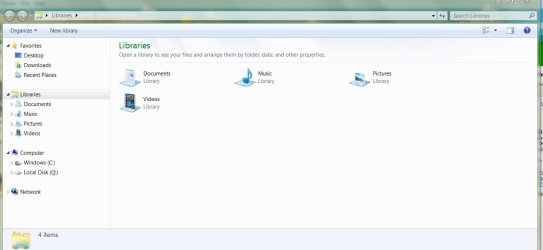
Here are screens,

It shows under my device and drivers page fine, but is not visible otherwise.

I was using this HDD on a Mac prior to this, and it has important information that I need on my Windows.

Thanks,
Brady
 

Attachments

  • 1.JPG
    1.JPG
    65.5 KB · Views: 4
  • 2.JPG
    2.JPG
    64 KB · Views: 7
  • 3.JPG
    3.JPG
    78.4 KB · Views: 4

My Computer

OS
Windows 7
I've read a google result and it stated a few options. Hope it helps!
 

My Computer

OS
Windows 7 Ultimate x64
CPU
AMD Phenom II X4 840
Motherboard
Acer RS780HVF
Graphics Card(s)
ATi Radeon HD5770 1GB
Monitor(s) Displays
HP 2009m
Screen Resolution
1600x900
Hard Drives
Seagate 320GB 7200rpm / Hitachi 1TB 7200rpm
PSU
Cooler Master GX 550W
Did you look in Start/Computer? Drives don't show in Libraries.

Did the Mac format the drive for a Mac file system?
 

My Computer

Computer type
PC/Desktop
Computer Manufacturer/Model Number
Home Built Desktop By DataTech
OS
Windows 7 Ultimate X64 SP1
CPU
Intel i5-2550K, Differing ~4.4-4.8GHz No built in GPU
Motherboard
ASUS P8Z68-V PRO/GEN3
Memory
16GB G.Skill Sniper 1866MHz @ 2133MHz 2x8GB
Graphics Card(s)
ASUS GTX650TIB-DC2OC-2GD5, (650TI Boost)
Sound Card
Onboard Realtek 5-1
Monitor(s) Displays
Samsung P2570HD
Screen Resolution
1920x1080
Hard Drives
Samsung 840 Pro 256GB SSD for OS, 500GB Seagate Constellation (Enterprise drive) for Data
PSU
Corsair HX650W
Case
Inwin Dragon Rider
Cooling
Hyper 212 EVO w/two Noctua fans, push-pull, @1300 RPM
Keyboard
E-Z Eyes, bright yellow keys with large characters
Mouse
steelseries SENSEI Laser Pro Gaming
Internet Speed
48-51Mbs Mbs down, 11 Mbs up Xfinity Cable
Antivirus
Norton Internet Security 2013
Browser
IE 10, Opera, Pale Moon if needed
Other Info
4 case fans, LG BluRay-RE, ASUS DVD-RW, Mr. Fusion power supply, 1.21 gigawatts.
You'll need a separate program to view Mac dives on a PC. Look at MacDrive.
 

My Computer

Computer Manufacturer/Model Number
MSI
OS
Windows 7 Professional 64bit
CPU
Intel Celeron 2.4 GH
Memory
4 GB
Graphics Card(s)
NVidia GeForce 9800GT
Sound Card
ATI HDMI Audio
Monitor(s) Displays
Acer S231HL Dual Monitors
Hard Drives
Hitachi 300GB ATA
Maxtor 300GB USB
Cooling
Standard
Keyboard
Logitech wireless
Mouse
Logitech wireless
Internet Speed
Cable
Look in Disk management and assign it a letter. Right click computer, select manage and choose disk management in the left column. You will see it there but will have to initialize it and give it a drive letter. You may have to create a partition and format it first. If you have been using it on a Mac, Windows cannot read HFS+. Macs can read but not write to NTFS, as I understand it.
 

My Computers

System One System Two

  • Computer type
    PC/Desktop
    Computer Manufacturer/Model Number
    ALWAYS UNDER CONSTRUCTION
    OS
    Windows 11 Pro
    CPU
    Ryzen 9 5900X
    Motherboard
    Asus X570 Crosshair Viii Hero
    Memory
    32GB G Skill DDR4-3600
    Graphics Card(s)
    EVGA RTX 3080 FTW 3 Ultra
    Sound Card
    On Board/Sennheiser PC37X Headset
    Monitor(s) Displays
    3 X Asus 27"
    Screen Resolution
    2560x1440
    Hard Drives
    2 X 1 TB NVME drives
    PSU
    EVGA 850
    Case
    Phanteks Eclipse P400A
    Cooling
    EVGA 280 AIO
    Keyboard
    Logitech G510s/ Logitech G13
    Mouse
    Logitech G502
    Internet Speed
    24/1
    Antivirus
    ESET/MBAM Pro/SAS Pro
    Browser
    Chrome/ Firefox/ Edge
  • Computer type
    Laptop
    System Manufacturer/Model Number
    Dell 16 Plus
    OS
    Windows 11 Pro
    CPU
    Intel Ultra 9 288V
    Memory
    32 GB LPDDR5X 8533
    Monitor(s) Displays
    16" Mini-LED HDR600 Touch 90 Hz
    Screen Resolution
    2560X1600
    Hard Drives
    1 TB NVME
Back
Top