fail to connect to samba on centOS 5.6

sunxiaoyang

New member
Local time
3:57 PM
Messages
5
I have following home network:

laptop (window7) <--> router <---> linux PC (centOS 5.6)
|
|
modem
|
|
internet

I want to connect laptop to samba service on the linux PC.
But it does not work.

I have setup router to reserve IP address for both laptop and linux PC.
I have setup samba service on the linux PC.

I can ping the ip address 192.168.0.102 from laptop.

C:\Users\Tim>ping 192.168.0.102
Pinging 192.168.0.102 with 32 bytes of data:
Reply from 192.168.0.102: bytes=32 time=6ms TTL=64
Reply from 192.168.0.102: bytes=32 time=1ms TTL=64

I also can putty to the linux PC from laptop:
login as: tim
[email protected]'s password:
Last login: Thu May 19 22:55:40 2011 from tim-pc.jgsignet
[tim@JGWORK ~]$

Don't know why?

I check my laptop, there is no "Windows Live ID" program. I just did not see it from All Programs.

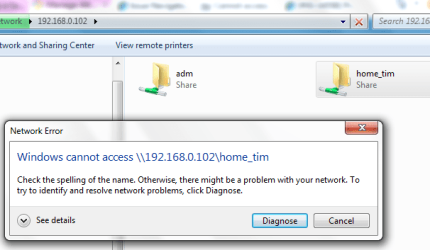
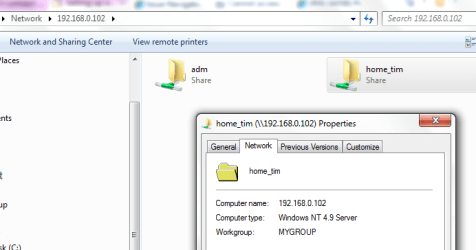
Attached Untitled.png, shows that window7 Network in file explorer can shows the two share directory on the IP address.
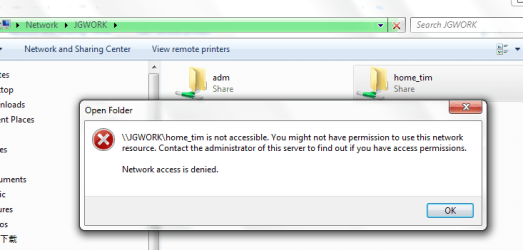
But when I click the "home_tim" directory, it shows error like error.png.
 

Attachments
  • Untitled.png
    Untitled.png
    18.1 KB · Views: 34
  • error.png
    error.png
    19 KB · Views: 36

My Computer My Computer

At a glance

windows 7 professional 64bitIntel Duo Core P87008G
Computer Manufacturer/Model Number
ThinkPad R400
OS
windows 7 professional 64bit
CPU
Intel Duo Core P8700
Memory
8G
in the network structure, the line connected to internet is from router; the blank space characters are eaten up.
 

My Computer My Computer

At a glance

windows 7 professional 64bitIntel Duo Core P87008G
Computer Manufacturer/Model Number
ThinkPad R400
OS
windows 7 professional 64bit
CPU
Intel Duo Core P8700
Memory
8G
Have you added the samba user with permissions to the share directory?

smb.conf
Code:
[home_tim]
   comment =
   path = /home/tim/
   browseable = no
   guest ok = no
   writable = true
   printable = no
   valid users = tim
   invalid users = *
Add samba user:
Code:
smbpasswd -a tim

Then restart samba service.
 

My Computer My Computer

At a glance

.
OS
.
here is my /etc/samba/smb.conf

[home_tim]
comment = tim's home
path = /home/tim/
browseable = yes
guest ok = yes
writable = yes


I just try to allow anyone to access it.
 

My Computer My Computer

At a glance

windows 7 professional 64bitIntel Duo Core P87008G
Computer Manufacturer/Model Number
ThinkPad R400
OS
windows 7 professional 64bit
CPU
Intel Duo Core P8700
Memory
8G
If you do it like that then what you'll have to do is make sure that the user "nobody" has permissions to the "path" directory specified. Otherwise your samba share will be "read only" for anyone that connects to it as they'll be running as the "nobody" user.

Code:
[home_tim]
comment = tim's home
path = /home/tim/
available = yes
browseable = yes
writable = true
guest ok = yes
security = share
 

My Computer My Computer

At a glance

.
OS
.
some good news, some bad news.

1. I find selinux will prevent some ftp/samba access home directory on CentOS.
So I enable home directory sharing by
setsebool -P samba_enable_home_dirs 1

with this, if I use ftp 192.168.0.102, it works and can list out the home directory. of course, you need to key in
the username/password.

2. Now my laptop can see the hostname of the linux PC

3. Try either way of #3 and #5, it still does not work. attached is what windows7 tells me.
 

Attachments

  • error.png
    error.png
    20.3 KB · Views: 46

My Computer My Computer

At a glance

windows 7 professional 64bitIntel Duo Core P87008G
Computer Manufacturer/Model Number
ThinkPad R400
OS
windows 7 professional 64bit
CPU
Intel Duo Core P8700
Memory
8G
I also follow this article:
Access FTP sites natively in Windows 7 | Redmond Pie

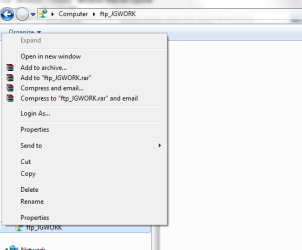
to map the directory in windows 7 explorer. But it does not work. Windows 7 allows me to map the driver. But shows nothing under the ftp-server.

Here is comparison. Using ftp in "cmd" console.

C:\Users\Tim>ftp 192.168.0.102
Connected to 192.168.0.102.
220 (vsFTPd 2.0.5)
User (192.168.0.102:(none)): tim
331 Please specify the password.
Password:
230 Login successful.
ftp> ls
200 PORT command successful. Consider using PASV.
150 Here comes the directory listing.
Desktop
Public
readme.tim
tools
226 Directory send OK.
ftp: 41 bytes received in 0.00Seconds 41000.00Kbytes/sec.
ftp> bye
221 Goodbye.

and attached is the windows 7 explorer. you can see the directory can not be "expand" and nothing shown in right-hand panel.
 

Attachments

  • error.png
    error.png
    11.4 KB · Views: 10

My Computer My Computer

At a glance

windows 7 professional 64bitIntel Duo Core P87008G
Computer Manufacturer/Model Number
ThinkPad R400
OS
windows 7 professional 64bit
CPU
Intel Duo Core P8700
Memory
8G
Back
Top