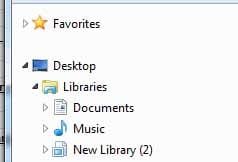
Favorites are closed by default and part of explorer menu at top missi

DonM123

New member
Member
VIP
Local time
12:17 AM
Messages
140
Favorites are closed by default and part of explorer menu at top is missing. ON windows 7 normally under file edit view tools help there is a place there with options but now that is missing somehow I used to be able to click view options there and such but now its missing. I do not see settings for this anywhere. Thanks
 

My Computer My Computer

At a glance

win7proi716GTX 980 TI
Computer type
PC/Desktop
Computer Manufacturer/Model Number
Gigibyte Custom build
OS
win7pro
CPU
i7
Memory
16
Graphics Card(s)
GTX 980 TI
Hard Drives
ssd 4t 750gig
Antivirus
norton pain
Hi open browser and right click an open spot on top right and put a check mark next to menu bar.
 

My Computer My Computer

At a glance

win 10
Computer type
PC/Desktop
Computer Manufacturer/Model Number
dell xps 9000
OS
win 10
I am talking the favorites in windows explorer When I plug my S10 in samsung fiddles with things and now every single time I want to go to folder in favorites I am reminded that samsung has tamperted with my computer.
 

My Computer My Computer

At a glance

win7proi716GTX 980 TI
Computer type
PC/Desktop
Computer Manufacturer/Model Number
Gigibyte Custom build
OS
win7pro
CPU
i7
Memory
16
Graphics Card(s)
GTX 980 TI
Hard Drives
ssd 4t 750gig
Antivirus
norton pain
maybe in the registry there are setting for favorites where I can tell it to how to behave. Obviously Samsung knows how to tamper with it.
 

My Computer My Computer

At a glance

win7proi716GTX 980 TI
Computer type
PC/Desktop
Computer Manufacturer/Model Number
Gigibyte Custom build
OS
win7pro
CPU
i7
Memory
16
Graphics Card(s)
GTX 980 TI
Hard Drives
ssd 4t 750gig
Antivirus
norton pain
ffff.jpg I want this to be open by default not closed.

We should have complete control over favorites. in 7 and 10 both
I go to users\favorites and that is not my favorites its something else.
I do not know where this favorites folder is actually located on my computer.
Maybe the settings for favorites is in my registry.
takes when it could all be avoided if we just had a little more control over how things worked.
 
Last edited:

My Computer My Computer

At a glance

win7proi716GTX 980 TI
Computer type
PC/Desktop
Computer Manufacturer/Model Number
Gigibyte Custom build
OS
win7pro
CPU
i7
Memory
16
Graphics Card(s)
GTX 980 TI
Hard Drives
ssd 4t 750gig
Antivirus
norton pain
well for me if I have favorites explanded and close explorer and open it again it stays explanded if I have it not show the stuff under favorites and close and open it stays that way I do not know how to fix your problem.
 

My Computer My Computer

At a glance

win 10
Computer type
PC/Desktop
Computer Manufacturer/Model Number
dell xps 9000
OS
win 10
Back
Top