File - Access Denied

Tatoon

New member
So, it's like this: I used to have some files on a laptop with windows xp. In that computer, the files only had permissions for admins, I think. I never had problems accessing those files in the laptop.
Later that laptop died, but I managed to get those files in my new computer. Problem is, I can't access those files now. I get an "access denied" warning.
I tried taking ownership of the file and changing permissions, but nothing worked. I tried a bunch of solutions I found on google, but so far nothing worked. I have an "Account unknown" on the file's permissions (suppose is the old laptop account) but I can't remove it.

Is there any way to solve this? Or are those files lost?
 

My Computer

OS
Windows 7 Ultimate x64
unlocker sometimes gets around these permissions errors without forcing you to do it the long way, and it's a tiny app.
UNLOCKER 1.9.1 BY CEDRICK 'NITCH' COLLOMB
If nothing else it should tell you exactly WHY it's not letting you move it.
 

My Computer

Computer Manufacturer/Model Number
Insane hobo technologies. ;-)
OS
Windows 7 x64
CPU
Intel i7 2600k
Motherboard
Asrock z68 extreme 4 gen 3
Memory
G.skill Ripjaw 16gigs @ 1866
Graphics Card(s)
Nvidia gtx580 (evga)
Sound Card
Integrated HD audio + hdmi
Monitor(s) Displays
24" ASUS widescreen + 42" insignia
Screen Resolution
1080p (1920x1080)
Hard Drives
128 Samsung 830
256 Samsung 840
3 x 1tb storage drive (various)
1 western digital 1tb (eSATA)
1 Seagate 1tb (eSATA)
PSU
1 kilowatt SLI/Crossfire rated Silverstone modular
Case
NZXT Phantom + additional 220 fan
Cooling
Zalmann
Keyboard
Microsoft wireless 3000 (v2)
Mouse
MS - wireless 5000 (bluetrack)
Internet Speed
depends on if you ask me or my provider.
Other Info
The above information is provided as is, and the author assumes no responsibility for issues it may cause with your sanity or fanboyism.
Hello and welcome Tatoon mate have you got any way of hooking the old drive to a working machine?

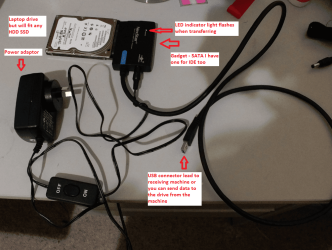
There is a gadget to do this via USB and also you could hook the drive directly into the machine.

If you can it may be worth using a Ubuntu boot disk to then access the drive without actually starting up Windows (you need to set the BIOS to CD boot)

The device here is a SATA one but you can get them for IDE drives not expensive and very useful to have around.

This way you may be able to get that data without having the access problem. Or you may be able to change the account settings while having it up on Ubuntu.
 

Attachments

  • DEVICE.PNG
    DEVICE.PNG
    1 MB · Views: 6

My Computer

Computer type
PC/Desktop
Computer Manufacturer/Model Number
Own build (new) Desk1 / Asus ROG Win 7 / Desk2 1st build
OS
Desk1 7 Home Prem / Desk2 10 Pro / Main lap Asus ROG 10 Pro 2 laptop Toshiba 7 Pro Asus P2520 7 & 10
CPU
Desk1 i5 3750K / Laptop i7 GTX 860M / Desk2 i5 2500
Motherboard
Desk1 Asus P877-V / Desk2 Gigabyte H67 UD3H / Laptop ?
Memory
Desk1 8GB (1866) / Desk2 16GB (1333) / Laptop 8Gb DDR3
Graphics Card(s)
Desk 1& 2NVidia GTX 650 & Laptops on board Intel
Sound Card
Desk 1 & 2 -XONAR DG Realtek High Def audio Laptop
Monitor(s) Displays
Desk 1 Benq HD 2450 / Desk2 Philips 24" / Laptop 17.5"
Screen Resolution
1920x1080 D1 & D2 & Laptop 1
Hard Drives
Desk1 Samsung 120GB 830 SSD
Asus ROG 256GB 850 Pro SSD
Desk2 Samsung 840 256 SSD
Toshiba 120GB EVO
PSU
Desk 1 Corsair HX 1050/ Laptop ? / Desk 2 Corsair HX 650
Case
Desk 1 Cooler HAF XM ? Toshiba laptop / Desk2 Coolermaster
Cooling
Fans on all Desk1 -2 Desk2 - all Coolermasters 5 Laptop ?
Keyboard
Desk 1 MS Sidewinder X6 Desk 2 MS Sidewinder X 4
Mouse
Desk 1&2 - Gigabyte MS 900 gamer - laptop - Logitec wireless
Internet Speed
ADSL2+
Other Info
One other Desktop (tester) and spare Toshba laptop both with SSD's
Running Kaspersky 2016 ISS on all machines config'd identically
Logitec audio stereo systems on each machine (x3)
Canon MG5250MFC
Router/modem TP-Link running WPA2SK
Back
Top