I'm on Win 7 Ultimate x64.
I just upgraded to a 4K monitor, and I've read on some issues related high DPI displays, and this might be one of them. I've set the default magnification to 150% in my Windows 7 display settings. And for the most part things look ok. But I noticed some strange behavior within file explorer.
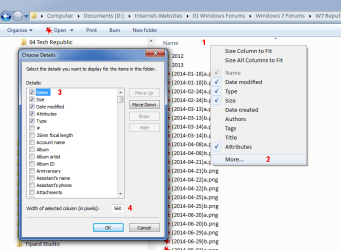
Here's an image for reference

You can see all that unnecessary extra space in the "Size" and "Date Modified" column. So naturally I try to drag the column width to make it smaller. But it wouldn't cooperate! If I try to make the Size column smaller, Explore jerks around and suddenly makes either the "Name" or "Date Modified" column bigger. Same if I try make one of the other columns smaller.
I've tried the Right click options on the columns: "Size Column to fit" and "Size all columns to fit". No good. It would still give me a bunch of unnecessary space in all columns.
This issue didn't happen on my old 1080p monitor. I can resize columns as I wished and they would behave.
Anyone have any idea what's happening and how to solve this?
I just upgraded to a 4K monitor, and I've read on some issues related high DPI displays, and this might be one of them. I've set the default magnification to 150% in my Windows 7 display settings. And for the most part things look ok. But I noticed some strange behavior within file explorer.
Here's an image for reference
You can see all that unnecessary extra space in the "Size" and "Date Modified" column. So naturally I try to drag the column width to make it smaller. But it wouldn't cooperate! If I try to make the Size column smaller, Explore jerks around and suddenly makes either the "Name" or "Date Modified" column bigger. Same if I try make one of the other columns smaller.
I've tried the Right click options on the columns: "Size Column to fit" and "Size all columns to fit". No good. It would still give me a bunch of unnecessary space in all columns.
This issue didn't happen on my old 1080p monitor. I can resize columns as I wished and they would behave.
Anyone have any idea what's happening and how to solve this?
My Computer
At a glance
Windows 7 Ultimate 64 bit
- OS
- Windows 7 Ultimate 64 bit