
Alaskaman66
New member
- Local time
- 7:07 PM
- Messages
- 2
File/Folder property: “Allow this file to have contents indexed in..."
When I right click on certain files and folders in MyDocuments, then select Properties, Advanced, I find that The feature labeled as “Allow this file to have contents indexed in addition to file properties” is not checked. I need to have this feature checked in all sub-folders and files under a head "Archive" folder. I can do so individually, but there are hundreds of files, and newly created ones still have this box unchecked. I have read the forum posts on permissions and tried making all sub-folders re-inherit characteristics from the head "Archive" folder, but no changes occur. Does this check box refer to a permission or a file attribute, or something else? I just love the way Microsoft obfuscates things when you try to figure out what the OS is actually doing.
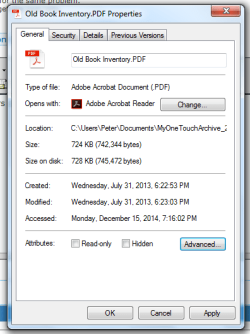

When I right click on certain files and folders in MyDocuments, then select Properties, Advanced, I find that The feature labeled as “Allow this file to have contents indexed in addition to file properties” is not checked. I need to have this feature checked in all sub-folders and files under a head "Archive" folder. I can do so individually, but there are hundreds of files, and newly created ones still have this box unchecked. I have read the forum posts on permissions and tried making all sub-folders re-inherit characteristics from the head "Archive" folder, but no changes occur. Does this check box refer to a permission or a file attribute, or something else? I just love the way Microsoft obfuscates things when you try to figure out what the OS is actually doing.
My Computer
At a glance
Windows 7 home premium Svc Pk 1Intel8G
- Computer type
- Laptop
- Computer Manufacturer/Model Number
- Toshiba
- OS
- Windows 7 home premium Svc Pk 1
- CPU
- Intel
- Memory
- 8G
- Antivirus
- Secure It (by Telecom provider)
- Browser
- Firefox