
Filenames don't autocomplete with "Save As...", must type whole name

catalogue

New member
Member
VIP
Local time
5:24 PM
Messages
108
Filenames don't autocomplete with "Save As...", must type whole name

When I save documents, files, or anything at all using "Save As...", and start typing in the filename field in the dialog box, Windows used to autofill the rest, using the first filename in the folder that starts with those letters. Now it has stopped doing that and doesn't autofill at all. How do I turn it back on?

In the example, I typed "fr" and the way it always worked in the past was, Windows would fill in the rest with "front_cover.jpg". Now it doesn't do that and I have to type the whole thing.
 

Attachments
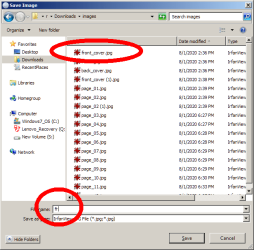
  • x2scrap2_2.png
    x2scrap2_2.png
    17.3 KB · Views: 11

My Computer My Computer

At a glance

7 Pro 64Intel Core i5-2540M 2.6 GHz6 GB RAM
Computer type
Laptop
Computer Manufacturer/Model Number
Lenovo Thinkpad T520
OS
7 Pro 64
CPU
Intel Core i5-2540M 2.6 GHz
Memory
6 GB RAM
Hard Drives
1 Tb

My Computer My Computer

At a glance

Win 10 x64, Linux Lite, Win 7 x64, BlackArch,...
Computer type
PC/Desktop
Computer Manufacturer/Model Number
HP Desktop & Compaq Laptop
OS
Win 10 x64, Linux Lite, Win 7 x64, BlackArch, & Kali
Hard Drives
Samsung 850 Pro 256Gb,
Hitachi HDD 1Tb,
Crucial MX SSD 250Gb
Segate 3Tb USB 3.0 Ext. Backup HDD
Internet Speed
150Mbps dn, 20Mbps up
Antivirus
Avast Free, Malwarebytes Anti-Exploit & Anti-Ransomware
Browser
Firefox, Chrome, Opera, & VPN
Hello catalogue

Had you installed any new applications prior to the change? It may be that a new installation has over-ridden the settings you see.

The Autocomplete settings can be found at HKEY_CURRENT_USER > Software > Microsoft > Windows > CurrentVersion > Explorer > AutoComplete .

Use Regedit to Check (don't alter) the values for AutoSuggest and Append Completion .
 

My Computer My Computer

At a glance

Windows 7 x64, Vista x64, 8.1 smartphoneIntel E8400 65W 64-bitDDR2 2 x 2GB, 1GB x 2XFX Radeon HD5750
Computer type
PC/Desktop
OS
Windows 7 x64, Vista x64, 8.1 smartphone
CPU
Intel E8400 65W 64-bit
Motherboard
Gigabyte EP45-UD3LR
Memory
DDR2 2 x 2GB, 1GB x 2
Graphics Card(s)
XFX Radeon HD5750
Sound Card
AMD High Definition Audio; Realtek High Definition Audio
Monitor(s) Displays
iiyama prolite X2377HDS
Screen Resolution
1920 x 1080
Hard Drives
500GB 7200 rpm Seagate ST3500413AS 16MB, 500GB 5400 rpm Toshiba MQ02ABF050H 32MB, 200GB 7200 rpm Seagate ST3200820AS 8MB, 2TB 7200 rpm Western Digital WD20EZRX 64MB
PSU
Enermax Liberty Modular
Case
Antec P193 Midi Tower
Keyboard
Mionix ZIBAL 60
Mouse
Razer USB 2.0 Diamondback Mouse or Huion Graphics Tablet
Browser
Internet Explorer, Lunascape, Firefox, Opera, Avast Safezone
HKEY_CURRENT_USER > Software > Microsoft > Windows > CurrentVersion > Explorer > AutoComplete .

Use Regedit to Check (don't alter) the values for AutoSuggest and Append Completion .

It's not clear whether you mean "check" as in "inspect, examine", or "check" as in, "to check a box". Can you clarify? The entries under AutoComplete are (Name Type Data):

(Default) REG_SZ (value not set)
AutoSuggest REG_SZ no

It would seem that the Data for AutoSuggest should be "yes" but you didn't say to change it, which also has confused me. There isn't any Append Completion entry.

Had you installed any new applications prior to the change? It may be that a new installation has over-ridden the settings you see.

Unfortunately the answer is "maybe". Here is a possible scenario. Just a >>>possibility<<< and we have no way of knowing if this actually happened.

1. I installed a new program
2. I didn't happen to do any "Save As..." for several days after that
3. I did a "Save As" and it didn't autosuggest. I figured it was just a standard example of the many ways Windows can be unpredictable, so I forgot out about it.
4. A few days later I did another "Save As" and again it didn't autosuggest. Now I figured I must have hit the Tab or Esc or Space or some similar key by accident that stops the autosuggest (for the current instance only). This is completely normal, intended functioning in many programs. I can never remember which ones have it and which don't.
5. By this time maybe 10 days had passed since installing the new program so I definitely wasn't going to recall if the problem had started right afterward.

[FONT=&quot]But again maybe I hadn't installed any new program at all.[/FONT]
 

My Computer My Computer

At a glance

7 Pro 64Intel Core i5-2540M 2.6 GHz6 GB RAM
Computer type
Laptop
Computer Manufacturer/Model Number
Lenovo Thinkpad T520
OS
7 Pro 64
CPU
Intel Core i5-2540M 2.6 GHz
Memory
6 GB RAM
Hard Drives
1 Tb
Hello,

no need to be confused, I meant the "check, inspect, examine" variety of words - we are communicating at a great distance, and I did not want to initiate anything at that point that could damage your computer's registry.

It is significant that you had installed new program prior to this unwanted behaviour. It sounds like that you want the AutoComplete feature. Since this is not in the registry, you would need create the entry.

So, you can choose to leave things as they are, or if you are confident, alter the registry to include "AutoComplete yes".

There is a forum tutorial that shows you what to do see OPTION 3 Windows Explorer AutoComplete - Turn On or Off . The tutorial says it is for Windows Explorer, but it uses the same registry keys as the Save As Dialog Box.

Remember to backup your Operating System or create a new restore point, before modifying the registry.
 

My Computer My Computer

At a glance

Windows 7 x64, Vista x64, 8.1 smartphoneIntel E8400 65W 64-bitDDR2 2 x 2GB, 1GB x 2XFX Radeon HD5750
Computer type
PC/Desktop
OS
Windows 7 x64, Vista x64, 8.1 smartphone
CPU
Intel E8400 65W 64-bit
Motherboard
Gigabyte EP45-UD3LR
Memory
DDR2 2 x 2GB, 1GB x 2
Graphics Card(s)
XFX Radeon HD5750
Sound Card
AMD High Definition Audio; Realtek High Definition Audio
Monitor(s) Displays
iiyama prolite X2377HDS
Screen Resolution
1920 x 1080
Hard Drives
500GB 7200 rpm Seagate ST3500413AS 16MB, 500GB 5400 rpm Toshiba MQ02ABF050H 32MB, 200GB 7200 rpm Seagate ST3200820AS 8MB, 2TB 7200 rpm Western Digital WD20EZRX 64MB
PSU
Enermax Liberty Modular
Case
Antec P193 Midi Tower
Keyboard
Mionix ZIBAL 60
Mouse
Razer USB 2.0 Diamondback Mouse or Huion Graphics Tablet
Browser
Internet Explorer, Lunascape, Firefox, Opera, Avast Safezone
It sounds like that you want the AutoComplete feature. Since this is not in the registry, you would need create the entry....

There is a forum tutorial that shows you what to do see OPTION 3 Windows Explorer AutoComplete - Turn On or Off .

Many thanks. That link seems to have solved the problem and saved me hours of headaches! The solution turned out be one that you didn't mention but is on that page and is even easier. Namely, all I had to do was check the box for "Use inline Autocomplete in File Explorer and Run Dialog" which is found at Control Panel > Internet Options > Advanced > Browsing section. (To be precise, in the screenshot the wording is *Windows* Explorer whereas in my computer it says *File* Explorer - I *hate* Windows' inconsistent terminology...)

After checking the box my registry now has the Append Completion entry which wasn't there before and the "Data" is "yes". "AutoSuggest" is "no" but apparently it doesn't affect the problem I was having.

I don't recall going into that part of Control Panel recently but I guess it's possible I did and accidentally clicked on Inline Autocomplete. Probably would be better if you could only change the settings by clicking in the box itself instead of the way Windows has it, which is that clicking anywhere in the text will change it, which is easy to do by accident.
 

My Computer My Computer

At a glance

7 Pro 64Intel Core i5-2540M 2.6 GHz6 GB RAM
Computer type
Laptop
Computer Manufacturer/Model Number
Lenovo Thinkpad T520
OS
7 Pro 64
CPU
Intel Core i5-2540M 2.6 GHz
Memory
6 GB RAM
Hard Drives
1 Tb
catalogue

Is you autocomplete working now?
 

My Computer My Computer

At a glance

Win 10 x64, Linux Lite, Win 7 x64, BlackArch,...
Computer type
PC/Desktop
Computer Manufacturer/Model Number
HP Desktop & Compaq Laptop
OS
Win 10 x64, Linux Lite, Win 7 x64, BlackArch, & Kali
Hard Drives
Samsung 850 Pro 256Gb,
Hitachi HDD 1Tb,
Crucial MX SSD 250Gb
Segate 3Tb USB 3.0 Ext. Backup HDD
Internet Speed
150Mbps dn, 20Mbps up
Antivirus
Avast Free, Malwarebytes Anti-Exploit & Anti-Ransomware
Browser
Firefox, Chrome, Opera, & VPN
(To be precise, in the screenshot the wording is *Windows* Explorer whereas in my computer it says *File* Explorer - I *hate* Windows' inconsistent terminology...)

Glad to hear that you were able to use the tutorial to your advantage. And I agree with you entirely about Microsoft terminology.
 

My Computer My Computer

At a glance

Windows 7 x64, Vista x64, 8.1 smartphoneIntel E8400 65W 64-bitDDR2 2 x 2GB, 1GB x 2XFX Radeon HD5750
Computer type
PC/Desktop
OS
Windows 7 x64, Vista x64, 8.1 smartphone
CPU
Intel E8400 65W 64-bit
Motherboard
Gigabyte EP45-UD3LR
Memory
DDR2 2 x 2GB, 1GB x 2
Graphics Card(s)
XFX Radeon HD5750
Sound Card
AMD High Definition Audio; Realtek High Definition Audio
Monitor(s) Displays
iiyama prolite X2377HDS
Screen Resolution
1920 x 1080
Hard Drives
500GB 7200 rpm Seagate ST3500413AS 16MB, 500GB 5400 rpm Toshiba MQ02ABF050H 32MB, 200GB 7200 rpm Seagate ST3200820AS 8MB, 2TB 7200 rpm Western Digital WD20EZRX 64MB
PSU
Enermax Liberty Modular
Case
Antec P193 Midi Tower
Keyboard
Mionix ZIBAL 60
Mouse
Razer USB 2.0 Diamondback Mouse or Huion Graphics Tablet
Browser
Internet Explorer, Lunascape, Firefox, Opera, Avast Safezone
Glad to hear that you were able to use the tutorial to your advantage. And I agree with you entirely about Microsoft terminology.

:thumbsup:
 

My Computer My Computer

At a glance

Win 10 x64, Linux Lite, Win 7 x64, BlackArch,...
Computer type
PC/Desktop
Computer Manufacturer/Model Number
HP Desktop & Compaq Laptop
OS
Win 10 x64, Linux Lite, Win 7 x64, BlackArch, & Kali
Hard Drives
Samsung 850 Pro 256Gb,
Hitachi HDD 1Tb,
Crucial MX SSD 250Gb
Segate 3Tb USB 3.0 Ext. Backup HDD
Internet Speed
150Mbps dn, 20Mbps up
Antivirus
Avast Free, Malwarebytes Anti-Exploit & Anti-Ransomware
Browser
Firefox, Chrome, Opera, & VPN
Back
Top