
Files in all folders and destop keep arranging themselves

Mezurya

New member
Local time
2:19 AM
Messages
2
Hey all, I tried asking around about this problem I've had for about a week now, but couldn't find any answers. Here's hoping a real Windows support site can help me find an answer.

The other day I was browsing a website and Norton Internet Security pops up saying that a Trojan has been blocked (I don't have a screenshot of it, but that's pretty much all it said). So I exited the website and told Norton to do a full system scan later that night and fell asleep.

When I woke up, all it found were some tracking cookies, which it deleted. However, I now had a problem on my computer: all files in every folder will auto arrange themselves every time the folder is opened or refreshed. The same happens on the desktop.
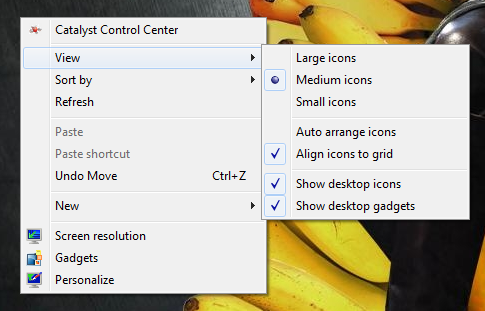
O8GV4.png


Auto arrange is not checked.

5j9Pm.png


Inside folders, the default setting is always "View > Details" and "Sort by > Name > Ascending."
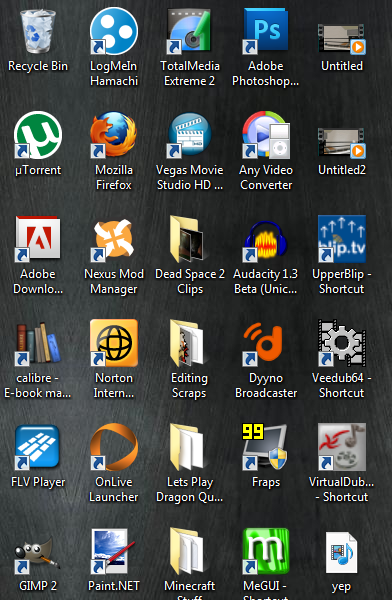
dLj74.png


The icons on the desktop are still medium, but they are arranged in an odd order, it seems to be alphabetical but in an odd way.

I looked around on Google for some help, but the results didn't come up with anything helpful. I had all my desktop icons arranged in a specific way, so now it's a pain to try and find programs that I need. It's also extremely difficult to find any files because of this setup too.

To clarify, here's an example of what happens:

xkdov.png


I arrange the icons the way I want (here being by "Date Modified"), but...
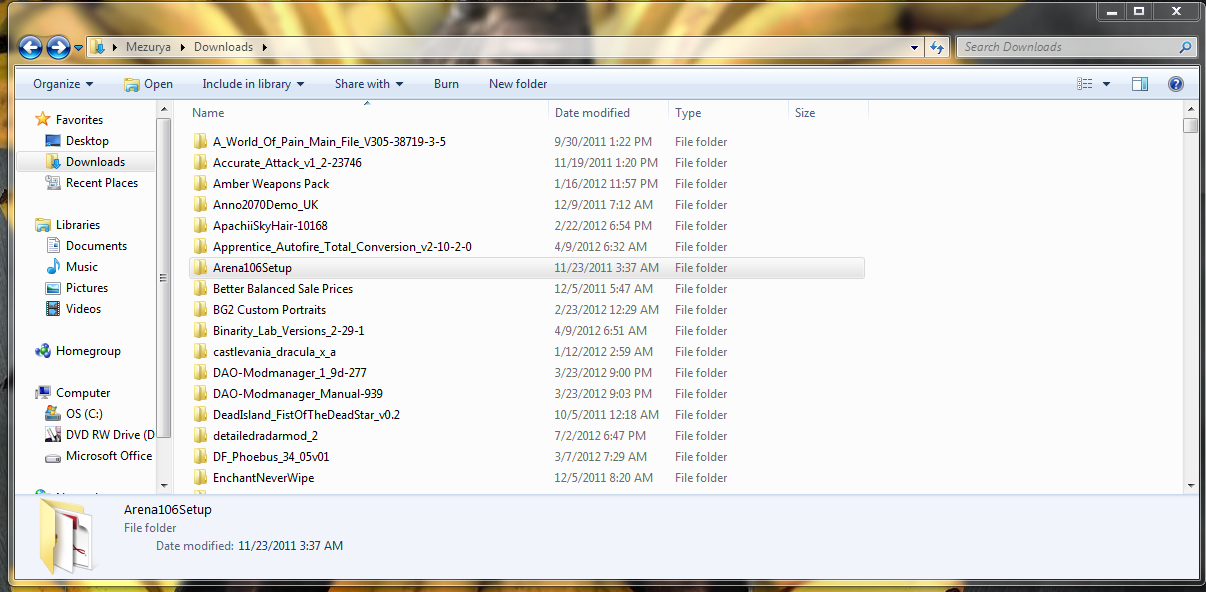
jTRYo.png


If the folder is refreshed or reopened, computer is restarted, etc, then the folder resets to this default.
 

My Computer My Computer

At a glance

Windows 7 64 bit Home Premium
OS
Windows 7 64 bit Home Premium
This might help the desktop. Uncheck align icons with grid. Then put your icons where you want them. Right click desktop and tick Refresh.
On my set up if I change the desktop picture or resolution the icons go all over and I have to reset them. Like I say that's on my system.
Have you took a look see at the Norton site or forum and see if anybody else has the same problem? Norton has been know to do some very strange things. That's why many use MSE instead. You could give it a try and see if it solves your problem.
http://windows.microsoft.com/en-US/windows/products/security-essentials
 

My Computer My Computer

At a glance

Windows 10 Pro. 64/ version 1709 Windows 7 Pr...Intel i7-6800K @ 4.3Corsair Platinum 16 gig @2400EVGA GTX 1070 OC
Computer type
PC/Desktop
Computer Manufacturer/Model Number
Home made Desktop
OS
Windows 10 Pro. 64/ version 1709 Windows 7 Pro/64
CPU
Intel i7-6800K @ 4.3
Motherboard
ASUS X-99 Deluxe II
Memory
Corsair Platinum 16 gig @2400
Graphics Card(s)
EVGA GTX 1070 OC
Monitor(s) Displays
Asus 27" LED LCD/VE278Q
Screen Resolution
1920-1080 or 1280-720 HDMI
Hard Drives
INTEL SSD 730-240 Gb Sata 3.0/
PSU
EVGA Platium 1200W
Case
Phanteks Luxe Tempered Glass 8 fans/ one radiator
Cooling
XSPC/ Water Cooled CPU
Keyboard
Das 4 Professional
Mouse
Logitech M705/MX Anywhere 2-S
Internet Speed
100 mbits
Antivirus
Microsoft Security Essentials/ Malwarebytes Premium 3.0/ SAS
Browser
I.E. 11 default/Firefox/ ISP Time Warner Cable/Spectrum
Other Info
LG BluRay Burner/
Sound system-KLipsch-THX/
Icy Dock ssd Hot Swap bays.
Sadly that align thing didn't fix it. Even when it's unticked, the icons rearrange themselves when refreshed. Aslo remember that this effects all my coputer's folders too, so that wouldn't affect those.

I'll look into Norton and try to find out if anyone has posted a problem like this.

Also, a friend recommended me MSE after I told him the Norton scan failed. I did a full system scan with that too, and it found nothing.
 

My Computer My Computer

At a glance

Windows 7 64 bit Home Premium
OS
Windows 7 64 bit Home Premium
Uninstall Norton and any anti-anything you have installed, EXCEPT for MSE.

Carry out this procedure:

HOW TO USE WINDOWS DEFENDER OFFLINE ON A USB STICK
Windows Defender Offline
· is a free standalone, bootable malware and virus remover from Microsoft.
· performs an offline scan of an infected PC to remove viruses, rootkits and other advanced malware.

Download Windows Defender Offline (about 764 kB)

You will have the choice of downloading the 32bit version (x86) or the 64 bit version (x64).
The link will help you determine whether you are running a 32 bit version or 64 bit version of Windows

NOTE!! You can download and prepare a 32 bit version using a 64 bit version of Windows
NOTE!! You can download and prepare a 64 bit version using a 32bit version of Windows.

You run the 32 bit version on a 32 bit version of Windows.
You run the 64 bit version on a 64 bit version of Windows.

The 32 bit download file name is: mssstool32.exe
The 64 bit download file name is: mssstool64.exe

For the curious, this program was originally name Microsoft Standalone System Sweeper.


INSTALLATION:
You will need an Internet Connection.
Insert 512 mB (Microsoft’s 256 mB is no longer accurate) or larger USB stick into a usb port.
Run the downloaded program--mssstool64.exe or mssstool32.exe
NEXT button
Choose the option On a USB flash drive that is not password protected
NEXT button
NEXT button
.
The install program will format the usb stick using the NTFS format.
The install program will download about 210 mB.
The install program will name the USB stick WDO_Media32 or WDO_Media64
The WDO_Media32 usb stick will have used space of 255 mB (268,140,544 bytes)
The WDO_Media64 usb stick will have used space of 282 mB (296,165,376 bytes)
You can expect the number of mB to increase as more malware appears.

UPDATE Windows Defender Offline USB stick:
· reinsert the usb stick
· run the installation program, mssstool64.exe or mssstool32.exe, again.
· the update will download about 66 mB (mssstool32.exe) and 68 mB (mssstool64.exe).

Since the malware database is sometimes updated several times in a day, always update before running.

PERFORM AN OFFLINE SCAN
Bootup your computer from the USB stick
Windows Defender Offline will automatically perform a quick scan.
After the quick scan finishes, Choose Full Scan
Select all of your drives

The initial, full scan can easily take several hours, but
Remember, your computer is being very thoroughly checked for all types of malware.
 

My Computer My Computer

At a glance

MS Windows 7 Ultimate SP1 64-bitAMD A10-4600M6.00 GB Dual-Channel DDR3 @ 798MHz (11-11-12-28)AMD Radeon HD 7660G
Computer Manufacturer/Model Number
Toshiba Satellite S875D-S7239 laptop
OS
MS Windows 7 Ultimate SP1 64-bit
CPU
AMD A10-4600M
Motherboard
AMD Pumori (Socket FT1)
Memory
6.00 GB Dual-Channel DDR3 @ 798MHz (11-11-12-28)
Graphics Card(s)
AMD Radeon HD 7660G
Sound Card
High Definition Audio Device
Monitor(s) Displays
Generic PnP Monitor (1600x900@60Hz)
Screen Resolution
1600x900@60Hz
Hard Drives
SSD 119GB Corsair CSSD-V128GB2 ATA Device
Keyboard
Standard PS/2 Keyboard
Mouse
HP Wireless Optical Mobile Mouse Model FHA-3410
Internet Speed
What the local pub, local coffee shop offers.
Other Info
Optical Drive:MATSHITA BD-CMB UJ160B ATA Device


Also have an Asus ha1002xp netbook with Win 7 Ultimate installed.
Back
Top