Firefox upgrade, memory hog?

sunshyne

New member
Local time
3:23 PM
Messages
6
Firefox recently upgraded itself to v27 and it appears that it's hogging up a bunch of memory. Has anyone else ran into this? If so, what did you do to correct? I tried turning off hardware acceleration but it still seems extreme. Currently i have one tab open (this one) and it's taking up about 500k memory.

this is on windows 7 ultimate 64 bit
 

My Computer

Computer type
PC/Desktop
Computer Manufacturer/Model Number
custom build
OS
Windows 7 Ultimate x64
CPU
intel i5 3570k
Motherboard
gigabyte z77
Memory
8
Monitor(s) Displays
24"
Hard Drives
kingston ssd
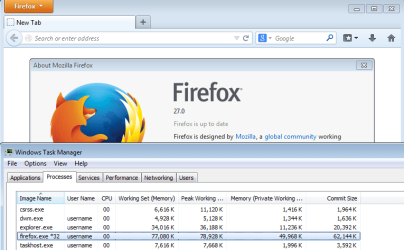
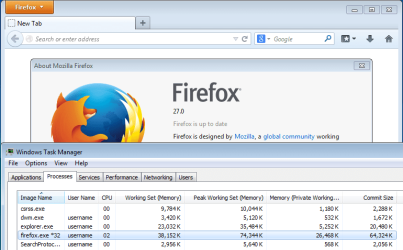
It is hard to compare RAM usage - especially in browsers. You might only have one tab open, but it is easier to compare using a blank page - never having surfed anywhere.

FF4096.png

FF0512.png

The way that I lower the RAM usage was to remove 7/8ths of the computer's RAM :-)

In other words, the more RAM that is available, the more RAM Firefox will ask for and get from Windows memory management system. You have 8GB. Is it really a problem if Firefox takes up even a full GB?

How much RAM does Firefox take up if it is set to show a blank page at start up?

Does your install of Firefox give up RAM to other apps as they request it?
 

My Computer

Computer type
Laptop
Computer Manufacturer/Model Number
Employer provided Dell Latitude
OS
W7 Pro SP1 64bit
CPU
i7
Memory
8GB
Graphics Card(s)
Intel HD Graphics
Hard Drives
crappy SSD
Antivirus
Employer mandated Symantec Endpoint Protection
Browser
Pale Moon 64bit, IE11 64bit & Chrome 64bit
The amount of RAM that a browser will use will vary widely. It depends on how much RAM you have, what the browser is doing, what other processes are doing, activity earlier in the session, and more. 500 MB RAM usage with a modern browser and 8 GB RAM is not at all unusual. In fact with 8 GB RAM I would be surprised if it didn't exceed that under some situations. With 4 GB RAM I often see usage over 500 MB, sometimes quite a bit more. The more RAM you have the more it will use.

The memory usage of Windows processes is always under the control of the memory manager. The goal is always to maximize performance by assigning memory where it will do the most good. This is very complex. The goal is maximum performance, not to minimize memory usage.

Based on the limited information provided I see nothing wrong or unusual.
 

My Computer

Computer type
PC/Desktop
Computer Manufacturer/Model Number
HP
OS
Windows 7 Pro 64 bit
CPU
Xeon W3520
Memory
8 GB
Graphics Card(s)
Nvidia Geforce 210
A quote from the mozillaZine Knowledge Base article on reducing memory usage:

"Normal Firefox memory usage reported by Windows might be as high as 100-150 MB. These numbers will vary because Firefox is configured by default to use more memory on systems that have more memory available and less on systems with less. If you experience substantially more usage than this, there may be a problem, or you may just be viewing pages with large amounts of data."

You do not have a memory-use problem with Firefox.
 

My Computer

Computer type
PC/Desktop
Computer Manufacturer/Model Number
Intel(R) Core(TM) i5-2320 CPU @ 3.00GHz (Gateway computer)
OS
Microsoft Windows 7 Home Premium 64-bit 7601 Multiprocessor Free Service Pack 1
CPU
Intel(R) Core(TM) i5-2320 CPU @ 3.00GHz
Motherboard
Gateway IPISB-VR
Memory
8.00 GB
Graphics Card(s)
Intel(R) HD Graphics
Sound Card
(1) Realtek High Definition Audio (2) Intel(R) Display Aud
Monitor(s) Displays
ViewSonic 2250 Series
Screen Resolution
1920 x 1080 x 32 bits (4294967296 colors) @ 60 Hz
Hard Drives
(1) WDC WD10EADX-22TDHB0 (2) Generic Mini SD Reader USB Device (3) Generic USB CF Reader USB Device (4) Generic USB MS Reader USB Device (5) Generic USB SD Reader USB Device (6) Generic USB xD/SM Reader USB Device (7) Seagate FreeAgent Go
Keyboard
Gateway
Mouse
Logitech
Internet Speed
20 Mbps (Theoretical.)
Antivirus
Avast
Browser
Firefox
Back
Top