Firefox won't load home page on startup when it's GMail

Thanks for your help. I'll see how it goes over the next two or three days, then take another look at the advice you and Anak have given.
 

My Computer My Computer

At a glance

Windows 7 Home Premium 64bit (Service Pack 1)Intel Core i76.00 GBNVIDIA GeForce GTX 550 Ti
Computer type
PC/Desktop
Computer Manufacturer/Model Number
Packard Bell ipower G5800
OS
Windows 7 Home Premium 64bit (Service Pack 1)
CPU
Intel Core i7
Memory
6.00 GB
Graphics Card(s)
NVIDIA GeForce GTX 550 Ti
Antivirus
Avira Free Antivirus
Browser
Firefox
Well, the problem went away for almost a week and I was about to mark it as solved, but it just happened again.
 

My Computer My Computer

At a glance

Windows 7 Home Premium 64bit (Service Pack 1)Intel Core i76.00 GBNVIDIA GeForce GTX 550 Ti
Computer type
PC/Desktop
Computer Manufacturer/Model Number
Packard Bell ipower G5800
OS
Windows 7 Home Premium 64bit (Service Pack 1)
CPU
Intel Core i7
Memory
6.00 GB
Graphics Card(s)
NVIDIA GeForce GTX 550 Ti
Antivirus
Avira Free Antivirus
Browser
Firefox
I was having too many connection problems with my TLS fallback and min settings at 2 so I've been running at the defaults (1).

Like you TIM, it seems to come and go, I've had 3 occasions since this past week where FF opened okay, but to a new blank tab, I click on home and it goes to my default home page.

Because this seems to deal with FF opening and the homepage, I looked into the home page settings; about:config >home. My services.sync.prefs.sync.browser.startup.homepage was set to true but I'm going to try it set as false and see what happens. With sync being the operative word, I want to see what happens when I stop FF from syncing at startup especially since I don't sync.


Related:
https://How can I prevent Firefox Sync from syncing home page? | support.mozilla.org
 

My Computer My Computer

At a glance

Originally Win 7 Hm Prem x64 Ver 6.1.7600 Bui...Intel i3 530 2.93GHz, 2933MHz 2 Cores 4 Logic...6GB of 1,333MHz DDR3 SDRAM32MB Intel Graphics Media Accelerator HD IGChip
Computer type
PC/Desktop
Computer Manufacturer/Model Number
Gateway DX4831-01e (Mid-Tower Desktop)
OS
Originally Win 7 Hm Prem x64 Ver 6.1.7600 Build 7601-SP1 | Upgraded to Windows 10 December 14, 2019
CPU
Intel i3 530 2.93GHz, 2933MHz 2 Cores 4 Logical Processors
Motherboard
Gateway H57M01 133 megahertz
Memory
6GB of 1,333MHz DDR3 SDRAM
Graphics Card(s)
32MB Intel Graphics Media Accelerator HD IGChip
Sound Card
Realtek High Definition Audio
Monitor(s) Displays
Gateway HX2000 20inch TFT active matrix TN
Screen Resolution
1600 x 900 x 59 hertz
Hard Drives
WDC WD10EADS-00M2B0 [HDD] (1000.20 GB) -- drive 0,
HL-DT-ST DVDRAM GH41N [CD-ROM dr]
Four card readers, and Four USB 2.0
PSU
300watts.
Case
Mid-Tower Desktop
Cooling
Stock from Gateway
Keyboard
Natural Ergonomic Keyboard 4000, see Other Info
Mouse
Orig. Gateway wore out now using Insignia USB wired optical
Internet Speed
Vz FIOS 10ms png 57.64Mbps down 65.53Mbps up Speedtest.org
Antivirus
Zamana Anti-logger with Anti-malware, MSE, Windows Firewall,
Browser
IE11.0.9600.19399-Upd ver11.0.135, Firefox 68.0.1 x64
Other Info
System Specs by Belarc.

BIOS: American Megatrends Inc. P01-A0 11/17/2009

Replaced the MS 'Natural' Standard PS/2 Enhanced 101-102 Keyboard with a new Natural Ergonomic Keyboard 4000 on August 1st 2014.

Canon Pixma MG3222 Printer.

Updated to IE11 on 12102015 | Fios Quantum Router g1100

Additional AV: SpywareBlaster, manual Mbam, SAS
Just to say that other then the excellent advice in the above post by Anak - if you are getting the problem every FF launch you can try copying your Profiles folder and profiles.ini file to a backup folder that you can create on your desktop. Then you could try restoring your profile that you backed up earlier using MozBackup. If that works then it's a question of working out if anything changed - maybe by comparing both profiles.
 

My Computer My Computer

At a glance

Microsoft Windows 7 Home Premium 64-bit 7601 ...AMD C-60 APU with Radeon(tm) HD Graphics4.00 GBAMD Radeon HD 6290 Graphics
Computer type
Laptop
Computer Manufacturer/Model Number
ASUS
OS
Microsoft Windows 7 Home Premium 64-bit 7601 Multiprocessor Free Service Pack 1
CPU
AMD C-60 APU with Radeon(tm) HD Graphics
Motherboard
ASUSTeK COMPUTER INC. X501U
Memory
4.00 GB
Graphics Card(s)
AMD Radeon HD 6290 Graphics
Sound Card
(1) AMD High Definition Audio Device (2) Realtek High Defi
Screen Resolution
1366 x 768 x 32 bits (4294967296 colors) @ 60 Hz
Hard Drives
Hitachi HTS545050A7E380 SATA Disk Device
Antivirus
Comodo CIS & FW, SecureAplus App Whitelisting, Threatfire
Browser
Cyberfox 64bit, Opera 64bit, Airfox
Other Info
Spy-The-Spy, HitmanPro.Alert, Norton Connect Safe, MJRegWatcher, BitDefender TrafficLight, Voodoo Shield, Zemana AntiMalware
Thanks to both of you. I'm going to try Anak's idea first. The only change I can think of immediately after restoring my profile with MozBackup is that I got rid of the old YouTube Link Title (from the now defunct userscripts) and installed the new one (from greasyfork).
 

My Computer My Computer

At a glance

Windows 7 Home Premium 64bit (Service Pack 1)Intel Core i76.00 GBNVIDIA GeForce GTX 550 Ti
Computer type
PC/Desktop
Computer Manufacturer/Model Number
Packard Bell ipower G5800
OS
Windows 7 Home Premium 64bit (Service Pack 1)
CPU
Intel Core i7
Memory
6.00 GB
Graphics Card(s)
NVIDIA GeForce GTX 550 Ti
Antivirus
Avira Free Antivirus
Browser
Firefox
You're welcome,

I was having too many connection problems with my TLS fallback and min settings at 2 so I've been running at the defaults (1).

Like you TIM, it seems to come and go, I've had 3 occasions since this past week where FF opened okay, but to a new blank tab, I click on home and it goes to my default home page.

   Tip
Because this seems to deal with FF opening and the homepage, I looked into the home page settings; about:config >home. My services.sync.prefs.sync.browser.startup.homepage was set to true but I'm going to try it set as false and see what happens. With sync being the operative word, I want to see what happens when I stop FF from syncing at startup especially since I don't sync.

Related:
https://How can I prevent Firefox Sync from syncing home page? | support.mozilla.org
I may be on to something here, but it's still not foolproof.

In the past week since I last posted I would estimate that I've opened Firefox (FF) on average 4 times a day for a total of 28, of those 28 there was only one occasion where FF opened to a new tab and not my designated homepage.

I also notice there is a new v36. for FF I'm going to update and see what it does to my about:config >home setting.


   Note
I added the tip box in the above quote to highlight the change I made.


Edit:
After updating FF to v36.0 the about:config >home settings held.
 
Last edited:

My Computer My Computer

At a glance

Originally Win 7 Hm Prem x64 Ver 6.1.7600 Bui...Intel i3 530 2.93GHz, 2933MHz 2 Cores 4 Logic...6GB of 1,333MHz DDR3 SDRAM32MB Intel Graphics Media Accelerator HD IGChip
Computer type
PC/Desktop
Computer Manufacturer/Model Number
Gateway DX4831-01e (Mid-Tower Desktop)
OS
Originally Win 7 Hm Prem x64 Ver 6.1.7600 Build 7601-SP1 | Upgraded to Windows 10 December 14, 2019
CPU
Intel i3 530 2.93GHz, 2933MHz 2 Cores 4 Logical Processors
Motherboard
Gateway H57M01 133 megahertz
Memory
6GB of 1,333MHz DDR3 SDRAM
Graphics Card(s)
32MB Intel Graphics Media Accelerator HD IGChip
Sound Card
Realtek High Definition Audio
Monitor(s) Displays
Gateway HX2000 20inch TFT active matrix TN
Screen Resolution
1600 x 900 x 59 hertz
Hard Drives
WDC WD10EADS-00M2B0 [HDD] (1000.20 GB) -- drive 0,
HL-DT-ST DVDRAM GH41N [CD-ROM dr]
Four card readers, and Four USB 2.0
PSU
300watts.
Case
Mid-Tower Desktop
Cooling
Stock from Gateway
Keyboard
Natural Ergonomic Keyboard 4000, see Other Info
Mouse
Orig. Gateway wore out now using Insignia USB wired optical
Internet Speed
Vz FIOS 10ms png 57.64Mbps down 65.53Mbps up Speedtest.org
Antivirus
Zamana Anti-logger with Anti-malware, MSE, Windows Firewall,
Browser
IE11.0.9600.19399-Upd ver11.0.135, Firefox 68.0.1 x64
Other Info
System Specs by Belarc.

BIOS: American Megatrends Inc. P01-A0 11/17/2009

Replaced the MS 'Natural' Standard PS/2 Enhanced 101-102 Keyboard with a new Natural Ergonomic Keyboard 4000 on August 1st 2014.

Canon Pixma MG3222 Printer.

Updated to IE11 on 12102015 | Fios Quantum Router g1100

Additional AV: SpywareBlaster, manual Mbam, SAS
Firefox v36

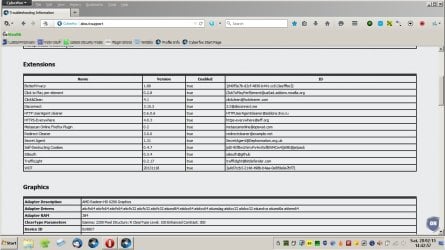
Interesting! Well I just updated Cyberfox to v36 and experienced all sorts of connection issues with new tab page and also sites randomly refusing to load. Tried launching in Safe Mode (browser in safe mode - not computer in safe mode) and everything worked. So one or more of the add ons is the problem.

Extensions.jpg

Tried a clean install and it worked okay. Restored extensions the problem returned.

There are sometimes bugs in new versions of Cyberfox that need to be ironed out so at the moment I'm not too concerned. I'll keep an eye out for any new updates with fixes.

For now I've rolled back to v35.0.2

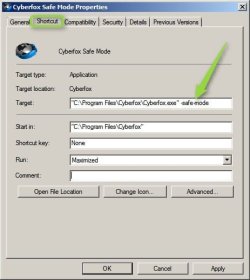
Perhaps you could test if Gmail loads every time in Firefox Safe Mode. Just create a shortcut and add

" -safe-mode"

including the space in the target box after the path.

Safe Mode.jpg
 

My Computer My Computer

At a glance

Microsoft Windows 7 Home Premium 64-bit 7601 ...AMD C-60 APU with Radeon(tm) HD Graphics4.00 GBAMD Radeon HD 6290 Graphics
Computer type
Laptop
Computer Manufacturer/Model Number
ASUS
OS
Microsoft Windows 7 Home Premium 64-bit 7601 Multiprocessor Free Service Pack 1
CPU
AMD C-60 APU with Radeon(tm) HD Graphics
Motherboard
ASUSTeK COMPUTER INC. X501U
Memory
4.00 GB
Graphics Card(s)
AMD Radeon HD 6290 Graphics
Sound Card
(1) AMD High Definition Audio Device (2) Realtek High Defi
Screen Resolution
1366 x 768 x 32 bits (4294967296 colors) @ 60 Hz
Hard Drives
Hitachi HTS545050A7E380 SATA Disk Device
Antivirus
Comodo CIS & FW, SecureAplus App Whitelisting, Threatfire
Browser
Cyberfox 64bit, Opera 64bit, Airfox
Other Info
Spy-The-Spy, HitmanPro.Alert, Norton Connect Safe, MJRegWatcher, BitDefender TrafficLight, Voodoo Shield, Zemana AntiMalware
I was wondering if there was a way to open Firefox in safe mode without having to start it normally first. It seems kind of obvious now that I've seen it:o. I'll keep that in mind as well.
 

My Computer My Computer

At a glance

Windows 7 Home Premium 64bit (Service Pack 1)Intel Core i76.00 GBNVIDIA GeForce GTX 550 Ti
Computer type
PC/Desktop
Computer Manufacturer/Model Number
Packard Bell ipower G5800
OS
Windows 7 Home Premium 64bit (Service Pack 1)
CPU
Intel Core i7
Memory
6.00 GB
Graphics Card(s)
NVIDIA GeForce GTX 550 Ti
Antivirus
Avira Free Antivirus
Browser
Firefox
I do not use sync and have it hidden with CSS. I do not have a use for it.
 

My Computer My Computer

At a glance

Win 10 Pro 64Intel Core i7 960 @3.20 GHz24.0 GB DDR3EVGA GTX 750Ti
Computer type
PC/Desktop
Computer Manufacturer/Model Number
Custom Build
OS
Win 10 Pro 64
CPU
Intel Core i7 960 @3.20 GHz
Motherboard
MSI MS7522
Memory
24.0 GB DDR3
Graphics Card(s)
EVGA GTX 750Ti
Monitor(s) Displays
LG E2341 23 Inch
Screen Resolution
1920x1080
Hard Drives
1TB Western Dgital 1002FAEX-00Y9A0
1TB Hitachi HDS721010CLA322
PSU
700 Watt
Case
Haf 912
Cooling
Fans
Keyboard
Logitech MK710
Mouse
Logitech M705
Internet Speed
Cable
Antivirus
AIS 2015 .10.0.2225
Browser
Firefox 49
Other Info
MalwareBytes Anti-Rootkit utility
I do not use sync and have it hidden with CSS. I do not have a use for it.
Are you having the same problem that the OP and me are having where; When firefox opens it opens a blank tab and not your custom home page?
 

My Computer My Computer

At a glance

Originally Win 7 Hm Prem x64 Ver 6.1.7600 Bui...Intel i3 530 2.93GHz, 2933MHz 2 Cores 4 Logic...6GB of 1,333MHz DDR3 SDRAM32MB Intel Graphics Media Accelerator HD IGChip
Computer type
PC/Desktop
Computer Manufacturer/Model Number
Gateway DX4831-01e (Mid-Tower Desktop)
OS
Originally Win 7 Hm Prem x64 Ver 6.1.7600 Build 7601-SP1 | Upgraded to Windows 10 December 14, 2019
CPU
Intel i3 530 2.93GHz, 2933MHz 2 Cores 4 Logical Processors
Motherboard
Gateway H57M01 133 megahertz
Memory
6GB of 1,333MHz DDR3 SDRAM
Graphics Card(s)
32MB Intel Graphics Media Accelerator HD IGChip
Sound Card
Realtek High Definition Audio
Monitor(s) Displays
Gateway HX2000 20inch TFT active matrix TN
Screen Resolution
1600 x 900 x 59 hertz
Hard Drives
WDC WD10EADS-00M2B0 [HDD] (1000.20 GB) -- drive 0,
HL-DT-ST DVDRAM GH41N [CD-ROM dr]
Four card readers, and Four USB 2.0
PSU
300watts.
Case
Mid-Tower Desktop
Cooling
Stock from Gateway
Keyboard
Natural Ergonomic Keyboard 4000, see Other Info
Mouse
Orig. Gateway wore out now using Insignia USB wired optical
Internet Speed
Vz FIOS 10ms png 57.64Mbps down 65.53Mbps up Speedtest.org
Antivirus
Zamana Anti-logger with Anti-malware, MSE, Windows Firewall,
Browser
IE11.0.9600.19399-Upd ver11.0.135, Firefox 68.0.1 x64
Other Info
System Specs by Belarc.

BIOS: American Megatrends Inc. P01-A0 11/17/2009

Replaced the MS 'Natural' Standard PS/2 Enhanced 101-102 Keyboard with a new Natural Ergonomic Keyboard 4000 on August 1st 2014.

Canon Pixma MG3222 Printer.

Updated to IE11 on 12102015 | Fios Quantum Router g1100

Additional AV: SpywareBlaster, manual Mbam, SAS
Possible solution

Well here's a possible solution based on my recent Cyberfox v36 experiences. Might be worth a try.

Steps taken so far:

Clean installed Cyberfox v36 and the problems returned. Dropped connections and pages not loading at random - anytime including new tabs.

Experimented with enabling and disabling certain add ons with mixed success. It was confusing because one minute the problem appeared to be fixed only to return again.

If anyone is interested there's a reasonably decent add on here:

https://addons.mozilla.org/en-US/firefox/addon/preferences-monitor/

It monitors changes to about:config preferences but also includes eCleaner that allows you to manually check for and remove traces of old add-ons that might not have been fully removed if you uninstalled them.

I used that to remove a couple of leftovers but it still didn't solve the issue.

Here's what worked for me:

I'm a long time user of Norton DNS as it blocks connection to known malicious sites. That's not the only method I use but it's part of my security layer. I decided to change to Google DNS just to see what happened and suddenly everything worked perfectly.

Note: Changing DNS requires restarting your network connection to take effect.

My usual choices and current setup are shown here:

screenshot DNS.jpg

So you might want to try changing DNS lookup to something other than the one you're using. In addition you might want to try running the command ipconfig /flushdns before switching.
 

My Computer My Computer

At a glance

Microsoft Windows 7 Home Premium 64-bit 7601 ...AMD C-60 APU with Radeon(tm) HD Graphics4.00 GBAMD Radeon HD 6290 Graphics
Computer type
Laptop
Computer Manufacturer/Model Number
ASUS
OS
Microsoft Windows 7 Home Premium 64-bit 7601 Multiprocessor Free Service Pack 1
CPU
AMD C-60 APU with Radeon(tm) HD Graphics
Motherboard
ASUSTeK COMPUTER INC. X501U
Memory
4.00 GB
Graphics Card(s)
AMD Radeon HD 6290 Graphics
Sound Card
(1) AMD High Definition Audio Device (2) Realtek High Defi
Screen Resolution
1366 x 768 x 32 bits (4294967296 colors) @ 60 Hz
Hard Drives
Hitachi HTS545050A7E380 SATA Disk Device
Antivirus
Comodo CIS & FW, SecureAplus App Whitelisting, Threatfire
Browser
Cyberfox 64bit, Opera 64bit, Airfox
Other Info
Spy-The-Spy, HitmanPro.Alert, Norton Connect Safe, MJRegWatcher, BitDefender TrafficLight, Voodoo Shield, Zemana AntiMalware
I was having too many connection problems with my TLS fallback and min settings at 2 so I've been running at the defaults (1).

Like you TIM, it seems to come and go, I've had 3 occasions since this past week where FF opened okay, but to a new blank tab, I click on home and it goes to my default home page.

Because this seems to deal with FF opening and the homepage, I looked into the home page settings; about:config >home. My services.sync.prefs.sync.browser.startup.homepage was set to true but I'm going to try it set as false and see what happens. With sync being the operative word, I want to see what happens when I stop FF from syncing at startup especially since I don't sync.


Related:
https://How can I prevent Firefox Sync from syncing home page? | support.mozilla.org

I tried this for about a week, and although the problem didn't completely go away, it hasn't occurred as much. I've set it back to true and I'll see if the problem starts occurring more often afterwards.
 

My Computer My Computer

At a glance

Windows 7 Home Premium 64bit (Service Pack 1)Intel Core i76.00 GBNVIDIA GeForce GTX 550 Ti
Computer type
PC/Desktop
Computer Manufacturer/Model Number
Packard Bell ipower G5800
OS
Windows 7 Home Premium 64bit (Service Pack 1)
CPU
Intel Core i7
Memory
6.00 GB
Graphics Card(s)
NVIDIA GeForce GTX 550 Ti
Antivirus
Avira Free Antivirus
Browser
Firefox
I'm back to my about:config defaults, and I switched my DNS to google, 8.8.8.8 (4).

So far I've only had one "new tab" when I opened FF since I changed it a week ago. I've also noticed google's DNS is more reliable and quicker than Verizon's DNS choices.

With all that's going on with Vz (TWC) I'm looking into changing to my only other choice, Xfinity, it'd be hard to cut the cord with the dear wife around and go with netflix, hulu, et al.

Vz and other big boys think they own ya. they put the fear of God in ya with termination fees but so what? Sometimes ya gotta take a stand!
 

My Computer My Computer

At a glance

Originally Win 7 Hm Prem x64 Ver 6.1.7600 Bui...Intel i3 530 2.93GHz, 2933MHz 2 Cores 4 Logic...6GB of 1,333MHz DDR3 SDRAM32MB Intel Graphics Media Accelerator HD IGChip
Computer type
PC/Desktop
Computer Manufacturer/Model Number
Gateway DX4831-01e (Mid-Tower Desktop)
OS
Originally Win 7 Hm Prem x64 Ver 6.1.7600 Build 7601-SP1 | Upgraded to Windows 10 December 14, 2019
CPU
Intel i3 530 2.93GHz, 2933MHz 2 Cores 4 Logical Processors
Motherboard
Gateway H57M01 133 megahertz
Memory
6GB of 1,333MHz DDR3 SDRAM
Graphics Card(s)
32MB Intel Graphics Media Accelerator HD IGChip
Sound Card
Realtek High Definition Audio
Monitor(s) Displays
Gateway HX2000 20inch TFT active matrix TN
Screen Resolution
1600 x 900 x 59 hertz
Hard Drives
WDC WD10EADS-00M2B0 [HDD] (1000.20 GB) -- drive 0,
HL-DT-ST DVDRAM GH41N [CD-ROM dr]
Four card readers, and Four USB 2.0
PSU
300watts.
Case
Mid-Tower Desktop
Cooling
Stock from Gateway
Keyboard
Natural Ergonomic Keyboard 4000, see Other Info
Mouse
Orig. Gateway wore out now using Insignia USB wired optical
Internet Speed
Vz FIOS 10ms png 57.64Mbps down 65.53Mbps up Speedtest.org
Antivirus
Zamana Anti-logger with Anti-malware, MSE, Windows Firewall,
Browser
IE11.0.9600.19399-Upd ver11.0.135, Firefox 68.0.1 x64
Other Info
System Specs by Belarc.

BIOS: American Megatrends Inc. P01-A0 11/17/2009

Replaced the MS 'Natural' Standard PS/2 Enhanced 101-102 Keyboard with a new Natural Ergonomic Keyboard 4000 on August 1st 2014.

Canon Pixma MG3222 Printer.

Updated to IE11 on 12102015 | Fios Quantum Router g1100

Additional AV: SpywareBlaster, manual Mbam, SAS
I haven't run into this issue recently. I'll see how I go next week. If it doesn't occur again, I'll mark the thread as solved. If not, I'll have a look at changing my DNS as well.
 

My Computer My Computer

At a glance

Windows 7 Home Premium 64bit (Service Pack 1)Intel Core i76.00 GBNVIDIA GeForce GTX 550 Ti
Computer type
PC/Desktop
Computer Manufacturer/Model Number
Packard Bell ipower G5800
OS
Windows 7 Home Premium 64bit (Service Pack 1)
CPU
Intel Core i7
Memory
6.00 GB
Graphics Card(s)
NVIDIA GeForce GTX 550 Ti
Antivirus
Avira Free Antivirus
Browser
Firefox
TIM, how has your issue been doing?

I'm up to FF-v37.0.2 with dns set to google 8888-8844 and I only had the random blank page twice this past month so it seems the developers at FF may be listening. I still get the random freezes but they're not as bad either. In looking for a freeze issue related to a different thread here at 7F I found that this/our issue started around 2012 and FF v3.6.25, but I don't remember it this bad, so I'm trying a new angle with the freeze issue.

I've only started with the first from here: Firefox Freezes, Crashes, Hangs in Windows 7 / 8 I cleared cache, history and D/L history, when I went to reset the browser.download.lastDir preference in about:config I had a mild shock, it was set to an obscure sub-folder in my pictures library, I have no idea how FF picked that one?!? Nonetheless I reset it. I'm going to wait for a few days to see how FF reacts and if need be I'll work down the list.
   Information
I only used download.lastDir in the config search. When I reset it the status went to default, the type to string and the value was blank, when I went back to double check it, it was gone :shock:. I'm thinking it won't show until it's needed or the newer versions of FF don't need it. I do have my D/L's set to go to my desktop, and that's where they have always gone even before the reset.
There is another angle that I may check into that thewindowsclub doesn't touch on and that is that FF has a problem with auto-fill and the .www prefix where (as I read it) if you have identical bookmarks but one has the www and the other does not FF churns away until it, FF resolves the issue of which one it wants to use.

I saw that here: Force Firefox Autofill to Behave By Removing "WWW" Bookmarks

This is from a link on that LH page: Problems to Solve » Make Firefox

Steve
 

My Computer My Computer

At a glance

Originally Win 7 Hm Prem x64 Ver 6.1.7600 Bui...Intel i3 530 2.93GHz, 2933MHz 2 Cores 4 Logic...6GB of 1,333MHz DDR3 SDRAM32MB Intel Graphics Media Accelerator HD IGChip
Computer type
PC/Desktop
Computer Manufacturer/Model Number
Gateway DX4831-01e (Mid-Tower Desktop)
OS
Originally Win 7 Hm Prem x64 Ver 6.1.7600 Build 7601-SP1 | Upgraded to Windows 10 December 14, 2019
CPU
Intel i3 530 2.93GHz, 2933MHz 2 Cores 4 Logical Processors
Motherboard
Gateway H57M01 133 megahertz
Memory
6GB of 1,333MHz DDR3 SDRAM
Graphics Card(s)
32MB Intel Graphics Media Accelerator HD IGChip
Sound Card
Realtek High Definition Audio
Monitor(s) Displays
Gateway HX2000 20inch TFT active matrix TN
Screen Resolution
1600 x 900 x 59 hertz
Hard Drives
WDC WD10EADS-00M2B0 [HDD] (1000.20 GB) -- drive 0,
HL-DT-ST DVDRAM GH41N [CD-ROM dr]
Four card readers, and Four USB 2.0
PSU
300watts.
Case
Mid-Tower Desktop
Cooling
Stock from Gateway
Keyboard
Natural Ergonomic Keyboard 4000, see Other Info
Mouse
Orig. Gateway wore out now using Insignia USB wired optical
Internet Speed
Vz FIOS 10ms png 57.64Mbps down 65.53Mbps up Speedtest.org
Antivirus
Zamana Anti-logger with Anti-malware, MSE, Windows Firewall,
Browser
IE11.0.9600.19399-Upd ver11.0.135, Firefox 68.0.1 x64
Other Info
System Specs by Belarc.

BIOS: American Megatrends Inc. P01-A0 11/17/2009

Replaced the MS 'Natural' Standard PS/2 Enhanced 101-102 Keyboard with a new Natural Ergonomic Keyboard 4000 on August 1st 2014.

Canon Pixma MG3222 Printer.

Updated to IE11 on 12102015 | Fios Quantum Router g1100

Additional AV: SpywareBlaster, manual Mbam, SAS
While I've had Firefox occasionally stall for a few seconds while loading a page, I can't remember the last time it completely froze. The blank homepage problem still happens sometimes, but it's much less frequent than it was when I started experiencing it.
 

My Computer My Computer

At a glance

Windows 7 Home Premium 64bit (Service Pack 1)Intel Core i76.00 GBNVIDIA GeForce GTX 550 Ti
Computer type
PC/Desktop
Computer Manufacturer/Model Number
Packard Bell ipower G5800
OS
Windows 7 Home Premium 64bit (Service Pack 1)
CPU
Intel Core i7
Memory
6.00 GB
Graphics Card(s)
NVIDIA GeForce GTX 550 Ti
Antivirus
Avira Free Antivirus
Browser
Firefox
About the same for me then. The last time it completely froze was back in the 34 to 35versions. I didn't have the mouse, keyboard, nothing until FF sorted things out and revived itself. Now like yours it will stall but at least I have the mouse and keyboard.

I'll try and keep updating my end, I'm near the end of my cold that I've been fighting for the last three weeks I believe I've only been on-line for a couple of hours in that time.
 

My Computer My Computer

At a glance

Originally Win 7 Hm Prem x64 Ver 6.1.7600 Bui...Intel i3 530 2.93GHz, 2933MHz 2 Cores 4 Logic...6GB of 1,333MHz DDR3 SDRAM32MB Intel Graphics Media Accelerator HD IGChip
Computer type
PC/Desktop
Computer Manufacturer/Model Number
Gateway DX4831-01e (Mid-Tower Desktop)
OS
Originally Win 7 Hm Prem x64 Ver 6.1.7600 Build 7601-SP1 | Upgraded to Windows 10 December 14, 2019
CPU
Intel i3 530 2.93GHz, 2933MHz 2 Cores 4 Logical Processors
Motherboard
Gateway H57M01 133 megahertz
Memory
6GB of 1,333MHz DDR3 SDRAM
Graphics Card(s)
32MB Intel Graphics Media Accelerator HD IGChip
Sound Card
Realtek High Definition Audio
Monitor(s) Displays
Gateway HX2000 20inch TFT active matrix TN
Screen Resolution
1600 x 900 x 59 hertz
Hard Drives
WDC WD10EADS-00M2B0 [HDD] (1000.20 GB) -- drive 0,
HL-DT-ST DVDRAM GH41N [CD-ROM dr]
Four card readers, and Four USB 2.0
PSU
300watts.
Case
Mid-Tower Desktop
Cooling
Stock from Gateway
Keyboard
Natural Ergonomic Keyboard 4000, see Other Info
Mouse
Orig. Gateway wore out now using Insignia USB wired optical
Internet Speed
Vz FIOS 10ms png 57.64Mbps down 65.53Mbps up Speedtest.org
Antivirus
Zamana Anti-logger with Anti-malware, MSE, Windows Firewall,
Browser
IE11.0.9600.19399-Upd ver11.0.135, Firefox 68.0.1 x64
Other Info
System Specs by Belarc.

BIOS: American Megatrends Inc. P01-A0 11/17/2009

Replaced the MS 'Natural' Standard PS/2 Enhanced 101-102 Keyboard with a new Natural Ergonomic Keyboard 4000 on August 1st 2014.

Canon Pixma MG3222 Printer.

Updated to IE11 on 12102015 | Fios Quantum Router g1100

Additional AV: SpywareBlaster, manual Mbam, SAS
Back
Top