Five operating system alternatives to Windows 8 and XP

To install Linux Mint Debian on a flash drive, one would need the ISO and Universal USB Installer or UUI. Any reason why the two cannot be integrated into a single Windows executable that runs UUI, the user select the USB drive, and off it goes? After all, the UUI is just a little over 1MBs...

The UUI installed Linux Mint quickly on my Voyager 64GBs USB 3.0 stick, but wouldn't let me create greater than 4GBs persistent partition. Unfortunately, it wouldn't boot in my system. I was just curious, but don't have time to find the reason for not booting...

The 64GBs USB 3.0 was around 80 bucks...
We made a bad investment - I bought an expensive fast USB3 stick too. And it is not all that good for running a Linux distro (I run Fedora right now from that stick).

A much better solution is to run from an external SSD. I bought a 60GB SSD for $59.95 plus a few bucks for the USB3 enclosure and I run Mint Mate, Zorin (and Windows 8) from there under VMware Player (free). Works beautifully and very fast with the added advantage that you can run it side by side with the host OS and need not reboot all the time. Plus, you can run those systems on any machine that have VMware Player installed (a 3 minute affair).

If you want to try it, here is some tutorial material I put together.

http://www.sevenforums.com/tutorials/276540-portable-os-carry-your-os-external-drive.html

And here is a whole series of tutorials I made regarding Mint Mate. If you double click on it in Chrome, you can read and control it in your browser. Else just download it (2 PDF pages).

https://skydrive.live.com/?cid=475a0a48ca6d4035&provision=1&ref=3&wa=wsignin1.0&sa=412485191#cid=475A0A48CA6D4035&id=475A0A48CA6D4035%211856

Hi there
an even BETTER solution is to use GRUB on the external USB drive and then mount and boot a Windows VHD (note NOT a Virtual machine) and boot from it. then you can run a Full PORTABLE NATIVE windows OS from your USB device. You can also boot any Linux distro you want.

Seems to me a bit pointless to run Windows as a VM from Linux if most of the time you are using Windows applications such as Photoshop, Office etc.

Don't get me wrong -- I LIKE Linux - but for me I only use it as a file and internet Database server.

For what I need and do Linux as a DESKTOP OS doesn't cut it for me -- but absolutely NO problems as a Server.

BTW another interesting idea is to try running ESXi (free version) from VMware -- it's a TINY Hypervisor -- and then run a Windows VM from the USB device. The disadvantage is that you would need a separate client machine to access the VM but the overhead of the hypervisor is so tiny that the VM runs at 99.9% native speed and you can use some real hardware too (Esxi allows things like Pci passthru to access real hardware). However setting this up is quite tricky so it's not for beginners. If you don't have a spare client machine then this isn't an option -- I mention this because if you DO have a spare machine it's quite a fun exercise to have a go with it. Installing Esxi takes around 2 mins !! it's such a small kernel -- but be warned some of its hardware requirements are quite picky.

Virtualising the Esxi itself could also be an interesting idea -- the overhead of a second level of virtualisation (a Windows VM under a Virtual esxi) might be LESS than running a windows VM under a full Linux distro - and in this case you wouldn't need a separate physical client machine --you could access the Windows VM from the Host machine.

Cheers
jimbo
 

My Computer My Computer

At a glance

Linux CENTOS 7 / various Windows OS'es and se...Intel i7 Intel i58GB, 16GBOn Motherboard
Computer type
PC/Desktop
Computer Manufacturer/Model Number
Custom built, several laptops HP/ASUS
OS
Linux CENTOS 7 / various Windows OS'es and servers
CPU
Intel i7 Intel i5
Memory
8GB, 16GB
Graphics Card(s)
On Motherboard
Sound Card
Realtek HD audio
Monitor(s) Displays
Apple Cinema display, Samsung LCD
Screen Resolution
1920 X 1080
Hard Drives
4 X 1TB SATA
Mouse
Toshiba wireless laser
Internet Speed
> 20MB up
Various linux OSs (maybe polished up a little?) provide a good OS environment as far as I can see. Most business users want 3rd party applications currently only supported on MS OSs. Business compatibility for information exchange is another issue. IMO MS rely on this high end third party application stranglehold. How long will this go on - I don't know.
 

My Computer My Computer

At a glance

Windows 7x64 Home Premium SP1Intel i7 2600kG.Skill Ripjaws (DDR3-1600) 2x4GBNvidia GeForce GTS 450; Intel HD Graphics 300...
Computer type
PC/Desktop
Computer Manufacturer/Model Number
Own build
OS
Windows 7x64 Home Premium SP1
CPU
Intel i7 2600k
Motherboard
ASUS P8Z68 Deluxe
Memory
G.Skill Ripjaws (DDR3-1600) 2x4GB
Graphics Card(s)
Nvidia GeForce GTS 450; Intel HD Graphics 3000(GT2+)
Monitor(s) Displays
Dell Ultrasharp IPS panel U2311H, Samsung SyncMaster P2350
Screen Resolution
1920x1080
Hard Drives
Samsung 850 Pro SSD 256GB, Samsung SSD 840 120GB, Seagates 1TB Barracuda ST31000528AS x2
PSU
Seasonic M12II 520W
Case
Lian Li Lancool PC-K60
Cooling
Case: 1x120mm, 3x140mm CPU: Hyper 212+
Keyboard
Logitech MK520 (wireless)
Mouse
Logitech MK520
Internet Speed
6-7 Mbps
Antivirus
Norton Security Premium, Malwarebytes on 2 (MSE on 3rd PC)
Browser
FireFox
Other Info
Audio: Logitech Z523 2.1
Various linux OSs (maybe polished up a little?) provide a good OS environment as far as I can see. Most business users want 3rd party applications currently only supported on MS OSs. Business compatibility for information exchange is another issue. IMO MS rely on this high end third party application stranglehold. How long will this go on - I don't know.


Hi there
It's fairly simple -- they are still CURRENTLY the best. As far as EXCEL is concerned nothing else even comes CLOSE - especially for integration with the Internet .

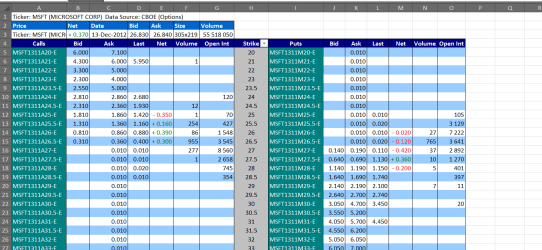
For example when trading the markets I pull real time Options quotes from the CBOE (Chicago Board of Options Exchange). Try replicating this in other "Excel Clones" such as in Libre Office.

There isn't ANY other spread sheet system where I could program this stuff in easily -- (although I'm not a programmer I can do some Visual Basic macros etc).

Here's a sample of what I mean (screenshot enc).

Simple processes might be OK in other office suites but for any complex stuff Ms still quite simple is nr 1 BY A UNIVERSE. I just hope that future releases of Office don't RUIN it by going that full screen Metro way as per W8. Office 2013 unfortunately looks like making this mistake - but Office 2010 will last for years yet. Don't forget that Office although it's reputed to be the most pirated software in the world is still Ms's biggest (or certainly one of the biggest) earners at corporate level.

Cheers
jimbo
 

Attachments

  • options.png
    options.png
    42.2 KB · Views: 8

My Computer My Computer

At a glance

Linux CENTOS 7 / various Windows OS'es and se...Intel i7 Intel i58GB, 16GBOn Motherboard
Computer type
PC/Desktop
Computer Manufacturer/Model Number
Custom built, several laptops HP/ASUS
OS
Linux CENTOS 7 / various Windows OS'es and servers
CPU
Intel i7 Intel i5
Memory
8GB, 16GB
Graphics Card(s)
On Motherboard
Sound Card
Realtek HD audio
Monitor(s) Displays
Apple Cinema display, Samsung LCD
Screen Resolution
1920 X 1080
Hard Drives
4 X 1TB SATA
Mouse
Toshiba wireless laser
Internet Speed
> 20MB up
We made a bad investment - I bought an expensive fast USB3 stick too. And it is not all that good for running a Linux distro (I run Fedora right now from that stick).

A much better solution is to run from an external SSD. I bought a 60GB SSD for $59.95 plus a few bucks for the USB3 enclosure and I run Mint Mate, Zorin (and Windows 8) from there under VMware Player (free). Works beautifully and very fast with the added advantage that you can run it side by side with the host OS and need not reboot all the time. Plus, you can run those systems on any machine that have VMware Player installed (a 3 minute affair).

If you want to try it, here is some tutorial material I put together.

http://www.sevenforums.com/tutorials/276540-portable-os-carry-your-os-external-drive.html

And here is a whole series of tutorials I made regarding Mint Mate. If you double click on it in Chrome, you can read and control it in your browser. Else just download it (2 PDF pages).

https://skydrive.live.com/?cid=475a...cid=475A0A48CA6D4035&id=475A0A48CA6D4035!1856
In my case, looking for a small and relatively fast storage device, the USB 3.0 is not a bad investment. Over a year ego I've done the SSD/external case combo with eSATA and USB interface for fast and portable storage. The combo just wasn't convenient to carry around. I put the SSD into my MSI netbook with Windows 7 and it runs relatively well with the SSD, with increased battery life.

I forgot about your tutorials, thanks for the reminder...
 

My Computer My Computer

At a glance

Windows 7 64-bit, Windows 8.1 64-bit, OSX El ...Intel i5-3350P 3.1 GHz16 GBs GSkill SniperRadeon HD 7850
Computer type
PC/Desktop
Computer Manufacturer/Model Number
Custom built at Home
OS
Windows 7 64-bit, Windows 8.1 64-bit, OSX El Capitan, Windows 10 (VMware)
CPU
Intel i5-3350P 3.1 GHz
Motherboard
Gigabyte GA-Z77X-UP5 TH
Memory
16 GBs GSkill Sniper
Graphics Card(s)
Radeon HD 7850
Sound Card
VIA HD Audio
Monitor(s) Displays
Dell U2410 24"
Screen Resolution
1920x1200
Hard Drives
1 x Intel 520 240 GBs
1 x Seagate 1TBs SATA 2.0,
1 x Seagate 1TBs eSATA 2.0
PSU
Thermaltake 850W
Case
Antec P183
Cooling
Noctua NH-D14 Heatsink 2 x 120mm fans, 4 x 120mm case fans
Keyboard
Dell Multimedia keyboard
Mouse
Logitech Trackball
Internet Speed
28.5 Mb/s
Now for the RT7 Lite there's one biggie problem you apparently ran into. If you bought 7 when first out or at least prior to the SP1 release slipsteaming the service pack in poses another problem of not being able to activate Windows! The same goes for downloading from Digital Rivers any iso with SP1 included. You have to have a post SP1 key to start with if not having any paid MSDN or TechNet subscription where a key per download is provided. So that left seeing SP1 wrapped up with all those updates out! :(:cry:
I have not ran into the "pre-SP1 key" issue yet, but thanks for the heads up. It'll come handy for older keys in the case of reinstalling Windows 7...
 

My Computer My Computer

At a glance

Windows 7 64-bit, Windows 8.1 64-bit, OSX El ...Intel i5-3350P 3.1 GHz16 GBs GSkill SniperRadeon HD 7850
Computer type
PC/Desktop
Computer Manufacturer/Model Number
Custom built at Home
OS
Windows 7 64-bit, Windows 8.1 64-bit, OSX El Capitan, Windows 10 (VMware)
CPU
Intel i5-3350P 3.1 GHz
Motherboard
Gigabyte GA-Z77X-UP5 TH
Memory
16 GBs GSkill Sniper
Graphics Card(s)
Radeon HD 7850
Sound Card
VIA HD Audio
Monitor(s) Displays
Dell U2410 24"
Screen Resolution
1920x1200
Hard Drives
1 x Intel 520 240 GBs
1 x Seagate 1TBs SATA 2.0,
1 x Seagate 1TBs eSATA 2.0
PSU
Thermaltake 850W
Case
Antec P183
Cooling
Noctua NH-D14 Heatsink 2 x 120mm fans, 4 x 120mm case fans
Keyboard
Dell Multimedia keyboard
Mouse
Logitech Trackball
Internet Speed
28.5 Mb/s
Hi there
an even BETTER solution is to use GRUB on the external USB drive and then mount and boot a Windows VHD (note NOT a Virtual machine) and boot from it. then you can run a Full PORTABLE NATIVE windows OS from your USB device. You can also boot any Linux distro you want.
There are certainly other viable alternatives. However, they all lack one feature that VMware can provide - that is concurrency. I run at least 1 virtual partition all day because I use Linux for the internet (safer and faster than Windows) and Windows for the rest. A constant rebooting of the system would not be a viable option for that.
 

My Computer My Computer

At a glance

Vista, Windows7, Mint Mate, Zorin, Windows 8from 1.6GHz Duo to i7
Computer Manufacturer/Model Number
HP, Dell, Gateway, Toshiba - 4 laptops and 2 desktops
OS
Vista, Windows7, Mint Mate, Zorin, Windows 8
CPU
from 1.6GHz Duo to i7
Monitor(s) Displays
2x HP w2207
Hard Drives
5x HDD, 7x SSD, 12x Externals
Keyboard
with trackball - no mices
Mouse
Trackball mice
Internet Speed
DSL 6000
jimbo45;2367887 Hi there It's fairly simple -- they are still CURRENTLY the best. As far as EXCEL is concerned nothing else even comes CLOSE - especially for integration with the Internet .[/QUOTE said:
I'm not denying MS Office is currently a good application package for them and Excel has features superior at the moment to some of the free offerrings but once the OS is opened up by a competing linux this may change once the $ come rolling in. I was talking apps like Photoshop etc.
 

My Computer My Computer

At a glance

Windows 7x64 Home Premium SP1Intel i7 2600kG.Skill Ripjaws (DDR3-1600) 2x4GBNvidia GeForce GTS 450; Intel HD Graphics 300...
Computer type
PC/Desktop
Computer Manufacturer/Model Number
Own build
OS
Windows 7x64 Home Premium SP1
CPU
Intel i7 2600k
Motherboard
ASUS P8Z68 Deluxe
Memory
G.Skill Ripjaws (DDR3-1600) 2x4GB
Graphics Card(s)
Nvidia GeForce GTS 450; Intel HD Graphics 3000(GT2+)
Monitor(s) Displays
Dell Ultrasharp IPS panel U2311H, Samsung SyncMaster P2350
Screen Resolution
1920x1080
Hard Drives
Samsung 850 Pro SSD 256GB, Samsung SSD 840 120GB, Seagates 1TB Barracuda ST31000528AS x2
PSU
Seasonic M12II 520W
Case
Lian Li Lancool PC-K60
Cooling
Case: 1x120mm, 3x140mm CPU: Hyper 212+
Keyboard
Logitech MK520 (wireless)
Mouse
Logitech MK520
Internet Speed
6-7 Mbps
Antivirus
Norton Security Premium, Malwarebytes on 2 (MSE on 3rd PC)
Browser
FireFox
Other Info
Audio: Logitech Z523 2.1
jimbo45;2367887 Hi there It's fairly simple -- they are still CURRENTLY the best. As far as EXCEL is concerned nothing else even comes CLOSE - especially for integration with the Internet .[/QUOTE said:
I'm not denying MS Office is currently a good application package for them and Excel has features superior at the moment to some of the free offerrings but once the OS is opened up by a competing linux this may change once the $ come rolling in. I was talking apps like Photoshop etc.


Hi there
Even Photoshop doesn't really have any serious competitor -- at least once you start thinking about professional quality RAW files, loads of layering, CYMK processing, colour profiles, pre-press presentations etc.

The GIMP is excellent for a free alternative which would be more than sufficient for a lot of people -- just like Libre Office would do -- but for really serious pro / business work there really isn't any choice and in combination with Lightroom -- nobody else even comes close in spite of the quite considerable cost of the software. If you add in the professional quality filters and add ins such as the TOPAZ set then there is even less competition. (And we are talking really expensive professional software here -- this TOPAZ set retails for around 300 USD by itself so you can see where I'm coming from).

Topaz Photoshop Plug-In Bundle

Don't get me wrong - I'd jump ship at a second's notice if something CHEAPER and JUST as good came up -- unfortunately that's still a LONG LONG way from being the case here.

Cheers
jimbo
 

My Computer My Computer

At a glance

Linux CENTOS 7 / various Windows OS'es and se...Intel i7 Intel i58GB, 16GBOn Motherboard
Computer type
PC/Desktop
Computer Manufacturer/Model Number
Custom built, several laptops HP/ASUS
OS
Linux CENTOS 7 / various Windows OS'es and servers
CPU
Intel i7 Intel i5
Memory
8GB, 16GB
Graphics Card(s)
On Motherboard
Sound Card
Realtek HD audio
Monitor(s) Displays
Apple Cinema display, Samsung LCD
Screen Resolution
1920 X 1080
Hard Drives
4 X 1TB SATA
Mouse
Toshiba wireless laser
Internet Speed
> 20MB up
I don't know if I can settle for "Just as good" because eventually I always have to do something where "Just as good" is "Not good enough."
 

My Computer My Computer

At a glance

Windows 8 Pro (32-bit)1.83GHz Intel Core Duo2GB 667MHz DDR2 SDRAM (PC2-5300) (upgrade)ATI Radeon X1600 with 128MB GDDR3 memory
Computer type
PC/Desktop
Computer Manufacturer/Model Number
Apple 17" iMac MA199LL (Early 2006)
OS
Windows 8 Pro (32-bit)
CPU
1.83GHz Intel Core Duo
Memory
2GB 667MHz DDR2 SDRAM (PC2-5300) (upgrade)
Graphics Card(s)
ATI Radeon X1600 with 128MB GDDR3 memory
Monitor(s) Displays
17-inch TFT active-matrix LCD, millions of colors
Screen Resolution
1440 x 900
Hard Drives
Hitachi 320GB HDT721032SLA360 7200RPM SATA II (upgrade)
Keyboard
Microsoft Wired Keyboard 600
Mouse
Microsoft Basic Optical Mouse v2.0
Internet Speed
4 Mbps
Antivirus
Microsoft Security Essentials
Browser
Google Chrome
Other Info
WEI:
Base Score: 3.9 Processor: 4.4 Memory 4.7
Graphics: 3.9 Gaming Graphics: 4.1 Primary HD: 5.9
I don't know if I can settle for "Just as good" because eventually I always have to do something where "Just as good" is "Not good enough."
It really depends on what you are doing. With MS Office I usually do very simple things (except PowerPoint) and for the simple tasks I found Libre Office to be a good match.

With pictures processing the same. I have yet to find a case where I could not manage with Gimp. But, of course, I am no professional.
 

My Computer My Computer

At a glance

Vista, Windows7, Mint Mate, Zorin, Windows 8from 1.6GHz Duo to i7
Computer Manufacturer/Model Number
HP, Dell, Gateway, Toshiba - 4 laptops and 2 desktops
OS
Vista, Windows7, Mint Mate, Zorin, Windows 8
CPU
from 1.6GHz Duo to i7
Monitor(s) Displays
2x HP w2207
Hard Drives
5x HDD, 7x SSD, 12x Externals
Keyboard
with trackball - no mices
Mouse
Trackball mice
Internet Speed
DSL 6000
I don't know if I can settle for "Just as good" because eventually I always have to do something where "Just as good" is "Not good enough."

Hi there
Agree with you -- perhaps I should have said BETTER than what's available -- that is going to be even MORE unlikely.

For the foreseeable future Photoshop and Office aren't going to be knocked of their perches -- and by the time they are I will either have long since passed away or won't be caring about computers anyway.

Cheers
jimbo
 

My Computer My Computer

At a glance

Linux CENTOS 7 / various Windows OS'es and se...Intel i7 Intel i58GB, 16GBOn Motherboard
Computer type
PC/Desktop
Computer Manufacturer/Model Number
Custom built, several laptops HP/ASUS
OS
Linux CENTOS 7 / various Windows OS'es and servers
CPU
Intel i7 Intel i5
Memory
8GB, 16GB
Graphics Card(s)
On Motherboard
Sound Card
Realtek HD audio
Monitor(s) Displays
Apple Cinema display, Samsung LCD
Screen Resolution
1920 X 1080
Hard Drives
4 X 1TB SATA
Mouse
Toshiba wireless laser
Internet Speed
> 20MB up
All these major apps appear to support Macs which is Unix based. Most photo pros apparently use Macs. So in principle Adobe Photo products could be ported to a linux platform with little effort depending on the user base. Although MS provide Office to Macs I doubt they would cannibalize Office to a low cost linux OS.

I doubt that I'd move to linux mainstream. I have 3 PCs running W7 and 2 copies sitting on the shelf and I am quite happy with the W7 OS. But the wind can change.
 

My Computer My Computer

At a glance

Windows 7x64 Home Premium SP1Intel i7 2600kG.Skill Ripjaws (DDR3-1600) 2x4GBNvidia GeForce GTS 450; Intel HD Graphics 300...
Computer type
PC/Desktop
Computer Manufacturer/Model Number
Own build
OS
Windows 7x64 Home Premium SP1
CPU
Intel i7 2600k
Motherboard
ASUS P8Z68 Deluxe
Memory
G.Skill Ripjaws (DDR3-1600) 2x4GB
Graphics Card(s)
Nvidia GeForce GTS 450; Intel HD Graphics 3000(GT2+)
Monitor(s) Displays
Dell Ultrasharp IPS panel U2311H, Samsung SyncMaster P2350
Screen Resolution
1920x1080
Hard Drives
Samsung 850 Pro SSD 256GB, Samsung SSD 840 120GB, Seagates 1TB Barracuda ST31000528AS x2
PSU
Seasonic M12II 520W
Case
Lian Li Lancool PC-K60
Cooling
Case: 1x120mm, 3x140mm CPU: Hyper 212+
Keyboard
Logitech MK520 (wireless)
Mouse
Logitech MK520
Internet Speed
6-7 Mbps
Antivirus
Norton Security Premium, Malwarebytes on 2 (MSE on 3rd PC)
Browser
FireFox
Other Info
Audio: Logitech Z523 2.1
Hi there
an even BETTER solution is to use GRUB on the external USB drive and then mount and boot a Windows VHD (note NOT a Virtual machine) and boot from it. then you can run a Full PORTABLE NATIVE windows OS from your USB device. You can also boot any Linux distro you want.

Seems to me a bit pointless to run Windows as a VM from Linux if most of the time you are using Windows applications such as Photoshop, Office etc.

Don't get me wrong -- I LIKE Linux - but for me I only use it as a file and internet Database server.

For what I need and do Linux as a DESKTOP OS doesn't cut it for me -- but absolutely NO problems as a Server.

BTW another interesting idea is to try running ESXi (free version) from VMware -- it's a TINY Hypervisor -- and then run a Windows VM from the USB device. The disadvantage is that you would need a separate client machine to access the VM but the overhead of the hypervisor is so tiny that the VM runs at 99.9% native speed and you can use some real hardware too (Esxi allows things like Pci passthru to access real hardware). However setting this up is quite tricky so it's not for beginners. If you don't have a spare client machine then this isn't an option -- I mention this because if you DO have a spare machine it's quite a fun exercise to have a go with it. Installing Esxi takes around 2 mins !! it's such a small kernel -- but be warned some of its hardware requirements are quite picky.

Virtualising the Esxi itself could also be an interesting idea -- the overhead of a second level of virtualisation (a Windows VM under a Virtual esxi) might be LESS than running a windows VM under a full Linux distro - and in this case you wouldn't need a separate physical client machine --you could access the Windows VM from the Host machine.

Cheers
jimbo

One thing I found out when first trying to custom install ubuntu onto a 2gb flash drive was not only did the 10.04 release actually need 2.25gb instead but how to repair the 7 mbr when Grub trashed that before finding out that it wasn't the root you pointed Grub at leaving it to go after the first drive available but pointing at the flash drive knowing what was the sda, sde, or whatever drive by identification! There were the fun times for sure! :what::roflmao:"7 mbr trashed? On no! :eek:" You learn fast! :doh:

Now speaking of seeing 7 running off of a flash drive someone wrote up a guide for that using the Portable VirtualBox back while 7 was in RC form I gave a try to see results. There should a way similar to how that is done with 8 as well using the win image file as one guide at 8F explains. Another older eHow guide explains how you can also do the same with Vista by following a certain proceedure since all three versions still use the same boot loader Vista brought in with it. How to Run Windows From a USB Flash Drive

The key for creating a partitioning scheme on a flash drive is a bit different then simply running DiskPart and only seeing one OS partition created. While booted live from either a GParted Live cd or flash drive prepared with that drive program if the distro's options for the one included are limited which has been found at times wanting the entire drive only! or with a better release's own GParted you create the major NTFS primary up front to act as the data partition while reserving a good 3-4gb at the back end for the root.

There won't be any need for a swap partition if the root is large enough since Linux has it's own form of paging file but different there of course. But this method reserves the bulk of the drive's capacity for any data rescues while still having enough OS space to work with.

Now for the RT7 Lite there's one biggie problem you apparently ran into. If you bought 7 when first out or at least prior to the SP1 release slipsteaming the service pack in poses another problem of not being able to activate Windows! The same goes for downloading from Digital Rivers any iso with SP1 included. You have to have a post SP1 key to start with if not having any paid MSDN or TechNet subscription where a key per download is provided. So that left seeing SP1 wrapped up with all those updates out! :(:cry:

I have not ran into the "pre-SP1 key" issue yet, but thanks for the heads up. It'll come handy for older keys in the case of reinstalling Windows 7...

That was disappointing when running into this and only finding out you could slip in the individual collection of separate updates like security fixed but the service pack for any version makes other changes as well as the "date stamps"! And that was the main problem for the key since it was viewed as a "newer version of" which automatically invalidated the key. :(

I had to tell Shawn about that problem coming up when the guide for replacing an OEM preinstall without the original recovery media available brought everyone to the DR site's liinks for Home and Pro with SP1 there. Now for someone who had bought a new 7 laptop after SP1 came out that have already seen SP1 and immediately work which is good for those who need to use the other guide gregrocker wrote uo for that. http://www.sevenforums.com/tutorials/219487-clean-reinstall-factory-oem-windows-7-a.html

The unfortunate side of course was for those who went right after 7 when first out... know anyone? :D and the key was too old for that! :cry: " I want my 7!" So it's SP1 separate install time for any clean install.
 

My Computers My Computers

  • At a glance

    W7 Ultimate x64/W10 Pro x64/W11 Pro Triple Bo...AMD Phenom II X4 975 Deneb 3.6ghz - 965 2nd r...Kingston Hyper X DDR3 1600 1.5v 16gb - Hyper ...MSI HD Radeon 5750 1gb - MSI HD Radeon 6450 o...
    Computer type
    PC/Desktop
    Computer Manufacturer/Model Number
    Custom builds = 2
    OS
    W7 Ultimate x64/W10 Pro x64/W11 Pro Triple Boot - Main PC W7 Remote PC Micro ATX W7 Pro x64/W11 Pro
    CPU
    AMD Phenom II X4 975 Deneb 3.6ghz - 965 2nd remote pc
    Motherboard
    Gigabyte GA-790XTA-UD4-Gigabyte GA-880GM-D2H remote pc
    Memory
    Kingston Hyper X DDR3 1600 1.5v 16gb - Hyper X Fury 8gb 2nd
    Graphics Card(s)
    MSI HD Radeon 5750 1gb - MSI HD Radeon 6450 on mini tower
    Sound Card
    Creative Labs X-Fi Xtreme Audio P - Realtek onooard 2nd case
    Monitor(s) Displays
    ASUS VW199T-P 19" HP 2082a Main-HP 2082a 20" remote pc
    Screen Resolution
    Asus 1440x900 - HP 1600x900
    Hard Drives
    WD Black 1TB HD per OS W7, W10, and pending W11 presently on 500gb OS Drive - Pending Triple 1TB HDs for Spanned Storage/backup volume
    Single 2TB external USB enclosure, single 1TB System 7 Host/Boot drive, Pending 8TB external HD for system image b
    PSU
    Corsair 750TX - primary / Corsair CX600 - second
    Case
    Antec 900-2 - SSD compatible / NZXT Vulcan mini tower
    Cooling
    Zalman CNPS9900A
    Keyboard
    AZIO L70 Backlit Letters Gaming - ONN Cordless/USB
    Mouse
    MSI DS200 Programmable, Logitech Cordless
    Internet Speed
    30mbps upgrade - primary hard wired - mini tower usb WiFi
    Antivirus
    GFI VIPRE Internet Security 2014 on W7 2016 beta on W10,
    Browser
    Cyberfox, WaterFox 64bit FF variants, FireFox x64, Pale Moon
    Other Info
    Accomdata fan cooled usb 2.0 PIDE/Sata II, III external enclosure.
    Sambient usb/eSata PATA/Sata II, III external enclosure.
  • At a glance

    W7 Pro x64/W11 ProAMD Deneb 3.6ghz - 965Kingston Hyper X Fury 8gbMSI HD Radeon 6450 DVI Output
    Computer type
    PC/Desktop
    System Manufacturer/Model Number
    CUSTOM ASSEMBLY
    OS
    W7 Pro x64/W11 Pro
    CPU
    AMD Deneb 3.6ghz - 965
    Motherboard
    Gigabyte GA-880GM-D2H remote pc
    Memory
    Kingston Hyper X Fury 8gb
    Graphics Card(s)
    MSI HD Radeon 6450 DVI Output
    Sound Card
    Realtek onooard Creative or Other separate PENDING
    Monitor(s) Displays
    VIZIO 32" LCD TV Separate LCD Pending
    Screen Resolution
    1600x1080
    Hard Drives
    WD 500GB OS Host/Boot WD Green 1TB Storage/Backup
    PSU
    Corsair 600W - THERMALTAKE 600W spare case
    Case
    NZXT Vulcan mini tower
    Cooling
    Twin 120mm Top Fans - 240mm Side Cover
    Keyboard
    ONN Cordless/USB Logitech Cordless
    Mouse
    ONN USB/Cordless - Logitech Cordless
    Internet Speed
    DSL 5G
    Browser
    MS Edge, FireFox, WaterFox x64, FireFox Nightly
    Other Info
    OS Testing-Remote Access to Main TeamViewer
Back
Top