Folder Template - Default

How to Set a Default Folder Template for All Folders in Windows 7


   Information
This will show you how to either set a folder template of your choice to be the default for all folders, or reset all folder templates back to default in all folders in Windows 7.

   Note
The folder template for Library folders cannot be changed in Windows 7.

   Tip
Automatic Folder Type Discovery is when Windows will automatically change the folder template of a folder to match the file type of the last file added or saved in the folder. For example, if your folder contains music files and you add a picture file, then Windows may change the folder template and view to the "Picture" template to match the new picture file.

By setting a specific template (steps 2 to 6) to be the default, you will disable Automatic Folder Type Discovery. Afterwards, you will still be able to set folder views and templates how you like, but without Automatic Folder Type Discovery changing them for you.

By restoring the default templates (step 1), you will enable Automatic Folder Type Discovery.


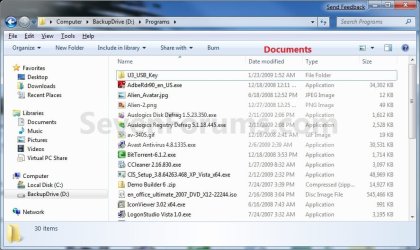
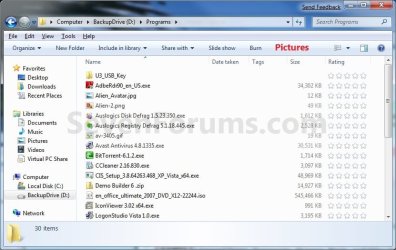
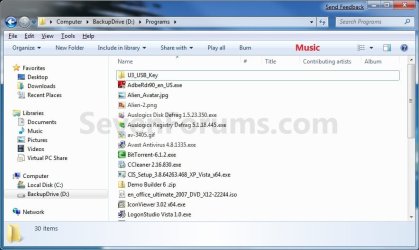
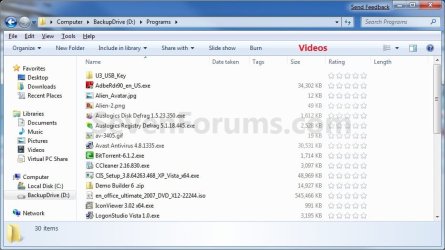
EXAMPLE: General Items, Documents, Pictures, Music, and Video templates
NOTE: These screenshots are with using the Details view. What you see in your window will also depend on what you have the View arrangement, Group by, Sort by, Stack by arrangement, or icon size set as.
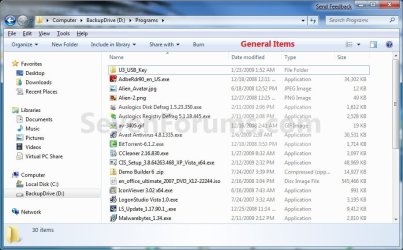
General_Items.jpg

Documents.jpg

Pictures.jpg

Music.jpg

Videos.jpg

Here's How:
1. To Restore Default Folder Templates for All Folders
NOTE: This will also reset all folder views back to default as well.
A) Click on the Download button below to download the file below.
Restore_Default_Folder_Templates.bat


Download


B) Go to step 7.
2. To Set General Items Folder Template as Default for All Folders
A) Click on the Download button below to download the file below.
All_Folders_Use_General_Items_Folder_Template.bat


Download


B) Go to step 7.
3. To Set Documents Folder Template as Default for All Folders
A) Click on the Download button below to download the file below.
All_Folders_Use_Documents_Folder_Template.bat


Download


B) Go to step 7.
4. To Set Pictures Folder Template as Default for All Folders
A) Click on the Download button below to download the file below.
All_Folders_Use_Pictures_Folder_Template.bat


Download


B) Go to step 7.
5. To Set Music Folder Template as Default for All Folders
A) Click on the Download button below to download the file below.
All_Folders_Use_Music_Folder_Template.bat


Download


B) Go to step 7.
6. To Set Videos Folder Template as Default for All Folders
A) Click on the Download button below to download the file below.
All_Folders_Use_Videos_Folder_Template.bat

Download


B) Go to step 7.
7. Save the .bat file to your desktop.

8. Close all running programs and opened windows, and run the downloaded .bat file.

9. If prompted, click on Run.
NOTE: If you like, you can stop getting the Run prompt by unblocking the downloaded .bat file.

10. You will now notice your screen flicker as explorer is restarted to apply the registry changes.

11. You can delete the downloaded .bat file if you like.

That's it,
Shawn


Attachments

Last edited:
No problem.

I'm not sure why either Folder Template - Default (Restore_Default_Folder_Templates.bat) is the same as Folder View Settings - Reset All to Default (Windows_7_Reset_All_Folders_To_Default_Folder_Views.bat) is not resetting them for you.

Something is interfering with the .bat on your system since they both reset all folder templates and views back to default.

See if right clicking on the .bat and clicking on "Run as administrator" may help if you have some sort of permissions issue.
 

My Computer

Computer type
PC/Desktop
Computer Manufacturer/Model Number
Self built custom
OS
64-bit Windows 11 Pro for Workstations
CPU
Intel i7-8700K OC'd to 5 GHz
Motherboard
ASUS ROG Maximus XI Formula Z390
Memory
64 GB (4x16GB) G.SKILL TridentZ RGB DDR4 3600 MHz
Graphics Card(s)
ASUS ROG-STRIX-GTX1080TI-O11G-GAMING
Sound Card
Integrated
Monitor(s) Displays
2 x Samsung Odyssey G7 27"
Screen Resolution
2560x1440
Hard Drives
1TB Samsung 990 PRO M.2,
4TB Samsung 990 PRO PRO M.2,
TerraMaster F8 SSD Plus NAS
PSU
Seasonic Prime Titanium 850W
Case
Thermaltake Core P3
Cooling
Corsair Hydro H115i
Keyboard
Logitech wireless K800
Mouse
Logitech MX Master 4
Internet Speed
2 Gb/s Download and 100 Mb/s Upload
Antivirus
Malwarebyte Anti-Malware Premium
Browser
Google Chrome
Other Info
Logitech Z625 speaker system,
Logitech BRIO 4K Pro webcam,
HP Color LaserJet Pro MFP M477fdn,
APC SMART-UPS RT 1000 XL - SURT1000XLI,
Galaxy S23 Plus phone
Are the commands for Folder Template - Default (Restore_Default_Folder_Templates.bat) and Folder View Settings - Reset All to Default (Windows_7_Reset_All_Folders_To_Default_Folder_Views.bat) supposed to be different?

I downloaded both .bat files and took a look at the commands, the commands for both .bat files are identical.

:: To reset all folders to default folder views
Reg Delete "HKCU\Software\Microsoft\Windows\Shell\BagMRU" /F
Reg Delete "HKCU\Software\Microsoft\Windows\Shell\Bags" /F

Reg Delete "HKCU\Software\Microsoft\Windows\ShellNoRoam\Bags" /F
Reg Delete "HKCU\Software\Microsoft\Windows\ShellNoRoam\BagMRU" /F

Reg Delete "HKCU\Software\Classes\Local Settings\Software\Microsoft\Windows\Shell\BagMRU" /F
Reg Delete "HKCU\Software\Classes\Local Settings\Software\Microsoft\Windows\Shell\Bags" /F

Reg Delete "HKCU\Software\Classes\Wow6432Node\Local Settings\Software\Microsoft\Windows\Shell\Bags" /F
Reg Delete "HKCU\Software\Classes\Wow6432Node\Local Settings\Software\Microsoft\Windows\Shell\BagMRU" /F


:: To kill and restart explorer
taskkill /f /im explorer.exe
start explorer.exe
 

My Computer

Computer type
PC/Desktop
Computer Manufacturer/Model Number
Less is more
OS
Windows 7 Ultimate x64 SP1
CPU
Core i7 2600k (4.6GHz)
Motherboard
ASUS P8Z68 Deluxe (3603)
Memory
16GB G.SKILL Ares 1600MHz
Graphics Card(s)
MSI R6970 Lightning
Sound Card
Asus Xonar Essence ST (UNi drivers 1.41)
Monitor(s) Displays
Samsung P2570, CrossOver 27Q LED-P
Screen Resolution
1920*1080, 2560*1440
Hard Drives
256GB OCZ Vector, 2x Hitachi 4TB (7K4000), Hitachi 3TB (7K3000 & 5K3000)
PSU
Seasonic X750
Case
Lian-Li PC-P80N
Cooling
NZXT HAVIK 140 (2x GELID Wing12PL Push/Pull)
Keyboard
CM Storm Trigger (Brown Switch)
Mouse
Logitech G400
Internet Speed
55Mbps/10Mbps
Other Info
Speakers - Klipsch ProMedia 2.1
Headphones - Sennheiser HD595
Router - ASUS RT-N66U
Webcam - Logitech C910
No, they are supposed to be the same since they both will reset all folder views and templates back to default.

Did you have any luck using "Run as administrator" on the .bat?
 

My Computer

Computer type
PC/Desktop
Computer Manufacturer/Model Number
Self built custom
OS
64-bit Windows 11 Pro for Workstations
CPU
Intel i7-8700K OC'd to 5 GHz
Motherboard
ASUS ROG Maximus XI Formula Z390
Memory
64 GB (4x16GB) G.SKILL TridentZ RGB DDR4 3600 MHz
Graphics Card(s)
ASUS ROG-STRIX-GTX1080TI-O11G-GAMING
Sound Card
Integrated
Monitor(s) Displays
2 x Samsung Odyssey G7 27"
Screen Resolution
2560x1440
Hard Drives
1TB Samsung 990 PRO M.2,
4TB Samsung 990 PRO PRO M.2,
TerraMaster F8 SSD Plus NAS
PSU
Seasonic Prime Titanium 850W
Case
Thermaltake Core P3
Cooling
Corsair Hydro H115i
Keyboard
Logitech wireless K800
Mouse
Logitech MX Master 4
Internet Speed
2 Gb/s Download and 100 Mb/s Upload
Antivirus
Malwarebyte Anti-Malware Premium
Browser
Google Chrome
Other Info
Logitech Z625 speaker system,
Logitech BRIO 4K Pro webcam,
HP Color LaserJet Pro MFP M477fdn,
APC SMART-UPS RT 1000 XL - SURT1000XLI,
Galaxy S23 Plus phone
I tried "Run as administrator" and the results are the same. The "View" and "Sort by" are still remembered for each template.

I'll try to explain to the best of my ability on what's going on.

After I run the .bat file the only things that appear to have reset are window size and icon placement on my desktop.

I have my Music Template set as follows, View -> List and Sort by -> Name. The default view setting for Music Template is View -> Details and Sort by -> Name

I have my Pictures Template set as follows, View -> Extra large icons and Sort by -> Name. The default view setting for Picture Template is View -> Large icons and Sort by -> Type.

I expected the .bat file to reset Folder view settings AND Template settings back to their original default. It seems the .bat is resetting the Folder view settings but not Template settings back to default.

I also noticed the Note you have posted on Folder View Settings - Reset All to Default,

The included folder view settings that will be set back to default will be all Group by, Sort by, Arrange by arrangement , Icon Size, or View arrangement settings. This will not reset any changes made to the folder templates back to default though.

Now I'm really confused.

I thought I was told that the .bat files DID reset folder templates back to default. :confused:
 

My Computer

Computer type
PC/Desktop
Computer Manufacturer/Model Number
Less is more
OS
Windows 7 Ultimate x64 SP1
CPU
Core i7 2600k (4.6GHz)
Motherboard
ASUS P8Z68 Deluxe (3603)
Memory
16GB G.SKILL Ares 1600MHz
Graphics Card(s)
MSI R6970 Lightning
Sound Card
Asus Xonar Essence ST (UNi drivers 1.41)
Monitor(s) Displays
Samsung P2570, CrossOver 27Q LED-P
Screen Resolution
1920*1080, 2560*1440
Hard Drives
256GB OCZ Vector, 2x Hitachi 4TB (7K4000), Hitachi 3TB (7K3000 & 5K3000)
PSU
Seasonic X750
Case
Lian-Li PC-P80N
Cooling
NZXT HAVIK 140 (2x GELID Wing12PL Push/Pull)
Keyboard
CM Storm Trigger (Brown Switch)
Mouse
Logitech G400
Internet Speed
55Mbps/10Mbps
Other Info
Speakers - Klipsch ProMedia 2.1
Headphones - Sennheiser HD595
Router - ASUS RT-N66U
Webcam - Logitech C910
LOL, now you got me confused. :p

I just tested it, and the .bat file does reset all folder views and templates back to default. :)
 

My Computer

Computer type
PC/Desktop
Computer Manufacturer/Model Number
Self built custom
OS
64-bit Windows 11 Pro for Workstations
CPU
Intel i7-8700K OC'd to 5 GHz
Motherboard
ASUS ROG Maximus XI Formula Z390
Memory
64 GB (4x16GB) G.SKILL TridentZ RGB DDR4 3600 MHz
Graphics Card(s)
ASUS ROG-STRIX-GTX1080TI-O11G-GAMING
Sound Card
Integrated
Monitor(s) Displays
2 x Samsung Odyssey G7 27"
Screen Resolution
2560x1440
Hard Drives
1TB Samsung 990 PRO M.2,
4TB Samsung 990 PRO PRO M.2,
TerraMaster F8 SSD Plus NAS
PSU
Seasonic Prime Titanium 850W
Case
Thermaltake Core P3
Cooling
Corsair Hydro H115i
Keyboard
Logitech wireless K800
Mouse
Logitech MX Master 4
Internet Speed
2 Gb/s Download and 100 Mb/s Upload
Antivirus
Malwarebyte Anti-Malware Premium
Browser
Google Chrome
Other Info
Logitech Z625 speaker system,
Logitech BRIO 4K Pro webcam,
HP Color LaserJet Pro MFP M477fdn,
APC SMART-UPS RT 1000 XL - SURT1000XLI,
Galaxy S23 Plus phone
Maybe I should try manually deleting the reg keys?

HKCU\Software\Microsoft\Windows\Shell\BagMRU
HKCU\Software\Microsoft\Windows\Shell\Bags

HKCU\Software\Microsoft\Windows\ShellNoRoam\Bags
HKCU\Software\Microsoft\Windows\ShellNoRoam\BagMRU

HKCU\Software\Classes\Local Settings\Software\Microsoft\Windows\Shell\BagMRU"
HKCU\Software\Classes\Local Settings\Software\Microsoft\Windows\Shell\Bags"

HKCU\Software\Classes\Wow6432Node\Local Settings\Software\Microsoft\Windows\Shell\Bags
HKCU\Software\Classes\Wow6432Node\Local Settings\Software\Microsoft\Windows\Shell\BagMRU
 

My Computer

Computer type
PC/Desktop
Computer Manufacturer/Model Number
Less is more
OS
Windows 7 Ultimate x64 SP1
CPU
Core i7 2600k (4.6GHz)
Motherboard
ASUS P8Z68 Deluxe (3603)
Memory
16GB G.SKILL Ares 1600MHz
Graphics Card(s)
MSI R6970 Lightning
Sound Card
Asus Xonar Essence ST (UNi drivers 1.41)
Monitor(s) Displays
Samsung P2570, CrossOver 27Q LED-P
Screen Resolution
1920*1080, 2560*1440
Hard Drives
256GB OCZ Vector, 2x Hitachi 4TB (7K4000), Hitachi 3TB (7K3000 & 5K3000)
PSU
Seasonic X750
Case
Lian-Li PC-P80N
Cooling
NZXT HAVIK 140 (2x GELID Wing12PL Push/Pull)
Keyboard
CM Storm Trigger (Brown Switch)
Mouse
Logitech G400
Internet Speed
55Mbps/10Mbps
Other Info
Speakers - Klipsch ProMedia 2.1
Headphones - Sennheiser HD595
Router - ASUS RT-N66U
Webcam - Logitech C910
Only if you are comfortable with working in the registry.

You might consider creating a restore point before doing so. This way if you make a mistake by accident, you could just do a system restore with the restore point to undo it.
 

My Computer

Computer type
PC/Desktop
Computer Manufacturer/Model Number
Self built custom
OS
64-bit Windows 11 Pro for Workstations
CPU
Intel i7-8700K OC'd to 5 GHz
Motherboard
ASUS ROG Maximus XI Formula Z390
Memory
64 GB (4x16GB) G.SKILL TridentZ RGB DDR4 3600 MHz
Graphics Card(s)
ASUS ROG-STRIX-GTX1080TI-O11G-GAMING
Sound Card
Integrated
Monitor(s) Displays
2 x Samsung Odyssey G7 27"
Screen Resolution
2560x1440
Hard Drives
1TB Samsung 990 PRO M.2,
4TB Samsung 990 PRO PRO M.2,
TerraMaster F8 SSD Plus NAS
PSU
Seasonic Prime Titanium 850W
Case
Thermaltake Core P3
Cooling
Corsair Hydro H115i
Keyboard
Logitech wireless K800
Mouse
Logitech MX Master 4
Internet Speed
2 Gb/s Download and 100 Mb/s Upload
Antivirus
Malwarebyte Anti-Malware Premium
Browser
Google Chrome
Other Info
Logitech Z625 speaker system,
Logitech BRIO 4K Pro webcam,
HP Color LaserJet Pro MFP M477fdn,
APC SMART-UPS RT 1000 XL - SURT1000XLI,
Galaxy S23 Plus phone
Ok, I'll do a system image just in case. Will report back the results.

*edit*

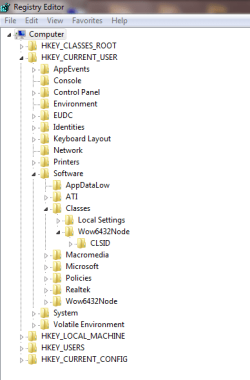
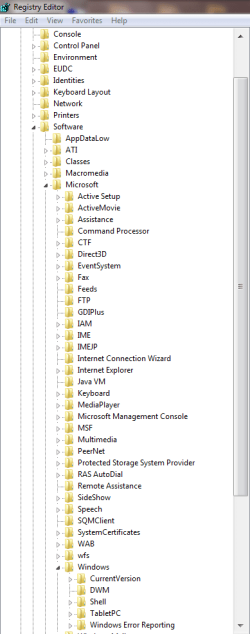
The following registry keys don't exist:

HKCU\Software\Microsoft\Windows\ShellNoRoam\Bags
HKCU\Software\Microsoft\Windows\ShellNoRoam\BagMRU

HKCU\Software\Classes\Wow6432Node\Local Settings\Software\Microsoft\Windows\Shell\Bags
HKCU\Software\Classes\Wow6432Node\Local Settings\Software\Microsoft\Windows\Shell\BagMRU
 

Attachments

  • nolocalsettings.PNG
    nolocalsettings.PNG
    39.9 KB · Views: 566
  • noshellnoroam.PNG
    noshellnoroam.PNG
    54.7 KB · Views: 122
Last edited:

My Computer

Computer type
PC/Desktop
Computer Manufacturer/Model Number
Less is more
OS
Windows 7 Ultimate x64 SP1
CPU
Core i7 2600k (4.6GHz)
Motherboard
ASUS P8Z68 Deluxe (3603)
Memory
16GB G.SKILL Ares 1600MHz
Graphics Card(s)
MSI R6970 Lightning
Sound Card
Asus Xonar Essence ST (UNi drivers 1.41)
Monitor(s) Displays
Samsung P2570, CrossOver 27Q LED-P
Screen Resolution
1920*1080, 2560*1440
Hard Drives
256GB OCZ Vector, 2x Hitachi 4TB (7K4000), Hitachi 3TB (7K3000 & 5K3000)
PSU
Seasonic X750
Case
Lian-Li PC-P80N
Cooling
NZXT HAVIK 140 (2x GELID Wing12PL Push/Pull)
Keyboard
CM Storm Trigger (Brown Switch)
Mouse
Logitech G400
Internet Speed
55Mbps/10Mbps
Other Info
Speakers - Klipsch ProMedia 2.1
Headphones - Sennheiser HD595
Router - ASUS RT-N66U
Webcam - Logitech C910
I am pretty sure the .bat file does not reset Folder Templates (General, Documents, Music, Pictures & Videos) back to their default view and sort by settings, but I want to be 100% sure.

I have a machine that is due for a client this Friday, so I decided to put everything together and load the OS. It's a AMD A10 Trinity build (not that the hardware matters) running on Windows 7 Home Premium x64 SP1 with all the latest updates and mobo drivers (drivers downloaded directly from OEM website).

This is what I did step by step, I have 2 folders on my desktop. One folder contains mp3 files and the other .jpg files.

The default Music Template settings are:

View as Details
Sort by Name

I changed the View settings from Details to List. I then went into Folder Options -> View tab and clicked "Apply to Folders" so everything associated with Music will be in List view.

The default Pictures Template settings are:

View as Large Icons
Sort by Name

I changed the View settings from Large Icons to Extra Large Icons and Sort by Name to Sort by Type. I then went into Folder Options -> View tab and clicked "Apply to Folders" so everything associated with Pictures will be viewed in Extra Large Icons and sorted by Type.

After that was set and done I went ahead and executed the .bat file (Windows_7_Reset_All_Folders_To_Default_Folder_Views.bat)

After Explorer was killed and restarted I rebooted the machine just in case.
After the machine was done rebooting I went and check my Music and Picture folders, their View and Sort by settings did not change, it did not reset to their default View and Sort by settings.

I am now 100% certain the .bat files do not reset All Folder Templates back to their default View and Sort by settings.
 

My Computer

Computer type
PC/Desktop
Computer Manufacturer/Model Number
Less is more
OS
Windows 7 Ultimate x64 SP1
CPU
Core i7 2600k (4.6GHz)
Motherboard
ASUS P8Z68 Deluxe (3603)
Memory
16GB G.SKILL Ares 1600MHz
Graphics Card(s)
MSI R6970 Lightning
Sound Card
Asus Xonar Essence ST (UNi drivers 1.41)
Monitor(s) Displays
Samsung P2570, CrossOver 27Q LED-P
Screen Resolution
1920*1080, 2560*1440
Hard Drives
256GB OCZ Vector, 2x Hitachi 4TB (7K4000), Hitachi 3TB (7K3000 & 5K3000)
PSU
Seasonic X750
Case
Lian-Li PC-P80N
Cooling
NZXT HAVIK 140 (2x GELID Wing12PL Push/Pull)
Keyboard
CM Storm Trigger (Brown Switch)
Mouse
Logitech G400
Internet Speed
55Mbps/10Mbps
Other Info
Speakers - Klipsch ProMedia 2.1
Headphones - Sennheiser HD595
Router - ASUS RT-N66U
Webcam - Logitech C910
OpTicaL,

I don't know what to tell you other than that on every system and VM I use it on, that .bat resets all folder views and templates back to default.

So far, you're the only one that it hasn't worked for. :confused:

As a test, try this .bat file below. It can only be used in an administrator account, and has these entries added to the one above.

Code:
Reg Delete "HKCR\Local Settings\Software\Microsoft\Windows\Shell\BagMRU" /F
Reg Delete "HKCR\Local Settings\Software\Microsoft\Windows\Shell\Bags" /F
 
Reg Delete "HKLM\SOFTWARE\Classes\Local Settings\Software\Microsoft\Windows\Shell\BagMRU" /F
Reg Delete "HKLM\SOFTWARE\Classes\Local Settings\Software\Microsoft\Windows\Shell\Bags" /F
 

Attachments

My Computer

Computer type
PC/Desktop
Computer Manufacturer/Model Number
Self built custom
OS
64-bit Windows 11 Pro for Workstations
CPU
Intel i7-8700K OC'd to 5 GHz
Motherboard
ASUS ROG Maximus XI Formula Z390
Memory
64 GB (4x16GB) G.SKILL TridentZ RGB DDR4 3600 MHz
Graphics Card(s)
ASUS ROG-STRIX-GTX1080TI-O11G-GAMING
Sound Card
Integrated
Monitor(s) Displays
2 x Samsung Odyssey G7 27"
Screen Resolution
2560x1440
Hard Drives
1TB Samsung 990 PRO M.2,
4TB Samsung 990 PRO PRO M.2,
TerraMaster F8 SSD Plus NAS
PSU
Seasonic Prime Titanium 850W
Case
Thermaltake Core P3
Cooling
Corsair Hydro H115i
Keyboard
Logitech wireless K800
Mouse
Logitech MX Master 4
Internet Speed
2 Gb/s Download and 100 Mb/s Upload
Antivirus
Malwarebyte Anti-Malware Premium
Browser
Google Chrome
Other Info
Logitech Z625 speaker system,
Logitech BRIO 4K Pro webcam,
HP Color LaserJet Pro MFP M477fdn,
APC SMART-UPS RT 1000 XL - SURT1000XLI,
Galaxy S23 Plus phone
Hi Brink,

I urge you to try using the "Apply to Folders" setting on a template and you will understand what I am talking about. I am very meticulous when it comes to troubleshooting and do not leave anything to chance, I zero out all possibilities.

I tried this on a fresh install of Windows 7 x64, there's no way the results could be wrong. There's nothing installed on the machine but the OS, updates and motherboard drivers.

For example, the Music folder and Pictures folder I have on the desktop in which Windows auto detected the template. If I make changes to the View and Sort by settings and NOT use the "Apply to Folders" option your .bat file will reset everything back to each templates original default, because their defaults did not change in the first place.

What I observed with the "Apply to Folders" option is that it sets a new default therefore your .bat file will only reset to the default set by "Apply to Folders" and does not have the same effect as "Reset Folders".

In my previous example, The default Pictures Template settings are, View as Large Icons, Sort by Name. If I change View to Extra Large Icons and Sort by Type and hit "Apply to Folders" the new default is Extra Large Icons and Sort by Type. Therefore running the .bat file as admin makes no difference, the default has been changed.


Try the following steps to reproduce the results I'm experiencing:

In this example I'm going to use the Pictures template which is currently defaulted to Extra Large Icons and Sort by Type.

1) First, reset the folder template to it's original default using "Reset Folders" option.

2) Verify the template has been reset, in this case the Picture template's original default is View as Large Icons and Sort by Name.

3) Restart the OS

4) Open the Picture folder and verify it's detected as the Picture template (right-click, Customize this folder…)

5) Change View to Extra Large Icons and Sort by Type

6) Go into Folder Options -> View and click Apply to Folders, close the folder

7) Execute your .bat file

8) Go back into the Pictures folder and you can see the View and Sort by settings did not reset the Pictures template back to it's original default (which is Large Icons and Sort by Name)
 

My Computer

Computer type
PC/Desktop
Computer Manufacturer/Model Number
Less is more
OS
Windows 7 Ultimate x64 SP1
CPU
Core i7 2600k (4.6GHz)
Motherboard
ASUS P8Z68 Deluxe (3603)
Memory
16GB G.SKILL Ares 1600MHz
Graphics Card(s)
MSI R6970 Lightning
Sound Card
Asus Xonar Essence ST (UNi drivers 1.41)
Monitor(s) Displays
Samsung P2570, CrossOver 27Q LED-P
Screen Resolution
1920*1080, 2560*1440
Hard Drives
256GB OCZ Vector, 2x Hitachi 4TB (7K4000), Hitachi 3TB (7K3000 & 5K3000)
PSU
Seasonic X750
Case
Lian-Li PC-P80N
Cooling
NZXT HAVIK 140 (2x GELID Wing12PL Push/Pull)
Keyboard
CM Storm Trigger (Brown Switch)
Mouse
Logitech G400
Internet Speed
55Mbps/10Mbps
Other Info
Speakers - Klipsch ProMedia 2.1
Headphones - Sennheiser HD595
Router - ASUS RT-N66U
Webcam - Logitech C910

My Computer

Computer type
PC/Desktop
Computer Manufacturer/Model Number
Self built custom
OS
64-bit Windows 11 Pro for Workstations
CPU
Intel i7-8700K OC'd to 5 GHz
Motherboard
ASUS ROG Maximus XI Formula Z390
Memory
64 GB (4x16GB) G.SKILL TridentZ RGB DDR4 3600 MHz
Graphics Card(s)
ASUS ROG-STRIX-GTX1080TI-O11G-GAMING
Sound Card
Integrated
Monitor(s) Displays
2 x Samsung Odyssey G7 27"
Screen Resolution
2560x1440
Hard Drives
1TB Samsung 990 PRO M.2,
4TB Samsung 990 PRO PRO M.2,
TerraMaster F8 SSD Plus NAS
PSU
Seasonic Prime Titanium 850W
Case
Thermaltake Core P3
Cooling
Corsair Hydro H115i
Keyboard
Logitech wireless K800
Mouse
Logitech MX Master 4
Internet Speed
2 Gb/s Download and 100 Mb/s Upload
Antivirus
Malwarebyte Anti-Malware Premium
Browser
Google Chrome
Other Info
Logitech Z625 speaker system,
Logitech BRIO 4K Pro webcam,
HP Color LaserJet Pro MFP M477fdn,
APC SMART-UPS RT 1000 XL - SURT1000XLI,
Galaxy S23 Plus phone
No problem I know I have trouble expressing my thoughts sometimes. Glad to see it all work out in the end. :)

Your guides have been very helpful, where's the Donate button?
 

My Computer

Computer type
PC/Desktop
Computer Manufacturer/Model Number
Less is more
OS
Windows 7 Ultimate x64 SP1
CPU
Core i7 2600k (4.6GHz)
Motherboard
ASUS P8Z68 Deluxe (3603)
Memory
16GB G.SKILL Ares 1600MHz
Graphics Card(s)
MSI R6970 Lightning
Sound Card
Asus Xonar Essence ST (UNi drivers 1.41)
Monitor(s) Displays
Samsung P2570, CrossOver 27Q LED-P
Screen Resolution
1920*1080, 2560*1440
Hard Drives
256GB OCZ Vector, 2x Hitachi 4TB (7K4000), Hitachi 3TB (7K3000 & 5K3000)
PSU
Seasonic X750
Case
Lian-Li PC-P80N
Cooling
NZXT HAVIK 140 (2x GELID Wing12PL Push/Pull)
Keyboard
CM Storm Trigger (Brown Switch)
Mouse
Logitech G400
Internet Speed
55Mbps/10Mbps
Other Info
Speakers - Klipsch ProMedia 2.1
Headphones - Sennheiser HD595
Router - ASUS RT-N66U
Webcam - Logitech C910
You pointing that out is the best donation. :)
 

My Computer

Computer type
PC/Desktop
Computer Manufacturer/Model Number
Self built custom
OS
64-bit Windows 11 Pro for Workstations
CPU
Intel i7-8700K OC'd to 5 GHz
Motherboard
ASUS ROG Maximus XI Formula Z390
Memory
64 GB (4x16GB) G.SKILL TridentZ RGB DDR4 3600 MHz
Graphics Card(s)
ASUS ROG-STRIX-GTX1080TI-O11G-GAMING
Sound Card
Integrated
Monitor(s) Displays
2 x Samsung Odyssey G7 27"
Screen Resolution
2560x1440
Hard Drives
1TB Samsung 990 PRO M.2,
4TB Samsung 990 PRO PRO M.2,
TerraMaster F8 SSD Plus NAS
PSU
Seasonic Prime Titanium 850W
Case
Thermaltake Core P3
Cooling
Corsair Hydro H115i
Keyboard
Logitech wireless K800
Mouse
Logitech MX Master 4
Internet Speed
2 Gb/s Download and 100 Mb/s Upload
Antivirus
Malwarebyte Anti-Malware Premium
Browser
Google Chrome
Other Info
Logitech Z625 speaker system,
Logitech BRIO 4K Pro webcam,
HP Color LaserJet Pro MFP M477fdn,
APC SMART-UPS RT 1000 XL - SURT1000XLI,
Galaxy S23 Plus phone
This is the worst windows 7 feature!

First, because of some reg hacks I did, I need to (would like to) reset all folders to factory default for each type of file...not all folders to the same headers.
General Items
Documents
Pictures
Video

The factory default for those is fine.


Then, for folders that have at least one of the following type;
MP3
WAV
OGG
WMA
FLAC

And Windows STOPS trying to force Contributing Artist etc etc... :mad::mad::mad::mad:
The headers should say [file name] [bit rate] [length] [file type] [date created] etc. or anything else I pick.

I work with a lot of audio files. This includes music files (where I don't care what the track number is much less the Contributing Artist. For those who need to know, yes I use song files legitimately, work related.

Let's say I also use audio files with dry voice for training or radio commercials.
Contributing Artist ???

I'm surprised someone hasn't figured this out yet, because every time I try to set the folder "of this type" then I create a new folder and drop an MP3 in it, guess who pops up? Mr Contributing Artist !!

There has to be a way to turn off auto discovery permanently!
It's absolutely insane!

Will the people at Microsoft post a reply? Somebody, anyone, Bill...help??
At least confess that this was a mistake like Ctrl + Alt + Del, then I'll stop.

So tonight, so that I can get some sleep, I'll have a dream the MS board members asked Steve to leave because HE WAS THE ONE who screwed up the Contributing Artist headers. It will actually be a nightmare, a continuation of the real life nightmare.

If anyone can shed more light, I'd greatly appreciate it!
 
Last edited:

My Computer

Computer type
Laptop
Computer Manufacturer/Model Number
Dell Precision M6600
OS
Windows 7 Professional 64bit
CPU
Intel Core i7 2820QM 2.3GHz
Memory
8GB ( 1666 MHz )
Graphics Card(s)
ATI Fire Pro M8900
Sound Card
MOTU UltraLite mk3 Hybrid ( external )
Screen Resolution
1200
Hard Drives
250GB 7200 rpm
Keyboard
It lights up
Mouse
Logitech laser
Internet Speed
Blazing
Antivirus
COMODO Internet Security (There is NO OTHER)
Browser
Firefox (There is NO OTHER)...well Opera is cool
Hello Voiceartistusa,

Automatic Folder Type Discovery is when Windows will automatically change the folder template of a folder to match the file type of the last file added or saved in the folder. For example, if your folder contains music files and you add a picture file, then Windows may change the folder template and view to the "Picture" template to match the new picture file.

By setting a specific template (steps 2 to 6 in tutorial on first page) to be the default, you will disable Automatic Folder Type Discovery. Afterwards, you will still be able to set folder views, columns, and templates how you like, but without Automatic Folder Type Discovery changing them for you.

By restoring the default templates (step 1), you will enable Automatic Folder Type Discovery.

Hope this helps, :)
Shawn
 

My Computer

Computer type
PC/Desktop
Computer Manufacturer/Model Number
Self built custom
OS
64-bit Windows 11 Pro for Workstations
CPU
Intel i7-8700K OC'd to 5 GHz
Motherboard
ASUS ROG Maximus XI Formula Z390
Memory
64 GB (4x16GB) G.SKILL TridentZ RGB DDR4 3600 MHz
Graphics Card(s)
ASUS ROG-STRIX-GTX1080TI-O11G-GAMING
Sound Card
Integrated
Monitor(s) Displays
2 x Samsung Odyssey G7 27"
Screen Resolution
2560x1440
Hard Drives
1TB Samsung 990 PRO M.2,
4TB Samsung 990 PRO PRO M.2,
TerraMaster F8 SSD Plus NAS
PSU
Seasonic Prime Titanium 850W
Case
Thermaltake Core P3
Cooling
Corsair Hydro H115i
Keyboard
Logitech wireless K800
Mouse
Logitech MX Master 4
Internet Speed
2 Gb/s Download and 100 Mb/s Upload
Antivirus
Malwarebyte Anti-Malware Premium
Browser
Google Chrome
Other Info
Logitech Z625 speaker system,
Logitech BRIO 4K Pro webcam,
HP Color LaserJet Pro MFP M477fdn,
APC SMART-UPS RT 1000 XL - SURT1000XLI,
Galaxy S23 Plus phone
If I have a folder of audio files and I want to add one jpg, I cannot have the headers change to accommodate the jpg, that's not the way a customizable system should behave.

Windows WILL change the headers on any subsequent folders, It's driving me nuts!

Now I'm stuck with [bit rate] [length] [date modified] for ALL folders...

:geek: But I made an IMAGE of my disk today :geek: I'll be back in 40 minutes ;) with a complete restore!
 

My Computer

Computer type
Laptop
Computer Manufacturer/Model Number
Dell Precision M6600
OS
Windows 7 Professional 64bit
CPU
Intel Core i7 2820QM 2.3GHz
Memory
8GB ( 1666 MHz )
Graphics Card(s)
ATI Fire Pro M8900
Sound Card
MOTU UltraLite mk3 Hybrid ( external )
Screen Resolution
1200
Hard Drives
250GB 7200 rpm
Keyboard
It lights up
Mouse
Logitech laser
Internet Speed
Blazing
Antivirus
COMODO Internet Security (There is NO OTHER)
Browser
Firefox (There is NO OTHER)...well Opera is cool
Did you do what I posted above to do either steps 2 to 6 in the tutorial to disable Automatic Folder Type Discovery?

If so, it should stop the issue you are having. Afterwards, you are still able to manually set the folder to have the folder template etc... you want instead again, and still have Automatic Folder Type Discovery disabled.
 

My Computer

Computer type
PC/Desktop
Computer Manufacturer/Model Number
Self built custom
OS
64-bit Windows 11 Pro for Workstations
CPU
Intel i7-8700K OC'd to 5 GHz
Motherboard
ASUS ROG Maximus XI Formula Z390
Memory
64 GB (4x16GB) G.SKILL TridentZ RGB DDR4 3600 MHz
Graphics Card(s)
ASUS ROG-STRIX-GTX1080TI-O11G-GAMING
Sound Card
Integrated
Monitor(s) Displays
2 x Samsung Odyssey G7 27"
Screen Resolution
2560x1440
Hard Drives
1TB Samsung 990 PRO M.2,
4TB Samsung 990 PRO PRO M.2,
TerraMaster F8 SSD Plus NAS
PSU
Seasonic Prime Titanium 850W
Case
Thermaltake Core P3
Cooling
Corsair Hydro H115i
Keyboard
Logitech wireless K800
Mouse
Logitech MX Master 4
Internet Speed
2 Gb/s Download and 100 Mb/s Upload
Antivirus
Malwarebyte Anti-Malware Premium
Browser
Google Chrome
Other Info
Logitech Z625 speaker system,
Logitech BRIO 4K Pro webcam,
HP Color LaserJet Pro MFP M477fdn,
APC SMART-UPS RT 1000 XL - SURT1000XLI,
Galaxy S23 Plus phone
I thought I did...thats why that PC is doing a disk restore
 

My Computer

Computer type
Laptop
Computer Manufacturer/Model Number
Dell Precision M6600
OS
Windows 7 Professional 64bit
CPU
Intel Core i7 2820QM 2.3GHz
Memory
8GB ( 1666 MHz )
Graphics Card(s)
ATI Fire Pro M8900
Sound Card
MOTU UltraLite mk3 Hybrid ( external )
Screen Resolution
1200
Hard Drives
250GB 7200 rpm
Keyboard
It lights up
Mouse
Logitech laser
Internet Speed
Blazing
Antivirus
COMODO Internet Security (There is NO OTHER)
Browser
Firefox (There is NO OTHER)...well Opera is cool
You might try again if you like if it's still doing it after the restore.
 

My Computer

Computer type
PC/Desktop
Computer Manufacturer/Model Number
Self built custom
OS
64-bit Windows 11 Pro for Workstations
CPU
Intel i7-8700K OC'd to 5 GHz
Motherboard
ASUS ROG Maximus XI Formula Z390
Memory
64 GB (4x16GB) G.SKILL TridentZ RGB DDR4 3600 MHz
Graphics Card(s)
ASUS ROG-STRIX-GTX1080TI-O11G-GAMING
Sound Card
Integrated
Monitor(s) Displays
2 x Samsung Odyssey G7 27"
Screen Resolution
2560x1440
Hard Drives
1TB Samsung 990 PRO M.2,
4TB Samsung 990 PRO PRO M.2,
TerraMaster F8 SSD Plus NAS
PSU
Seasonic Prime Titanium 850W
Case
Thermaltake Core P3
Cooling
Corsair Hydro H115i
Keyboard
Logitech wireless K800
Mouse
Logitech MX Master 4
Internet Speed
2 Gb/s Download and 100 Mb/s Upload
Antivirus
Malwarebyte Anti-Malware Premium
Browser
Google Chrome
Other Info
Logitech Z625 speaker system,
Logitech BRIO 4K Pro webcam,
HP Color LaserJet Pro MFP M477fdn,
APC SMART-UPS RT 1000 XL - SURT1000XLI,
Galaxy S23 Plus phone
Back
Top