Folder Template - Default

How to Set a Default Folder Template for All Folders in Windows 7


   Information
This will show you how to either set a folder template of your choice to be the default for all folders, or reset all folder templates back to default in all folders in Windows 7.

   Note
The folder template for Library folders cannot be changed in Windows 7.

   Tip
Automatic Folder Type Discovery is when Windows will automatically change the folder template of a folder to match the file type of the last file added or saved in the folder. For example, if your folder contains music files and you add a picture file, then Windows may change the folder template and view to the "Picture" template to match the new picture file.

By setting a specific template (steps 2 to 6) to be the default, you will disable Automatic Folder Type Discovery. Afterwards, you will still be able to set folder views and templates how you like, but without Automatic Folder Type Discovery changing them for you.

By restoring the default templates (step 1), you will enable Automatic Folder Type Discovery.


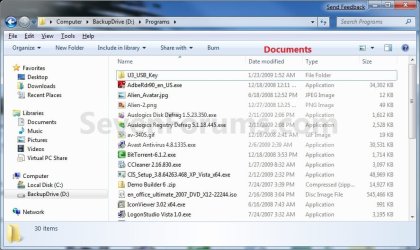
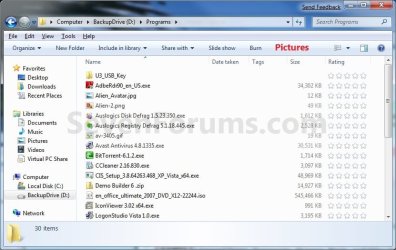
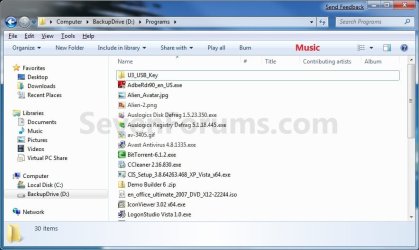
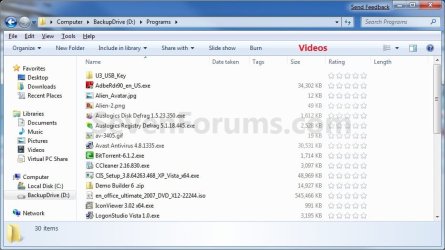
EXAMPLE: General Items, Documents, Pictures, Music, and Video templates
NOTE: These screenshots are with using the Details view. What you see in your window will also depend on what you have the View arrangement, Group by, Sort by, Stack by arrangement, or icon size set as.
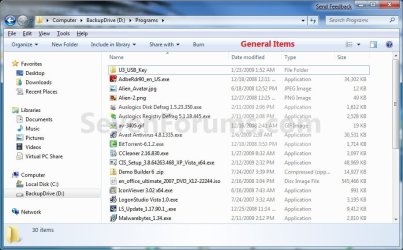
General_Items.jpg

Documents.jpg

Pictures.jpg

Music.jpg

Videos.jpg

Here's How:
1. To Restore Default Folder Templates for All Folders
NOTE: This will also reset all folder views back to default as well.
A) Click on the Download button below to download the file below.
Restore_Default_Folder_Templates.bat


Download


B) Go to step 7.
2. To Set General Items Folder Template as Default for All Folders
A) Click on the Download button below to download the file below.
All_Folders_Use_General_Items_Folder_Template.bat


Download


B) Go to step 7.
3. To Set Documents Folder Template as Default for All Folders
A) Click on the Download button below to download the file below.
All_Folders_Use_Documents_Folder_Template.bat


Download


B) Go to step 7.
4. To Set Pictures Folder Template as Default for All Folders
A) Click on the Download button below to download the file below.
All_Folders_Use_Pictures_Folder_Template.bat


Download


B) Go to step 7.
5. To Set Music Folder Template as Default for All Folders
A) Click on the Download button below to download the file below.
All_Folders_Use_Music_Folder_Template.bat


Download


B) Go to step 7.
6. To Set Videos Folder Template as Default for All Folders
A) Click on the Download button below to download the file below.
All_Folders_Use_Videos_Folder_Template.bat

Download


B) Go to step 7.
7. Save the .bat file to your desktop.

8. Close all running programs and opened windows, and run the downloaded .bat file.

9. If prompted, click on Run.
NOTE: If you like, you can stop getting the Run prompt by unblocking the downloaded .bat file.

10. You will now notice your screen flicker as explorer is restarted to apply the registry changes.

11. You can delete the downloaded .bat file if you like.

That's it,
Shawn


Attachments

Last edited:
This looks like restoring a factory setting:
1. To Restore Default Folder Templates for All Folders

2 through 6 look like I'd be banging my head up against the wall until I get to number 6 where
it will "Set Videos Folder Template as Default for All Folders"

Does "all folders" mean All [video, pictures, etc] folders or ALL system folders?


Since I have restored, I am back to factory:
EDIT:
Since I have restored, I am back to factory folder settings:

-Create new folder on desktop
Headers are "Name" "Date Modified" "Type" "Size"
-Drag an mp3 to that new folder, the folder is open, the headers don't change.

-Close the folder, then re-open it
Headers are now "Name" " # " "Title" "Contributing Artists" "Album"

Now Add "Bit Rate", close the folder, re-open "Bit Rate" still shows-good.

Make another new folder, copy a different MP3 in and "Bit Rate" is not there.

If I go to ORGANIZE | FOLDER AND SEARCH OPTIONS | VIEW
Windows Says:
" You can apply the view (such as details or icons) that you are using for this folder to all folders of THIS TYPE"

-Click "Apply To Folders" button

-Confirm with "Do you want all folders of THIS TYPE to match this folder's view settings?"

-Click YES

-When I create a new EMPTY folder WITHOUT any audio files, it shows my custom header when it should show the system default.

Minutes later...

Things are working the way I want...
If there are mp3s in a folder on external drive with PDF and TXT, the headers stay the way I want, i.e. no bit rate for the TXT file(obvious). Good

I want to reboot and see again before posting this, but no option to save as draft, So I'll post. :confused:

After reboot:

Preferences stay as desired

Is there a reg I can backup, in the case I use CCleaner/Glary/Privazer??

Thank you for all your help !!


Attachments

  • 2013-09-29_012554.jpg
    2013-09-29_012554.jpg
    151.1 KB · Views: 160
Last edited:

My Computer

Computer type
Laptop
Computer Manufacturer/Model Number
Dell Precision M6600
OS
Windows 7 Professional 64bit
CPU
Intel Core i7 2820QM 2.3GHz
Memory
8GB ( 1666 MHz )
Graphics Card(s)
ATI Fire Pro M8900
Sound Card
MOTU UltraLite mk3 Hybrid ( external )
Screen Resolution
1200
Hard Drives
250GB 7200 rpm
Keyboard
It lights up
Mouse
Logitech laser
Internet Speed
Blazing
Antivirus
COMODO Internet Security (There is NO OTHER)
Browser
Firefox (There is NO OTHER)...well Opera is cool
Another important piece for others to consider...if using CCleaner, be sure to UNCHECK

Custom Files and Folders
 

My Computer

Computer type
Laptop
Computer Manufacturer/Model Number
Dell Precision M6600
OS
Windows 7 Professional 64bit
CPU
Intel Core i7 2820QM 2.3GHz
Memory
8GB ( 1666 MHz )
Graphics Card(s)
ATI Fire Pro M8900
Sound Card
MOTU UltraLite mk3 Hybrid ( external )
Screen Resolution
1200
Hard Drives
250GB 7200 rpm
Keyboard
It lights up
Mouse
Logitech laser
Internet Speed
Blazing
Antivirus
COMODO Internet Security (There is NO OTHER)
Browser
Firefox (There is NO OTHER)...well Opera is cool
This tutorial is to use only ONE of the steps you want to set as the default for "all folders" on your PC. You don't want to do them all one by one. If you do, you'll just be wasting your time since each one you did would be the new default for all folders.

The columns headers you have showing in a folder depend on what folder template you are using. Columns only show when you are using "Details" view.

The best backup would be a system image backup.
 

My Computer

Computer type
PC/Desktop
Computer Manufacturer/Model Number
Self built custom
OS
64-bit Windows 11 Pro for Workstations
CPU
Intel i7-8700K OC'd to 5 GHz
Motherboard
ASUS ROG Maximus XI Formula Z390
Memory
64 GB (4x16GB) G.SKILL TridentZ RGB DDR4 3600 MHz
Graphics Card(s)
ASUS ROG-STRIX-GTX1080TI-O11G-GAMING
Sound Card
Integrated
Monitor(s) Displays
2 x Samsung Odyssey G7 27"
Screen Resolution
2560x1440
Hard Drives
1TB Samsung 990 PRO M.2,
4TB Samsung 990 PRO PRO M.2,
TerraMaster F8 SSD Plus NAS
PSU
Seasonic Prime Titanium 850W
Case
Thermaltake Core P3
Cooling
Corsair Hydro H115i
Keyboard
Logitech wireless K800
Mouse
Logitech MX Master 4
Internet Speed
2 Gb/s Download and 100 Mb/s Upload
Antivirus
Malwarebyte Anti-Malware Premium
Browser
Google Chrome
Other Info
Logitech Z625 speaker system,
Logitech BRIO 4K Pro webcam,
HP Color LaserJet Pro MFP M477fdn,
APC SMART-UPS RT 1000 XL - SURT1000XLI,
Galaxy S23 Plus phone

My Computer

Computer type
PC/Desktop
Computer Manufacturer/Model Number
Self built custom
OS
64-bit Windows 11 Pro for Workstations
CPU
Intel i7-8700K OC'd to 5 GHz
Motherboard
ASUS ROG Maximus XI Formula Z390
Memory
64 GB (4x16GB) G.SKILL TridentZ RGB DDR4 3600 MHz
Graphics Card(s)
ASUS ROG-STRIX-GTX1080TI-O11G-GAMING
Sound Card
Integrated
Monitor(s) Displays
2 x Samsung Odyssey G7 27"
Screen Resolution
2560x1440
Hard Drives
1TB Samsung 990 PRO M.2,
4TB Samsung 990 PRO PRO M.2,
TerraMaster F8 SSD Plus NAS
PSU
Seasonic Prime Titanium 850W
Case
Thermaltake Core P3
Cooling
Corsair Hydro H115i
Keyboard
Logitech wireless K800
Mouse
Logitech MX Master 4
Internet Speed
2 Gb/s Download and 100 Mb/s Upload
Antivirus
Malwarebyte Anti-Malware Premium
Browser
Google Chrome
Other Info
Logitech Z625 speaker system,
Logitech BRIO 4K Pro webcam,
HP Color LaserJet Pro MFP M477fdn,
APC SMART-UPS RT 1000 XL - SURT1000XLI,
Galaxy S23 Plus phone
Thank You !! That works...but on a second computer (Win 7 Pro 64) I had to first to delete:

BagMRU and Bags first, then immediately run your batch file, which imported the backup placed on the desktop of second computer...from the first computer ! Then reboot.

Located in HKCU\Software\Classes\Local Settings\Software\Microsoft\Windows\Shell
 

My Computer

Computer type
Laptop
Computer Manufacturer/Model Number
Dell Precision M6600
OS
Windows 7 Professional 64bit
CPU
Intel Core i7 2820QM 2.3GHz
Memory
8GB ( 1666 MHz )
Graphics Card(s)
ATI Fire Pro M8900
Sound Card
MOTU UltraLite mk3 Hybrid ( external )
Screen Resolution
1200
Hard Drives
250GB 7200 rpm
Keyboard
It lights up
Mouse
Logitech laser
Internet Speed
Blazing
Antivirus
COMODO Internet Security (There is NO OTHER)
Browser
Firefox (There is NO OTHER)...well Opera is cool
You're most welcome.

You shouldn't have needed to delete those, or restart the PC to apply.

When restoring a backup using the batch file, it already deletes the current folder view registry locations (including that one) by default first, then imports the backup, and restarts explorer to apply.
 

My Computer

Computer type
PC/Desktop
Computer Manufacturer/Model Number
Self built custom
OS
64-bit Windows 11 Pro for Workstations
CPU
Intel i7-8700K OC'd to 5 GHz
Motherboard
ASUS ROG Maximus XI Formula Z390
Memory
64 GB (4x16GB) G.SKILL TridentZ RGB DDR4 3600 MHz
Graphics Card(s)
ASUS ROG-STRIX-GTX1080TI-O11G-GAMING
Sound Card
Integrated
Monitor(s) Displays
2 x Samsung Odyssey G7 27"
Screen Resolution
2560x1440
Hard Drives
1TB Samsung 990 PRO M.2,
4TB Samsung 990 PRO PRO M.2,
TerraMaster F8 SSD Plus NAS
PSU
Seasonic Prime Titanium 850W
Case
Thermaltake Core P3
Cooling
Corsair Hydro H115i
Keyboard
Logitech wireless K800
Mouse
Logitech MX Master 4
Internet Speed
2 Gb/s Download and 100 Mb/s Upload
Antivirus
Malwarebyte Anti-Malware Premium
Browser
Google Chrome
Other Info
Logitech Z625 speaker system,
Logitech BRIO 4K Pro webcam,
HP Color LaserJet Pro MFP M477fdn,
APC SMART-UPS RT 1000 XL - SURT1000XLI,
Galaxy S23 Plus phone
Sorry, but I have no idea for those. :(
 

My Computer

Computer type
PC/Desktop
Computer Manufacturer/Model Number
Self built custom
OS
64-bit Windows 11 Pro for Workstations
CPU
Intel i7-8700K OC'd to 5 GHz
Motherboard
ASUS ROG Maximus XI Formula Z390
Memory
64 GB (4x16GB) G.SKILL TridentZ RGB DDR4 3600 MHz
Graphics Card(s)
ASUS ROG-STRIX-GTX1080TI-O11G-GAMING
Sound Card
Integrated
Monitor(s) Displays
2 x Samsung Odyssey G7 27"
Screen Resolution
2560x1440
Hard Drives
1TB Samsung 990 PRO M.2,
4TB Samsung 990 PRO PRO M.2,
TerraMaster F8 SSD Plus NAS
PSU
Seasonic Prime Titanium 850W
Case
Thermaltake Core P3
Cooling
Corsair Hydro H115i
Keyboard
Logitech wireless K800
Mouse
Logitech MX Master 4
Internet Speed
2 Gb/s Download and 100 Mb/s Upload
Antivirus
Malwarebyte Anti-Malware Premium
Browser
Google Chrome
Other Info
Logitech Z625 speaker system,
Logitech BRIO 4K Pro webcam,
HP Color LaserJet Pro MFP M477fdn,
APC SMART-UPS RT 1000 XL - SURT1000XLI,
Galaxy S23 Plus phone
Thank you for this Shawn. Most helpful! :)

It seems a shame (and odd) that Windows users are forced to download and run a custom bat file simply to get Windows to behave in a "normal and logical" fashion, treating all folders the same regardless of what is in them.

I feel like Windows is moving away from its traditional values of practicality and control, and becoming dumb, gimmicky and patronising like Mac OS.
 

My Computer

OS
Windows 7 Home Premium 64bit
You're welcome Marty.

The ideal behind Automatic Folder Type Discovery was to help the user by automatically optimizing the folder's template based on the type of file you last saved into it.

While this can be helpful if you say create a New Folder, and start saving only one type of file (ex: pictures) in it. However, it's not so useful if you save a bunch of different files in the folder (ex: downloads).

It would be nice to be able to turn on/off Automatic Folder Type Discovery on a per folder basis instead of having to set all folders to have the same template first to turn it off.
 

My Computer

Computer type
PC/Desktop
Computer Manufacturer/Model Number
Self built custom
OS
64-bit Windows 11 Pro for Workstations
CPU
Intel i7-8700K OC'd to 5 GHz
Motherboard
ASUS ROG Maximus XI Formula Z390
Memory
64 GB (4x16GB) G.SKILL TridentZ RGB DDR4 3600 MHz
Graphics Card(s)
ASUS ROG-STRIX-GTX1080TI-O11G-GAMING
Sound Card
Integrated
Monitor(s) Displays
2 x Samsung Odyssey G7 27"
Screen Resolution
2560x1440
Hard Drives
1TB Samsung 990 PRO M.2,
4TB Samsung 990 PRO PRO M.2,
TerraMaster F8 SSD Plus NAS
PSU
Seasonic Prime Titanium 850W
Case
Thermaltake Core P3
Cooling
Corsair Hydro H115i
Keyboard
Logitech wireless K800
Mouse
Logitech MX Master 4
Internet Speed
2 Gb/s Download and 100 Mb/s Upload
Antivirus
Malwarebyte Anti-Malware Premium
Browser
Google Chrome
Other Info
Logitech Z625 speaker system,
Logitech BRIO 4K Pro webcam,
HP Color LaserJet Pro MFP M477fdn,
APC SMART-UPS RT 1000 XL - SURT1000XLI,
Galaxy S23 Plus phone
Shawn I have a slight problem. I wanted all my folders to show as the "details" view and thanks to your .bat files I am now able to achieve this, with no more stupid special "music" and "video" templates. :)

However, I would really like for picture folders to still have their own template (so they show as large icons). I can't currently figure any way to achieve this.

Here is what I am doing: First I run the "Disable" .bat file to start afresh. Then I run only the "Documents", "Music" and "Videos" .bat files. Shouldn't this mean that picture folders still have their own independent settings? But whenever I change a picture folder to "large icons" and then "apply to all folders", it also affects all other folder types too!
 

My Computer

OS
Windows 7 Home Premium 64bit
Hello Marty,

After making all folders the same, you would need to manually set each pictures type folder one by one to have a Pictures folder template again without using "Apply to all folders". :(
 

My Computer

Computer type
PC/Desktop
Computer Manufacturer/Model Number
Self built custom
OS
64-bit Windows 11 Pro for Workstations
CPU
Intel i7-8700K OC'd to 5 GHz
Motherboard
ASUS ROG Maximus XI Formula Z390
Memory
64 GB (4x16GB) G.SKILL TridentZ RGB DDR4 3600 MHz
Graphics Card(s)
ASUS ROG-STRIX-GTX1080TI-O11G-GAMING
Sound Card
Integrated
Monitor(s) Displays
2 x Samsung Odyssey G7 27"
Screen Resolution
2560x1440
Hard Drives
1TB Samsung 990 PRO M.2,
4TB Samsung 990 PRO PRO M.2,
TerraMaster F8 SSD Plus NAS
PSU
Seasonic Prime Titanium 850W
Case
Thermaltake Core P3
Cooling
Corsair Hydro H115i
Keyboard
Logitech wireless K800
Mouse
Logitech MX Master 4
Internet Speed
2 Gb/s Download and 100 Mb/s Upload
Antivirus
Malwarebyte Anti-Malware Premium
Browser
Google Chrome
Other Info
Logitech Z625 speaker system,
Logitech BRIO 4K Pro webcam,
HP Color LaserJet Pro MFP M477fdn,
APC SMART-UPS RT 1000 XL - SURT1000XLI,
Galaxy S23 Plus phone
Thanks! :) I think I've sorted it now by going to my pictures folders > Properties > Customize > set to "Pictures" and include subfolders. That has changed the attributes of all my photo folders to be Pictures. :)

What confused me Shawn was that these picture folders were not already set to "Pictures". I guess that's because it's a new install of Windows and this version of Windows never witnessed any files being copied into those folders and therefore their folder type had yet to be "discovered". So the mistake I was making was that when I was applying my view settings to all folders, I was applying to all GENERAL folders rather than Picture folders.

This stuff is so confusing and Microsoft have not made this interface at all intuitive to understand! I wouldn't even have known about "Automatic Folder Type Discovery" had it not been for your article. How can average users be expected to understand how the interface works when there isn't even a help page explaining how this works?

If I were Microsoft I would have put a small icon in the corner of each folder to indicate what the folder type was, then when you rollover it, you get a little popup saying "This folder looks like a picture folder and has been optimized for pictures, to assign a different folder type or find out more about how this works, click here".
 

My Computer

OS
Windows 7 Home Premium 64bit
Picture folders would normally be set to have a pictures template by default, but since you set all folders to have a "General Items" template, they wouldn't afterwards. That's all.

Luckily, you can still change them to whatever you like though. :)
 

My Computer

Computer type
PC/Desktop
Computer Manufacturer/Model Number
Self built custom
OS
64-bit Windows 11 Pro for Workstations
CPU
Intel i7-8700K OC'd to 5 GHz
Motherboard
ASUS ROG Maximus XI Formula Z390
Memory
64 GB (4x16GB) G.SKILL TridentZ RGB DDR4 3600 MHz
Graphics Card(s)
ASUS ROG-STRIX-GTX1080TI-O11G-GAMING
Sound Card
Integrated
Monitor(s) Displays
2 x Samsung Odyssey G7 27"
Screen Resolution
2560x1440
Hard Drives
1TB Samsung 990 PRO M.2,
4TB Samsung 990 PRO PRO M.2,
TerraMaster F8 SSD Plus NAS
PSU
Seasonic Prime Titanium 850W
Case
Thermaltake Core P3
Cooling
Corsair Hydro H115i
Keyboard
Logitech wireless K800
Mouse
Logitech MX Master 4
Internet Speed
2 Gb/s Download and 100 Mb/s Upload
Antivirus
Malwarebyte Anti-Malware Premium
Browser
Google Chrome
Other Info
Logitech Z625 speaker system,
Logitech BRIO 4K Pro webcam,
HP Color LaserJet Pro MFP M477fdn,
APC SMART-UPS RT 1000 XL - SURT1000XLI,
Galaxy S23 Plus phone
You're most welcome Marty. :)
 

My Computer

Computer type
PC/Desktop
Computer Manufacturer/Model Number
Self built custom
OS
64-bit Windows 11 Pro for Workstations
CPU
Intel i7-8700K OC'd to 5 GHz
Motherboard
ASUS ROG Maximus XI Formula Z390
Memory
64 GB (4x16GB) G.SKILL TridentZ RGB DDR4 3600 MHz
Graphics Card(s)
ASUS ROG-STRIX-GTX1080TI-O11G-GAMING
Sound Card
Integrated
Monitor(s) Displays
2 x Samsung Odyssey G7 27"
Screen Resolution
2560x1440
Hard Drives
1TB Samsung 990 PRO M.2,
4TB Samsung 990 PRO PRO M.2,
TerraMaster F8 SSD Plus NAS
PSU
Seasonic Prime Titanium 850W
Case
Thermaltake Core P3
Cooling
Corsair Hydro H115i
Keyboard
Logitech wireless K800
Mouse
Logitech MX Master 4
Internet Speed
2 Gb/s Download and 100 Mb/s Upload
Antivirus
Malwarebyte Anti-Malware Premium
Browser
Google Chrome
Other Info
Logitech Z625 speaker system,
Logitech BRIO 4K Pro webcam,
HP Color LaserJet Pro MFP M477fdn,
APC SMART-UPS RT 1000 XL - SURT1000XLI,
Galaxy S23 Plus phone
i feel like an idiot- last time I got the view stuck like this was in Vista days.
explorer is only displaying one big column: how do I get the two big columns [panes? windows? what do we call it]: i.e.recent, downloads, documents, pictures, C: drive, D'; drive ad infinitum all on the left, then details etc of the selected one on the right. the defaults bat file does not affect this; it leaves it however I have it set, which is messed up. can't find the 'switch' to give me that standard view
 

My Computer

Computer Manufacturer/Model Number
HP DC7600, HP DC7600[2], HP DC7100, Samsung NC10
OS
Windows XP Pro SP3, Windows 7 Pro 32-bit, Windows 7 Ultimate 64bit, Windows XP Home SP3
CPU
Pentium 4 3.2GHz, Pentium 4 3.4GHz 64bit, Atom,
Motherboard
Dunno
Memory
4GB matched, 1GB, 2.5GB, 4.0 GB
Graphics Card(s)
Geforce 8400 GS and others
Sound Card
RealteK ALC260 and others
Monitor(s) Displays
Asus HD
Screen Resolution
1920x1080
Hard Drives
WD Caviar 640gb SATA
Cooling
We Be Cool

My Computer

Computer type
PC/Desktop
Computer Manufacturer/Model Number
Self built custom
OS
64-bit Windows 11 Pro for Workstations
CPU
Intel i7-8700K OC'd to 5 GHz
Motherboard
ASUS ROG Maximus XI Formula Z390
Memory
64 GB (4x16GB) G.SKILL TridentZ RGB DDR4 3600 MHz
Graphics Card(s)
ASUS ROG-STRIX-GTX1080TI-O11G-GAMING
Sound Card
Integrated
Monitor(s) Displays
2 x Samsung Odyssey G7 27"
Screen Resolution
2560x1440
Hard Drives
1TB Samsung 990 PRO M.2,
4TB Samsung 990 PRO PRO M.2,
TerraMaster F8 SSD Plus NAS
PSU
Seasonic Prime Titanium 850W
Case
Thermaltake Core P3
Cooling
Corsair Hydro H115i
Keyboard
Logitech wireless K800
Mouse
Logitech MX Master 4
Internet Speed
2 Gb/s Download and 100 Mb/s Upload
Antivirus
Malwarebyte Anti-Malware Premium
Browser
Google Chrome
Other Info
Logitech Z625 speaker system,
Logitech BRIO 4K Pro webcam,
HP Color LaserJet Pro MFP M477fdn,
APC SMART-UPS RT 1000 XL - SURT1000XLI,
Galaxy S23 Plus phone
Back
Top