
You are using an out of date browser. It may not display this or other websites correctly.
You should upgrade or use an alternative browser.
You should upgrade or use an alternative browser.
Forget all Logins using Internet Explorer
- Thread starter Chips
- Start date

- Local time
- 2:47 PM
- Messages
- 1,102
Hi, @Chips:
It would help us to better help you if we knew what version of IE -- 11, 10, 9, etc?
I do not use IE and I do not store passwords in any browser, so I am not a good expert on this....
...Assuming it's IE11:
And
Or, you could be more drastic and RESET IE:
http://www.sevenforums.com/tutorials/1222-internet-explorer-reset.html
MM
It would help us to better help you if we knew what version of IE -- 11, 10, 9, etc?
I do not use IE and I do not store passwords in any browser, so I am not a good expert on this....
...Assuming it's IE11:
https://support.microsoft.com/en-us...orer-11-remember-passwords-fill-out-web-formsAutoComplete saves you time by remembering passwords and other info you enter into forms online. Since this info is securely stored on whatever PC you're using at the time, you should be careful about using AutoComplete on public or shared computers. When you're using a public or shared PC, make sure AutoComplete is turned off. You can also remove AutoComplete history from that PC if you accidentally enter info that you don't want to share—like the billing address for a credit card.
To delete AutoComplete history on a PC
- In Internet Explorer, select the Tools button , and then select Internet options.
- On the Content tab, under AutoComplete, select Settings, and then select Delete AutoComplete history.
- In the Delete Browsing History dialog box, select Form data and Passwords. To clear web address entries, you must select the History check box, which also deletes your browsing history.
- Select Delete to clear your AutoComplete history. Select OK, and then select OK again.
And
https://social.technet.microsoft.co...xplorer-11-on-windows-7-?forum=w7itprogeneralI went through so many pages of reading until I found this answer for Windows 7 Internet Explorer 11 - how to change a remembered password. I got this directly from answers.microsoft.com.
To change the saved login id and password for a website on Internet Explorer, please try these steps:
1.Type the first letter of your user name, auto-complete will bring up a box of choices.
2.Highlight the username you want to delete. Hit the "delete" key.
3.Another auto complete window will pop up saying, "Windows has a stored password for this user name. Do you want to delete the username and password?"
4.Click, "yes".
5<snip>
Or, you could be more drastic and RESET IE:
http://www.sevenforums.com/tutorials/1222-internet-explorer-reset.html
MM
My Computer
- Computer type
- PC/Desktop
- Computer Manufacturer/Model Number
- Dell Studio XPS 8500
- OS
- OEM Windows 7 Ult (x64) SP1
- CPU
- Intel Core-i7 3770 @ 3.4 GHz
- Motherboard
- "Dell" branded
- Memory
- 16 GB DDR3 SDRAM @ 1333 MHz
- Graphics Card(s)
- NVidia GeForce GT620 1 GB
- Sound Card
- THX TruStudio PC
- Monitor(s) Displays
- Dell U2410 Full HD
- Hard Drives
- 2.0 TB SATA2 @ 7200 RPM
- PSU
- 350W
- Keyboard
- MS 4000 Ergon - Wired
- Mouse
- Logitech Anywhere MX
- Internet Speed
- Cable HSI w/Turbo (router)
- Antivirus
- KIS-MBAM Premium-MBAE Premium
- Browser
- Fx (current version); IE
- Other Info
- And a Win7/64 Pro laptop; And a Win10/64 Pro desktop.
- Local time
- 2:47 PM
- Messages
- 1,102
Then I guess RESET IE might be the best option?
Perhaps someone more facile with IE will have another idea.
Cheers,
MM
Perhaps someone more facile with IE will have another idea.
Cheers,
MM
My Computer
- Computer type
- PC/Desktop
- Computer Manufacturer/Model Number
- Dell Studio XPS 8500
- OS
- OEM Windows 7 Ult (x64) SP1
- CPU
- Intel Core-i7 3770 @ 3.4 GHz
- Motherboard
- "Dell" branded
- Memory
- 16 GB DDR3 SDRAM @ 1333 MHz
- Graphics Card(s)
- NVidia GeForce GT620 1 GB
- Sound Card
- THX TruStudio PC
- Monitor(s) Displays
- Dell U2410 Full HD
- Hard Drives
- 2.0 TB SATA2 @ 7200 RPM
- PSU
- 350W
- Keyboard
- MS 4000 Ergon - Wired
- Mouse
- Logitech Anywhere MX
- Internet Speed
- Cable HSI w/Turbo (router)
- Antivirus
- KIS-MBAM Premium-MBAE Premium
- Browser
- Fx (current version); IE
- Other Info
- And a Win7/64 Pro laptop; And a Win10/64 Pro desktop.
- Local time
- 2:47 PM
- Messages
- 1,102
Hi:
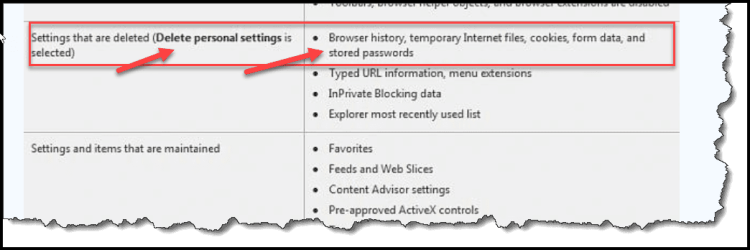
Sorry, but this tutorial clearly states that stored passwords would be removed if "delete personal settings" is selected (see screen cap).
If that did not work, then I am fresh out of ideas.
Perhaps someone who uses IE will have better advice.
MM
Sorry, but this tutorial clearly states that stored passwords would be removed if "delete personal settings" is selected (see screen cap).
If that did not work, then I am fresh out of ideas.
Perhaps someone who uses IE will have better advice.
MM
Attachments
My Computer
- Computer type
- PC/Desktop
- Computer Manufacturer/Model Number
- Dell Studio XPS 8500
- OS
- OEM Windows 7 Ult (x64) SP1
- CPU
- Intel Core-i7 3770 @ 3.4 GHz
- Motherboard
- "Dell" branded
- Memory
- 16 GB DDR3 SDRAM @ 1333 MHz
- Graphics Card(s)
- NVidia GeForce GT620 1 GB
- Sound Card
- THX TruStudio PC
- Monitor(s) Displays
- Dell U2410 Full HD
- Hard Drives
- 2.0 TB SATA2 @ 7200 RPM
- PSU
- 350W
- Keyboard
- MS 4000 Ergon - Wired
- Mouse
- Logitech Anywhere MX
- Internet Speed
- Cable HSI w/Turbo (router)
- Antivirus
- KIS-MBAM Premium-MBAE Premium
- Browser
- Fx (current version); IE
- Other Info
- And a Win7/64 Pro laptop; And a Win10/64 Pro desktop.

IE 11. And yep, I've tried the first one. What I want is for my computer to log me out of all my forums, websites, everything.
As far as I know there is no option for logging out of forums or websites, you have to do that manually if it is required.
My Computer
- Computer type
- PC/Desktop
- Computer Manufacturer/Model Number
- Self built using existing case
- OS
- Windows 7 Home Premium 64 bit sp1
- CPU
- Intel i5 3570 3.4Ghz Ivy Bridge SKT 1155 quad core
- Motherboard
- Gigabyte Z77-HD3 SKT 1155 2xSata 3, 4x USB 3.0
- Memory
- G-Skill Rip Jaws 16Gb (8x2) DDR3 -1600 PC3 12800 CL 10 red
- Graphics Card(s)
- Gigabyte NVIDIA GT610 1Gb DDR3 810/1200 PCI-E 2.0 Silent
- Sound Card
- NVIDIA High Definition & Realtech High Definition Audio
- Monitor(s) Displays
- 2 x Philips 226V4L 16:9 aspect ratio
- Screen Resolution
- 1920 x 1080 HD
- Hard Drives
- Samsung 840 Pro 256gb SSD, SATA 3.
Hitachi Touro Portable 1tb, USB 3.0 HDD used for image b/ups.
- PSU
- Corsair VS450
- Case
- Codeng
- Cooling
- PSU fan & CPU fan
- Keyboard
- Logitech
- Mouse
- Logitech Wireless trackball M570
- Internet Speed
- Wireless 3G. 3mg down & 550kb up.
- Antivirus
- Bitdefender Internet Security 2020
- Browser
- Opera (Current Version) & Firefox
- Other Info
- MS Office 2013 Pro. Davis weather station software. MGE Nova 600 avr UPS.
- Local time
- 2:47 PM
- Messages
- 1,102
IE 11. And yep, I've tried the first one. What I want is for my computer to log me out of all my forums, websites, everything.
As far as I know there is no option for logging out of forums or websites, you have to do that manually if it is required.
Indeed!
I think I misunderstood the OP's original query, given the title.

It sounded as if he wanted to deleted stored data from IE.
Now that it's a bit more clear what he wants to do, the answer is likewise a bit more clear.
Cheers,
MM
My Computer
- Computer type
- PC/Desktop
- Computer Manufacturer/Model Number
- Dell Studio XPS 8500
- OS
- OEM Windows 7 Ult (x64) SP1
- CPU
- Intel Core-i7 3770 @ 3.4 GHz
- Motherboard
- "Dell" branded
- Memory
- 16 GB DDR3 SDRAM @ 1333 MHz
- Graphics Card(s)
- NVidia GeForce GT620 1 GB
- Sound Card
- THX TruStudio PC
- Monitor(s) Displays
- Dell U2410 Full HD
- Hard Drives
- 2.0 TB SATA2 @ 7200 RPM
- PSU
- 350W
- Keyboard
- MS 4000 Ergon - Wired
- Mouse
- Logitech Anywhere MX
- Internet Speed
- Cable HSI w/Turbo (router)
- Antivirus
- KIS-MBAM Premium-MBAE Premium
- Browser
- Fx (current version); IE
- Other Info
- And a Win7/64 Pro laptop; And a Win10/64 Pro desktop.
IE 11. And yep, I've tried the first one. What I want is for my computer to log me out of all my forums, websites, everything.
As far as I know there is no option for logging out of forums or websites, you have to do that manually if it is required.
Indeed!
I think I misunderstood the OP's original query, given the title.
It sounded as if he wanted to deleted stored data from IE.
Now that it's a bit more clear what he wants to do, the answer is likewise a bit more clear.
Cheers,
MM
Yes the first Post was very ambiguous, so what you did was the logical answer. Then later Posts get to the real question.
My Computer
- Computer type
- PC/Desktop
- Computer Manufacturer/Model Number
- Self built using existing case
- OS
- Windows 7 Home Premium 64 bit sp1
- CPU
- Intel i5 3570 3.4Ghz Ivy Bridge SKT 1155 quad core
- Motherboard
- Gigabyte Z77-HD3 SKT 1155 2xSata 3, 4x USB 3.0
- Memory
- G-Skill Rip Jaws 16Gb (8x2) DDR3 -1600 PC3 12800 CL 10 red
- Graphics Card(s)
- Gigabyte NVIDIA GT610 1Gb DDR3 810/1200 PCI-E 2.0 Silent
- Sound Card
- NVIDIA High Definition & Realtech High Definition Audio
- Monitor(s) Displays
- 2 x Philips 226V4L 16:9 aspect ratio
- Screen Resolution
- 1920 x 1080 HD
- Hard Drives
- Samsung 840 Pro 256gb SSD, SATA 3.
Hitachi Touro Portable 1tb, USB 3.0 HDD used for image b/ups.
- PSU
- Corsair VS450
- Case
- Codeng
- Cooling
- PSU fan & CPU fan
- Keyboard
- Logitech
- Mouse
- Logitech Wireless trackball M570
- Internet Speed
- Wireless 3G. 3mg down & 550kb up.
- Antivirus
- Bitdefender Internet Security 2020
- Browser
- Opera (Current Version) & Firefox
- Other Info
- MS Office 2013 Pro. Davis weather station software. MGE Nova 600 avr UPS.
- Local time
- 1:47 PM
- Messages
- 8,138
Then I guess RESET IE might be the best option?
Perhaps someone more facile with IE will have another idea.
Cheers,
MM
There is no automatic process. You would need a 3rd party app to do that automatically.Nope, didn't work. It didn't even log me out here! I mean, what does it take just to have my computer automatically log me out of all my forums and websites?
Let's concentrate on how/why the IE reset process did not log you out of this forum.
Test 1:
Log into this forum.
Exit IE
Restart your computer.
Do not start IE.
Do steps 3, 4 and 5 of that tutorial.
Let us know if those steps logged you out of this forum.
Test 2:
Log into this forum.
Exit IE
Only do step 3 of that tutorial.
Click on the button named Delete... in the Browsing history section.
Uncheck everything in the Delete Browsing History window.
Put a check by Cookies and website data.
Click on the button named Delete.
Click on the button named OK to exit the Internet Properties window.
Let us know if those steps logged you out of this forum.
Are you letting IE save passwords for websites?
My Computer
- Computer type
- Laptop
- Computer Manufacturer/Model Number
- Employer provided Dell Latitude
- OS
- W7 Pro SP1 64bit
- CPU
- i7
- Memory
- 8GB
- Graphics Card(s)
- Intel HD Graphics
- Hard Drives
- crappy SSD
- Antivirus
- Employer mandated Symantec Endpoint Protection
- Browser
- Pale Moon 64bit, IE11 64bit & Chrome 64bit
It's okay Moxie, it did it!  It took more time than I expected, but it finally logged me out of everything. There's a forum I belong to that has a bug. Occasionally it logs me out on its end but thinks I'm still logged in because I myself haven't logged out. In such an event I have to have my computer forget all my logins, if that makes any sense? Thanks again!
It took more time than I expected, but it finally logged me out of everything. There's a forum I belong to that has a bug. Occasionally it logs me out on its end but thinks I'm still logged in because I myself haven't logged out. In such an event I have to have my computer forget all my logins, if that makes any sense? Thanks again! My Computer
- Computer type
- PC/Desktop
- OS
- Windows 10
- Local time
- 1:47 PM
- Messages
- 8,138
You can automate the clearing of some IE data using 3rd party tools.
In my case, when IE leaves RAM, an Autoit script automatically clears lots of IE stuff.
In my case, when IE leaves RAM, an Autoit script automatically clears lots of IE stuff.
My Computer
- Computer type
- Laptop
- Computer Manufacturer/Model Number
- Employer provided Dell Latitude
- OS
- W7 Pro SP1 64bit
- CPU
- i7
- Memory
- 8GB
- Graphics Card(s)
- Intel HD Graphics
- Hard Drives
- crappy SSD
- Antivirus
- Employer mandated Symantec Endpoint Protection
- Browser
- Pale Moon 64bit, IE11 64bit & Chrome 64bit
- Local time
- 2:47 PM
- Messages
- 1,102
It's okay Moxie, it did it!
OK, great, I'm glad you were able to resolve your issue.
It seems there are many ways to delete the info from IE, some of them more drastic than others.
Don't forget, you can also just go into settings > internet options and delete them there at the end of each browser session.
Anyway....
If you wish, please mark this thread as "solved".
Thanks,
MM
My Computer
- Computer type
- PC/Desktop
- Computer Manufacturer/Model Number
- Dell Studio XPS 8500
- OS
- OEM Windows 7 Ult (x64) SP1
- CPU
- Intel Core-i7 3770 @ 3.4 GHz
- Motherboard
- "Dell" branded
- Memory
- 16 GB DDR3 SDRAM @ 1333 MHz
- Graphics Card(s)
- NVidia GeForce GT620 1 GB
- Sound Card
- THX TruStudio PC
- Monitor(s) Displays
- Dell U2410 Full HD
- Hard Drives
- 2.0 TB SATA2 @ 7200 RPM
- PSU
- 350W
- Keyboard
- MS 4000 Ergon - Wired
- Mouse
- Logitech Anywhere MX
- Internet Speed
- Cable HSI w/Turbo (router)
- Antivirus
- KIS-MBAM Premium-MBAE Premium
- Browser
- Fx (current version); IE
- Other Info
- And a Win7/64 Pro laptop; And a Win10/64 Pro desktop.