Format my PC without a system cd??

Mukendi

New member
Local time
1:43 PM
Messages
1
Hi, Im not the smartest PC opperator.
I wish to format my PC, its running WD7, but I dont have the systemcd.
I bought the PC used from a Netgaming cafe, so its not a normal produced pc, and therefore I dont have any manufactor to ask...

Do any of you know how I can get a cd, or format/reboot without a cd?

Thanks alot!
 

My Computer My Computer

OS
64bit
CPU
Duo 2,2Ghz
Memory
4Gb
Graphics Card(s)
GeForce GT7800
Well assuming that you have a valid license for Windows 7, you could always "obtain" an .iso image of an install disc. Then make it a universal disc and use that to re-install Windows. You would just have to make sure you have a key, and find out what version you are running. Directions for a universal install disc can be found here:
http://www.sevenforums.com/tutorials/85813-windows-7-universal-installation-disc-create.html
As for getting your hands on an iso image of the disc, you can always borrow a disc from a friend and make your own (Just remember to use your key), or you can obtain one from your favourite peer-to-peer service.
 

My Computer My Computer

Computer Manufacturer/Model Number
Acer Aspire TimelineX AS4820T-6645
OS
Windows 7 Home Premium 64bit
CPU
Intel Core i3 380M(2.53GHz)
Memory
4GB DDR3 1066
Graphics Card(s)
Intel HD Graphics 128MB VRAM
Screen Resolution
1366x768
Hard Drives
640GB 5400RPM SATA
before doing anything, make sure you have all the latest drivers for your computer downloaded and saved. as once its formatted you will not have access to the internet, until your ethernet drivers are installed.. without the drivers youd be snookered :)
 

My Computer My Computer

Computer type
PC/Desktop
Computer Manufacturer/Model Number
Built by badgers!!!
OS
Windows 7 Ultimate x64, & Mac OS X 10.9.2
CPU
Intel Core i5 2500k
Motherboard
Asus P8z68 LE
Memory
Corsair Vengence 8gb 1866mhz
Graphics Card(s)
Nvidia GTX 770 OC
Monitor(s) Displays
2x ASUS LED 22" IPS
Screen Resolution
3840x1080
Hard Drives
240GB Crucial M500 SSD
120gb Corsair Force 3 SSD
1TB Western Digital
PSU
Corsair HX650w Modular
Case
Corsair Air 540
Cooling
Corsair H60 Push/Pull
Keyboard
Corsair K70/ Logitech G27 wheel
Mouse
Saitek R.A.T 9
Internet Speed
Too slow!
Other Info
AMD fusion E350N Home server-Windows Home Server 2011 (also made by badgers!)
2011 Macbook 2.4ghz Core2Duo, 4gb ddr3, 120gb Ocz Vertex SSD
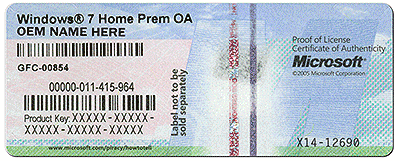
coa-stickers.gif

Do you have a Certificate of Authenticity affixed to the computer, which shows that it has a legal copy of MS installed upon it? The COA has a Product Key you will need to clean reinstall. Reinstalling Windows 7

What is the licensed version given on the COA sticker?

What problems are you having with Win7 as we might be able to help you fix them? troubleshooting steps
 
before doing anything, make sure you have all the latest drivers for your computer downloaded and saved. as once its formatted you will not have access to the internet, until your ethernet drivers are installed.. without the drivers youd be snookered :)

Excellent point. I use this tool for backing up drivers, gives you different options on what you want backed up (default being which ever don't come with Windows). Then gives you options as to how they will be backed up, either a series of folders, a zip folder, or a single exe file.
BooZet Freeware | Double Driver - backup and restore installed drivers
 

My Computer My Computer

Computer Manufacturer/Model Number
Acer Aspire TimelineX AS4820T-6645
OS
Windows 7 Home Premium 64bit
CPU
Intel Core i3 380M(2.53GHz)
Memory
4GB DDR3 1066
Graphics Card(s)
Intel HD Graphics 128MB VRAM
Screen Resolution
1366x768
Hard Drives
640GB 5400RPM SATA
As suggested in the steps to get a perfect reinstall Reinstalling Windows 7:

Back up installed drivers from windows/system32/drivers

The installer is mostly driver-complete, with newer arriving quickly via optional Windows Updates. Just in case, have your Wireless driver on flash stick or CD so you can get online quickly. Then enable hardware driver auto-updating and check for optional Updates frequently.

Any drivers still missing in Device Manager can be found on the Support Downloads webpage for your model computer or device. Driver Install - Device Manager
 
Back
Top